Municipal website design should do more than publish office hours. A well-planned site helps residents find answers, access public documents, submit requests, and complete common tasks while giving staff a simpler way to manage content and workflows.
This practical guide explains how cities, towns, and special districts can improve a municipal website incrementally—from navigation and online forms to permissions, backups, accessibility, and request tracking—without rebuilding everything unnecessarily.
Start with the question: what should the website do for you?
A public website should do more than display office hours. It should answer frequent questions, accept and route public requests, hold public documents, and let staff update content without a technical degree. Identify the few tasks that consume the most staff time—permit intake, service requests, meeting agendas, or recreation sign-ups—and design around those workflows first.
Common priorities that save time
Focus on a short list: clear department pages, searchable meeting agendas and minutes, online forms for permits and complaints, a public-service request tracker, and a simple staff portal for content and documents. These features reduce phone calls, duplicate work, and the need for email attachments.
Use WordPress as the platform—then extend it where needed
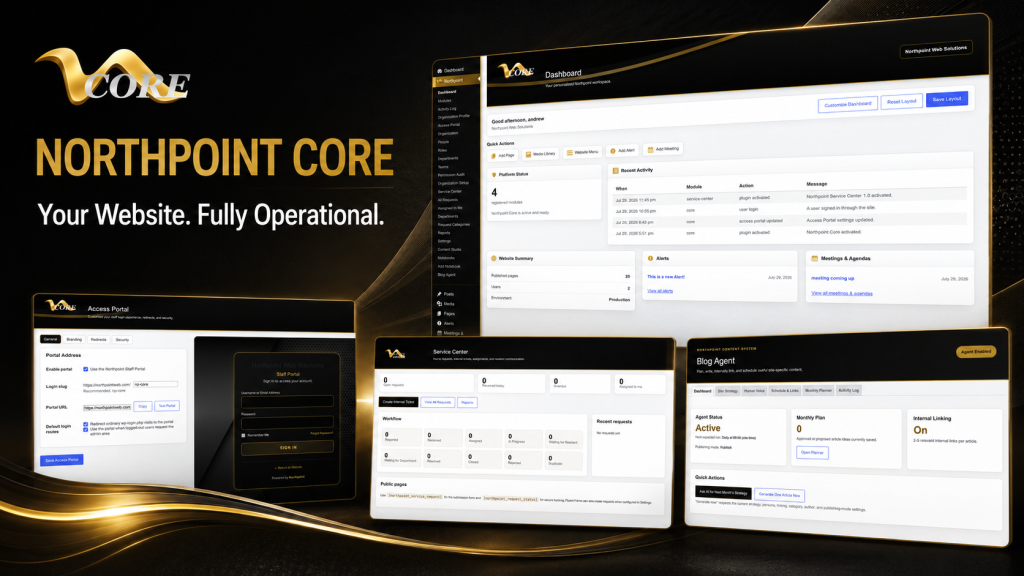
WordPress is familiar to many nontechnical staff and supports custom tools without forcing a full platform change. If you already have WordPress, you don’t have to rebuild everything. Install focused modules that provide the functionality you need and keep your public site intact while improving administration behind the scenes. For example, a centralized admin framework like Northpoint Core is designed to turn WordPress into an operational dashboard where staff manage content and tools in one place.
Public request systems and forms: design for real workflows
Online forms should do more than collect submissions. They should generate a tracking code, notify the right department, provide internal notes, and allow staff to update status. Tools that support Fluent Forms integration and provide task assignment, due dates, and public updates can reduce back-and-forth and keep residents informed. Northpoint Service Center, for example, is designed to support submission tracking, staff assignment, requester communication, and Fluent Forms integration so your intake process becomes an actual workflow rather than a stack of emails.
Roles, permissions, and staff portals
Small governments often wrestle with who can edit what on the website. Create department-based access control: give each department a limited administrative area, define roles (editor, reviewer, admin), and use a simple portal where staff see tasks and pending approvals. This reduces mistakes and centralizes content work without requiring technical staff to intervene for every change.
Backups, hosting, and disaster recovery
Managed WordPress hosting that includes automated backups and easy recovery options matters more than flashy features. You want nightly backups, a clear recovery process, and an environment where updates to WordPress and plugins can be tested before they go live. That way, if something fails after an update, you can restore a working copy quickly and avoid long downtime.
Security and maintenance for small organizations
Security isn’t a single product—it’s a practice. Keep WordPress core, themes, and plugins updated, enforce strong admin passwords, use two-factor authentication for accounts with elevated access, and limit access by role. Regular maintenance plans that include monitoring and staged updates reduce the risk of problems and keep the site reliable for residents.
Accessibility and public documents
Municipal websites must be usable by all residents. Prioritize simple, readable layouts, clear headings, keyboard-friendly navigation, and accessible PDF practices. For public records like agendas, minutes, and ordinances, using structured publishing tools makes documents easier to find and keeps a consistent approach across departments. Northpoint offers tools that support meeting agendas, minutes, and municipal code publishing that are designed to integrate with WordPress document workflows.
Content strategy and local search
Identify the pages residents use most—utility billing, service requests, emergency contacts, recreation calendars—and keep those pages front and center. A small content calendar helps coordinators publish regular updates, and an internal linking plan improves navigation. Local SEO for rural communities usually starts with accurate, consistent contact information, service area details, and pages for the services you provide, rather than trying to rank for broad, competitive keywords.
Improve incrementally—don’t rebuild unless you must
If your current site mostly works, consider an incremental plan: a content audit to remove outdated pages, add forms and request tracking, reorganize navigation, and implement a staff-facing dashboard. A complete redesign is sometimes necessary, but often targeted improvements produce the biggest gains with the least disruption. If you’d like a structured approach, read our practical manual for municipal modernization: A Practical Guide to Municipal Website Design and Easier Administration.
Choosing a vendor and what to ask
Ask potential providers how they handle backups and recovery, what admin training looks like, whether they support roles and department access, and how they integrate forms and service requests into staff workflows. Avoid vendors that require you to surrender ownership of content or lock you into a proprietary platform. Practical technology is portable—keep your content and data under your control.
Next steps and a simple checklist
Begin with these steps: run a short content audit, list top staff headaches, identify two forms that should be online, set hosting and backup expectations, and assign one staff member as the website lead. If you want modules that handle public requests, agendas, and administrative dashboards while keeping your public site unchanged, consider tools like Northpoint Service Center or explore municipal publishing options such as Northpoint Municipal Code.
When I first started building websites after learning from library books and early web experiments, the best solutions were the ones that actually reduced work. That’s still true. A municipal website should be working for your organization 24 hours a day, not just sitting online.
Tell us what is difficult about managing your current website, and we can help identify a practical next step. Request a Northpoint website review to discuss design, maintenance, hosting, accessibility, content, or administrative needs. Whether you need a complete website, ongoing support, or one specialized tool, Northpoint Web can help you plan a solution that fits your organization.
Start with the municipal work the website should handle
Begin with the tasks that create the most staff work or resident confusion. Common priorities include permit intake, service requests, meeting agendas, recreation sign-ups, utility information, emergency contacts, and public-document access.
For each priority, document what residents need to find, what information staff must collect, who owns the next step, and how the request or document will be updated. This turns a website project into a workflow-planning exercise instead of a purely visual redesign.
Build the core pages residents use most
Organize the site around clear department pages and common resident tasks. Keep frequently used information easy to reach, use descriptive page titles, and remove outdated or duplicated content during a short content audit.
- Department and contact pages
- Meeting agendas and minutes
- Permits, complaints, and service-request forms
- Utility, recreation, and emergency information
- Public records, ordinances, and municipal code content
Use WordPress to support administration—not just publishing
WordPress is familiar to many nontechnical staff and can be extended with focused tools. If the existing site is already built on WordPress, improvements may be possible without replacing the public website.
A centralized administrative framework such as Northpoint Core can provide a foundation for bringing content and tools into a more organized staff experience. Evaluate any extension based on the workflows it supports, the permissions it provides, and how easily staff can maintain it.
Turn online forms into trackable service workflows
An online form is more useful when it supports what happens after submission. For service requests and public inquiries, consider a tracking code, department notification, internal notes, assignment, due dates, status updates, and resident communication.
The page’s public request systems and forms guidance can be extended with tools such as Northpoint Service Center and Fluent Forms integration, depending on the organization’s requirements.
Is your municipal website creating more work than it removes?
A municipal website should help residents find answers and help staff manage recurring work. If staff are handling permit questions, service requests, meeting documents, or updates through disconnected emails and attachments, the problem may be the website workflow—not simply the design.
Start by identifying the tasks that consume the most staff time. Those workflows should shape the website structure, forms, permissions, and administrative tools.
Design the website around municipal workflows
A practical municipal website combines clear public information with usable administrative tools. That can include department pages, searchable agendas and minutes, online forms, request tracking, document publishing, and department-based access.
WordPress can support this approach without requiring an organization to abandon an existing public site. Focused extensions can improve administration while keeping the public-facing website intact.
What a better municipal website can improve
- Residents can find common answers and public documents more easily.
- Forms can route requests to the appropriate department instead of creating email bottlenecks.
- Staff can update assigned content without needing technical help for every change.
- Roles and approvals can reduce accidental edits and clarify responsibility.
- Backups, staged updates, and maintenance practices can support a more reliable site.
A practical, incremental approach
If the current site mostly works, a complete rebuild may not be the first step. A content audit, improved navigation, online forms, request tracking, and a staff-facing dashboard may address the largest problems with less disruption.
Northpoint’s municipal tools are presented in this article as WordPress-based options for administration, service requests, agendas, minutes, and municipal code publishing. The right scope should follow the organization’s workflows and ownership requirements.
Questions to ask before choosing a municipal website provider
- Who owns the website content and data?
- How are backups and recovery handled?
- Can departments have limited access to their own content?
- What training is provided for staff?
- Can forms and service requests become trackable workflows?
- How are accessibility, updates, security, and public documents managed?
Plan the next practical improvement
Northpoint can review your current municipal website and discuss design, maintenance, hosting, accessibility, content, or administrative needs. Whether the appropriate next step is a focused improvement, ongoing support, or a larger website project, begin with the staff headaches and resident tasks that matter most.
Find the right next step for your municipal website
Tell Northpoint what is difficult about managing your current website. A website review can help identify practical improvements related to design, maintenance, hosting, accessibility, content, or administrative workflows.