Tag: local seo

  • Local SEO Checklist for Contractors in the Uinta Basin (Actionable Steps to Win More Jobs)

    Hi—Andrew North here. I run Northpoint Web from the Uinta Basin, and before I built municipal websites I spent afternoons learning on BBSes and early web guides. That background taught me a simple idea that still applies: if something is online, make it do useful work. For a contractor in Vernal, Roosevelt, or Duchesne, that means pairing local SEO with reliable lead-handling so web visitors actually turn into jobs.

    Quick checklist (read this first)

    Start with these priorities, then use the sections below for step-by-step actions:

    • Claim and optimize your Google Business Profile (GBP) and list a clear service area.
    • Create focused service pages on your website for each primary service and local area.
    • Upload and name images correctly; add descriptive alt text.
    • Build a review request workflow and respond to reviews.
    • Connect website forms and call tracking to a CRM or simple tracking sheet so leads are assigned and followed up.

    1. Google Business Profile: make it the first helpful interaction

    Contractors get a lot of immediate visibility through the map pack. Verify your GBP, keep your name/address/phone (NAP) consistent, and choose the primary and secondary categories that match the services you want more of. One problem we encounter when helping local customers is an out-of-date business hours or phone number on GBP—fixing that removes friction for people who are ready to call.

    Action steps:

    • Verify your listing and set the correct service area (Uinta Basin towns you serve).
    • Add a direct booking URL or “Request a Quote” link that points to a specific form on your website.
    • Post recent project photos and short updates—GBP posts help show activity.

    If you want help aligning GBP messaging and website pages, see our local SEO services for contractors for hands-on support.

    2. Service pages that match search intent and convert

    Each primary service (for example: pump repairs, well service, road grading) should have its own page. Those pages are where search intent meets your ability to capture lead details.

    Action steps:

    • Create a dedicated service page for each offering with a concise description, typical service area, and common questions.
    • Add a clear call-to-action (CTA) above the fold—“Request a quote,” “Upload a photo,” or “Call now.”
    • Include a short checklist of what you need from the customer (address, photos, best contact time) to speed quoting.

    Note: We regularly integrate conversion-focused pages into broader website plans; see our SEO and web design services for examples of how pages and lead capture work together.

    3. Images: name, compress, and explain

    Contractor photos do double duty: they show credibility to customers and provide search engines context. But many businesses upload phone photos with default camera filenames. That’s a missed opportunity.

    Action steps:

    • Rename image files before upload using a readable format: uinta-basin-well-pump-repair.jpg.
    • Use descriptive alt text that includes the service and location when appropriate.
    • Compress images for fast pages; slow pages lose visitors.

    In the systems we build, images are stored with consistent metadata so they’re easier to reuse for proposals, social posts, or portfolio pages.

    4. Reviews: build a simple, repeatable workflow

    Positive reviews matter. More important than chasing perfect wording is having a repeatable process so happy customers actually leave reviews.

    Action steps:

    • Automate a short review request after job completion via SMS or email with a direct link to your Google review page.
    • Store the link in a mobile-friendly format so crews can send it from the field.
    • Track who left a review and assign someone to respond—thanking reviewers builds trust.

    We help teams set up review workflows tied to their forms and job systems so requests don’t get lost.

    5. Capture leads: connect forms, calls, and job assignment

    Local SEO is only useful if leads are captured and followed up. A website form that lands in a forgotten inbox does no work.

    Action steps:

    • Use focused forms on service pages that ask for the minimum details needed to follow up (name, phone, address, brief description, photo upload).
    • Send an immediate autoresponder confirming you received the request and setting expectations for response time.
    • Integrate form submissions and call logs into a CRM or tracking sheet so every lead is assigned and tracked to close—this is where traffic becomes booked work.

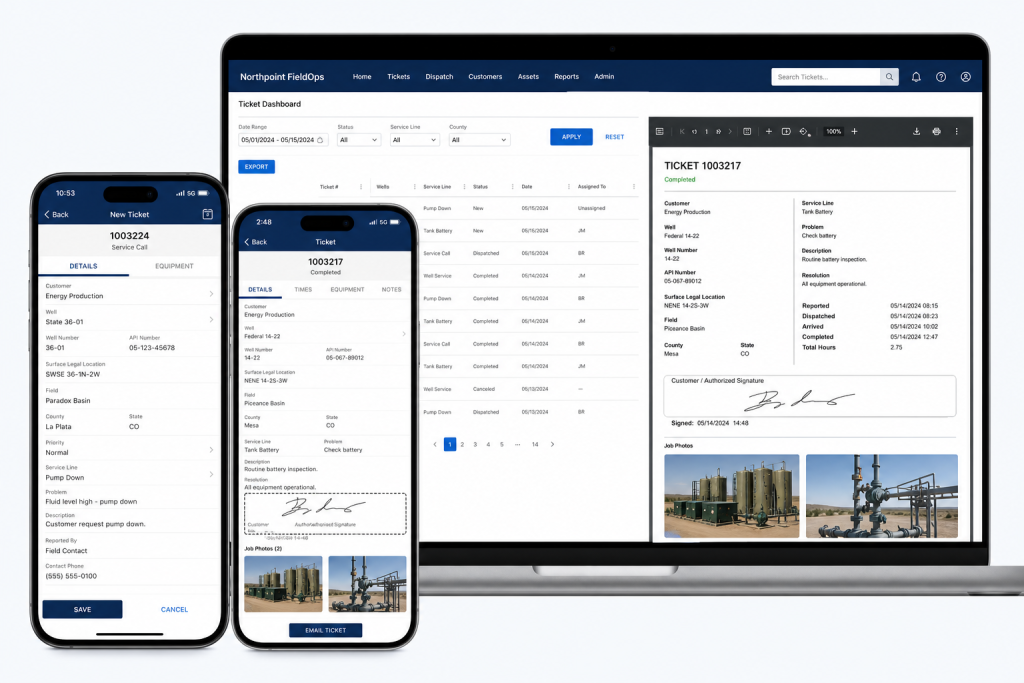
    If your business needs job tracking, invoicing, or field ticketing built into the website, tools like Northpoint FieldOps or custom integrations can convert leads into scheduled work and invoices without juggling multiple subscriptions.

    6. Calls, tracking, and measuring what matters

    Set up basic tracking so you know which pages and keywords send the best leads. Use a unique call-tracking number for ads or listings when necessary, and make sure you capture the referring page for every form submission.

    Action steps:

    • Tag links from your GBP and ads with UTM parameters so you can see which channels lead to requests.
    • Log lead source in your CRM so you can measure “leads-to-jobs” conversion by channel.
    • Review where leads stall—if many calls never get a follow-up, tighten your assignment workflow.

    7. Iterate: small changes, measured improvement

    Make one measurable change at a time: tweak a CTA, rename images, or add a FAQ to a service page. Track the effect on form submissions and phone calls, and repeat what works.

    Bringing the pieces together

    Your website can do more than publish information—it can be the system that handles requests, assigns work, and follows up until the job is done. We design WordPress sites and plugins so forms, CRM integrations, and job workflows live in one place. If you want an option that fits how your business actually runs, our custom software and integrations may be helpful resources.

    Want help applying this checklist to your business? Request a website review or schedule a conversation so we can look at your current setup and suggest practical next steps. Tell us what is difficult about managing your current website, and we can help identify a practical next step.

    Northpoint local SEO & contractor services | Northpoint FieldOps (field job tracking) | Northpoint custom software | Contact Northpoint Web

  • Practical Steps for Municipal Website Design: Easier Administration and Better Public Service

    Hi — I’m Andy. I started learning about online systems back in the BBS and dial-up days, and I still like practical fixes more than technology for its own sake. If your municipal website feels like another thing on the to-do list, this article is for you. I’ll walk through concrete steps cities, towns, and special districts can take to make a website actually reduce staff work and serve residents better.

    Start with the question: what should the website do for you?

    A public website should do more than display office hours. It should answer frequent questions, accept and route public requests, hold public documents, and let staff update content without a technical degree. Identify the few tasks that consume the most staff time—permit intake, service requests, meeting agendas, or recreation sign-ups—and design around those workflows first.

    Common priorities that save time

    Focus on a short list: clear department pages, searchable meeting agendas and minutes, online forms for permits and complaints, a public-service request tracker, and a simple staff portal for content and documents. These features reduce phone calls, duplicate work, and the need for email attachments.

    Use WordPress as the platform—then extend it where needed

    WordPress is familiar to many nontechnical staff and supports custom tools without forcing a full platform change. If you already have WordPress, you don’t have to rebuild everything. Install focused modules that provide the functionality you need and keep your public site intact while improving administration behind the scenes. For example, a centralized admin framework like Northpoint Core is designed to turn WordPress into an operational dashboard where staff manage content and tools in one place.

    Public request systems and forms: design for real workflows

    Online forms should do more than collect submissions. They should generate a tracking code, notify the right department, provide internal notes, and allow staff to update status. Tools that support Fluent Forms integration and provide task assignment, due dates, and public updates can reduce back-and-forth and keep residents informed. Northpoint Service Center, for example, is designed to support submission tracking, staff assignment, requester communication, and Fluent Forms integration so your intake process becomes an actual workflow rather than a stack of emails.

    Roles, permissions, and staff portals

    Small governments often wrestle with who can edit what on the website. Create department-based access control: give each department a limited administrative area, define roles (editor, reviewer, admin), and use a simple portal where staff see tasks and pending approvals. This reduces mistakes and centralizes content work without requiring technical staff to intervene for every change.

    Backups, hosting, and disaster recovery

    Managed WordPress hosting that includes automated backups and easy recovery options matters more than flashy features. You want nightly backups, a clear recovery process, and an environment where updates to WordPress and plugins can be tested before they go live. That way, if something fails after an update, you can restore a working copy quickly and avoid long downtime.

    Security and maintenance for small organizations

    Security isn’t a single product—it’s a practice. Keep WordPress core, themes, and plugins updated, enforce strong admin passwords, use two-factor authentication for accounts with elevated access, and limit access by role. Regular maintenance plans that include monitoring and staged updates reduce the risk of problems and keep the site reliable for residents.

    Accessibility and public documents

    Municipal websites must be usable by all residents. Prioritize simple, readable layouts, clear headings, keyboard-friendly navigation, and accessible PDF practices. For public records like agendas, minutes, and ordinances, using structured publishing tools makes documents easier to find and keeps a consistent approach across departments. Northpoint offers tools that support meeting agendas, minutes, and municipal code publishing that are designed to integrate with WordPress document workflows.

    Content strategy and local search

    Identify the pages residents use most—utility billing, service requests, emergency contacts, recreation calendars—and keep those pages front and center. A small content calendar helps coordinators publish regular updates, and an internal linking plan improves navigation. Local SEO for rural communities usually starts with accurate, consistent contact information, service area details, and pages for the services you provide, rather than trying to rank for broad, competitive keywords.

    Improve incrementally—don’t rebuild unless you must

    If your current site mostly works, consider an incremental plan: a content audit to remove outdated pages, add forms and request tracking, reorganize navigation, and implement a staff-facing dashboard. A complete redesign is sometimes necessary, but often targeted improvements produce the biggest gains with the least disruption. If you’d like a structured approach, read our practical manual for municipal modernization: A Practical Guide to Municipal Website Design and Easier Administration.

    Choosing a vendor and what to ask

    Ask potential providers how they handle backups and recovery, what admin training looks like, whether they support roles and department access, and how they integrate forms and service requests into staff workflows. Avoid vendors that require you to surrender ownership of content or lock you into a proprietary platform. Practical technology is portable—keep your content and data under your control.

    Next steps and a simple checklist

    Begin with these steps: run a short content audit, list top staff headaches, identify two forms that should be online, set hosting and backup expectations, and assign one staff member as the website lead. If you want modules that handle public requests, agendas, and administrative dashboards while keeping your public site unchanged, consider tools like Northpoint Service Center or explore municipal publishing options such as Northpoint Municipal Code.

    When I first started building websites after learning from library books and early web experiments, the best solutions were the ones that actually reduced work. That’s still true. A municipal website should be working for your organization 24 hours a day, not just sitting online.

    Tell us what is difficult about managing your current website, and we can help identify a practical next step. Request a Northpoint website review to discuss design, maintenance, hosting, accessibility, content, or administrative needs. Whether you need a complete website, ongoing support, or one specialized tool, Northpoint Web can help you plan a solution that fits your organization.

  • A Practical Guide to Municipal Website Design and Easier Administration

    I’m Andrew North. I started fiddling with bulletin board systems and early websites long before broadband was common, and that hands-on habit shapes how I approach municipal websites today: build things that actually help people do work, not just look pretty.

    Why municipalities need modern, manageable websites

    Residents expect to find answers and make requests online. For small cities and special districts that typically means juggling limited staff, scattered documents, and outdated sites. A modern municipal website should reduce phone calls, speed simple requests, and let staff focus on important work instead of wrestling with menus and broken forms.

    What “working for you 24/7” looks like

    A municipal website that works around the clock answers common questions, accepts requests, publishes agendas and minutes, and routes issues to the right staff member. That doesn’t require enterprise software—WordPress plus a few targeted tools can accomplish a lot when the site is organized for real-world workflows.

    Why WordPress is a practical choice

    WordPress is widely supported, portable, and flexible. For many small organizations it offers a balance of ownership and extensibility: you keep control of content and can add functionality through plugins or custom modules. That flexibility helps avoid lock-in to expensive proprietary platforms and keeps your content portable if you change providers.

    Core priorities for municipal sites

    When planning a redesign or upgrade, prioritize features that lower staff workload and improve resident experience. Focus on:

    • Clear navigation and content organization so residents find services quickly.
    • Simple online forms for permits, service requests, and registrations.
    • Public-facing tracking for requests and predictable status updates.
    • Role-based access for staff and department-based content editing.
    • Document libraries for agendas, minutes, and municipal code.
    • Accessibility improvements so content is usable for all residents.

    Forms, requests, and workflow

    Online forms are where the web actually saves time. For many municipalities, replacing paper or email with structured forms and request tracking cuts follow-up work. Integrating a request system with department assignment, due dates, internal notes, and public status updates creates a repeatable workflow staff can rely on.

    Northpoint Service Center is designed to support public request submission, tracking codes, staff assignment, departments, categories, workflow statuses, requester communication, internal notes, due dates, reporting, and Fluent Forms integration. Fluent Forms is a popular form plugin that can capture submissions and feed them into a tracking workflow.

    Administration: roles, portals, and custom dashboards

    Small staffs need simple tools. Department-based access control and clear WordPress roles reduce accidental edits and make it easier to delegate content tasks. A branded, simplified WordPress dashboard helps non-technical staff complete routine tasks without hunting through menus.

    Northpoint Admin Studio and Northpoint Core are designed to centralize administrative tools and present a clearer interface for staff, while Northpoint Organization supports departments, teams, staff roles, and permissions.

    Documents, agendas, and municipal code

    Publishing meeting agendas, minutes, and municipal code in searchable, consistent formats matters. Structured document libraries and routine publishing workflows make it easier to meet public records expectations without creating more busywork for staff. Tools that support versioning and simple bulk uploads will save time during meeting cycles.

    Northpoint Municipal Code is designed to host and publish municipal code within WordPress, making ordinances easier to find and reference.

    Hosting, maintenance, backups, and security

    Managed WordPress hosting and regular maintenance are practical investments for municipalities with limited IT staff. Look for providers who offer automated backups, tested disaster recovery procedures, plugin and core updates, and reasonable support SLAs. Those services reduce the chance that an expired plugin or a small misconfiguration takes the site offline.

    Northpoint provides managed WordPress hosting, maintenance, backups, security, and technical support as part of its services.

    Accessibility and local search

    Accessibility improvements, clear content structure, and consistent metadata help residents find the services they need. Local SEO for rural communities and small businesses matters too—structured data, local landing pages, and optimized department pages help search engines present accurate local results.

    Content strategy—regular updates, a sensible content calendar, and internal linking—keeps your site useful and discoverable. Northpoint Blog Agent is designed to help with content planning, monthly topic lists, and internal linking to support that ongoing work.

    Migrating or improving an existing site without a full rebuild

    You rarely need to throw everything away to make meaningful improvements. Start with a content audit: which pages are essential, which need rewriting, and what forms are currently in use? Consider installing administrative tools alongside your existing site to manage forms, requests, and staff workflows without migrating content immediately.

    Northpoint tools are designed to operate within WordPress and complement an existing website—so you can add functionality gradually and prioritize the changes that provide the biggest staff relief.

    Questions to ask before hiring a municipal website provider

    • Can you show examples of municipal workflows or features similar to what we need?
    • How will content ownership and portability be handled if we change providers?
    • What hosting, backup, and disaster-recovery procedures do you offer?
    • How do you handle staff training and documentation for site administration?
    • Can you support integrations with our existing forms or permit systems?

    Final thoughts

    Municipal websites don’t need to be complicated to be useful. Focus on clear navigation, forms that replace paper, request tracking that routes work to the right people, and hosting and maintenance that let staff sleep at night. A modest, practical WordPress site with the right administrative tools can deliver more value than an expensive, feature-heavy platform that staff never learn to use.

    If you want a practical starting point, read the step-by-step approach in our guide to modernizing municipal websites and consider how a centralized dashboard can reduce daily friction. Northpoint Core and the Service Center are designed to help organizations add capability without rebuilding everything at once.

    Tell us what’s difficult about managing your current website, and we can help identify a practical next step. Request a Northpoint website review to discuss design, maintenance, hosting, accessibility, or administrative needs—whether you’re in Utah or elsewhere in the United States.

  • Modernizing Municipal Websites: A practical WordPress guide for small cities, special districts, and rural communities

    Hi — I’m Andy. I grew up in the era of dial-up BBSs and learned web development from library books and trial-and-error. That same hands-on attitude guides how I approach municipal websites today: practical, incremental, and focused on making a site work for staff and residents every hour of the day.

    Start with a tight content and functionality audit

    Before spending money on design, inventory what’s actually on the site and how people use it. An effective audit asks:

    • What pages receive regular traffic (even from basic analytics)?
    • Which documents are required by policy—agendas, minutes, ordinances, fee schedules—and are they easy to find?
    • What forms do residents repeatedly request (permits, service requests, recreation sign-ups)?
    • Which administrative tasks consume staff time because they’re manual or duplicated?

    Documenting this gives you a prioritized roadmap. Often the biggest wins are low-cost changes: clearer navigation, a prominent online form, or a better document index.

    Focus on forms and public request systems

    Residents expect to complete common transactions online. Using modern form tools reduces phone and counter traffic while producing searchable records. Look for solutions that support:

    • Custom, conditional forms for permits and registrations
    • Automatic email confirmations and unique tracking codes for requesters
    • Staff assignment, internal notes, and status updates
    • Reporting and exportable records for audits

    Tools that integrate with Fluent Forms or a municipal forms module can avoid re-entering data. Northpoint Service Center, for example, is designed to support public request submission, tracking codes, staff assignment, departments, categories, workflow statuses, requester communication, public updates, internal notes, due dates, and reporting.

    Make administration easier for nontechnical staff

    Municipal websites are often updated by people whose main job is not web development. Simplify their work by:

    • Creating department-based pages and templates so staff can add content without breaking layout
    • Using role-based permissions so each user sees only the tools they need
    • Providing a simplified, branded dashboard that hides unnecessary options
    • Establishing content workflows and approval steps for public notices and meeting materials

    Northpoint Organization tools and Northpoint Admin Studio are designed to support departments, staff roles, and a simplified WordPress dashboard that reduces accidental edits and training time.

    Backup, hosting, and disaster recovery: practical expectations

    Managed WordPress hosting, regular backups, and a tested recovery plan are non-negotiable for public-facing sites. Key elements to require from a hosting plan:

    • Automated daily backups with easy restores
    • Simple staging environments for content or code changes
    • Access to logs and a process for emergency restores

    Don’t overcomplicate disaster recovery—document who can restore a backup, how to access credentials, and what pages or services must be back online first (public notices, outage alerts, payment portals).

    Security and maintenance for small organizations

    Security and maintenance are ongoing, not one-time tasks. Reasonable practices include keeping WordPress, themes, and plugins updated; limiting admin accounts; and using role-based permissions. Regularly review plugin inventory and remove plugins that aren’t actively needed. A managed maintenance plan that includes updates, backups, and support is the most practical approach for teams with limited technical staff.

    Accessibility and clear public communication

    Municipal websites must be readable and navigable for as many residents as possible. Start with these steps:

    • Use clear headings and page structure so assistive technologies can navigate documents and agendas
    • Provide accessible document formats (HTML pages for agendas and minutes rather than only PDFs) when possible
    • Keep public notices and alerts prominently visible and easy to subscribe to

    Accessibility is both technical and editorial—plain language, concise forms, and obvious next steps help everyone. A content-first approach often yields bigger accessibility gains than a cosmetic redesign.

    Local SEO and content strategy for rural communities

    Local search matters for towns and small districts. Focus on service-first content that answers common resident questions: how to report a streetlight outage, where to find meeting minutes, how to register for recreation. Use a content calendar to publish predictable updates—meeting agendas, project updates, and seasonal announcements—and link related pages internally to help both users and search engines find information.

    Northpoint Blog Agent is designed to assist with topic planning, writer personas, and scheduled publishing, which makes it easier to keep a steady stream of useful, local content without overwhelming staff.

    Improve without rebuilding: incremental modernization

    You don’t always need a full redesign. Consider these incremental upgrades:

    • Replace or reorganize the top navigation to reflect how residents search for services
    • Add a central public service request form and link it across department pages
    • Introduce a simplified admin dashboard and train staff on a small set of tasks
    • Publish meeting documents as searchable web pages and link them from a dedicated calendar

    If you do opt to migrate an old site, collect URLs, common queries, and top documents first. That saves time and prevents broken links after migration. Northpoint Core provides a centralized administrative framework designed to operate within WordPress and complement an existing website, so new tools can be added without tearing everything down.

    Short historical note

    I still remember the first time I dialed into a BBS and uploaded a file—there was an immediate thrill to making information available on someone else’s machine. That same principle matters today: your municipal website should do more than sit online. It should actively work for residents and staff, reliably and predictably.

    Want practical next steps? Request a Northpoint website review to discuss design, maintenance, hosting, accessibility, content, or administrative needs. Tell us what is difficult about managing your current website, and we can help identify a practical next step. Whether you need a complete website, ongoing support, or one specialized tool like modern forms or request tracking, contact Northpoint Web to discuss a solution that fits your organization.

    For related resources see our practical guide on modern municipal websites and learn more about Northpoint Core, Northpoint Service Center, and Northpoint Civic Forms.

  • Modern Municipal Websites: Practical Steps for Easier Administration and Better Public Service

    Hi — I’m Andrew North. I learned about online communities on dial-up BBS systems and then built websites throughout the early web era. Those early lessons stuck: a website should do more than sit online; it should work for your organization, day and night. Based in the Uinta Basin and serving municipalities across Utah and the United States, Northpoint focuses on making municipal websites practical, easier to maintain, and useful to residents.

    Start with a focused audit

    Before a redesign or new plugin, audit what your website does today. Look for the pages visitors actually use, common resident questions, broken links, outdated contact details, and forms that still arrive by paper or email. An audit tells you what to fix first so limited staff time goes to changes that reduce repeated work.

    Prioritize improvements that reduce staff time

    Municipal staff are busy. The best website changes are the ones that automate repetitive tasks or make everyday updates easier. Practical priorities include:

    • Converting paper or email requests into online forms with automated tracking and notifications.
    • Publishing meeting agendas, minutes, and public documents in a consistent location so staff aren’t answering the same questions repeatedly.
    • Creating department pages and clear navigation so visitors find essential services without calling the main number.

    Use WordPress tools designed for government workflows

    WordPress is flexible and widely supported. Instead of forcing a one-size-fits-all product, consider modular tools that slot into your existing site and address specific needs. Northpoint Core provides a centralized dashboard and a module framework designed to add functionality over time. For example, Northpoint Service Center is designed to accept public requests, assign them to staff, track statuses, and integrate with Fluent Forms for intake—reducing manual tracking and follow-up.

    If you need a simpler admin interface, a branded dashboard like Northpoint Admin Studio can make WordPress easier for nontechnical staff by hiding irrelevant options and surfacing the tasks they perform daily.

    Forms, request tracking, and workflows

    Online forms should capture the minimum required details, generate a reference code for the requester, notify the responsible department, and record internal notes and due dates. That sequence—intake, assignment, status updates, and reporting—keeps requests from slipping through the cracks. When forms integrate with a service center or ticketing module, staff spend less time copying data between email and spreadsheets.

    Content strategy for city websites

    A clear content plan helps residents find answers without calling. Use these practical steps:

    • Create simple how-to pages for frequent tasks: permit steps, utility billing, recreation registration procedures.
    • Organize content by department and service rather than by internal office names.
    • Maintain a content calendar to keep event, meeting, and seasonal pages current.

    Northpoint Content Studio and the Northpoint Blog Agent are designed to help with topic planning, drafting, and scheduling when you want a system that supports organized publishing and internal linking.

    Security, backups, and disaster recovery

    Small organizations need straightforward, reliable practices: keep WordPress core, themes, and plugins up to date; use role-based accounts rather than sharing logins; enforce strong passwords; and maintain regular backups stored off-site. Managed WordPress hosting makes these tasks easier by including automated backups, update tools, and server-side protections. Planning a recovery process—who restores the site, which backup to use, and where to communicate during an outage—reduces confusion if something goes wrong.

    Accessibility and public communication

    Municipal websites serve everyone. Focus on clear language, predictable navigation, descriptive link text, and properly structured headings. These practices help people with different abilities and ensure the site works better on mobile devices. Accessibility work can be phased: start with the most visited pages and public documents, then expand improvements across the site.

    Local SEO for rural communities

    For smaller towns and districts, local search visibility often comes from accurate contact details, consistent service pages, event listings, and properly configured business or agency profiles. Keep addresses, office hours, and department pages consistent across your site and directory listings. Structured content that answers common resident questions will help visitors find the right pages without calling.

    Manage access and reduce mistakes

    Define roles and permissions so staff have access only to the tools they need. Department-based access control reduces accidental edits and keeps sensitive documents restricted. For many organizations, a simplified dashboard with tailored editing screens is all it takes to reduce errors and speed up routine updates.

    Improve incrementally—don’t rebuild unless you must

    Large redesigns can be costly and disruptive. Often you can improve a site by reorganizing navigation, adding a service center or form system, moving the most used content into easy-to-edit blocks, and cleaning up broken links. If a migration is needed, plan it in stages: audit, export content, test modules on a staging site, and train staff before switching the public site.

    A short historical note

    When I started building websites, I learned by reading library books and testing code on early personal servers. That hands-on approach still matters: test changes on a staging site before pushing them live, and keep a rollback plan handy.

    How to choose a municipal website provider

    Ask prospective providers about practical support for the workflows you need: forms and request tracking, document publishing, staff dashboards, hosting and backups, and phased improvements. Avoid long vendor lock-in and prefer solutions that keep your content portable and under your control. If you’re considering WordPress, check whether the provider can add modules later—so you don’t pay for features you won’t use now.

    For more detailed, step-by-step guidance, see our practical guides on municipal website design and our description of the Northpoint Core framework.

    Tell us what is difficult about managing your current website, and we can help identify a practical next step. Request a Northpoint website review to discuss design, maintenance, hosting, accessibility, or administrative needs, or ask for a demonstration of Northpoint Core or one of the available modules. Whether you need a complete website, ongoing support, or one specialized tool, Northpoint can help you plan a solution that fits your organization.

  • A practical guide to municipal website design and easier administration

    Hi — I’m Andy North. I learned a lot about computers the slow way, tinkering with bulletin board systems and library books long before the web felt easy. That background still shapes how I approach municipal websites: they should do real work for your staff and residents, not just sit online.

    Start with a short audit, not a full redesign

    Many town and district leaders assume a failing website means they need a full rebuild. Often that’s not true. A short, practical audit—one page that lists broken links, poor navigation, unreadable PDFs, and the top five tasks people visit the site to complete—can identify high-impact wins. Focus first on the things that reduce staff calls: obvious contact info, current meeting agendas, searchable documents, and clear online forms.

    What an audit should include

    • Primary user tasks (pay a bill, report a problem, find meeting minutes).
    • Navigation clarity: can a visitor find the task in two clicks?
    • Forms and workflows: are submissions routed to staff and tracked?
    • Accessibility and mobile readiness checks.
    • Backup and hosting setup and recovery options.

    Make administration easier with role-based access and simplified dashboards

    Staff turnover and limited technical support are common in small municipalities. WordPress can be configured so each department has only the tools they need. Department-based access control and custom dashboards reduce training time and the chance of accidental edits.

    Northpoint builds tools designed to simplify the WordPress admin area. For organizations that need a branded, simplified dashboard and clearer role management, consider solutions that let you assign content and workflow permissions by department or role rather than giving everyone full editor access.

    Use forms and request tracking to reduce repetitive work

    Online forms are where a website becomes a service hub. A good public service request system accepts the request, assigns a tracking code, notifies staff, and lets the requester see status updates. That sequence removes repeated phone calls and emails.

    If you already use Fluent Forms or a similar plugin, integrations can forward submissions into staff workflows and reporting. Northpoint Service Center is designed to support public request submission, tracking codes, assignment, internal notes, requester communication, due dates, and reporting while integrating with form solutions.

    Keep content organized and discoverable

    City pages often suffer from scattered content and inconsistent page structures. Use a consistent template for department pages, meeting agendas, and service descriptions. A content studio or structured content manager helps staff draft pages in a dedicated workspace before publishing.

    Internal linking and a content calendar reduce duplication and improve search visibility for local queries. Northpoint Content Studio and Blog Agent are designed to help plan topics, draft posts, and create internal links that make pages easier to find.

    Accessibility, backups, and security basics

    Accessibility should be a practical checklist: clear headings, descriptive link text, readable color contrast, and accessible forms. While compliance is a specialized area, these basic steps improve usability for everyone.

    Backups and disaster recovery are non-negotiable. Managed WordPress hosting that includes off-site backups, staging environments, and a tested recovery process lets you restore a site without major downtime. Regular maintenance—plugin updates, security scans, and monitored backups—keeps small organizations safer without requiring in-house server expertise.

    Local SEO and helping residents find information

    Local search is different in rural communities. Make sure each page clearly states the organization name, service area, and contact information. Structured content—like event pages, business directories, and recreation schedules—helps search engines understand what you offer.

    Don’t try to game rankings. Consistent NAP (name, address, phone), good page organization, and regularly updated, helpful content make the biggest difference over time.

    Improve public communication with simple automation

    Newsletters, alert systems, and targeted notifications reduce the need for phone-based updates. A single-alert notification system that can publish to email, SMS, and on-site banners ensures messages reach the right audience. Northpoint Notify is designed as a communication platform to distribute alerts across channels.

    When to rebuild and when to improve incrementally

    Choose a full redesign when the site’s structure, CMS, or hosting is preventing all practical improvements. If the public-facing site is generally functional, incremental changes—better navigation, improved forms, a simplified admin, and modular software—often deliver the most value for the least cost.

    Northpoint software is designed to work within WordPress so you can add modules over time instead of replacing everything at once. That modular approach suits small governments and districts that prefer gradual improvements.

    Questions to ask when choosing a municipal website provider

    • How will you make the admin area easier for non-technical staff?
    • Can you integrate with our existing forms and databases?
    • What’s your backup and disaster recovery plan?
    • How do you handle accessibility improvements and testing?
    • Will we own the site and be able to move it if needed?

    Preparing content and managing updates with limited staff

    Start by documenting the most common public tasks and who on staff handles them. Create templates for meeting agendas, press releases, and service forms so staff can quickly populate pages. Schedule a quarterly content review and use a simple approval workflow so published content stays current without overloading a single person.

    Final thoughts and a short history note

    When I started with BBSs, information moved at the speed of a modem and a lot of patience. Today we can use the same practical mindset: choose small, manageable improvements that make the site genuinely useful every day. A website should do more than stay online 24 hours a day — it should be working for your organization 24 hours a day.

    Tell us what is difficult about managing your current website, and we can help identify a practical next step. Request a Northpoint website review to discuss design, maintenance, hosting, accessibility, or administrative tools like service request tracking and simplified dashboards. Contact Northpoint Web to schedule a conversation or ask for a demonstration of Northpoint Core or Northpoint Service Center.

  • Modern Municipal Websites: Practical Steps for Easier Administration and Better Public Service

    I still remember dialing into a BBS as a kid and waiting for pages to load while reading manuals from the public library. That early curiosity—learning by doing and fixing things when they broke—shapes how I approach municipal websites today. A city website should do more than sit online; it should work for staff and residents around the clock.

    Why municipalities need easier website administration

    Small cities, special districts, and rural municipalities often operate with limited staff. When your website requires developer help to change a menu, publish an agenda, or update a fee schedule, the site becomes a bottleneck. Easier administration means staff can make routine updates safely, preserve institutional knowledge, and respond faster to residents.

    What “easier” looks like

    • Simple, role-based editing so department staff only see what they need.
    • Modular tools for forms, agendas, documents, and service requests.
    • Workflows and approvals that match your internal processes.
    • Clear backups, maintenance, and a recovery plan that staff understand.

    Practical checklist to modernize without rebuilding everything

    Not every site needs a full redesign. You can get big wins with focused improvements.

    1. Audit content and navigation

    Make a short list of the pages people actually use: utilities, meeting agendas, forms, public notices. Group related items under department-based menus and surface high-demand resources on a single “I need to…” page. That reduces clicks and phone calls.

    2. Simplify administration and roles

    Use WordPress roles and department-based access control so each staff member has a clear, limited set of tasks. Consider a custom dashboard that shows only the tools a person needs—this reduces mistakes and training time. Northpoint Core provides a centralized admin framework designed to organize roles and modules within WordPress.

    3. Replace paper processes with online forms and workflows

    Online forms reduce manual entry and lost paperwork. Choose a form solution that supports file uploads, automated emails, and integrations with your request-tracking system. For public requests and internal assignment, a service-center approach that links forms to ticketing, departments, and reporting can be transformational. Northpoint Service Center is designed to support public request submission, staff assignment, internal notes, reporting, and Fluent Forms integration.

    4. Improve backups and disaster recovery

    Backups are only useful if someone knows how to restore them. Make sure backups are automated, stored offsite, and that you have a simple documented recovery procedure. Test restores at least annually or after major updates.

    5. Managed hosting and maintenance

    Managed WordPress hosting removes routine maintenance tasks from internal staff while keeping the site up-to-date and patched. A maintenance plan should include core and plugin updates, security scans, database optimization, and a schedule for content reviews.

    6. Security tailored to small organizations

    Security for a municipal site can be practical rather than paranoid. Use strong passwords, limit admin accounts, enable two-factor authentication where practical, and keep plugins trimmed to what you actually use. Regular monitoring and an incident contact plan are helpful—know who to call if something looks wrong.

    Focus on accessibility and clear public communication

    Accessibility isn’t just compliance—it’s how residents find information. Use clear headings, readable text sizes, and descriptive link text. Publish meeting agendas, minutes, ordinances, and permit instructions in straightforward language. When you post public notices, include alternative contact methods for people who can’t use online forms.

    Content strategy and local search for small communities

    Content that answers common resident questions ranks better and saves staff time. Build a simple content calendar focused on recurring needs: utility billing, trash schedules, permit steps, recreation registration. Northpoint Blog Agent supports monthly topic planning, draft publishing, and internal linking to help sites stay consistent.

    How to manage updates with limited staff

    Set realistic expectations and protect staff time.

    • Schedule regular content sprints: one-hour sessions to update a specific section each month.
    • Use templates for meeting agendas, job postings, and permits so anyone can fill in the details without layout work.
    • Train at least two people on basic tasks and keep a short “how to” notebook for emergency updates—something like Northpoint Notebooks does for internal notes and working information.

    Questions to ask before hiring a municipal website provider

    When you talk to vendors, ask:

    • Can you show examples of municipal sites you’ve adapted without replacing the public-facing site?
    • How do you handle roles and department access so nontechnical staff can edit safely?
    • What’s included in hosting, backups, and disaster recovery? Who restores data?
    • How will forms and public requests be routed to staff, and can we customize workflows?
    • Do you provide training and a short reference guide for day-to-day tasks?

    These practical questions focus on how the vendor will reduce your daily workload, not just what the website will look like.

    Small improvements with big impact

    A few focused changes often deliver the best return: a clear top-level navigation, an “I need to…” quick links block on the homepage, online forms tied to request tickets, and a simple content calendar. These moves reduce phone calls and help staff spend time on priorities.

    Where to get started

    If you’re unsure what to tackle first, start with a quick website review: identify the three pages that cause the most questions; make those easier to find; and create or improve the form a resident uses most often. For organizations that want an administrative framework, Northpoint Core is built to turn WordPress into a dashboard for modular municipal tools.

    Whether you need help with a full redesign, a form and ticketing system, or just a plan for better content, I’m happy to talk through practical next steps. Tell us what is difficult about managing your current website, and we can help identify a practical next step. Request a Northpoint website review to discuss design, maintenance, hosting, accessibility, or administrative tools. Need a better way to manage public requests, content, or staff access? Let’s talk about the tools your organization actually needs.

    Contact Northpoint Web to discuss a WordPress website or custom software solution for your organization.

  • Practical Guide to Municipal Website Design: Easier Administration, Better Service, and Less Headache

    Hi — I’m Andrew North. I grew up fascinated by bulletin board systems and the early web, and I still believe a municipal website should do more than sit online: it should actively work for your staff and residents 24 hours a day. This article lays out practical steps small cities, special districts, and rural municipalities can take to make their WordPress sites more useful, easier to manage, and less dependent on a single vendor.

    Start with a clear problem list

    Before budgeting for a redesign, gather a short list of real problems. Ask staff and a few residents these focused questions:

    • What tasks take staff more time than they should (posting meeting minutes, routing permit requests, updating department pages)?
    • Which pages are hard for residents to find?
    • What workflows are still paper-based and could use online forms and assignment tracking?

    These answers help you prioritize improvements that reduce staff workload and improve public service.

    Prefer modular fixes over full rebuilds

    Rebuilding a whole site is expensive and disruptive. For many municipalities you can keep the public-facing site and add administrative tools that fit into WordPress. Modular systems let you add functionality one step at a time: a better content workflow here, a service-request system there, then improved staff dashboards.

    If you want a concise starting point for practical modernization, see this guide to easing municipal website administration for small cities and special districts: Practical Steps for Modern Municipal Websites.

    Key features that actually help municipal staff

    When evaluating solutions, focus on tools that reduce repetitive work and centralize control:

    • Structured content tools so department pages, event listings, and service descriptions are easy to edit and consistently presented. Northpoint Content Studio is designed to provide a dedicated environment for content work and publishing.
    • Service request and tracking — a public form, automatic request codes, staff assignment, status updates, and requester notifications. Northpoint Service Center supports these workflows and integrates with Fluent Forms.
    • Role- and department-based access so clerks, public works, and recreation staff each see only the tools and pages they need. That reduces mistakes and speeds up updates.
    • Branded, simplified dashboards for non-technical users so staff don’t have to learn the full WordPress admin. Northpoint Admin Studio is designed to transform the standard dashboard into an easier interface for your team.

    Forms and workflow: practical notes

    Online forms replace paper when they’re tied to internal workflows. Integrations with Fluent Forms or similar plugins let you:

    • Capture structured data (addresses, parcel numbers, permit types).
    • Automatically create a tracking code for each submission.
    • Assign requests to a department or staff member and set due dates.
    • Send status updates to the requester and keep internal notes attached to the request.

    Design forms around the actual workflow — not just the information you want to collect. Make the backend routing automatic where reasonable.

    Accessibility, security, and hosting basics

    Small organizations often juggle many responsibilities. Managed WordPress hosting and a regular maintenance plan reduce risk by keeping backups current, WordPress and plugins up to date, and basic security measures in place. Backups and a tested disaster-recovery plan mean you can recover quickly if something goes wrong.

    Accessibility improvements make sites usable for more residents and simplify compliance work. Focus first on clear structure, readable content, keyboard navigation, and properly labeled forms — those changes often deliver the most benefit for the least cost.

    Local SEO and content strategy that serves residents

    Local search helps residents find utility billing, meeting agendas, parks, and permit information. Practical steps include:

    • Organizing content so each service or department has a dedicated page with clear contact and hours.
    • Using a content calendar to publish routine items (meeting agendas, minutes, notice updates) on a predictable schedule.
    • Linking internally between related pages (permit forms → fee schedules → contact person) to help visitors and search engines understand relationships.

    Content planning tools like Northpoint Blog Agent are designed to help with topic planning, internal linking, and scheduled publishing for blogs and news sections.

    How to choose a municipal website provider

    Ask focused questions before you sign anything. Useful questions include:

    • Can you keep our existing public site while adding admin tools? (If yes, ask how updates will be staged and tested.)
    • How do you manage backups and disaster recovery?
    • Who will train our staff, and what documentation will we receive?
    • How are roles and permissions handled, and can we restrict access by department?
    • Will we own the website content and data, and how portable is the setup?

    A good provider will give clear, practical answers and outline incremental options so you don’t have to replace everything at once.

    Preparing for a website project with limited staff

    Small teams succeed when projects are broken into digestible steps. Start by collecting existing content in one place, identify high-priority pages, and assign a single staff member as the project lead. Use simple templates for recurring content (events, council minutes, permit instructions) so contributors know what to provide.

    Automate repetitive tasks where you can: scheduled backups, automated status emails for service requests, and a single content-review workflow. These small automations free staff time for higher-value work.

    Closing thoughts and a short tech history note

    Back in the BBS and dial-up era, I learned early that systems that do routine work reliably free people to do the work that really matters. The same principle applies to municipal websites: stop treating the site as just a place to publish information and start treating it as a working tool for staff and residents.

    If you’d like practical advice for your city, district, or small organization, tell us what’s difficult about managing your current website and we can identify a practical next step. Request a Northpoint website review to discuss design, maintenance, hosting, accessibility, content, or administrative needs, or ask for a demonstration of Northpoint Core and related tools. Whether you need a complete website, ongoing support, or one specialized tool, Northpoint can help plan a solution that fits your organization.

    Northpoint Core | Northpoint Service Center | Northpoint Content Studio | Northpoint Admin Studio

  • Practical Guide to Municipal Website Design and Easier Administration

    Hi — I’m Andrew North. I grew up tinkering with bulletin-board systems and learned early that a good system keeps working even when you’re not logged in. That same idea drives municipal websites: they should be doing useful work for residents 24/7, not just showing office hours. This article walks through practical choices a city, town, or special district can make to make that happen without unnecessary cost or complexity.

    Why municipalities need simpler website administration

    Many small governments inherit sites that are hard to update, cluttered, or arranged around staff who left the organization years ago. When updating content requires a developer, the site becomes a bottleneck. Simpler administration means staff can post meeting agendas, update service notices, and respond to residents without long delays. That alone improves public communication and reduces phone traffic.

    What “simpler” looks like

    Think role-based access, clear department pages, reusable content blocks, and a streamlined editor that hides technical details. Tools that let nontechnical staff draft, schedule, and preview content reduce errors and free up IT time for higher-value tasks.

    Priorities for municipal website projects

    When planning a redesign or an incremental improvement, prioritize systems that deliver daily value:

    • Public service request intake and tracking with clear statuses and communication for the requester. A purpose-built system can handle assignment, due dates, internal notes, and reporting while integrating with online forms.
    • Simple staff portals and dashboards that consolidate tasks, messages, and outstanding requests so team members don’t have to hunt for information.
    • Accessible publishing tools for agendas, minutes, ordinances, and public notices so information is easy to find and maintain.
    • Reliable hosting, backups, and disaster-recovery procedures to reduce downtime and speed recovery when problems happen.

    Northpoint’s Service Center is designed to support common public-request workflows, including integration with online forms and staff assignment. Using a system built for these needs avoids shoehorning a generic plugin into very specific municipal workflows.

    Managed WordPress hosting, backups, and disaster recovery

    Managed hosting for a municipal WordPress site isn’t about flashy features; it’s about predictable updates, secure backups, and a tested recovery plan. Ask potential providers how they handle offsite backups, how frequently they test restores, and what their process is for emergency access if an administrator’s account is unavailable.

    Practical items to request

    • Daily backups retained for a reasonable period and at least one offsite copy.
    • An established process to restore the site to a known good state without losing critical submissions (forms, service requests).
    • Clear documentation for staff with emergency contact steps and basic troubleshooting checks.

    Security and accessibility for small organizations

    Security for municipalities should focus on minimizing attack surface: keep WordPress and plugins updated, use role-appropriate accounts, and limit administrative access. Accessibility work is equally practical — structure content so screen readers can navigate agendas and public notices, and provide clear labels for forms. Accessibility is an ongoing effort; plan improvements that make the site easier to use rather than aiming for a single “complete” sweep.

    Content strategy and local SEO that serves residents

    Good content planning is surprisingly effective. Map the top tasks residents perform (pay a bill, report a pothole, find meeting minutes) and make those actions prominent. Use local SEO practices that help residents find services and essential pages rather than focusing only on marketing keywords. Structured content, consistent internal linking, and a modest content calendar go a long way toward keeping information fresh and findable.

    Forms, workflows, and automation

    Online forms are where websites move from informational to operational. Forms tied to internal workflows reduce manual work: incoming requests can generate tracking codes, notify the right department, allow staff to add internal notes, and send updates back to the requester. Integration with a form builder that supports confirmations, conditional logic, and exportable records is essential for municipal use. Fluent Forms integrations are commonly used for these needs because they offer the flexibility most municipalities require.

    Improving a website without rebuilding everything

    A full rebuild isn’t always necessary. You can often add administrative tools and modern features to an existing WordPress site: a structured content layer for agendas and ordinances, a public service request module, or a simplified admin dashboard for staff. Northpoint’s approach emphasizes modular tools that integrate into WordPress so organizations can add the features they need over time without a complete overhaul.

    How to choose a municipal website provider

    Ask focused, practical questions during selection:

    • Can you show examples of municipal workflows and administrative tools you’ve built?
    • How do you handle ongoing maintenance, backups, and security updates?
    • Will the site let us keep ownership and move hosting if we need to?
    • What training and documentation do you provide for nontechnical staff?

    If you’re comparing enterprise platforms to smaller providers, look beyond feature lists and examine how the provider supports staff-level tasks. For a discussion about alternatives, see this overview of affordable options for small cities.

    Preparing content and managing updates with limited staff

    Start with a content inventory: list the pages you use most and identify stale content. Prioritize pages that support resident tasks. Use templates for recurring items like meeting agendas and press releases so staff can fill a form and publish a consistent page quickly. Scheduling small, regular content-review sessions prevents information from drifting out of date.

    Closing thoughts

    I still remember the first time I set up a bulletin-board system and realized people would use it while I slept. Municipal websites should do the same: accept requests, share information, and keep operations moving even when staff aren’t at a desk. If your current site is hard to manage or you’d like to add service-request workflows, simpler dashboards, or structured content tools, there are practical steps you can take without a full rebuild.

    Tell us what is difficult about managing your current website, and we can help identify a practical next step. Request a Northpoint website review to discuss design, maintenance, hosting, accessibility, content, or administrative needs. Whether you need a single tool or a broader municipal solution, we can talk about options that fit your staff and budget.

    Northpoint Service Center supports public request submission, tracking, assignment, reporting, and Fluent Forms integration. For simpler staff access and a branded dashboard, see Northpoint Admin Studio. To improve structured content and make updates easier, explore Northpoint Content Manager. If you’d like a perspective on alternatives for small cities, this article may help: Why Small Cities Need More Than a Basic Government Website.

  • Website Design Vernal Utah: Local Web Design, SEO and Online Management for Vernal Businesses

    Website Design Vernal Utah: Local Web Design, SEO and Online Management for Vernal Businesses

    If you are looking for website design in Vernal, Utah, you may need more than someone who can simply build a good-looking website.

    Vernal businesses compete for customers online every day.

    Contractors.

    Oilfield service companies.

    Restaurants.

    Retail businesses.

    Professional services.

    Home service companies.

    Tourism and recreation businesses.

    When a potential customer needs something, one of the first things they often do is search online.

    The question is simple:

    Will they find your business—or someone else’s?

    At Northpoint Web, we provide website design, ongoing website management, proactive search engine optimization, managed content, and AI integration options for businesses in Vernal and throughout the Uinta Basin.

    A Vernal Business Website Should Be Built for Vernal Customers

    One of the problems with national website companies is that they often approach every local business the same way.

    Choose a template.

    Add a logo.

    Write a few paragraphs.

    Publish the website.

    But Vernal is not a generic market.

    Businesses here serve a unique combination of local residents, oilfield companies, contractors, rural communities, tourists, and customers from throughout northeastern Utah.

    The website for a Vernal business should reflect the people that company actually serves.

    Where do your customers come from?

    What services are they searching for?

    Do you only serve Vernal?

    Do you work throughout Uintah County?

    Do customers come from Roosevelt or Duchesne?

    Do you serve businesses connected to the energy industry?

    Does tourism affect your business?

    These questions matter when planning a website and local SEO strategy.

    Why Local SEO Matters for Vernal, Utah Businesses

    Imagine someone searches Google for a service you provide.

    They may search:

    “contractor Vernal Utah”

    “plumber near Vernal”

    “excavation company Uintah County”

    “website designer Vernal Utah”

    “best roofing company Vernal”

    Your business may provide exactly what that customer needs.

    But if your website does not clearly explain your services and location, search engines may have difficulty understanding when your company is relevant.

    This is where local SEO for Vernal businesses becomes important.

    Local search engine optimization is not simply adding “Vernal Utah” to the bottom of every page.

    A strong local website should clearly communicate what the company does, where it works, and why the business is relevant to potential customers.

    Your Services May Need Their Own Website Pages

    One of the most common small business website problems is trying to put everything on the homepage.

    Consider a Vernal contractor that provides:

    Custom home construction.

    Basement finishing.

    Kitchen remodeling.

    Bathroom remodeling.

    Garages.

    Decks.

    Commercial construction.

    If every service is mentioned in a short paragraph, the website provides very little detailed information about any of them.

    Potential customers may have questions.

    Search engines also need context.

    Depending on the business, important services may deserve individual pages.

    A page about kitchen remodeling can answer kitchen remodeling questions.

    A page about custom homes can discuss the building process.

    A page about garages can explain available options.

    This creates a website built around the actual services the business wants to sell.

    At Northpoint Web, we consider website structure part of the SEO strategy.

    Vernal Web Design Should Continue After the Website Launches

    A website should not become outdated the day it launches.

    Businesses change.

    Services change.

    Employees change.

    Markets change.

    Search behavior changes.

    New competitors appear.

    Yet many small business websites remain untouched for years.

    Northpoint Web offers an alternative to the traditional build-it-and-leave-it website model.

    We provide ongoing website management for Vernal and Uinta Basin businesses.

    That means we can continue paying attention to the website after launch.

    We can update content.

    Add services.

    Build new landing pages.

    Evaluate search opportunities.

    Create articles.

    Improve calls to action.

    And help the website change as the business changes.

    Proactive SEO Instead of Waiting for the Business Owner

    Most Vernal business owners have enough to do.

    They should not have to spend Saturday night researching Google keywords.

    We believe the website company should help look for online opportunities.

    At Northpoint Web, our proactive SEO approach can include evaluating services that are poorly represented on a website, identifying customer questions that deserve content, reviewing local search opportunities, and improving existing pages.

    If a business expands into a new service, the website may need a new page.

    If customers repeatedly ask the same question, that question may make a useful article.

    If a company wants more work in a specific part of the Uinta Basin, the website strategy may need to change.

    The business owner should not always have to call the website company first.

    Managed and Automatic Blog Content for Vernal Businesses

    Many website companies tell small businesses to start a blog.

    Then they leave the business owner to write it.

    That rarely works.

    A Vernal contractor probably has better things to do than write an article after working all day.

    The same is true for most business owners.

    Northpoint Web can help plan, create, manage, and publish website content based on actual business services and search opportunities.

    In some situations, automatic blog publishing can help maintain a consistent content schedule.

    But we do not believe in publishing meaningless AI articles simply to fill a website.

    Content should have a reason to exist.

    It should answer a customer question.

    Explain a service.

    Address a local issue.

    Or help potential customers understand the business.

    AI Integration for Vernal Small Businesses

    Artificial intelligence is creating new opportunities for small businesses.

    The challenge is knowing what is actually useful.

    A Vernal business may benefit from an AI website assistant that helps visitors find the correct service.

    A contractor may use a smarter inquiry process to collect project details.

    A service company may want to better organize incoming customer questions.

    A business may need help creating and managing ongoing website content.

    Northpoint Web can evaluate practical AI integration options for Vernal businesses.

    We start with the business problem.

    Then we consider whether AI or automation can help solve it.

    Technology should make the business easier to operate.

    It should not create another complicated system for the owner to manage.

    Why Work With a Local Uinta Basin Website Company?

    There are excellent website designers throughout the country.

    But local presence can provide an advantage.

    We know where Vernal is.

    That may sound like a low standard, but it matters more than people think.

    We understand the relationship between Vernal, Roosevelt, Duchesne, and the surrounding Uinta Basin communities.

    We understand that local businesses may serve customers across a wide geographic area.

    We understand the importance of the oil and gas industry to the Basin.

    We understand rural Utah.

    We understand that local reputation still matters.

    Northpoint Web combines professional website development with a local understanding of the Uinta Basin.

    Looking for a Web Designer in Vernal, Utah?

    If you are comparing website design companies in Vernal, Utah, consider what you want after the website launches.

    Do you simply want a new website?

    Or do you want someone helping manage your online presence?

    Northpoint Web provides website design, ongoing website management, proactive SEO, local search optimization, managed blog content, automatic publishing options, and practical AI integration for Vernal and Uinta Basin businesses.

    Our goal is simple.

    We want your website to become a managed part of your business—not another online project everyone forgets about.

    Learn more about Northpoint Web’s Uinta Basin website services and discover how we can help manage the online side of your business.