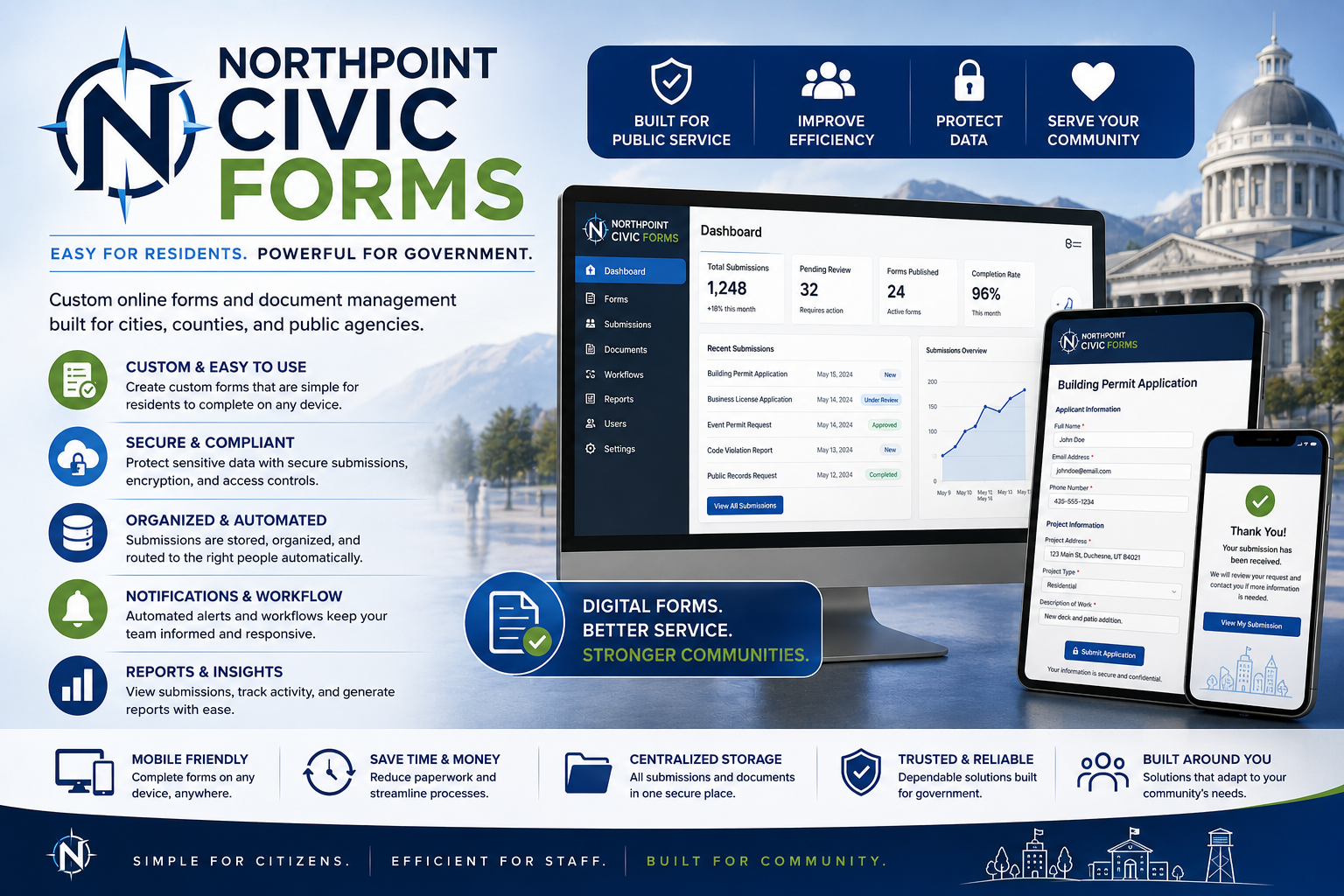
Modern Online Forms for Cities, Towns, and Public Agencies
Northpoint Civic Forms transforms paper applications, permits, registrations, and service requests into professional online workflows.
Residents can complete forms from a computer or mobile device, upload supporting documents, provide electronic signatures, and submit information directly to the appropriate department.
Staff receive organized submissions that are easier to review, print, export, and process.
[Request a Demonstration]
Replace Paper Forms Without Replacing Your Entire Website
Many public agencies still rely on forms that must be printed, completed by hand, scanned, mailed, or delivered to City Hall.
Northpoint Civic Forms provides a more convenient option while preserving the agency’s existing procedures.
Forms can be added to:
- Existing WordPress websites
- Northpoint Civic CMS websites
- Department pages
- Resident service portals
- Standalone application pages
- Hosted form pages
Organizations may continue offering downloadable PDFs while also giving residents the option to apply online.
Forms Built Around Municipal Workflows
Northpoint Civic Forms is designed for the types of applications and requests local governments process every day.
Common examples include:
- Building permit applications
- Business license applications
- Utility service applications
- Water fill station applications
- Park reservations
- Facility rentals
- Employment applications
- Public-record requests
- Planning and zoning applications
- Event permits
- Complaint forms
- Service requests
- Volunteer applications
- Cemetery requests
- Recreation registrations
- Vendor applications
Each form can be customized around the department’s actual requirements.
Easier for Residents
Residents should not need to visit City Hall simply to obtain or submit a basic application.
Northpoint Civic Forms allows users to:
- Complete forms online
- Save time by avoiding unnecessary trips
- Submit from a phone, tablet, or computer
- Upload required documents
- Review information before submitting
- Receive confirmation by email
- Print or save a submission copy
- Pay applicable fees when enabled
- Contact staff if additional help is needed
Clear instructions can be placed at the beginning of each form so applicants understand what information and documents they should prepare.
Easier for Staff
Online submissions arrive in a consistent, organized format.
Authorized staff can:
- Review applications in WordPress
- Search and filter entries
- Receive email notifications
- Download uploaded documents
- Print submission records
- Export information to CSV
- Add internal notes
- Update application status
- Resend confirmation messages
- Forward information to another department
- Maintain an application history
This reduces problems caused by incomplete handwriting, missing pages, and documents being submitted separately.
Multi-Step Applications
Long municipal forms can feel overwhelming when every field appears on one page.
Northpoint Civic Forms can divide applications into clear steps.
For example:
1. Applicant Information
2. Property or Business Information
3. Project Details
4. Required Documents
5. Fees and Payment
6. Agreement and Signature
7. Review and Submit
A progress indicator helps applicants understand how much of the form remains.
This format works especially well for building permits, business licenses, utility applications, and employment forms.
Conditional Fields
Forms can show only the questions relevant to the applicant.
For example:
Are you using a licensed contractor?
When the applicant selects Yes, the form can display:
- Contractor name
- License number
- Company
- Phone
- Insurance information
When the applicant selects No, those fields remain hidden.
Conditional logic can also be used for:
- Residential or commercial projects
- New service or transfer service
- Owner or tenant
- Individual or business applicant
- Water, sewer, or garbage service
- Indoor or outdoor events
- Paid or volunteer positions
- Different permit types
This keeps forms shorter and easier to understand.
Document Uploads
Applicants can upload supporting files directly with the form.
Examples include:
- Site plans
- Construction drawings
- Contractor licenses
- Sales tax licenses
- Business registrations
- Permission letters
- Driver licenses
- Proof of ownership
- Insurance certificates
- Resumes
- Photographs
- Maps
- Supporting PDFs
File requirements can specify permitted formats, size limits, and the number of files allowed.
Staff receive the documents with the application rather than requesting them later through separate emails.
Electronic Signatures and Agreements
Northpoint Civic Forms can include:
- Typed electronic signatures
- Drawn signatures
- Required agreement checkboxes
- Initial-style acknowledgements
- Date and time of submission
- Consent records
- Applicant certification statements
For mobile usability, paper initials are often converted into required checkboxes.
For example:
☐ I certify that the information provided is accurate.

☐ I understand that submitting this application does not constitute approval.

☐ I agree to comply with applicable ordinances, policies, and regulations.
Electronic-signature requirements should be reviewed by the organization’s legal counsel for the specific type of application.
Online Payments
Applicable fees can be collected during or after submission.
Possible uses include:
- Permit fees
- Business license fees
- Park reservation deposits
- Facility rental fees
- Utility connection fees
- Recreation registration
- Application fees
Payment options may include:
- Credit or debit card
- Hosted payment link
- Stripe
- PayPal
- Square
- Existing municipal payment provider
- Payment by phone
- Payment at City Hall
- Check submission
A form may also allow applicants to submit first and pay separately.
Clear instructions can explain that an application or reservation is not complete until payment is received.
Automated Email Notifications
Northpoint Civic Forms can send different notifications based on the type of submission.
Staff Notification
The appropriate department receives:
- Applicant name
- Submission summary
- Complete form data
- Uploaded document links
- Submission date and time
- Payment status
- Link to review the entry
Applicant Confirmation
The applicant receives:
- Confirmation that the form was received
- Submission reference number
- Copy or summary of the information
- Payment instructions
- Expected review process
- Department contact information
- Next steps
Email messages can include the organization’s logo, address, colors, and official footer.
Branded Submission Records
Submissions can be formatted as professional records containing:
- City or agency logo
- Form title
- Applicant information
- Submission details
- Uploaded-document list
- Signature information
- Date and time
- Reference number
- Internal-use section
- Staff notes
- Approval information
Depending on the configuration, records may be printed from the entry screen or generated as PDFs.
This gives staff an official-looking document that can be saved, printed, shared, or included in a meeting packet.
Internal Staff Fields
Not every field should appear on the public application.
Northpoint Civic Forms can separate applicant information from internal processing fields.
Internal fields may include:
- Application number
- Permit number
- Account number
- Assigned staff member
- Department review
- Fee calculation
- Payment received
- Inspection status
- Approval date
- Council action
- Conditions of approval
- Internal notes
- Final disposition
These fields can be hidden from applicants and restricted to authorized employees.
Application Status Tracking
Forms can support a basic status workflow such as:
Submitted
↓
Under Review
↓
Additional Information Requested
↓
Pending Payment
↓
Approved
or
Denied
Staff can update the status as the application moves through the process.
Applicants may receive automated emails when important status changes occur.
More advanced configurations may include a secure applicant portal where users can review their own submissions.
Department Routing
Applications can be directed to the correct staff member based on the applicant’s selections.
For example:
- Building permits → Building Department
- Business licenses → City Recorder
- Utility applications → Utility Billing
- Park reservations → Parks and Recreation
- Employment applications → Administration
- Public-record requests → Records Officer
Conditional routing reduces the need for one employee to manually forward every submission.
Approval Workflows
Some applications require review by several people or departments.
A workflow may include:
Applicant Submission
↓
Staff Completeness Review
↓
Department Review
↓
Fee Confirmation
↓
Council or Board Review
↓
Approval or Denial
Northpoint Civic Forms can be configured to support notifications, status changes, internal notes, and document sharing throughout the process.
The exact workflow depends on the organization’s procedures and selected integrations.
Reference Numbers
Each submission can receive a unique reference number.
Examples:
BP-2026-00142
BL-2026-0048
PR-2026-0175
UTIL-2026-0093
Reference numbers help residents and staff discuss an application without relying solely on the applicant’s name.
They can also appear in confirmation emails, PDF records, and internal reports.
Search, Filter, and Export
Staff can locate entries by:
- Applicant name
- Email address
- Phone number
- Submission date
- Form type
- Application status
- Reference number
- Department
- Payment status
- Property address
- Business name
Entries can be exported for:
- Spreadsheets
- Reports
- Record retention
- Department review
- Council packets
- Mailing lists
- Data analysis
Spam and Security Protection
Public forms require protection against automated spam and malicious submissions.
Available safeguards may include:
- CAPTCHA
- Honeypot fields
- Submission rate limiting
- Email validation
- File-type restrictions
- File-size limits
- Nonce protection
- Logged administrative access
- Role-based permissions
- Secure SMTP delivery
- Database backups
- Malware scanning
Sensitive information should be collected only when necessary and handled according to the agency’s privacy, retention, and security requirements.
Mobile-Friendly Design
Many residents will complete forms from a phone.
Northpoint Civic Forms is designed with mobile use in mind.
Forms can include:
- Large tap-friendly fields
- Clear labels
- Simple dropdowns
- Proper phone and email keyboards
- Multi-step navigation
- Mobile document uploads
- Readable agreement text
- Responsive confirmation pages
- Accessible error messages
A form that works well on mobile is more likely to be completed successfully.
Accessibility-Conscious Forms
Public forms should be usable by as many residents as possible.
Northpoint Civic Forms can support:
- Proper field labels
- Keyboard navigation
- Logical tab order
- Required-field identification
- Clear validation messages
- Accessible buttons
- Descriptive instructions
- Sufficient contrast
- Screen-reader-friendly structure
- Alternatives to inaccessible PDF-only processes
Forms and uploaded documents should still be reviewed regularly for accessibility compliance.
Fluent Forms Integration
Northpoint Civic Forms can be built using Fluent Forms and related WordPress tools.
This provides access to features such as:
- Drag-and-drop form creation
- Conditional logic
- Multi-step forms
- File uploads
- Email notifications
- Entry management
- Payment integrations
- Signatures
- PDF generation
- Webhooks
- CRM connections
- Spreadsheet exports
Northpoint adds the municipal structure, workflow design, branding, configuration, and staff-facing experience around those tools.
FluentSMTP Integration
Form notifications can be routed through FluentSMTP for more reliable email delivery.
The delivery flow may look like:
Resident submits form
↓
Northpoint Civic Forms
↓
WordPress email notification
↓
FluentSMTP
↓
Municipal mail server or delivery provider
↓
Staff and applicant receive confirmation
This can help reduce the likelihood that important applications are lost or sent to spam.
Northpoint Notify Integration
Northpoint Civic Forms can also work with Northpoint Notify.
Examples include:
- A resident subscribes to alerts while submitting a utility application
- Recreation applicants opt into program updates
- Business owners subscribe to business notices
- Park reservation applicants receive closure alerts
- Form submissions trigger internal staff notifications
- Approved subscribers are assigned to relevant alert categories
Consent should remain clear and separate from the required application fields.
Northpoint Civic CMS Integration
When used with Northpoint Civic CMS, forms can appear in a centralized staff dashboard.
Staff may see:
- New submissions
- Pending applications
- Recent payments
- Forms awaiting review
- Applications requiring more information
- Upcoming reservations
- Submission counts by department
This creates a more unified municipal management experience.
Common Form Packages
Building Permit Package
May include:
- Applicant information
- Property details
- Project type
- Contractor information
- Valuation
- Plan uploads
- Site-plan upload
- Agreement
- Signature
- Internal review fields
Business License Package
May include:
- Applicant information
- Business details
- Ownership type
- Business location
- Description of operations
- Required licenses
- Supporting documents
- Applicant certification
- Signature
- Council review status
Utility Service Package
May include:
- Service address
- Applicant information
- Owner or tenant status
- Employer information
- Requested services
- Garbage options
- Billing preference
- Agreements
- Signature
- Account setup fields
Park Reservation Package
May include:
- Applicant information
- Event details
- Park selection
- Facility requests
- Attendance estimate
- Rules and acknowledgements
- Deposit information
- Payment instructions
- Signature
Public-Record Request Package
May include:
- Requester information
- Description of records
- Preferred delivery method
- Fee acknowledgement
- Expedited-request details
- Date range
- Department routing
- Staff response status
Keep the PDF Option
Moving forms online does not mean every paper form must disappear.
Northpoint Civic Forms can provide both:
- Complete online application
- Downloadable PDF version
A page may explain:
Complete the online application below, or download and print the PDF form. Printed applications may be submitted to the appropriate department with any required documents and payment.
This gives residents flexibility while gradually reducing staff dependence on paper processing.
Built for Your Procedures
Northpoint Civic Forms is not a one-size-fits-all library of generic templates.
Each implementation can reflect:
- Local ordinances
- Department requirements
- Approval procedures
- Fee structures
- Required documents
- Staff roles
- Payment methods
- Record-retention practices
- Existing forms
- Organizational branding
The goal is to improve the existing process without forcing the agency into an unrelated workflow.
Available Services
Northpoint can assist with:
- Reviewing current paper forms
- Recommending a better online structure
- Building multi-step applications
- Creating conditional logic
- Configuring uploads
- Adding signatures
- Setting up notifications
- Connecting FluentSMTP
- Configuring payments
- Creating confirmation pages
- Branding submission emails
- Building printable records
- Training staff
- Maintaining and updating forms
Benefits of Northpoint Civic Forms
Greater Convenience
Residents can apply from home or a mobile device.
More Complete Applications
Required fields and document prompts reduce missing information.
Better Readability
Typed entries replace difficult handwriting.
Faster Routing
Submissions reach the correct department immediately.
Consistent Records
Every application follows the same format.
Reduced Data Entry
Staff do not need to retype information from paper forms.
Easier Reporting
Entries can be searched, filtered, and exported.
Flexible Implementation
Organizations can begin with one form and add others over time.
Start with the Forms That Cause the Most Work
An organization does not need to digitize every form at once.
A practical first phase might include:
- Utility service application
- Business license application
- Building permit application
- Park reservation form
- Public-record request
Additional forms can be added after staff become comfortable with the system.
Northpoint Civic Forms
Turn Paper Applications into Clear, Professional Online Workflows
Northpoint Civic Forms helps public agencies collect better information, reduce manual processing, and offer residents a more convenient way to complete applications.
Residents get an easier experience.
Staff receive more organized submissions.
Your existing procedures remain at the center of the system.