
Modern Golf Management Software Built for Courses, Teams, Tournaments, and Events
Northpoint GolfSuite is a flexible golf management platform designed to make everyday golf operations simpler.
From tee times and reservations to tournaments, scorekeeping, team management, schedules, and communications, GolfSuite brings the tools you need into one connected system.
Whether you manage a golf course, high school golf program, tournament, league, or community golf event, Northpoint GolfSuite can be configured around the way you actually operate.
Manage. Operate. Grow.
One Golf Platform. Multiple Tools.
Golf operations often require several separate systems for reservations, scoring, communication, tournament management, and reporting.
Northpoint GolfSuite is being built differently.
Instead of forcing your organization into one rigid workflow, GolfSuite provides individual modules that can work together as one system.
Tee Time & Reservation Management
Manage your tee sheet from a clear, easy-to-use interface designed for the people working the golf desk.
GolfSuite can help staff:
- View available tee times quickly
- Book directly from the tee sheet
- Edit existing reservations
- Cancel reservations
- Move players to another available tee time
- Find open times without manually searching through the entire day
- Adjust the tee sheet when delays or scheduling changes occur
- Manage player and group information from one screen
The goal is to reduce clicks and make common front-desk tasks faster.
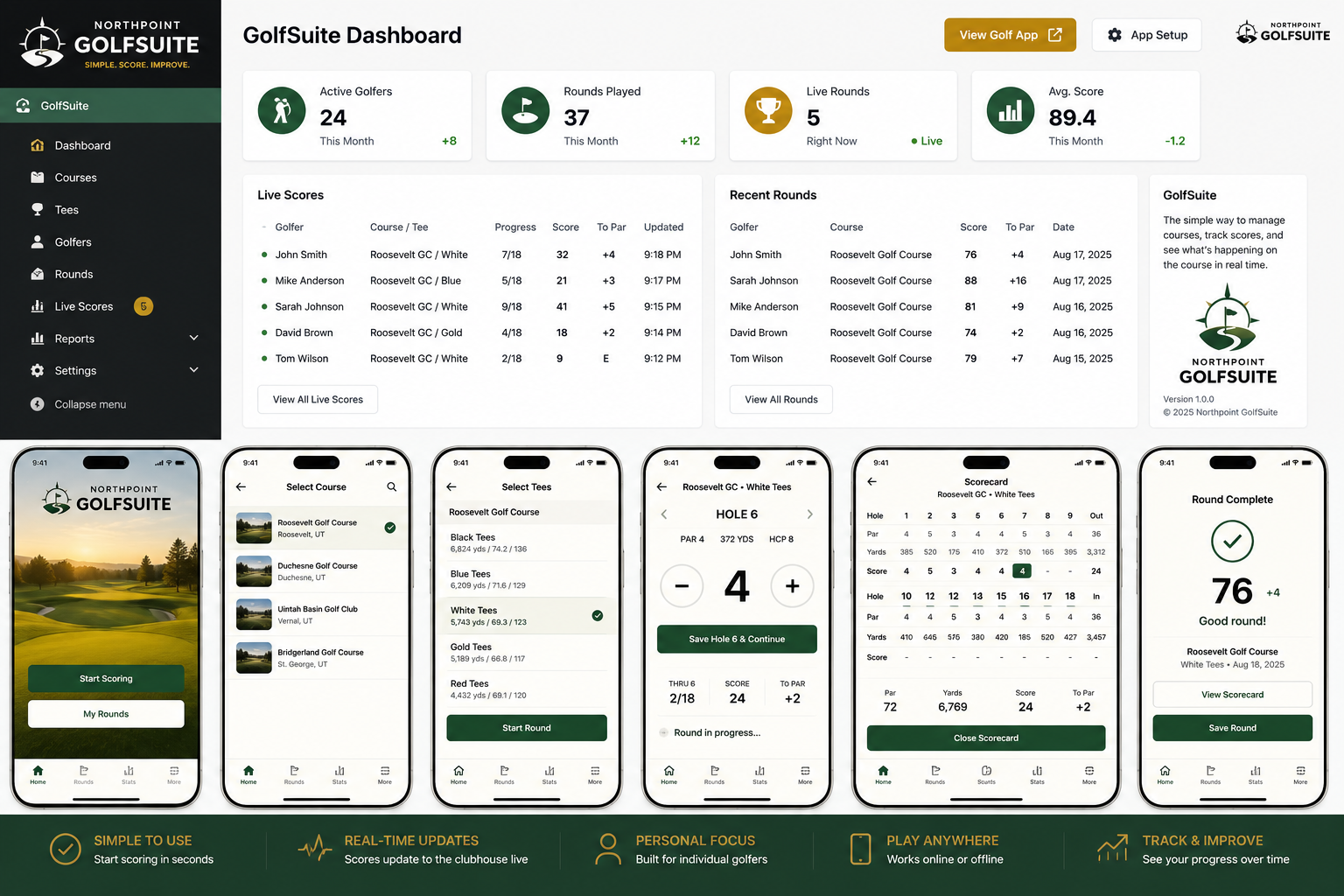
Northpoint GolfSuite ScoreKeeper
Give golfers, coaches, tournament officials, and spectators a better way to follow a round.
Northpoint GolfSuite ScoreKeeper provides digital golf scoring designed for both individual and organized play.
ScoreKeeper Features
- Hole-by-hole scoring
- Course par and yardage information
- Live leaderboards
- Player scorecards
- Team scoring
- Tournament scoring
- Coach and administrator views
- Spectator viewing
- Mobile-friendly scoring
- Round history
- Handicap tracking capabilities
- Offline scoring with synchronization support
- Exportable results and score sheets
For school golf programs, golfers can enter their own scores while coaches monitor the entire team from one dashboard.
Parents and spectators can follow the event without gaining access to scoring controls.
Tournament Management
Northpoint GolfSuite can help manage tournaments from registration through final results.
Features can include:
- Tournament creation
- Player and team registration
- Starting-hole assignments
- Shotgun starts
- Tee-time starts
- Live scoring
- Leaderboards
- Team standings
- Individual standings
- Course setup
- Player groups
- Results reporting
- Printable and downloadable score sheets
GolfSuite can support school tournaments, club events, charity tournaments, leagues, corporate outings, and other competitive formats.
Golf Team Management
GolfSuite also includes tools designed specifically for school and organized golf teams.
Coaches can manage:
- Players
- Team rosters
- Matches
- Practices
- Golf courses
- Schedules
- Team calendars
- Scores
- Player history
- Communications
- Tournament participation
Players receive a simplified interface focused on what they actually need during a round.
Coaches retain control of match setup, scoring oversight, and final results.
Golf Calendar & Scheduling
Keep matches, practices, tournaments, and golf events organized in one place.
GolfSuite can provide:
- Team schedules
- Course events
- Tournament calendars
- Practice schedules
- Event categories
- Calendar imports
- Upcoming-event displays
- Mobile-friendly schedules
Organizations can publish schedules directly to their website while managing them from the GolfSuite administration system.
Course Management
Build and maintain your own golf course database.
Course records can include:
- Course name
- Location
- Number of holes
- Par
- Hole yardages
- Tees
- Course rating
- Slope
- Individual hole information
Courses can be edited locally so your scoring and tournament information remains accurate even when third-party course data is incomplete.
Designed for the Golf Desk
Golf software should make the busiest part of the operation easier.
GolfSuite’s reservation and tee-sheet tools are being designed around actual front-desk workflows.
Instead of navigating through multiple screens for routine changes, staff can perform common tasks directly from the tee sheet.
That can include:
Book
Select an available tee time and create a reservation without leaving the screen.
Modify
Change players, carts, notes, contact information, or reservation details.
Move
Choose from available tee times and relocate the reservation quickly.
Cancel
Cancel a reservation while retaining the information needed for reporting.
Push
Shift affected tee times later when weather, frost, maintenance, or other delays occur.
Squeeze
Carefully adjust spacing when staff needs to accommodate additional play.
These tools are intended to give the golf shop more control while keeping the interface understandable for seasonal and part-time employees.
Built for Mobile Use
Golf happens away from a desk.
Northpoint GolfSuite is designed to work across:
- Desktop computers
- Golf shop workstations
- Tablets
- Android phones
- iPhones
Golfers can score from the course while coaches, tournament administrators, staff, and spectators see the information appropriate to their role.
GolfSuite can also be configured as an installable web application, allowing users to add it to their phone’s home screen without relying entirely on a traditional app-store installation.
Role-Based Access
Not every user should see the same controls.
GolfSuite can provide dedicated access for:
Golf Course Staff
Manage tee times, reservations, events, and course operations.
Administrators
Configure GolfSuite, manage users, courses, tournaments, and system settings.
Coaches
Create matches, manage players, monitor scoring, and finalize events.
Golfers
Join rounds and enter authorized scores.
Tournament Officials
Manage players, groups, scoring, and tournament results.
Spectators and Parents
Follow scores and leaderboards through read-only access.
This helps protect scoring and administrative functions while keeping information accessible to the people who need it.
A Golf Platform That Can Grow With You
One of the advantages of Northpoint GolfSuite is its modular design.
You may only need ScoreKeeper today.
Later, you may want to add:
- Tee time booking
- Tournament management
- Team management
- League management
- Course operations
- Membership tools
- Communications
- Online payments
- Sponsorship tools
- Advertising
- Website integration
- Reporting
- Customer management
Because the tools are part of the same GolfSuite ecosystem, your organization does not have to replace its entire system every time its needs change.
Built by Northpoint Web
Northpoint GolfSuite is developed by Northpoint Web Solutions.
We build practical software for organizations that need specialized tools without the cost and complexity of traditional enterprise software.
Our approach is different from one-size-fits-all platforms.
We can configure GolfSuite for the way your course, school, tournament, or organization actually works.
If you identify a workflow that slows your staff down, we can evaluate whether it should become part of GolfSuite.
GolfSuite Solutions
Northpoint GolfSuite can be configured for:
- Public golf courses
- Private golf clubs
- Municipal golf courses
- High school golf programs
- College golf programs
- Junior golf
- Golf leagues
- Charity tournaments
- Corporate golf events
- Amateur tournaments
- Golf associations
- Independent tournament directors
- Community recreation programs
See Northpoint GolfSuite in Action
If you are looking for a simpler way to manage golf scoring, tournaments, tee times, teams, or golf operations, we would be glad to show you what Northpoint GolfSuite can do.
Request a Northpoint GolfSuite demonstration.
Or contact Northpoint Web to discuss the features your organization needs.
Northpoint GolfSuite
Manage • Operate • Grow
