
Small business website management is the ongoing work that keeps your website secure, current, fast, and useful to customers. It includes updates, backups, form testing, content changes, performance checks, and regular reviews of the pages that bring in leads or applicants.
If your website helps people call, request a quote, visit your location, or apply for a job, treat it like an operating asset—not a one-time project. This guide explains what to check weekly, monthly, and quarterly, how to compare DIY with professional help, and what website management services should cover.
If your website is helping people choose whether to call, request a quote, visit your location, or apply for a job, it should be managed like an operating asset—not treated as a one-time project. This guide explains what to check weekly, monthly, and quarterly, plus when professional website management services may make more sense than handling everything in-house.
If your website is helping people choose whether to call, request a quote, visit your location, or apply for a job, it should be managed like an operating asset—not treated as a one-time project. This guide explains what to check weekly, monthly, and quarterly, plus when professional website management services may make more sense than handling everything in-house.
That's where most small businesses get stuck.
For a lot of contractors, trucking outfits, welders, excavation crews, and oilfield service companies, the hard part isn't launching the site. It's keeping it useful when you're busy running jobs, dealing with weather, chasing parts, and trying to hire decent people. A website without management turns into the digital version of a truck with bald tires and a dead battery. It's still sitting there, but it's not helping you make money.
Good small business website management is not about babysitting technology. It's about keeping your site ready to do three jobs every day: bring in leads, back up your credibility, and help people decide to call you instead of the next guy.
Table of Contents
- Your New Website Is Live Now What
- Think of Your Website Like a Work Truck
- Your Digital Maintenance Schedule
- Who Is Your Digital Foreman DIY vs Agency
- The Essential Digital Toolbox for Contractors
- Connect Your Website to Local Search and Google Business Profile
- A Website Management Checklist for Utah Businesses
Your New Website Is Live Now What
A contractor in Roosevelt gets a new website launched on Friday. By Tuesday, he's already wondering what he's supposed to do with it. He thought the website was the finish line. It's not. It's the yard where the actual work starts.
That confusion is normal. Most owners were sold the build, not the management. They got handed the keys but no maintenance plan, no login process, no update routine, and no clear idea who's responsible for what.
Here's the reality. About 83% of U.S. small businesses have a website as of 2026, so merely having one isn't special anymore. What matters now is whether it's managed well. At the same time, 81% of consumers research online before making a purchase, and 94% of first impressions relate to web design, which means buyers judge you before they ever call. Those figures are noted in Network Solutions website statistics.
A neglected website stops pulling its weight fast. Old project photos make you look inactive. Expired job postings make you look disorganized. Broken forms make you miss bids without even knowing it. A service page that never got updated can steer work to a competitor.
Your website should answer the questions your office gets asked every week. If it doesn't, your staff is doing the same work twice.
That's why I tell business owners to stop thinking about the website as a one-time expense. Treat it like an operating asset. If it helps you win jobs, hire workers, and look credible, it needs regular attention just like your trucks, trailers, and equipment.
Think of Your Website Like a Work Truck
If you own a construction company, trucking business, or oilfield service outfit, this part is simple. Your website is a work truck. It's not wall art. It has a job.
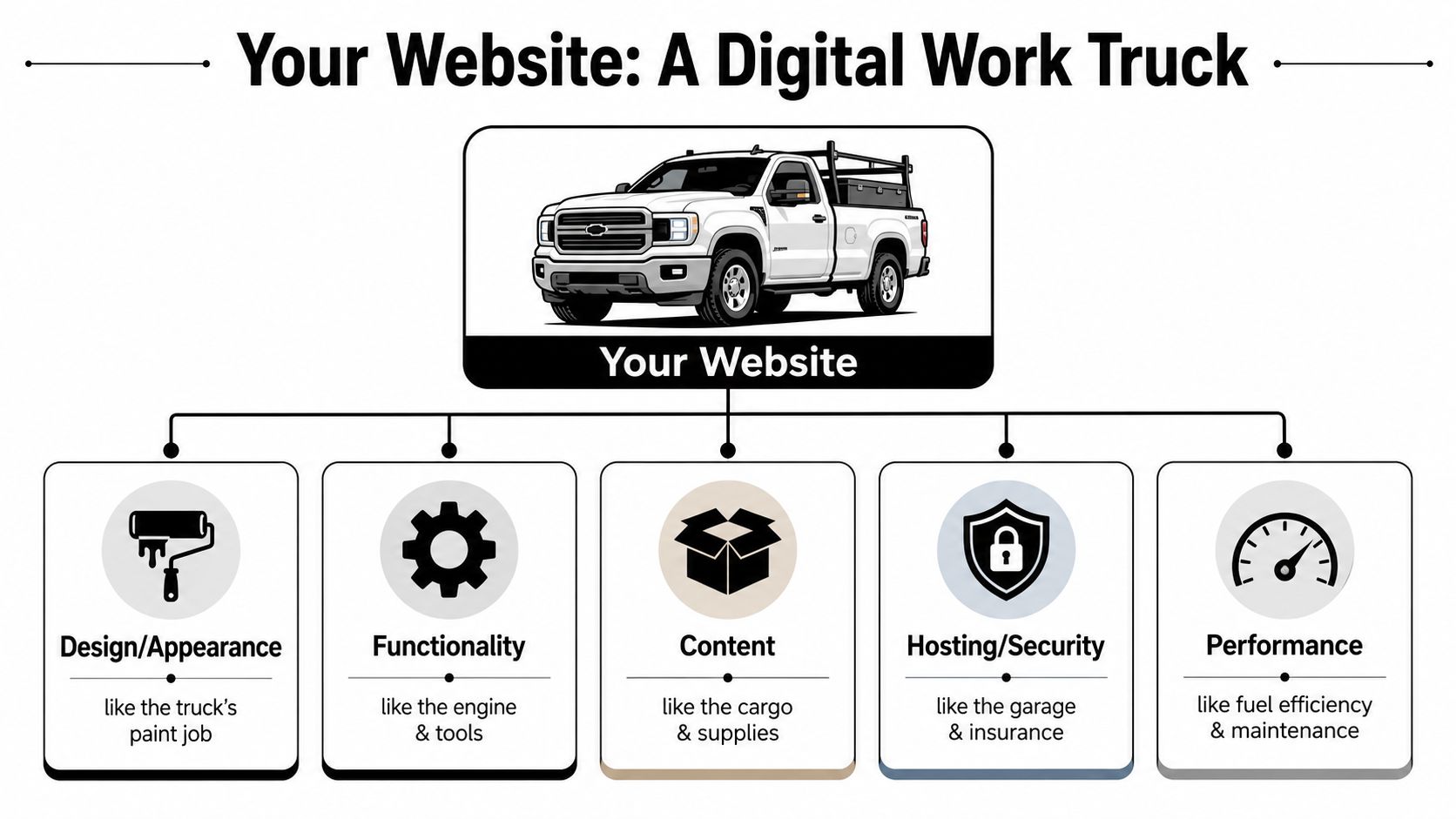
The parts that matter
Hosting is the garage. If the garage is junk, the truck sits in a bad environment and you deal with problems you shouldn't have to deal with.
Your domain name is the license plate. That's how people find you and identify you.
Software updates are oil changes. Skip them long enough and things start breaking at the worst time.
Security is locks, alarms, and insurance. You hope you never need it, but when you need it, you really need it.
Backups are the spare truck and the insurance file. If something fails, you need a way to get back on the road quickly.
Content is the fuel and the payload. Service pages, hiring pages, photos, reviews, and contact info are what make the website useful.
What poor maintenance looks like
A truck can look good and still be unreliable. Same with a website.
If pages load slowly, people leave. A commonly used benchmark says a 10-second page load delay increases bounce rates by 123%, and a one-second delay can cut conversions by up to 20%. That came up in the source linked earlier, and it matters because speed isn't a vanity issue. It affects whether someone fills out a form or moves on.
Here's the plain-English version:
- Slow pages cost calls.
- Broken forms cost estimates.
- Outdated info costs trust.
- Missing photos cost credibility.
- Weak security can shut the whole thing down.
Practical rule: If you wouldn't send a foreman to a job in a truck with warning lights on, don't send customers to a website with known issues.
What a well-run site actually does
A managed website doesn't need to be flashy. It needs to be dependable.
It should load fast on a phone in the field. It should show the towns you serve. It should make it easy to call, request a quote, or apply for a job. It should prove you're active with current project photos, current services, and current contact information.
That's small business website management in real terms. Keep the machine running, and it keeps helping the business.
Your Digital Maintenance Schedule
Most owners fail at website management for one reason. They treat it like a random chore instead of a schedule.
That's a mistake. If you put this on a calendar and keep it simple, it becomes manageable. HubSpot notes that key technical tasks include prompt software and plugin updates, regular full-site backups, uptime and performance monitoring, broken-link checks, and analytics review because those tasks reduce security risks and help spot traffic and conversion problems early. You can review that list in HubSpot's guide on website management for small business.
Use the same mindset you'd use for preventive maintenance on equipment.
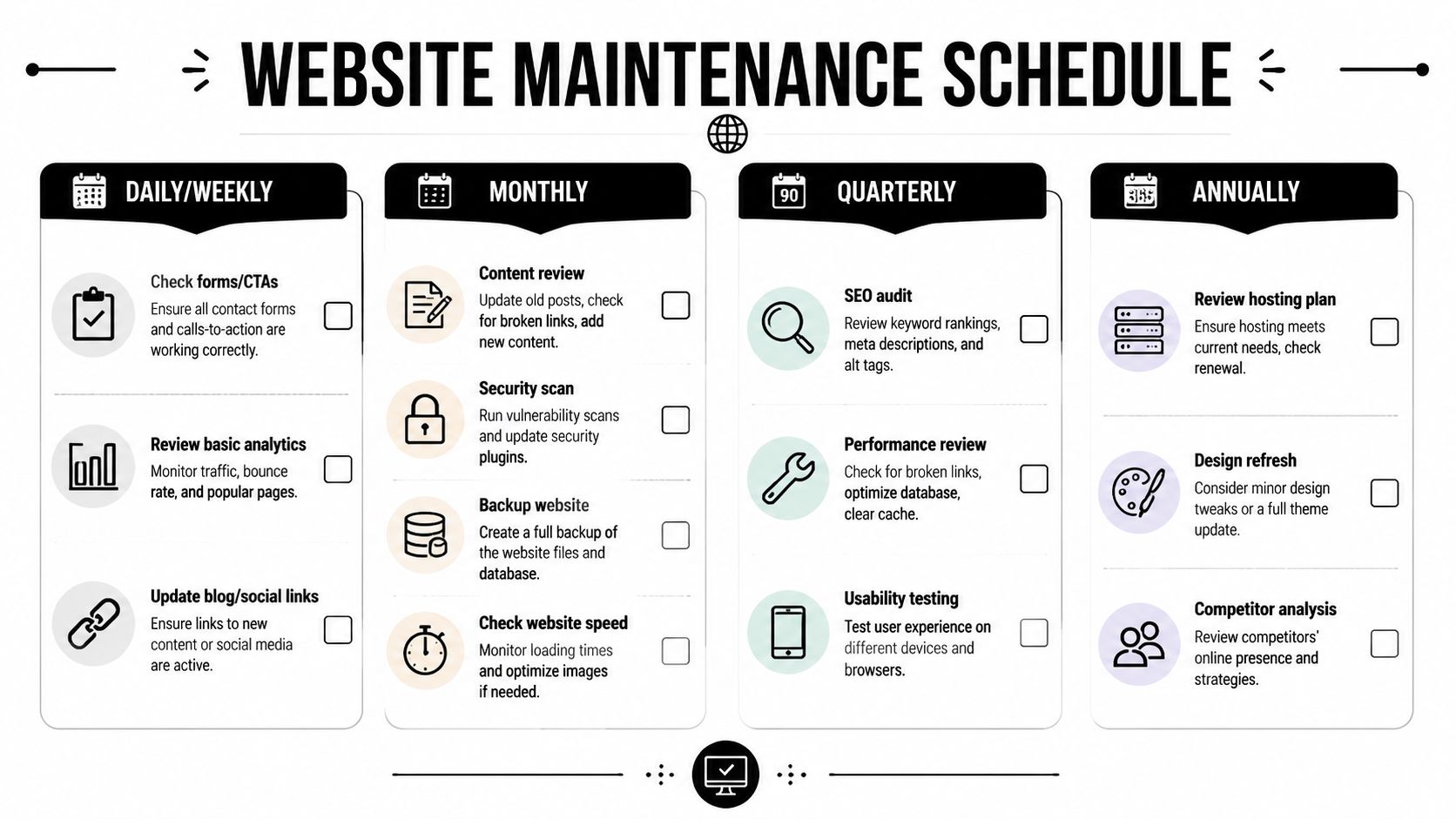
Weekly jobs that keep you out of trouble
Every week, somebody needs to check the basics.
- Test the contact form: Fill it out yourself. Make sure the message lands in the right inbox.
- Click the main call buttons: Phone, quote request, careers, and service pages should all work.
- Review updates: If your site runs on WordPress, plugins and themes need prompt attention.
- Run or confirm a backup: Don't assume it's happening.
- Look for obvious errors: Broken layouts, missing images, strange popups, or pages that won't load.
A weekly check doesn't need to take long if the site is set up right. It's a short walkaround inspection.
Here's a practical walkthrough worth keeping handy for your team:
Monthly checks that protect leads and reputation
Once a month, step back and look at how the site is performing.
Review analytics. Find out which pages people visit, which service pages get attention, and whether your careers page is being used. If you're trying to tie website activity back to real business outcomes, this resource for proving marketing ROI is useful because it shows how to think about tracking without turning your office into a data lab.
Then handle the maintenance jobs owners usually ignore:
- Check page speed: Slow pages frustrate users fast.
- Review broken links: Old links make the site feel neglected.
- Update photos and project examples: Fresh work proves you're active.
- Read submitted leads: Look for patterns. Are people asking for a service you haven't explained clearly?
- Review security settings: A solid baseline matters. Northpoint Web has a practical page on website security best practices if you want a simple checklist.
If customers keep asking questions your website should answer, the problem isn't the customer. The page is weak.
Quarterly reviews that keep the site aligned with the business
Quarterly is where strategy shows up.
A lot can change in a few months. New service areas. New hiring needs. New equipment. A boom in one town and a slowdown in another. Your website should reflect that.
Do these quarterly:
Review every main service page
Make sure services, locations, and wording still match the work you want.Update the careers section
If you need CDL drivers, operators, welders, or laborers, say so clearly.Check every major call to action
Quote request, call button, job application, and map directions should all be friction-free.Audit local relevance
Add recent work from recognizable local places when possible.Decide what can be delegated
If the owner is still doing all this alone, the system is wrong.
That last point matters more than is often acknowledged. Website maintenance falls apart when it depends on one overloaded person remembering everything.
Who Is Your Digital Foreman DIY vs Agency
A website needs an owner. Not ownership on paper. Actual responsibility.
If nobody owns it, updates get skipped, forms break, hiring pages go stale, and the site slowly turns into a digital brochure from two years ago. That's why I like to frame this as a foreman problem. Who's running the digital job site?
A 2024 National Small Business Association report found that 62% of small business owners spend more than 10 hours per week on non-core digital tasks. That's time you're not using to estimate jobs, manage crews, or close work. For a lot of rural businesses, the better answer is fractional, task-specific management instead of either doing everything yourself or paying for a bloated retainer.
The three real options
DIY works if your site is simple, you're organized, and you'll do the work. Most owners overestimate this. They think they'll update it Friday night. Then Friday night comes and they're fixing a trailer light or catching up on paperwork.
In-house staff can work if you've got an office manager or marketing person who is dependable and trained. The risk is turnover. One person learns the logins, process, and tools, then leaves. Now you're back at zero.
Agency or specialist support makes sense when the site directly affects bids, recruiting, and reputation. The smart version of this is not always full-service. For many small businesses, the practical answer is limited support for the few things that really matter, like safety notice updates, careers page changes, project uploads, and basic maintenance.
Don't buy a giant service package if what you need is consistent help with a short list of high-value jobs.
Website Management Options Compared
| Approach | Cost | Time Required | Best For |
|---|---|---|---|
| DIY | Lowest cash cost, highest owner time cost | High | Very small businesses with simple sites and a disciplined owner |
| In-house | Ongoing payroll cost | Moderate | Companies with stable office support and clear internal processes |
| Fractional agency support | Targeted monthly cost for specific tasks | Low to moderate | Rural contractors who need help updating key pages without a full retainer |
| Full agency management | Highest recurring cost | Lowest owner involvement | Businesses where the site is central to lead flow, recruiting, and active marketing |
My opinion is simple. If the owner is the only person who can update the site, that system is fragile. If an agency controls everything and your team can't make basic changes, that system is also fragile.
The best setup for a lot of contractors is shared control. The business owns the logins, process, and approvals. A trusted partner handles the technical work and the updates that tend to get pushed off.
The Essential Digital Toolbox for Contractors
You do not need twenty apps. You need a few tools that answer a few basic questions.
Is the site up?
Are people finding it?
Are forms working?
Can you restore it if something breaks?
That's the toolbox.
The few tools that actually matter
Google Analytics tells you what pages people visit and where they came from. Don't get lost in every report. Start with your service pages, careers page, and contact page. Those are the pages tied closest to money and hiring.
Google Search Console shows how your site appears in search and can flag indexing or coverage issues. It's one of the few free tools I'd call mandatory.
An uptime monitor alerts you if the site goes down. If your website is offline and nobody knows, you can lose opportunities unseen.
A backup tool gives you a restore point when updates or errors cause trouble. If your site runs on WordPress, pick a reputable backup plugin and make sure someone verifies it works.
A simple content process matters as much as any software. One shared folder for job photos, one approved list of services, one person responsible for submitting updates. That alone fixes a lot of chaos.
If you're still deciding where your site should live and what platform makes sense, this page on small business website platforms is useful because it frames the decision in practical terms instead of tech jargon.
For the marketing side, I also like this guide to contractor marketing success because it connects website work to the bigger picture of getting found and chosen.
One local option in this mix is Northpoint Web. They provide website design, hosting, and maintenance for small businesses in the Uinta Basin, which is relevant if you want one provider handling the technical side while your team focuses on operations.
Connect Your Website to Local Search and Google Business Profile
Your website should not sit by itself.
For contractors and industrial businesses, the website is the home base. Your Google Business Profile, local search visibility, review activity, service area pages, and project updates should all connect back to it. When those pieces work together, you have a better shot at showing up when someone nearby needs the work you do.
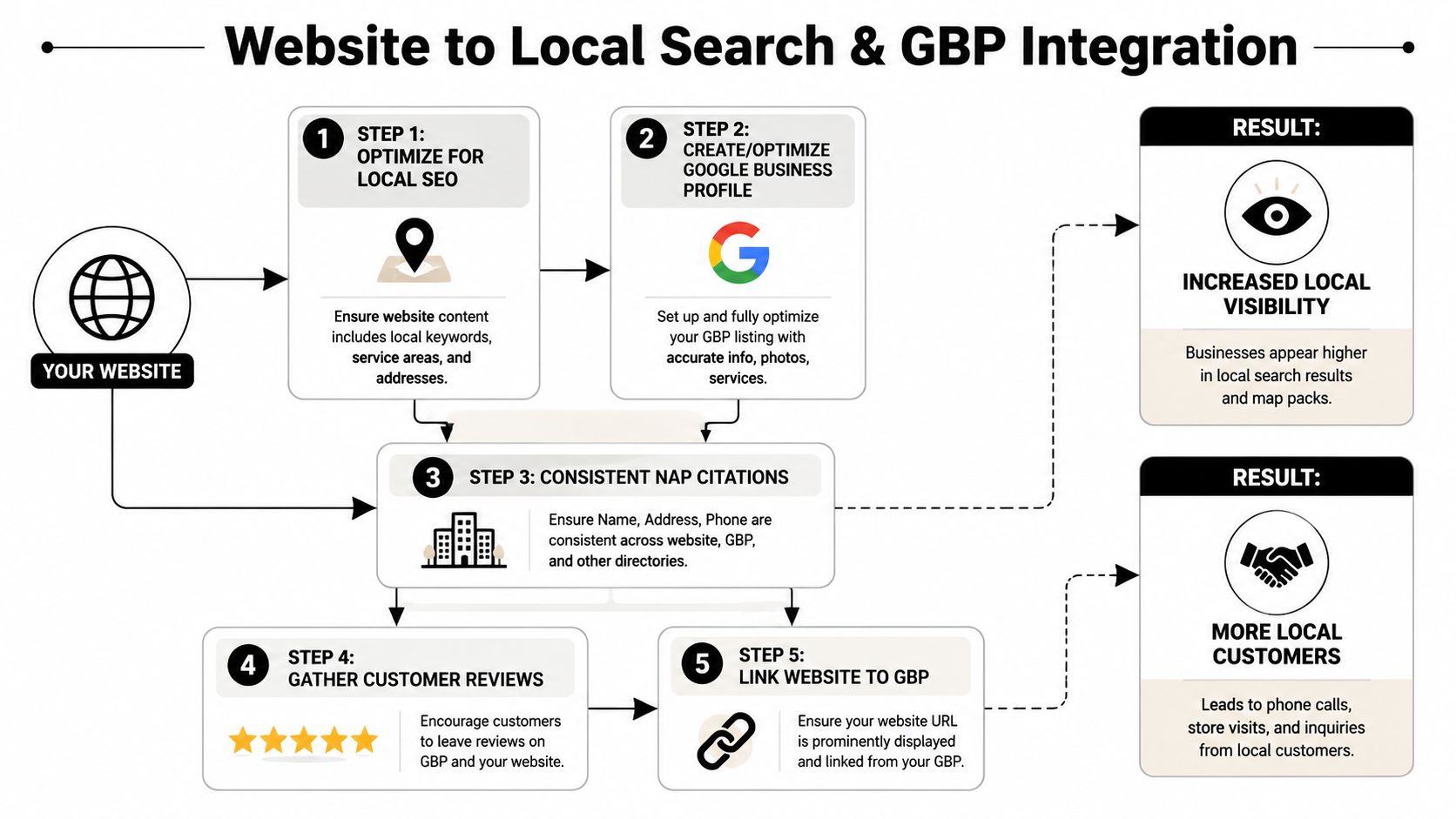
Here's where rural businesses need a different approach than generic website advice. In construction and similar trades, staff turnover can run over 20% annually, and that reality affects website management. If your process depends on one office person or one tech-savvy employee, it will break. A better system uses simple workflows so field crews can send in project photos and basic updates that can quickly be posted to the website and Google Business Profile.
A simple field to office workflow
A foreman finishes a job near Duchesne. He takes a few solid photos on his phone. He sends them to one shared place with a short note: location, service performed, and any equipment shown. Someone in the office or your web partner turns that into:
- A gallery update on the website
- A short Google Business Profile post
- A service area signal tied to the town or region
- Fresh proof that you're active and doing real work nearby
That's not busywork. That's local visibility.
If you want a practical breakdown of how this fits into rankings, maps, and service area visibility, this page on local SEO for contractors is worth reading.
A job photo isn't just a photo. It's proof you're active, local, and capable.
The same goes for hiring. If your careers page says “always accepting applications” but never mentions the actual roles you need, you're wasting a strong asset. Connect the website to real recruiting needs. Update openings. Show your equipment. Show your crews. Make it easy to apply from a phone.
That's how small business website management ties directly to local search and local trust. Not with abstract SEO talk. With simple proof, posted consistently.
A Website Management Checklist for Utah Businesses
If you run a business in Duchesne, Roosevelt, Vernal, or anywhere in rural Utah, you need a checklist that matches real operating conditions. Spotty service. Limited office time. Crews in the field. Hiring pressure. Fast changes in workload.
Print this out. Put it on the desk. Review it once a month.
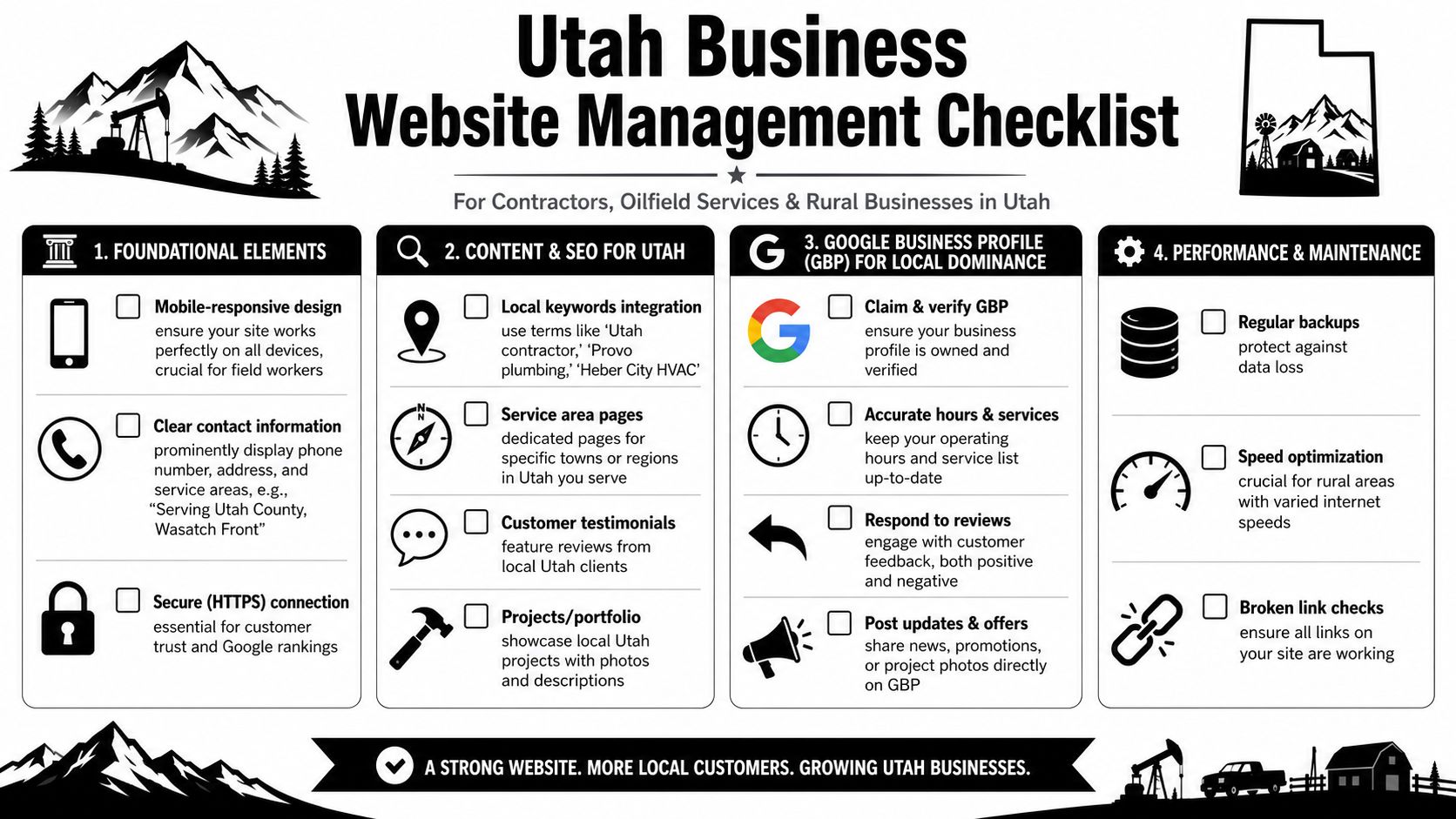
What to check this month
Phone number visibility
Is your number easy to tap on a phone? A foreman or property manager shouldn't have to hunt for it.Service area accuracy
Are the towns and regions you serve listed clearly?Hiring page relevance
Are you showing the positions you need now, not the ones you needed last season?Recent project proof
Do you have current photos from local jobs, equipment in the field, or completed work people can recognize?Quote form function
Has somebody tested the form recently and confirmed the lead goes to the right person?Google Business Profile consistency
Do the website and Google listing match on services, phone, business hours, and location details?Mobile experience
Can somebody on a jobsite load the page, read it, and call you without pinching and zooming all over the screen?Core page freshness
Homepage, services, careers, and contact page should never look abandoned.Security and backup status
Do you know who handles updates, backups, and restore points?Analytics sanity check
Are people reaching the pages that matter most? If you need a broader framework for auditing what your data is telling you, this master your analytics data guide is a useful companion.
A well-managed site doesn't have to be complicated. It has to be current, easy to use, and tied to what your business needs right now. More bids. Better hires. Fewer missed opportunities.
If your website is live but nobody's really managing it, Northpoint Web can help you put a practical system around it. That means maintenance, updates, local visibility, and a site that supports the way rural Utah businesses operate.
What small business website management includes
Website management is broader than fixing a broken page. A practical management routine usually includes:
- Technical maintenance: WordPress, plugin, theme, hosting, and security updates.
- Reliability checks: Backups, uptime monitoring, broken-link reviews, and contact-form testing.
- Content management: Updating services, service areas, project photos, job openings, contact information, and calls to action.
- Performance review: Checking page speed, mobile usability, analytics, and the pages connected to leads.
- Business alignment: Making sure the website reflects current services, hiring needs, locations, and priorities.
The right scope depends on the site and the business, but the goal is consistent: keep the website dependable and useful when customers need it.
Why website management matters after launch
A newly launched website is not the finish line. Services change, job postings expire, contact details become outdated, and forms or integrations can stop working. A page that once answered a customer’s question may no longer match the work your business wants.
For contractors, trucking companies, welders, excavation crews, and oilfield service companies, a managed site should make it easy for people to understand what you do, where you work, how to contact you, and whether you are actively hiring. Current information supports credibility and reduces repeat questions for the office.
Weekly website management checklist
A short weekly review can catch problems before they cost a lead or create confusion:
- Submit the main contact or quote form and confirm the message reaches the right inbox.
- Click phone, quote, careers, and primary service-page buttons on a mobile device.
- Check for broken layouts, missing images, error messages, or unexpected popups.
- Confirm that backups and security updates are being handled.
- Review urgent changes, such as a new service area, closed office, or expired job opening.
Keep a simple record of who checks these items and what needs follow-up. Clear ownership is often as important as the checklist itself.
Monthly and quarterly website reviews
Monthly management should go beyond checking whether the site is online. Review which pages receive attention, whether visitors can complete important actions, and what questions appear repeatedly in submitted leads or customer conversations. Then update the pages that should answer those questions.
Every quarter, review the major service pages, locations served, careers content, project examples, contact details, and calls to action. Compare the website with the work the business actually wants. If a service, town, hiring need, or priority has changed, the site should change with it.
Need help keeping your business website current?
If your team does not have time to manage updates, backups, forms, content changes, and routine reviews, Northpoint Web Solutions offers website management support for keeping a business website maintained and useful. Review the service details to see whether ongoing help fits your site and workflow.
What small business website management includes
Website management is broader than fixing a broken page. A practical management routine usually includes:
- Technical maintenance: WordPress, plugin, theme, hosting, and security updates.
- Reliability checks: Backups, uptime monitoring, broken-link reviews, and contact-form testing.
- Content management: Updating services, service areas, project photos, job openings, contact information, and calls to action.
- Performance review: Checking page speed, mobile usability, analytics, and the pages connected to leads.
- Business alignment: Making sure the website reflects current services, hiring needs, locations, and priorities.
The right scope depends on the site and the business, but the goal is consistent: keep the website dependable and useful when customers need it.
Why website management matters after launch
A newly launched website is not the finish line. Services change, job postings expire, contact details become outdated, and forms or integrations can stop working. A page that once answered a customer’s question may no longer match the work your business wants.
For contractors, trucking companies, welders, excavation crews, and oilfield service companies, a managed site should make it easy for people to understand what you do, where you work, how to contact you, and whether you are actively hiring. Current information supports credibility and reduces repeat questions for the office.
Weekly website management checklist
A short weekly review can catch problems before they cost a lead or create confusion:
- Submit the main contact or quote form and confirm the message reaches the right inbox.
- Click phone, quote, careers, and primary service-page buttons on a mobile device.
- Check for broken layouts, missing images, error messages, or unexpected popups.
- Confirm that backups and security updates are being handled.
- Review urgent changes, such as a new service area, closed office, or expired job opening.
Keep a simple record of who checks these items and what needs follow-up. Clear ownership is often as important as the checklist itself.
Monthly and quarterly website reviews
Monthly management should go beyond checking whether the site is online. Review which pages receive attention, whether visitors can complete important actions, and what questions appear repeatedly in submitted leads or customer conversations. Then update the pages that should answer those questions.
Every quarter, review the major service pages, locations served, careers content, project examples, contact details, and calls to action. Compare the website with the work the business actually wants. If a service, town, hiring need, or priority has changed, the site should change with it.
Need help keeping your business website current?
If your team does not have time to manage updates, backups, forms, content changes, and routine reviews, Northpoint Web Solutions offers website management support for keeping a business website maintained and useful. Review the service details to see whether ongoing help fits your site and workflow.
What is small business website management?
Website management is the ongoing care required after a site launches. It is broader than occasional content editing and more practical than simply having hosting. The work should keep the website available, secure, accurate, easy to use, and connected to business goals.
For a contractor, trucking company, welder, excavation crew, oilfield service company, or other small business, the managed site should make it easy to understand services, see current evidence of work, find service areas, contact the company, and review open jobs when hiring is important.
What website management services include
- WordPress maintenance: Review and apply relevant software, plugin, and theme updates.
- Backups and recovery readiness: Run or confirm backups rather than assuming they are working.
- Lead-path testing: Test contact forms, phone links, quote requests, service pages, and careers paths.
- Content maintenance: Update services, project photos, job postings, contact information, and locations served.
- Performance and quality checks: Look for slow pages, broken links, missing images, broken layouts, and unusual popups.
- Review and improvement: Use analytics and submitted-lead patterns to identify pages that need attention.
A weekly, monthly, and quarterly maintenance schedule
Weekly: Test the main contact form, click important call and quote buttons, confirm updates and backups, and look for obvious errors.
Monthly: Review analytics, page speed, broken links, security settings, current photos, and submitted leads. Check whether important service or careers pages answer the questions customers and applicants are asking.
Quarterly: Review whether the website still matches the business. Revisit services, service areas, hiring information, calls to action, project examples, and the pages that support current priorities.
What poor website maintenance looks like
A website can appear attractive while still failing operationally. Slow pages can cause people to leave, broken forms can hide missed estimates, outdated information can weaken trust, and neglected security can create a serious interruption. The practical test is simple: if a known website issue would stop a customer from calling or submitting a request, it belongs on the maintenance list.
A website launch is not a maintenance plan
A website can look finished while forms, software, backups, pages, and contact details gradually become unreliable. For a busy small business, that can mean missed leads, outdated information, and less confidence from people deciding whether to call.
Small business website management keeps the site dependable
Website management is the recurring work that keeps a site secure, current, fast, and useful. That includes updates, backups, form testing, content changes, performance checks, and regular reviews of pages that bring in leads or applicants.
What consistent management helps protect
- Lead flow: Contact, quote, phone, and careers paths stay easier to test and maintain.
- Credibility: Services, photos, job postings, and contact information remain current.
- Security and recovery: Updates and backups receive regular attention instead of being left to chance.
- Business alignment: Monthly and quarterly reviews help the site reflect current priorities.
A practical maintenance schedule, not vague promises
Use a simple rhythm: check forms, buttons, updates, backups, and obvious errors weekly; review analytics, speed, links, security, photos, and submitted leads monthly; and reassess services, hiring information, locations, and business priorities quarterly.
DIY, internal ownership, or professional help?
DIY can work when someone has the time, access, and technical confidence to follow the schedule. Internal ownership can work when responsibilities are clearly assigned. Professional help may make more sense when the site supports important leads or hiring but nobody can reliably maintain it during the workweek.
See whether website management is the right next step
If your business needs a dependable process for keeping its WordPress website current and useful, review Northpoint’s Website Management service. If you are still evaluating the need, keep using the checklist on this page to identify gaps first.
Ready to take website management off the random-chore list?
Review Northpoint’s Website Management page to see whether professional support is a fit for your business. If you are not ready to ask for help, use the schedule above to identify the first maintenance gaps to address.