If you own a contracting company, trucking outfit, welding shop, or oilfield service business in the Uinta Basin, there's a good chance your website isn't pulling its weight. Maybe it looks dated. Maybe it only has a phone number, a few blurry job photos, and a paragraph that says you “offer quality service.” Maybe you don't even know if people are finding it.
That's a problem, because your website now does more than prove you exist. It helps project managers decide whether to call you. It helps landowners compare you to the next contractor. It helps CDL drivers, welders, mechanics, and operators figure out whether you're a company worth applying to.
For this kind of business, a WordPress website for business works best when it's treated like a working asset. It should bring in leads, support hiring, answer questions, and make your company look established before you ever pick up the phone.
Table of Contents
- Your Website Is a Business Asset Not a Brochure
- The Blueprint Phase Before You Build
- Choosing Your Foundation Tools and Tech
- Building a Site That Wins Jobs and Attracts Talent
- Launching and Dominating Your Local Market
- The True Cost Maintenance Security and Growth
Your Website Is a Business Asset Not a Brochure
A lot of rural businesses still treat the website like a yard sign. Put the logo on it. Add a few service names. Drop in a phone number. Call it done.
That approach doesn't hold up anymore. A website has to do work.
If someone searches for excavation, hydrovac, roustabout, welding, trucking, or reclamation services, they're trying to answer a few basic questions fast. Do you do the work I need? Do you serve my area? Can I trust your crew? Can I contact you right now? If a CDL driver or welder lands on your site, they're asking something different. Is this company active, organized, and worth applying to?
Practical rule: If your website only describes your company and doesn't tell visitors what to do next, it's a brochure.
That's why structure matters more than decoration. A polished homepage is nice, but if it doesn't route a customer to the right service page or a job seeker to a clean application flow, it won't help much. The same goes for flashy design that loads poorly on a phone out in the field.
For contractors, I usually point people toward layouts that already prioritize calls, service sections, trust elements, and estimate forms. A good example is this high-converting construction website resource, because it shows the kind of page structure that moves a visitor instead of just impressing another designer.
A solid website also takes more than design. Messaging, page hierarchy, mobile usability, forms, search visibility, and follow-up all matter. That's the difference between a site that looks decent and one that becomes part of your sales process. This is also why a business owner should understand why your website needs more than just a designer. Design is one layer. Business function is the whole job.
WordPress fits this role well because it can start simple and expand as the business grows. You can begin with core pages, then add recruiting, location pages, booking flows, CRM connections, and stronger SEO without rebuilding the whole thing.
The Blueprint Phase Before You Build
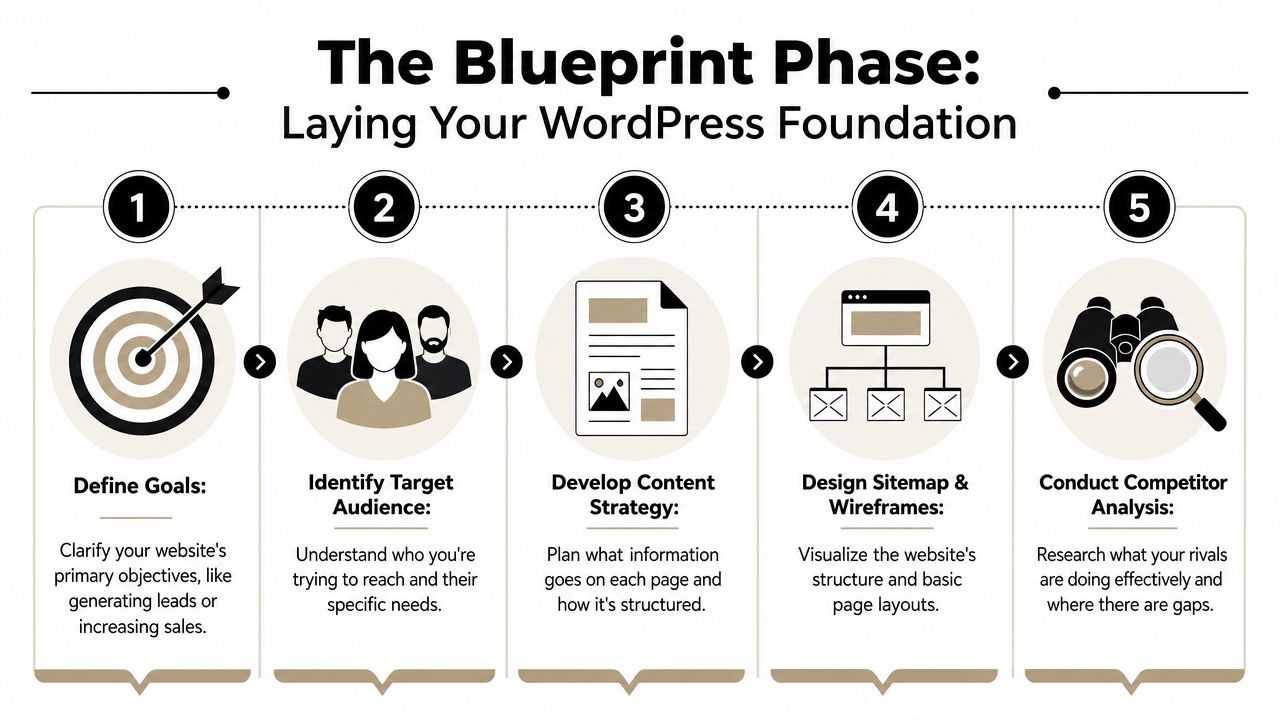
Before anyone touches colors, fonts, or themes, the website needs a blueprint. The fastest way to waste money on a site is to build pages first and think later.
A practical build process follows a phased workflow of discovery and requirements, wireframing, design, development, testing, and launch, as noted by WordPress specialist workflow guidance. That sequence matters because each phase answers a different business question. If you skip discovery, you usually end up redesigning after launch.
Start with the jobs the site must do
Most contractor websites try to serve everybody with the same message. That's where they go sideways. A superintendent looking for a subcontractor doesn't browse like a job applicant. A landowner needing dirt work doesn't search like an oilfield operations manager.
Start by defining the main jobs of the site:
- Lead generation: Estimate requests, bid invitations, phone calls, and quote forms.
- Recruiting: Applications from CDL drivers, operators, welders, laborers, diesel mechanics, or office staff.
- Credibility: Proof that your company is established, insured, staffed, and active in the region.
- Operations support: Easy access to service areas, contact routes, and required documents.
If you can't name the top jobs of the site, the site will drift into generic marketing language.
A good blueprint answers one blunt question: what do you want a visitor to do before they leave the page?
Map pages before design
Once the jobs are clear, build the page map. For most industrial businesses, that usually means a homepage, service pages, about page, careers page, contact page, and a projects or gallery section. Some companies also need separate pages by location or industry segment.
A rough page map might look like this:
| Page | Main purpose | Primary visitor |
|---|---|---|
| Home | Introduce the company and direct traffic | Everyone |
| Service pages | Explain work offered and service area | Prospects |
| Careers | Recruit applicants | Job seekers |
| Projects or gallery | Show proof of work | Prospects and hires |
| About | Build trust and legitimacy | Everyone |
| Contact | Convert interest into calls or forms | Everyone |
Wireframes come next. These don't need to be fancy. They just need to show where the headline, proof, service summaries, calls to action, and forms will sit.
One detail many businesses miss is testing by segment. Performance work should be separated by mobile versus desktop, landing pages versus transactional pages, and cold-cache versus warm-cache testing, because those behave differently in practice, as covered in the workflow guidance above. That matters when your customers are often on mobile and your key pages are quote or application pages.
Choosing Your Foundation Tools and Tech

A WordPress site gives a contractor, trucking company, or industrial shop room to grow without starting over every time the business changes. That matters in places like the Uinta Basin, where one company site may need to do three jobs at once. Bring in bid requests, show up in local search, and help hire CDL drivers, mechanics, welders, and field crews.
For this kind of business, WordPress is usually the practical fit because it is flexible and widely supported. You are not stuck inside a closed platform that fights you when you need a careers section, location pages, application forms, or a better SEO setup six months from now.
Why WordPress fits growing businesses
A small excavation company may launch with a homepage, a few service pages, and a contact form. Then hiring gets tight. Now the site needs a real careers page, job postings, application forms with file uploads, and pages for the towns and counties that bring in work.
WordPress handles that shift well.
It also comes with trade-offs. A bad theme, cheap hosting, and a pile of plugins can make the site slow, fragile, and expensive to maintain. I see this a lot with businesses that had one person build the site, another person host it, and nobody responsible for keeping forms, backups, updates, and speed under control.
What to choose first
Skip the design extras until the foundation is right. The first choices should support speed, security, updates, and lead flow.
Here is what usually works for contractor and industrial sites:
- Managed hosting: Pick a host that handles backups, core updates, uptime monitoring, and basic security. Bargain hosting often looks cheap until the site goes down or gets hacked during your busy season.
- A lightweight mobile-first theme: Owners often review the site on a desktop in the office. Customers and job applicants usually find it on a phone, often from a truck, a shop, or a jobsite.
- Clean page templates: Your home, service, careers, and contact pages should load fast and keep the next step obvious.
- A form system that matches the business: Estimate requests, employment applications, and vendor inquiries should go to the right person without creating inbox chaos.
If local search matters, and for most rural service businesses it does, set up your SEO foundation early instead of trying to bolt it on later. That means page structure, title tags, service-area targeting, and location signals built into the site from the start. A good contractor SEO setup is covered in this guide to SEO services for contractors.
Plugin categories that matter
Plugin decisions should come from business needs, not from a random “must-have plugins” list.
- SEO plugin: Use one solid SEO plugin and configure it well. If you are comparing options, this list of 12 top free WordPress SEO plugins is a useful starting point.
- Forms plugin: Choose a form tool that can handle quote requests, job applications, file uploads, and notification routing.
- Security and backups: You need dependable backups and basic protection. You do not need several overlapping security plugins creating conflicts.
- Performance tools: Some hosts include caching and CDN features. Some do not. Match the plugin stack to the hosting environment so you are not duplicating work.
- Careers or job management: If hiring matters, use a proper job workflow with clear openings, application steps, and confirmation messages.
Keep the stack lean. Every plugin should solve a defined problem tied to revenue, operations, or recruiting.
That is the critical test. If a tool does not help you get found in Roosevelt, Vernal, Duchesne, or the surrounding Basin, help a customer request a bid, or help a qualified worker apply for a job, it probably does not belong on the site.
Building a Site That Wins Jobs and Attracts Talent
The pages that bring results usually aren't the pages owners spend the most time thinking about. Everybody obsesses over the homepage. The service pages and careers page often do more of the essential work.

For a contractor, trucking company, or industrial service business, content has to answer practical questions fast. What do you do? Where do you do it? What kind of jobs do you take? What equipment or capabilities do you have? How does someone request a bid or apply for work?
Service pages beat generic summaries
A single “Services” page with a bulleted list usually isn't enough. If you want to rank locally and convert visitors, build individual pages around real services and places.
Examples:
- Hydrovac services in Vernal
- Excavation contractor in Roosevelt
- CDL hauling services in Duchesne County
- Welding and fabrication for industrial projects
- Reclamation contractor in the Uinta Basin
Each page should include a plain-English description of the work, the type of customer you serve, service area language, proof photos, and a direct call to action.
If you want a strong outside example of how search visibility ties into project acquisition, this guide to winning more projects is worth reviewing. The useful takeaway isn't “do SEO.” It's that service-specific pages align better with how buyers search.
A project gallery matters too, but only if it's organized. Don't upload a random pile of images. Group projects by service type, location, or industry. Add captions that explain what the crew did.
Your careers page should recruit not just exist
A lot of companies say they need help hiring, then hide jobs in a PDF or expect applicants to call the office. That adds friction for no reason.
A recruiting-focused careers page should include:
- Open positions: List real roles, not “always hiring good people.”
- What the work involves: Shift type, travel expectations, equipment, certifications, and whether the role is local or rotational.
- Why someone should apply: Crew culture, type of projects, advancement path, steady workload, and professionalism.
- A clean application form: Let applicants submit basic info and resume files from a phone.
This video gives a helpful look at building a website that supports hiring and lead generation in a more practical way:
Technical details that help Google understand the site
Good content still needs sound technical execution. According to WordPress technical best practices for business sites, WordPress runs on PHP and MySQL, with HTML, CSS, and JavaScript handling structure, styling, and interactivity. That matters because your developer needs to respect the stack instead of patching things together carelessly.
The same guidance emphasizes on-page SEO, XML sitemaps, mobile-friendliness, image compression, clean URLs, and schema markup. Those aren't extras. They help search engines crawl the site and help users move through it effortlessly.
If your pages are hard to read on a phone, slow to load, or vague about what you do and where you work, Google isn't the only one getting confused. Your customers are too.
Launching and Dominating Your Local Market
A lot of owners think the website is finished the day it goes live. It isn't. Launch is when local visibility work starts.
WordPress has the depth and staying power to support that work over time. Kinsta reports that WordPress powers 14.7% of the world's top websites, that more than 500 new sites are built each day on the platform, and that it's used in over 178 countries, which points to a stable ecosystem with broad support and a deep talent pool, according to Kinsta's WordPress statistics roundup.

Launch is when promotion starts
Once the site is live, Google still has to discover pages, understand the business, and connect your site to local intent. That doesn't happen because the homepage exists.
For a contractor in Duchesne, Roosevelt, or Vernal, local search work should include your website and your Google Business Profile together. Those two assets reinforce each other. If one is weak, the other usually underperforms.
The first thing I'd tighten up is your local service footprint. If you serve multiple towns or counties, your website needs to say that clearly on the right pages. Don't make Google guess, and don't make customers guess either.
What to do in the first stretch after going live
Use a simple post-launch checklist:
- Submit your sitemap: Get the site into Google Search Console so indexing starts cleanly.
- Finish your Google Business Profile: Add the right services, service area details, current photos, and accurate contact info.
- Track key pages: Watch your contact page, service pages, and careers page for form issues or drop-off.
- Review search intent: If people search one phrase and land on the wrong page, page targeting needs adjustment.
For businesses that want help with the visibility side after launch, these SEO services for contractors show the type of work that usually matters most. Not vanity rankings. Local service visibility, better traffic alignment, and stronger lead paths.
A launched site with no local SEO plan is like parking a clean service truck behind the shop and wondering why nobody sees it.
The True Cost Maintenance Security and Growth
This is the part most articles skip. A WordPress website for business can be a strong fit, but only if someone is responsible for keeping it healthy.
That means updates, backups, plugin management, uptime awareness, and performance checks. Not once. Ongoing.
A less-covered but important point, raised in this guide on setting up a business website with WordPress, is whether WordPress is still the right choice after you account for uptime, security, and maintenance in the true cost of ownership. That guide notes that many articles focus on ease of use and customization while skipping updates, backups, and plugin management. For contractors and rural businesses, that gap matters because the site needs to operate like a dependable lead asset, not a side project.
WordPress works when someone owns the upkeep
The wrong way to run a business website is to launch it, ignore it, and hope nothing breaks. That usually leads to plugin conflicts, form failures, spam issues, old content, and missed leads.
If your estimator stops getting quote forms for a week because a plugin update broke something, that's not a website problem. That's a business problem.
WordPress isn't the wrong platform when maintenance exists. It becomes the wrong platform when nobody owns maintenance.
What maintenance looks like in real life
For most contractor sites, practical maintenance includes:
- Core and plugin updates: Keep the software current without blindly updating everything at once.
- Backup checks: Make sure backups exist and can be restored.
- Form testing: Test estimate requests and job applications so they still reach the right people.
- Performance review: Watch your money pages, especially contact, service, and careers pages.
- Content upkeep: Remove outdated hiring language, old service area gaps, and stale project examples.
This is also where many owners underestimate the website budget. Build cost matters, but operations matter too. A business owner comparing proposals should understand what's really included in a $7,500 website build it's more than you think. The cheapest proposal can become the expensive one if it leaves you holding all the support, cleanup, and rebuild risk later.
If you want WordPress, have a maintenance plan before launch. If you don't want ongoing responsibility, a simpler hosted platform may be the better fit. That's the honest trade-off.
If your company needs a website that brings in leads, supports recruiting, and holds up under real business use, Northpoint Web builds and manages WordPress sites for contractors, trucking companies, oilfield service businesses, and other Uinta Basin companies that need more than an online brochure.