You're probably in one of two spots right now. Either your company does solid work but Google barely shows you, or your phone rings from referrals and repeat customers, but you know that pipeline gets shaky the second work slows down, a foreman leaves, or a competitor gets more visible online.
That's the core issue with SEO for small businesses in the Uinta Basin. It's not about chasing vanity rankings or sounding smart in a marketing meeting. It's about getting the phone to ring for jobs in Vernal, Roosevelt, Duchesne, and the surrounding area. And for a lot of trades and industrial businesses, it's also about getting qualified job applications from people who are motivated to work.
If you're a contractor, trucking company, welding shop, excavation outfit, or oilfield service business, your online presence needs to do two jobs at once. It needs to bring in customers and help you recruit. Most SEO advice only handles the first half. That's a mistake.
Table of Contents
- Why Your Competitor Is Getting All the Calls
- Your Digital Storefront Mastering Google Business Profile
- Building a Website That Wins Jobs and Builds Trust
- Using Your Website to Recruit Skilled Workers
- Building Authority with Local Citations and Reviews
- Measuring Success and Choosing Your Path Forward
Why Your Competitor Is Getting All the Calls
A lot of business owners in the Basin still think the company with the best crew, best equipment, or best reputation should naturally get the work. That's not how search works. The company that shows up first gets the first look, the first call, and often the job.
If someone searches for welding, excavation, water hauling, roustabout services, or CDL jobs near them, they're usually not starting with a list of names they already trust. They're starting with Google. A 2026 SEO industry roundup reports that 68% of online experiences begin with a search engine, and the top three organic Google results receive 68.7% of all clicks. That same roundup says 74% of small businesses invest in SEO. That should tell you everything you need to know. Your competitors aren't ignoring this anymore.
Search visibility decides who gets considered
If you're buried below the top results, you're not just losing website traffic. You're losing the chance to even be compared. Most buyers don't investigate ten contractors. They check the businesses Google puts in front of them, skim reviews, glance at photos, and make a call.
That's why SEO for small businesses matters so much in a market like the Uinta Basin. The service area may be regional, but the buying behavior is the same as anywhere else. People search. Google filters. The visible companies get the action.
Practical rule: If your business isn't showing up when a customer searches for the service you want to sell, your reputation alone won't save you.
A lot of owners waste time blaming the market, seasonality, or price shoppers. Sometimes that's fair. But often the simpler answer is this: your competitor is easier to find.
Good work is not enough if nobody sees it
Local contractors often get tripped up. They assume SEO is some big-city tactic for software companies and online stores. It isn't. It's basic visibility. If your website and Google presence don't clearly show what you do and where you do it, Google has no reason to send people your way.
If you want a practical breakdown of implementing SEO for SMBs, that resource is worth reviewing because it lays out the process in plain language. But the local takeaway is simpler. Your company needs to be findable for the exact services and locations that pay your bills.
Here's the blunt version:
- If you depend on local jobs, you need local search visibility.
- If you serve a niche trade, you need pages built around that trade.
- If you want steady hiring, you need to show up for job-related searches too.
The contractor who understands that will keep taking market share from the one who doesn't.
Your Digital Storefront Mastering Google Business Profile
Your Google Business Profile is usually the first thing people see. Before they hit your website, they see your business name, category, reviews, photos, hours, service area, and phone number. That profile does a lot of the selling before your homepage even gets a chance.
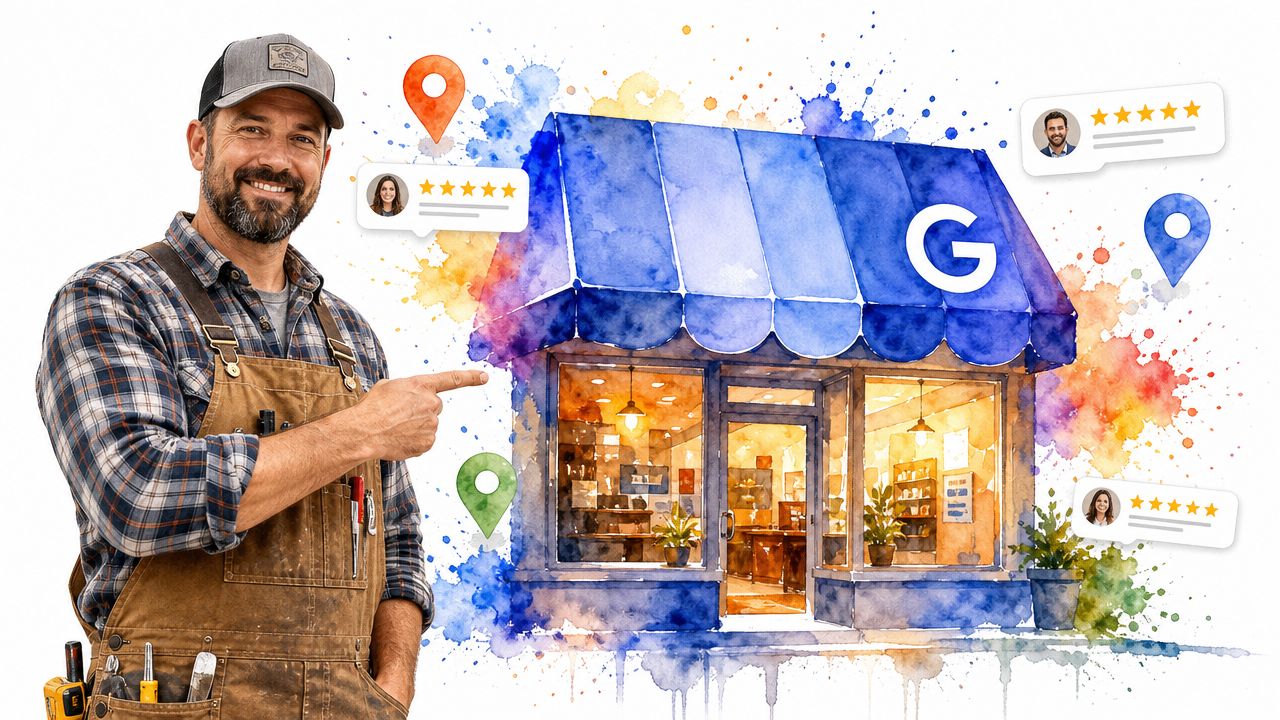
Guidance for small businesses with limited budgets points to Google Business Profile as the local SEO cornerstone because it can produce the fastest lift in calls and form fills for a tight geographic service area, especially for local service companies in smaller markets like ours, as noted in this local SEO guidance for small businesses.
Why Google Business Profile comes first
If your budget is limited, don't start with a fancy website rebuild just because an agency says you need one. Start with the asset closest to the search result. For local contractors, that's usually your Google Business Profile.
A weak profile creates friction fast. Wrong category. Incomplete services. Old phone number. No recent photos. No jobsite updates. No review responses. That makes your company look inactive, even if your crew is slammed every day.
Your profile should answer these questions immediately:
- What do you do
- Where do you work
- Can I trust you
- How do I contact you right now
If those answers aren't obvious, fix that before you touch anything else.
What to fix on your profile this week
Here's the checklist I'd use for a contractor in Duchesne, Roosevelt, or Vernal.
- Pick the right primary category: Don't settle for something broad if a more precise option exists. If you're an excavation contractor, use that. If you're a trucking company, don't hide behind a vague construction label.
- Set real service areas: Use the towns and counties you serve. Don't sprawl into areas you never work just because you think it will help.
- List specific services: Add excavation, grading, hydrovac, reclamation, welding, fabrication, hauling, roustabout work, or whatever services you want more of.
- Upload current photos: Use real equipment, real crews, real trucks, real projects. Stock photos weaken trust.
- Keep hours and contact info current: This sounds basic because it is. It still gets messed up constantly.
- Answer reviews: A short, professional response shows the profile is active and monitored.
For businesses trying to tighten up local visibility, Northpoint Web has also published resources related to Google Business Profile optimization that are relevant if you want to compare your setup against a contractor-focused approach.
After you've cleaned up the basics, use short updates to prove the business is active.
How to post like an active local company
Most contractors never touch Google Posts. That's a miss. You don't need polished ad copy. You need evidence that your company is alive and doing work.
Post things like:
- Recent jobs: Finished a pad, completed a weld-out, delivered a haul, wrapped a reclamation project.
- Equipment updates: Added a truck, upgraded a trailer, brought on new gear.
- Seasonal notes: Mud season scheduling, winter access, summer project availability.
- Hiring notices: CDL openings, operator positions, welders needed.
A quick visual walkthrough helps if you've never managed a profile seriously:
A complete Google Business Profile won't fix a bad business. It will stop a good business from looking invisible.
Keep the posts plain. One photo, one short description, one clear action. Call. Request a quote. Apply now. That's enough.
Building a Website That Wins Jobs and Builds Trust
Your Google profile gets the click. Your website decides whether that click turns into a lead. If your site looks dated, loads poorly on a phone, buries your services, or makes people hunt for contact info, you're leaking opportunity.
A small business website does not need to be massive. It needs to be clear. It needs to match what people searched for. And it needs to make contacting you easy.
Stop trying to rank for everything
The right SEO model for most small businesses is simple. Define a focused set of 20 to 50 phrases, map them to specific pages, then monitor performance in Google Search Console and Google Analytics 4 before making changes, as outlined in this small-business SEO workflow guide.
That means you don't need a bloated site with random pages for every possible phrase. You need a controlled list of high-intent keywords tied to real services and real locations.
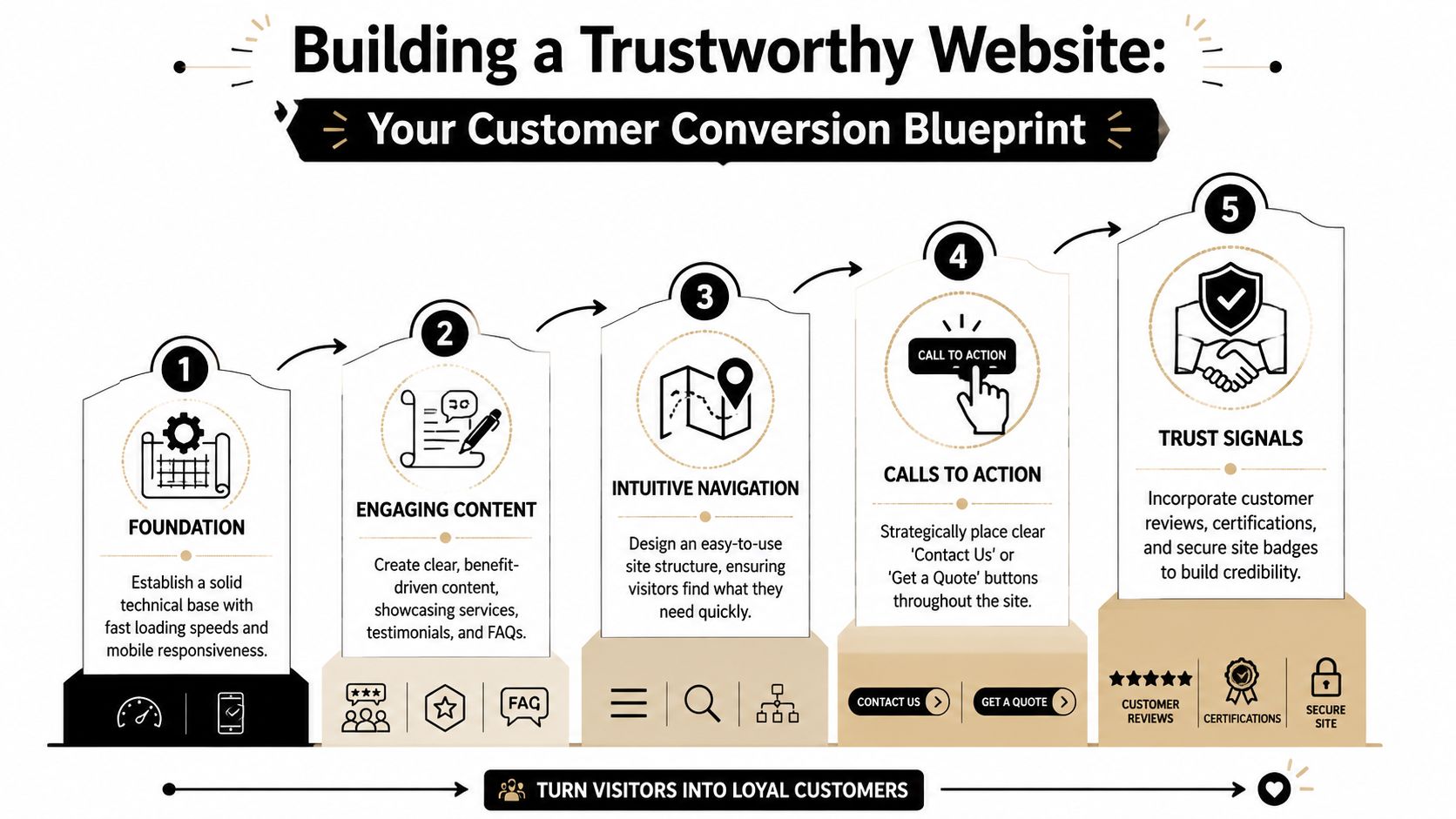
A solid starter set might include service phrases, location phrases, and a few combination terms. Think in plain English. The way a customer talks on the phone is usually close to the way they search.
Examples:
- commercial welding Vernal
- excavation contractor Roosevelt
- water hauling Uinta Basin
- hydrovac services Duchesne
- CDL driver jobs Vernal
That's manageable. That's trackable. That's useful.
A simple page structure that works
Most contractor websites should have dedicated pages for core services. Not one giant “Services” page stuffed with everything from welding to trucking to reclamation to rentals.
Build pages around the jobs you want more of. Then make each page answer the basic buying questions fast.
Here's a structure that works well:
- Headline with service and location fit
- Short intro saying who the service is for
- List of specific jobs or scopes
- Photos from real projects
- Trust signals like reviews, certifications, or experience
- Clear call to action
If you're reworking a site from scratch, this kind of small business web design approach is usually more effective than trying to patch an old site with scattered pages and vague messaging.
What your service pages should actually say
Don't write like a brochure. Write like you're explaining the work to a serious buyer.
Use page titles and headings like these:
| Page type | Example title |
|---|---|
| Excavation page | Excavation Contractor in Vernal for Site Prep, Utilities, and Earthwork |
| Welding page | Commercial Welding in Roosevelt for Field Repairs and Fabrication |
| Trucking page | Water Hauling and Trucking Services in the Uinta Basin |
| Careers page | CDL Driver Jobs in Duchesne with Local and Regional Work |
Then make the body copy specific. Name the work. Name the service area. Name the kinds of clients you serve. If you do industrial, say industrial. If you do oilfield support, say oilfield support. If you handle emergency field repair, say that plainly.
Don't make a prospect guess whether you handle their type of job. If it's profitable work you want, put it on the page.
Also, every service page should have a visible phone number, a contact form, and a next step that doesn't sound vague. “Request a quote” beats “Learn more.” “Talk to our team” beats “Submit.”
Using Your Website to Recruit Skilled Workers
A lot of contractor websites are built like the company is only trying to sell jobs. That's half the battle. In the Basin, a business can lose just as much money from a labor shortage as it does from a weak sales pipeline.
That's why SEO for small businesses needs to include hiring. If you need operators, CDL drivers, welders, mechanics, laborers, or field hands, your site should help recruit them every day of the week.
Most contractors ignore recruiting SEO
Many small businesses in trades and industrial markets overlook SEO for hiring, even though a recruiting-focused strategy can turn a website into a hiring funnel for roles like CDL drivers, welders, and operators, according to this BDC guide on SEO for small businesses.
That gap is your opening.
Most competitors still treat hiring like a Facebook post and a prayer. They post “now hiring,” maybe throw up a basic job ad, and wonder why weak applicants trickle in. Meanwhile, a candidate is searching Google for local driving jobs, welding jobs, or operator jobs and landing on whichever company built pages for those searches.

If you need skilled people, your website shouldn't just say “we're hiring.” It should give applicants a reason to choose you.
What a hiring page needs to include
Your careers page should not be a dead-end paragraph with an email address. Build pages around real roles if you hire for them repeatedly.
Good recruiting pages include:
- Job title and location: CDL Driver in Duchesne, Welder in Vernal, Equipment Operator in Roosevelt.
- Type of work: local hauling, oilfield support, shop fabrication, field repair, civil work, reclamation.
- What the day looks like: candidates want to know the actual environment.
- Requirements: licenses, experience, schedule expectations, travel if applicable.
- Why someone would want the job: equipment quality, steady work, crew culture, project type.
- Simple application path: no clunky maze, no broken forms.
If you need a lightweight way to collect applications on your own site, this guide on how to build application forms with HTML is useful for understanding the structure of a clean application form without making the process more complicated than it needs to be.
Project pages can help you hire
This is the part most companies miss. A strong project page can attract clients and future employees at the same time.
If you publish a jobsite recap about a reclamation project, pipeline support job, trucking contract, or custom fabrication job, you're showing more than capability. You're showing your standards. Applicants see your equipment, your work environment, your safety mindset, and the type of jobs they'd be walking into.
That matters.
A bare careers page says, “We have openings.” A good project gallery says, “Here's the kind of operation you'd be joining.”
Use a few simple content types:
- Project spotlights: before and after photos, scope, location, challenges, outcome
- Crew features: introduce welders, operators, drivers, shop leads
- Equipment pages: trucks, trailers, rigs, support equipment
- FAQ content: scheduling, overtime expectations, travel radius, application process
The companies that recruit well online make the business look real, active, and worth joining.
Building Authority with Local Citations and Reviews
Google trusts businesses it can verify across the web. That's where citations and reviews come in. This isn't glamorous work, but it affects whether your company looks established or sketchy.
A citation is your business name, address, phone number, and sometimes your website listed somewhere online. Reviews are public proof that real customers have dealt with you. Both matter because they support trust.
Get listed where your industry actually looks
A lot of cheap SEO vendors chase quantity. They'll dump your business into generic directories nobody uses. That's lazy work.
You want relevance and consistency. Your business details should match everywhere they appear, and the places that mention you should make sense for your trade and region.
Focus on listings like these:
- Local business organizations: chamber listings, community directories, local associations
- Industry-specific sites: contractor directories, transportation directories, trade associations
- Major business platforms: the core places customers already use to verify businesses
- Partner mentions: vendors, associations, sponsorship pages, subcontractor directories
If your business name is written one way on Google, another way on Facebook, and your old phone number still lives on some directory from years ago, clean that up. Mixed signals create doubt.
Ask for reviews without sounding desperate
A lot of owners either never ask for reviews or ask in a way that feels awkward. Keep it simple and send the request right after a successful job, while the experience is still fresh.
Use a short message like this:
Thanks again for the opportunity to work with you. If you were happy with the job, would you mind leaving us a quick Google review? It helps other local customers find our business and lets them know what it's like working with us.
That's enough. No hard sell. No guilt. No long speech.
A few practical habits help:
- Ask after a positive outcome: don't wait two months.
- Make it easy: send the direct review link by text or email.
- Reply to reviews: thank people, mention the service, keep it professional.
- Don't script every response: robotic replies look fake.
One honest review from a real customer in your market does more for trust than a pile of weak directory listings ever will.
Measuring Success and Choosing Your Path Forward
Most business owners get lost in SEO because they start staring at the wrong numbers. They obsess over traffic, rankings, or reports full of charts they'll never use. That's not how a contractor should judge online marketing.
Track what ties back to revenue and hiring. If visibility goes up but calls, quote requests, and job applications don't, something is off.
Track the numbers that matter
For most small contractors, the scoreboard is pretty simple:
- Are more people finding you in Google and Maps
- Are more qualified leads calling or filling out forms
- Are more applicants coming through for the roles you need
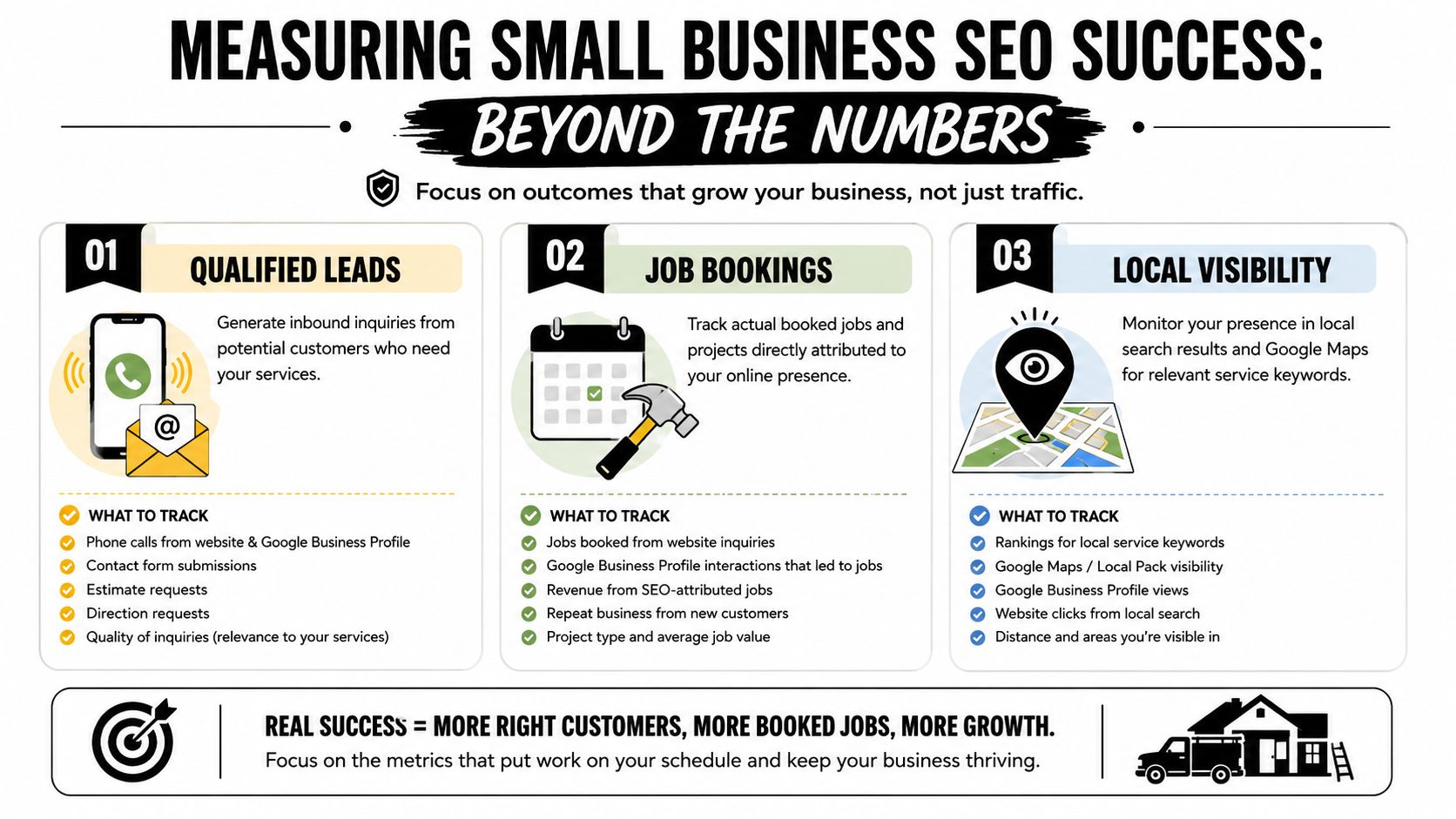
You can monitor a lot of this with free tools. Google Search Console shows what searches trigger your pages. Google Analytics 4 shows what people do on your site. Your Google Business Profile shows calls, messages, and visibility trends inside the profile interface.
That's enough to make smart decisions.
Look for patterns like:
- service pages that get impressions but few clicks
- pages that get traffic but no contact form submissions
- job pages that attract visits but no applications
- map visibility improving after profile updates or review activity
DIY SEO vs. Working with an Agency
You can absolutely handle parts of this yourself. A lot of owners should. But be honest about what will get done once work picks up.
| Factor | DIY Approach | Agency Partnership |
|---|---|---|
| Time | You save money but spend your own hours learning, writing, updating, and tracking | You trade budget for speed and consistency |
| Control | You control every change and every message | You need a clear process and good communication |
| Execution | Often strong at the start, then slips when operations get busy | Usually better for regular updates, content, and follow-through |
| Local knowledge | Best if you know your customers and write plainly about the work | Best when the agency understands your market and service area |
| Technical work | Harder if your site has structural issues or tracking gaps | Easier if you need site fixes, page builds, and reporting |
| Hiring support | Usually neglected unless someone owns it internally | Easier to build recruiting pages and application flows if it's part of the scope |
If you're comparing options, contractor-focused providers that handle website structure, local search strategy, and lead generation support, like SEO services for contractors, make more sense than generic agencies that don't understand rural service businesses.
Pick the path you will actually follow through on
Here's the honest test.
DIY works if you're disciplined enough to keep your Google Business Profile updated, publish service and hiring pages, ask for reviews, monitor Search Console, and improve pages over time. Most owners start with good intentions and then get buried in actual work.
Hiring help makes sense when your time is worth more on operations, estimating, sales, crew management, or job execution. It also makes sense if your current site is weak enough that piecemeal fixes won't cut it.
The worst option is sitting in the middle. Half-finished profile. Thin website. No service pages. No careers page. No review process. No follow-up. That's how businesses stay invisible.
SEO for small businesses is not complicated when you strip away the fluff. Show up in Google. Build pages around real services and real locations. Make it easy to contact you. Make it easy to apply. Keep your information current. Track leads and applications. Repeat what works.
If your business needs a website and SEO setup that brings in local leads and supports hiring at the same time, Northpoint Web works with contractors and local companies in the Uinta Basin on exactly that kind of practical digital foundation.