municipal recreation Software Built Around the Way Your Program Actually Works
Northpoint Recreation Manager gives cities, towns, parks and recreation departments, and community sports programs one organized place to manage sports, teams, coaches, facilities, schedules, scores, standings, alerts, and registration information.
Instead of forcing a local program into a large national sports platform or a collection of disconnected tools, Northpoint helps organize recreation information through a city-branded, mobile-friendly WordPress website that can be adapted to your programs and workflow.
Unlike large national sports platforms that may include unnecessary features, complicated pricing, and rigid workflows, Northpoint Recreation Manager is designed around the practical needs of local recreation programs.
Everything is presented through a professional, mobile-friendly website that can match your organization’s branding and connect directly to your existing WordPress website.
[Request a Demonstration]
Bring Your Recreation Program Together
Many recreation departments rely on a mixture of spreadsheets, printed schedules, social media posts, text messages, separate registration forms, and outdated website pages.
Northpoint Recreation Manager brings those tools into one organized system.
Staff can update recreation information from a familiar WordPress dashboard, while parents, coaches, players, and neighboring communities receive a clean public experience.
The result is less duplicated work, fewer missed updates, and a better way for families to find the information they need.
Manage Multiple Sports and Programs
Northpoint Recreation Manager can support a wide variety of sports and community activities, including:
- Baseball
- Tee ball
- Softball
- Football
- Basketball
- Junior Jazz
- Volleyball
- Soccer
- Tennis
- Cheer
- Camps and clinics
- Adult recreation
- Custom programs
Organizations can create additional sports and programs without rebuilding the website.
Programs, Seasons, Divisions, and Teams
Organize recreation information using a simple structure:
Sport
└── Season
    └── Division
        └── Team
            └── Games and Practices
Staff can manage:
- Active sports
- Seasonal programs
- Age and grade divisions
- Competitive and noncompetitive programs
- Team names and colors
- Assigned coaches
- Practice and game schedules
- Locations and facilities
- Scores and standings
Each program, team, coach, and facility can have its own public page.
Schedules, Scores, and Standings
Publish clear schedules for games, practices, matches, clinics, camps, and other activities.
Staff can enter:
- Date and time
- Home and away teams
- Facility
- Game status
- Final scores
- Set results
- Schedule changes
- Cancellations
Completed results automatically update basic standings.
The system supports:
- Point-based games
- Run or goal scoring
- Set-based matches
- Win-loss records
- League-point standings
- Schedule-only programs
- Divisions without standings
Parents can view schedules and standings from a phone without downloading a complicated app.
Public Coach Profiles
Help families identify the adults responsible for their child’s team.
Coach profiles may include:
- Coach photo
- Name and role
- Assigned team
- Sport and division
- Coaching experience
- Training and certifications
- Recreation department verification
- Optional background-check status
- Approved public contact information
Privacy controls allow staff to decide exactly what is shown publicly.
A coach’s personal information remains private unless it is specifically approved for public display.
Facility Locations and Availability
Create public profiles for:
- Baseball and softball fields
- Football and soccer fields
- Gymnasiums
- Basketball courts
- Volleyball courts
- Tennis courts
- Parks
- Pools
- Meeting rooms
- Recreation facilities
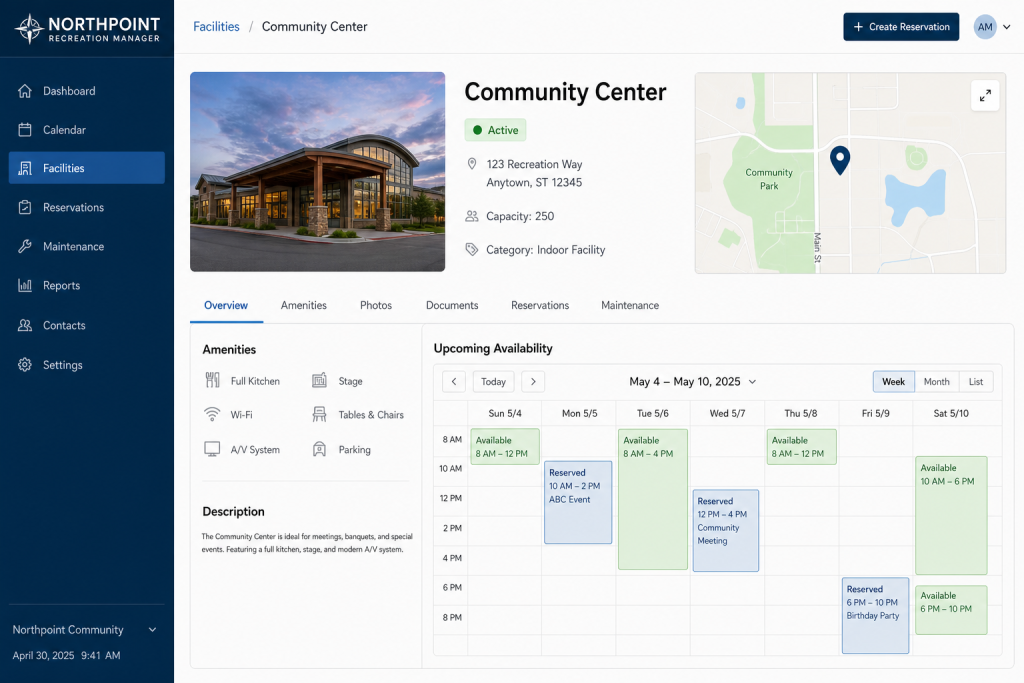
Each facility page may include:
- Photos
- Address and map
- Facility type
- Amenities
- Accessibility information
- Normal hours
- Current condition
- Closure status
- Upcoming games and practices
- Approved reservations
Facility schedules can show when a location is being used and when it may be available.
Facility Reservation Requests
Northpoint Recreation Manager can connect to an online reservation-request form.
Residents or organizations may submit:
- Requested facility
- Date
- Start and end time
- Type of activity
- Estimated attendance
- Equipment needs
- Contact information
- Agreement to facility rules
Requests remain pending until approved by staff.
Approved requests can then be added to the public facility calendar.
Recreation Alerts and Schedule Changes
Publish important notices directly to the recreation website.
Alert types may include:
- Game cancellations
- Practice cancellations
- Weather delays
- Field closures
- Location changes
- Registration deadlines
- Schedule changes
- General announcements
- Emergency notices
A future communications module may distribute the same update through:
- Website alerts
- Text messaging
- BAND
- Main city website widgets
Staff update the information once instead of entering the same notice in several systems.
Registration Information
Northpoint Recreation Manager can display active registration information and connect families to an online application.
Registration tools may include:
- Program selection
- Participant information
- Parent or guardian information
- Emergency contacts
- Waivers
- Communication preferences
- Electronic signatures
- Jersey sizes
- Team requests
- Payment status
- Administrative review
Organizations that are not ready for online payment can instruct families to call or visit the office to complete payment.
Online payment integration may be added later without rebuilding the entire registration process.
A Better Public Website Experience
The recreation portal can include pages for:
- Programs
- Registration
- Schedules
- Standings
- Teams
- Coaches
- Facilities
- Alerts
- Documents
- Contact information
Information can be displayed through reusable WordPress blocks and shortcodes.
This allows recreation updates to appear on:
- The recreation homepage
- Individual sport pages
- Team pages
- Facility pages
- Sidebars
- The main city website
- Other approved websites
Recreation-Focused Website Sidebar
Instead of showing generic WordPress content such as recent blog posts and archives, Northpoint Recreation Manager can display useful recreation information, including:
- Upcoming games
- Latest results
- Registration status
- Current alerts
- Facility closures
- Important links
The site feels like recreation software rather than a standard blog.
Built for Municipal Recreation
Northpoint Recreation Manager is especially well suited for:
- Cities
- Towns
- Parks and recreation departments
- Youth sports programs
- Community leagues
- School-affiliated recreation
- Nonprofit sports organizations
- Regional recreation partnerships
The system can be adapted to match each organization’s programs, terminology, branding, facilities, and administrative workflow.
Why Choose Northpoint?
City-Branded Experience
Your recreation portal can use your logo, colors, terminology, and official domain.
Local Customization
The system can be adjusted around the way your recreation department actually operates.
Direct Support
Work directly with Northpoint instead of navigating a national support queue.
Familiar WordPress Dashboard
Authorized staff can manage the website and recreation information from one system.
Expandable Platform
Begin with schedules and standings, then add registration, payments, messaging, reservations, and reporting as needed.
No Unnecessary Complexity
Use the features your organization needs without paying for a large platform designed for national leagues or professional clubs.
Available Modules
Northpoint Recreation Manager may be configured with:
Recreation Essentials
- Sports and programs
- Seasons and divisions
- Teams
- Coaches
- Facilities
- Schedules
- Scores
- Standings
- Alerts
Registration
- Participant applications
- Waivers
- Parent information
- Team assignment
- Registration reports
- Payment-status tracking
Communications
- Email notices
- Text messaging
- BAND integration
- Schedule-change alerts
- Cancellation notifications
Facility Management
- Public facility pages
- Reservation requests
- Approved bookings
- Monthly calendars
- Closure notices
- Availability displays
Custom Development
- Organization-specific workflows
- Accounting integrations
- Payment processor integration
- Main website widgets
- Reports and exports
- Additional staff tools
Designed to Grow With Your Program
You do not need to launch every feature at once.
Northpoint Recreation Manager can begin with the essential public system:
- Programs
- Teams
- Coaches
- Facilities
- Schedules
- Scores
- Standings
- Alerts
Additional functions can be developed as the recreation department identifies its priorities.
This phased approach helps organizations control costs while building a system that fits their actual needs.
See Northpoint Recreation Manager in Action
Discover a simpler way to manage recreation programs, teams, coaches, facilities, schedules, standings, registrations, and community updates.
Need Custom Web Software for Your Organization?
Northpoint Web Solutions creates practical WordPress websites, plugins, portals, forms, dashboards, and custom software for cities, businesses, nonprofits, and community organizations.
Rather than forcing your staff to adapt to generic software, Northpoint can build a solution around the way your organization works.
What Northpoint Recreation Manager Can Organize
Use a connected structure for sports, seasons, divisions, teams, games, practices, coaches, facilities, and public information. Staff can manage items such as:
- Active sports and seasonal programs
- Age and grade divisions
- Competitive and noncompetitive programs
- Team names, colors, and assigned coaches
- Game and practice schedules
- Scores, results, and basic standings
- Public program, team, coach, and facility pages
Schedules, Scores, Standings, and Alerts in One Public Experience
Staff can publish games, practices, matches, clinics, camps, schedule changes, cancellations, weather delays, field closures, registration deadlines, and general announcements. Depending on the program, the system can support point-based games, run or goal scoring, set-based matches, win-loss records, league-point standings, or schedule-only programs.
Parents, coaches, players, and community members can view approved information from a phone without downloading a complicated app.
Facilities and Reservation Requests
Create public facility profiles for fields, courts, gymnasiums, parks, pools, meeting rooms, and other recreation locations. Profiles may include photos, maps, amenities, accessibility information, hours, condition, closure status, upcoming activities, and approved reservations.
When configured, a reservation-request form can collect the requested facility, date, time, activity type, attendance estimate, equipment needs, contact information, and agreement to facility rules. Requests remain pending until staff approval.
Coach Profiles and Registration Information
Public coach profiles can help families identify the adults responsible for a team. Staff can choose which information to display, such as a photo, name, role, assigned team, sport, division, experience, training, certifications, verification, and approved contact information.
Registration pages can display program information and connect families to an application that may collect participant details, guardian information, emergency contacts, waivers, communication preferences, electronic signatures, jersey sizes, team requests, and payment status. Organizations that are not ready for online payment can direct families to call or visit the office.
Replace Disconnected Recreation Workflows
Many recreation departments manage schedules, teams, facilities, registration information, alerts, and results across spreadsheets, printed materials, social posts, messages, and outdated website pages. That makes updates harder to coordinate and families more likely to miss important information.
One Recreation System Built Around Your Program
Northpoint Recreation Manager brings sports, programs, teams, coaches, facilities, schedules, scores, standings, alerts, and registration information into an organized WordPress-based experience. Staff can manage approved information from a familiar dashboard while families, coaches, players, and neighboring communities use a mobile-friendly public website.
Make Recreation Information Easier to Manage and Find
- Keep program, team, coach, facility, and schedule information connected.
- Publish schedule changes, cancellations, closures, and other alerts in one public location.
- Give families phone-friendly access to schedules, standings, registration information, and facility details.
- Use reusable WordPress blocks and shortcodes to display recreation information across approved website pages.
Adapt the System to Your Organization
The platform can be configured around an organization’s sports, terminology, branding, facilities, administrative workflow, and launch priorities. Organizations can begin with essential programs, teams, coaches, facilities, schedules, scores, standings, and alerts, then consider additional modules as their needs become clearer.
Start With the Features You Actually Need
Northpoint Recreation Manager is intended for organizations that do not want to adopt a large national sports platform with unnecessary features, rigid workflows, or complicated pricing. Optional capabilities such as registration, payment integration, messaging, reservations, reporting, and custom development can be evaluated according to the organization’s priorities.
See Northpoint Recreation Manager in Action
A demonstration can help your recreation department evaluate how programs, schedules, teams, facilities, alerts, registration information, and other modules could work together on a city-branded public website.
Request a Demonstration of Northpoint Recreation Manager
See how a recreation department could organize its programs, teams, coaches, facilities, schedules, standings, alerts, and registration information in a connected WordPress experience. Discuss the features and workflow your organization actually needs.