
Tag: field operations

  • Need WordPress Help in the Uinta Basin? What Local Businesses Should Look For

    Need WordPress Help in the Uinta Basin? What Local Businesses Should Look For

    Hey—I’m Andrew North. I grew up fascinated by bulletin board systems and the early web, teaching myself with library books and trial-and-error. That background matters because I still believe a website should do real work, not just look pretty. If you run a business or municipal office in the Uinta Basin (Vernal, Roosevelt, Duchesne), this article gives a practical, industry-aligned checklist for hiring WordPress help and explains which Northpoint product or service usually matches each local need.

    Why ask region-specific questions when hiring WordPress help?

    The Basin’s mix of energy support services, contractors, recreation, and small-town government creates predictable website and workflow needs: offline field work, permit-heavy municipal processes, seasonal recreation sign-ups, and straightforward local SEO. When you interview a WordPress developer or agency, focus on whether they understand those operational realities—not just whether they can make a site look modern.

    Six common Uinta Basin use cases and the WordPress solution to ask for

    Below are the top local scenarios we see and a concrete recommendation for what to ask your developer or which Northpoint product typically fits the job.

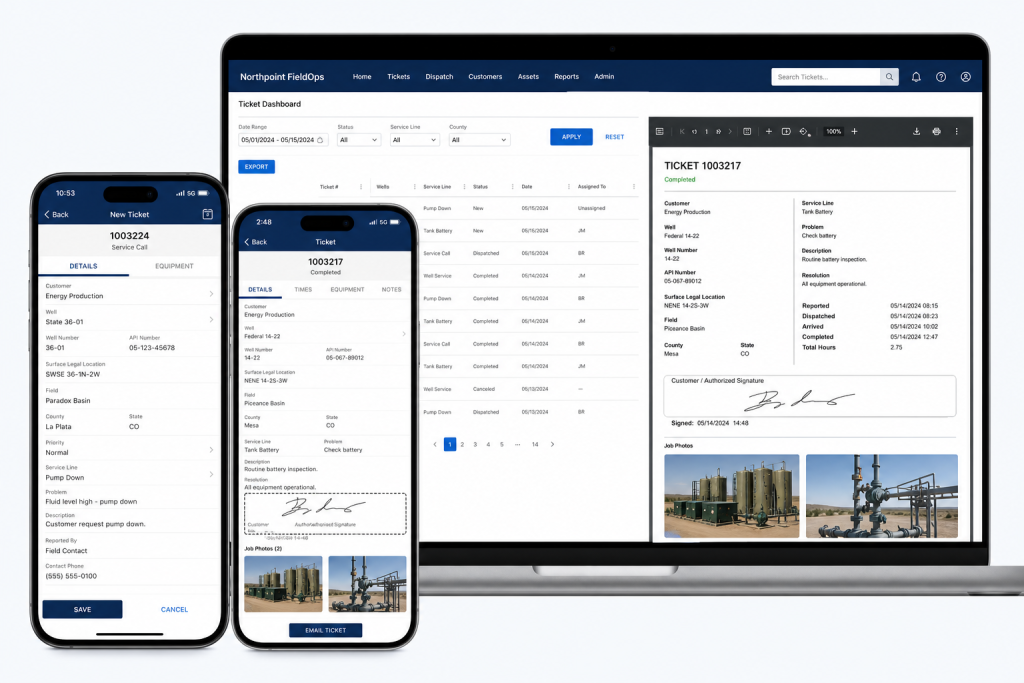
    1) Oilfield and field operations: tickets, crew dispatch, and offline forms

    The problem: crews on-site need a quick way to submit tickets, attach photos, and track assignments without a complex SaaS stack.

    Ask for: a WordPress-based ticketing and dispatch workflow that supports mobile submissions, attachments, assignment, and reporting.

    Northpoint fit: Northpoint FieldOps is designed for oilfield field tickets and field operations software. Ask how the developer will integrate mobile-friendly forms, assignment workflows, and CSV exports so your office can reconcile tickets without extra copying.

    2) Municipal permits, public forms, and tracking

    The problem: municipalities need reliable online forms that convert to an auditable internal workflow and keep the public informed on status.

    Ask for: form-to-workflow systems that assign submissions, track statuses, send automated updates, and retain records for public access when required.

    Northpoint fit: Northpoint Civic Forms and Northpoint Civic provide form and municipal website tools designed for online permits, applications, and civic workflows. Confirm the proposal includes staff notifications, status updates to requesters, and an internal assignment dashboard.

    3) Parks, recreation, and seasonal program registration

    The problem: rec departments need class and tournament sign-ups, wait lists, receipts, and limited-time events handled without manual spreadsheets.

    Ask for: a registration system that supports capacity limits, payments or fee tracking, automated confirmations, and easy rostering for staff.

    Northpoint fit: Northpoint Recreation Manager or modular form and content tools can be configured inside WordPress to handle registrations, event pages, and staff views for rosters and cancellations.

    4) Service requests, public works, and accountability

    The problem: resident requests arrive by phone, email, and paper—and they disappear into staff inboxes.

    Ask for: a managed service-center workflow that captures requests in one place, assigns responsibility, and provides public-facing tracking codes.

    Northpoint fit: Northpoint Service Center supports submission tracking, staff assignment, requester communication, internal notes, and reporting. A clear acceptance criterion is that requests shouldn’t rely on individual inboxes.

    5) Small business operations: CRM, invoicing, and job scheduling

    The problem: multiple SaaS subscriptions for CRM, scheduling, invoicing, and forms can be expensive and fragment data.

    Ask for: a plan showing whether WordPress can centralize parts of your workflow—forms that create leads, an integrated staff portal, and automation that reduces manual entry.

    Northpoint fit: Northpoint Core and custom WordPress software can connect forms, staff dashboards, and content into a single site-based operating system. Discuss whether a hybrid approach (WordPress for lead and workflow capture plus specialized SaaS for payments) makes sense for your business.

    6) Local SEO and customer discovery for high-visibility services

    The problem: in close-knit markets, being visible for local queries—“service + town”—drives calls and jobs.

    Ask for: local SEO work tied to content that answers real customer questions (service pages, how-to posts, and Google Business optimization), and a content plan that produces steady pages or posts your team can maintain.

    Northpoint fit: Our website and software services include local search strategy and content planning tools (Northpoint Blog Agent and Content Studio). A practical deliverable is a prioritized list of 10 service pages and a monthly content schedule tailored to Uinta Basin search behavior.

    What to verify before hiring a WordPress developer

    • Can they show examples of workflow automation or custom plugins they built (not just themes)?
    • Do they propose tangible acceptance criteria—e.g., “forms create tickets with a unique tracking code and email notifications to X roles”?
    • Will the solution operate within your existing WordPress site or require a replacement? (We often add tools without rebuilding the public site.)
    • How will hosting, backups, and updates be handled—especially for sites that run critical operations?
    • Who will train staff and document the new processes?

    Implementation and effort considerations

    Custom WordPress tools can often replace several separate SaaS subscriptions, but there’s a trade-off: built-in workflow and ownership versus off-the-shelf convenience. Ask for an estimate that separates discovery, development, and ongoing support. In the early web days I learned the hard lesson that a system without documentation becomes a black box—so insist on staff training and simple admin screens.

    Quick checklist to bring to vendor meetings

    • List your top three workflows (e.g., field tickets, permit applications, event registration).
    • Identify required outputs (PDFs, CSV exports, payment receipts, tracking codes).
    • Note who needs access: public users, front-desk staff, department heads.
    • Decide whether data must be retained publicly or archived internally.
    • Ask for a staged plan: discovery → prototype → staff testing → launch → maintenance.

    Final note

    The web began as a place for sharing files over slow connections; now we use the same platform to run real work. A WordPress developer who understands local industries in the Uinta Basin can turn your website into a working system that handles tickets, permits, registrations, requests, and leads—so it actually works for your organization 24 hours a day.

    Talk with Northpoint Web Solutions about your website, software or workflow problem. We can help determine whether an existing Northpoint product, a custom WordPress plugin, or a custom software solution is the best fit.


  • Turn Your Contractor Website into a Job Management Hub (forms → jobs → invoicing)

    If you remember connecting to a bulletin‑board system (BBS) over a squeaky dial‑up line, you know how satisfying it feels when a simple system just works. I still like things that do their job without extra fuss. For many contractor owners and operations managers, the website is boxed into the marketing role when it could be doing the actual work of the business: taking requests, creating jobs, tracking field work, and issuing invoices.

    Why use the website for job management?

    Too many small contractor shops run on emails, text threads, paper tickets, and spreadsheets. That creates lost requests, duplicated work, and billing gaps. The workflow below shows how a WordPress site can accept a form, convert it into a job record, collect field tickets, and produce an invoice—so your team doesn’t have to jump between separate SaaS tools every time.

    Overview: forms → jobs → invoicing

    At a high level the flow looks like this:

    • Customer or staff submits a web form (service request, estimate request, or intake)
    • The form becomes a tracked job record in an internal dashboard
    • Field staff add time, materials, and inspection notes using mobile field tickets
    • Office staff review the job summary and create an invoice from the job
    • Invoice is issued and records are archived for reporting

    Step 1 — Capture definitively: use structured forms

    Start by replacing free‑text emails with structured web forms that collect the fields you actually need: customer name, address, contact, requested service, priority, photos, and preferred appointment windows. In municipal and contractor systems we build, forms live inside WordPress and can be tailored to ask for required permits, site access notes, or safety items.

    If you’re already losing submissions or paperwork, the checklist in How to Stop Losing Form Submissions shows how to capture and track those entries rather than letting them slip into an inbox.

    Practical tips

    • Require at least one phone or email field and an address when a site visit is needed.
    • Allow photo uploads from phones—many issues are resolved faster when techs see the site beforehand.
    • Use conditional fields so requesters only see questions relevant to their request.

    Step 2 — Turn form submissions into job records

    Once a form arrives, it needs to become a manageable job. In the systems we design, a submission creates a job record in an administrative dashboard where staff can:

    • Assign the job to a crew or individual
    • Set statuses (new, scheduled, in progress, invoiced, closed)
    • Attach files and internal notes
    • Set due dates and estimated hours or cost

    Using an internal job record avoids sending PDF tickets back and forth. It also creates a single source of truth that the office and field crews reference.

    Permissions and roles

    Make sure staff roles are explicit: office staff need editing and invoicing rights, supervisors need to reassign or close jobs, and technicians should be able to add field notes without changing billing fields. Northpoint Core is designed to support organization roles and permissions so access levels are practical and easy to manage; you can learn more about that approach at the Northpoint Core overview.

    Step 3 — Field tickets: capture work where it happens

    Field staff should be able to add time, parts, photos, and short inspection notes from a phone or tablet. The best practice is a compact field ticket form linked to the job record that appends entries rather than creating separate files. When techs complete a ticket, the office sees the additions in the job timeline and can update status or plan follow‑ups.

    Mobile considerations

    • Design tickets for slow cell coverage—allow offline drafts that submit when the device reconnects.
    • Keep the UI minimal: time in/out, materials used (with unit and quantity), and a photo or two.
    • Validate numeric fields on entry so time and material quantities don’t require manual cleanup later.

    Step 4 — Build invoices from job summaries

    Once a job’s field tickets and materials are in the system, creating an invoice should be a one‑click or one‑form process that pulls the job’s items into a billable summary. That avoids double entry and reduces billing errors.

    In WordPress‑centric systems it’s possible to generate invoices and PDF copies from the job record, and to flag invoices as sent, paid, or overdue. If you prefer external accounting software, the job record can still export a clean CSV for import—keeping the website as the single source of job truth.

    Step 5 — Reporting, reconciliation, and continuous improvement

    After a few weeks of use, look at basic reports: jobs per week, average time per job type, and invoices issued vs. paid. These insights let you standardize job templates, set realistic dispatch windows, and adjust pricing where needed.

    Checklist: what to prepare before you build this workflow

    • List the exact fields you need on intake forms (don’t guess).
    • Decide on minimal job statuses and who can change them.
    • Create a short field ticket template (time, materials, notes, photos).
    • Identify required invoice line items and preferred output format (PDF, CSV).
    • Plan basic reports you want in month one—start small and iterate.

    Integration and maintenance considerations

    Keeping the job system inside WordPress reduces subscription bloat and centralizes backups and access control. It does mean you should plan for ongoing maintenance: plugin updates, secure hosting, and regular backups. Northpoint provides managed WordPress hosting and application maintenance if you prefer to hand off that responsibility.

    How to get started

    Begin with one service type (for example: residential service calls) and implement the intake form and a simple job record. When the team adopts the process, add field tickets and invoice generation. If you want forms prebuilt for municipal-style intake, consider looking at Northpoint Civic Forms as an example of structured form design for public agencies and service organizations.

    Turning a website into a working job-management hub doesn’t require replacing everything you use today. It requires deliberate steps: capture structured data, create a single job record, collect field entries, and produce invoices from that record. Those four steps remove friction for office staff and keep technicians focused on the work that pays the bills.

    If you want help planning or testing a workflow, tell us what is difficult about managing your current website, and we can help identify a practical next step. Request a Northpoint website review to discuss forms, job tracking, invoicing, or a demo of how these pieces fit together.