Turn Your WordPress Website Into a Complete Business Operating System
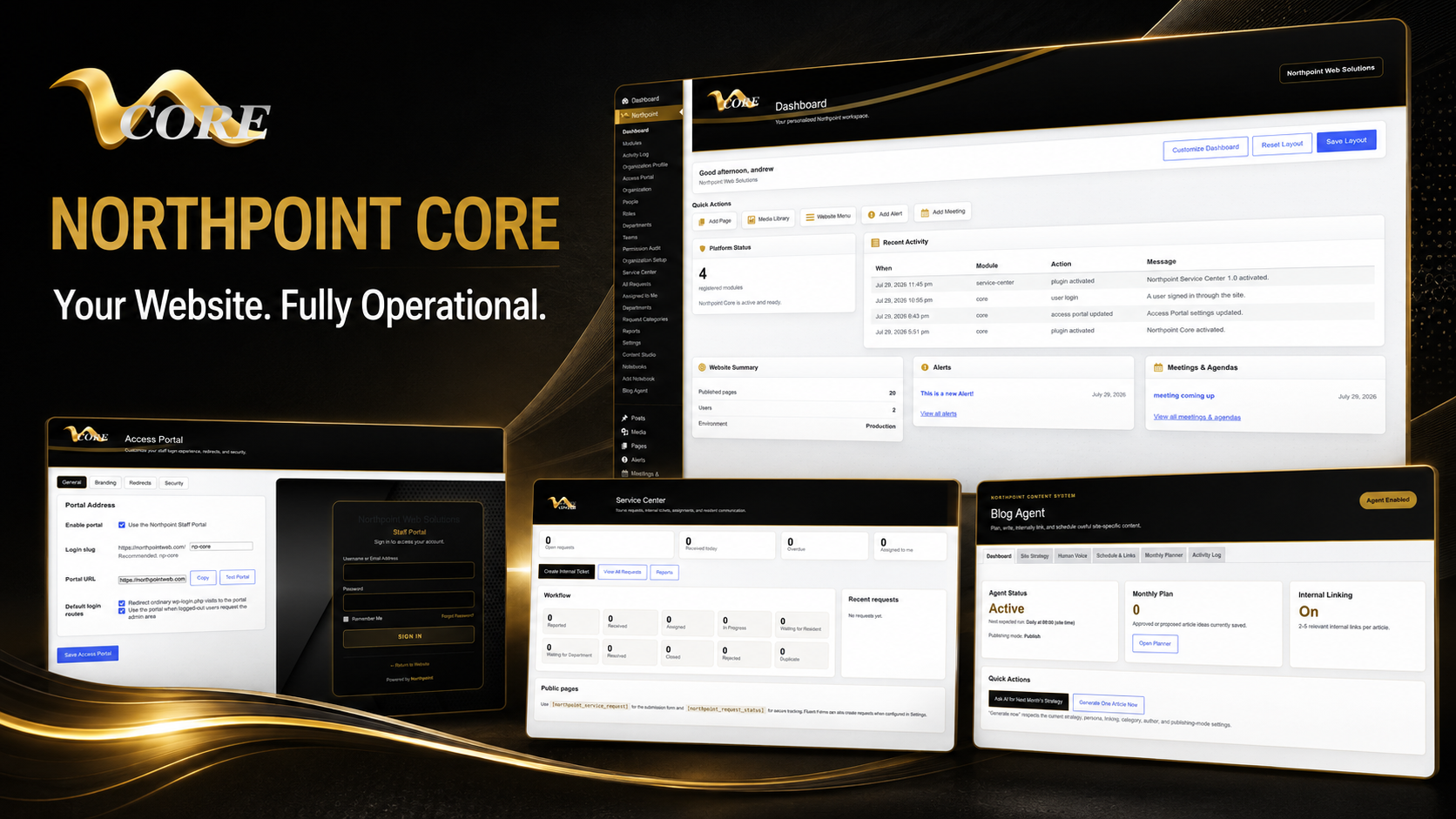
Your website should do more than display information. Northpoint Core turns WordPress into a coordinated business operations system where your team can manage content, organize employees, assign responsibilities, track service requests, publish alerts, and support everyday work.
Built from modular tools, Northpoint Core can be configured around your organization’s departments, terminology, branding, permissions, and responsibilities—without forcing every employee to work inside a confusing standard WordPress dashboard.
Built from modular tools, Northpoint Core can be configured around your organization’s departments, terminology, branding, permissions, and responsibilities—without forcing every employee to work inside a confusing standard WordPress dashboard.
Built from modular tools, Northpoint Core can be configured around your organization’s departments, terminology, branding, permissions, and responsibilities—without forcing every employee to work inside a confusing standard WordPress dashboard.
Northpoint Core changes that.
Northpoint Core is a modular website management and business operations system developed by Northpoint Web Solutions. It transforms WordPress from a traditional website platform into a customized digital workspace where your team can manage content, organize employees, assign responsibilities, respond to service requests, automate routine work, communicate with customers, and operate essential parts of the organization.
Your website should not simply be online 24 hours a day. It should be working for your organization 24 hours a day.
WordPress Is Capable of Much More
When WordPress was released in 2003, it was primarily known as a blogging platform. Over the years, it grew into one of the world’s most widely used website management systems. Yet many organizations still use it much as they would have used a basic website twenty years ago: publish a few pages, post occasional updates, and wait for someone to visit.
Northpoint Core unlocks the greater potential hiding underneath that website.
Instead of requiring your organization to assemble a confusing collection of unrelated plugins, Northpoint Core provides a coordinated set of modules designed to work together. Each installation can be configured around the organization’s employees, departments, services, terminology, branding, and everyday responsibilities.
The result is not a generic WordPress dashboard. It is a system that feels as though it was built specifically for your organization.
A Professional, Branded Administrative Workspace
The standard WordPress administration area was designed to accommodate thousands of different themes, plugins, developers, and publishers. That flexibility is powerful, but it can also create a cluttered and confusing experience for ordinary employees.
Northpoint Core replaces that experience with a clean, professional administrative workspace.
Your organization can have its own:
- Branded staff login portal
- Logo and organizational colors
- Customized administrative menus
- Simplified employee dashboards
- Department-specific tools
- Helpful instructions and shortcuts
- Custom terminology
- Permission-based work areas
Employees see the tools they need without being overwhelmed by technical settings, advertising notices, developer menus, or features unrelated to their responsibilities.
This makes the system easier to learn, reduces accidental changes, and gives staff a professional portal that feels like part of the organization rather than the back end of a generic website.
Northpoint Organization Studio
Organization Studio provides the structure behind the entire Northpoint Core system.
It allows a business to organize users according to the way the organization actually operates. Employees can be connected to departments, divisions, locations, teams, or other organizational groups.
Depending on the installation, an organization might create areas for:
- Administration
- Sales
- Customer service
- Marketing
- Human resources
- Accounting
- Operations
- Public works
- Planning and zoning
- School departments
- Individual office locations
Organization Studio makes it possible to connect employees, content, requests, permissions, and responsibilities to the appropriate part of the organization.
Instead of treating every employee as simply another WordPress user, Northpoint Core recognizes that people have different jobs, responsibilities, and levels of authority.
Benefits of Organization Studio
- Creates a clear organizational structure
- Keeps departmental information organized
- Makes employee onboarding easier
- Supports multiple offices or locations
- Helps route work to the correct people
- Establishes the foundation for roles and permissions
- Allows the system to grow with the organization
Northpoint Role Editor
Every employee should have access to the tools required for the job—but not necessarily the entire website.
The Northpoint Role Editor allows administrators to create practical profile types and permission sets based on real responsibilities. A business might have administrators, managers, editors, customer-service representatives, department employees, contractors, or volunteers.
Each role can be configured to control what a person can:
- View
- Create
- Edit
- Publish
- Approve
- Assign
- Manage
- Delete
This is especially valuable when several people help operate a website. Employees are less likely to become confused or accidentally change an important setting because unnecessary tools can be removed from their workspace.
Benefits of the Role Editor
- Protects important website settings
- Reduces the chance of employee errors
- Simplifies each employee’s dashboard
- Supports separation of duties
- Makes onboarding and offboarding easier
- Provides greater control as the organization grows
Northpoint Content Studio
Not every type of information belongs in a standard webpage or blog post.
Northpoint Content Studio allows an organization to create dedicated content areas—called notebooks—based on the information it regularly manages.
A business could create notebooks for:
- Company announcements
- Projects
- Job openings
- Policies and procedures
- Frequently asked questions
- Employee resources
- Product updates
- Customer notices
- Meeting information
- Service alerts
- Training materials
- Documents and forms
Each notebook becomes its own organized area with the appropriate name, fields, publishing options, and administrative menu.
This means employees do not need to decide whether something should be created as a page, post, widget, or custom code. They simply open the correct notebook and enter the information.
Northpoint Content Studio gives businesses a repeatable publishing process while keeping important information consistent and easy to locate.
Benefits of Content Studio
- Organizes different categories of information
- Creates a consistent publishing process
- Reduces staff training requirements
- Prevents important content from becoming buried
- Makes future website growth easier
- Allows information to be displayed automatically throughout the website
- Helps several employees contribute without creating disorder
Northpoint Service Center
Customer requests should not disappear inside an email inbox.
Northpoint Service Center provides a centralized system for receiving, assigning, tracking, and resolving requests. It can be used internally by employees or publicly by customers, residents, parents, students, vendors, or other people served by the organization.
Depending on the organization, Service Center can manage:
- Customer questions
- Support tickets
- Maintenance requests
- Website update requests
- Complaints and concerns
- Internal technology requests
- Facility issues
- Document requests
- Department assignments
- Follow-up communication
Requests can be sent to the proper person or department and tracked through completion. This provides greater accountability and helps the organization create a dependable process instead of relying on scattered phone calls, text messages, handwritten notes, and email chains.
Benefits of Service Center
- Keeps requests in one organized location
- Creates a record of communication
- Assigns responsibility
- Reduces missed or forgotten requests
- Improves response times
- Helps management identify recurring problems
- Provides better customer service
Alerts and Important Announcements
Northpoint Core can include a dedicated alert system for urgent or time-sensitive information.
Authorized employees can publish an alert from their dashboard and have it appear prominently on the website. Alerts can be used for closures, emergencies, schedule changes, service interruptions, deadlines, weather conditions, or important organizational announcements.
Because alerts are managed as their own content type, employees do not have to redesign a page whenever something important happens.
Benefits of the Alert System
- Publishes urgent information quickly
- Keeps alerts visually consistent
- Allows authorized staff to respond without a developer
- Reduces repetitive phone calls
- Helps customers find critical information immediately
Northpoint AI Assistant
The Northpoint AI Assistant gives organizations a new way to help visitors find information.
Rather than providing generic answers, the assistant can be configured to prioritize information from the organization’s own website, approved documents, policies, services, and frequently asked questions.
A properly configured assistant can help visitors:
- Locate forms and documents
- Find office hours and contact information
- Understand available services
- Navigate complex website content
- Identify the correct department
- Receive answers outside normal business hours
- Find the next step in a process
When an answer cannot be verified confidently, the assistant can be instructed to clearly identify uncertainty rather than presenting an interpretation as an official answer.
The AI Assistant does not replace employees. It handles common questions and navigation tasks so employees can spend more time on work that requires personal attention and professional judgment.
Northpoint Newsletter
Northpoint Newsletter helps organizations turn website content into direct communication.
New articles, announcements, project updates, events, or service information can be organized for email distribution. Instead of separately creating website content and then rebuilding the same material in another email platform, organizations can use information already managed through Northpoint Core.
Depending on configuration, newsletters may be sent immediately, scheduled, or delivered in controlled batches.
Benefits of Northpoint Newsletter
- Extends the reach of website content
- Reduces duplicate data entry
- Keeps communication consistent
- Builds stronger customer and community relationships
- Helps subscribers stay informed
- Brings visitors back to the website
Northpoint Social Stack
Organizations often maintain several social media accounts, but website visitors may never see those updates.
Northpoint Social Stack connects selected social content to the organization’s website through a clean, expandable interface. Visitors can discover recent posts and connect with the organization’s social channels without overwhelming the design of the website.
Benefits of Social Stack
- Connects the website with social media activity
- Increases visibility for recent updates
- Encourages visitors to follow social accounts
- Keeps the website looking active
- Provides convenient access without cluttering the page
Northpoint Site Backup
A business website can represent years of work, customer information, uploaded documents, configurations, and specialized software. A dependable backup system is not optional.
Northpoint Site Backup can help automate scheduled backups and send or store them in an approved location. Administrators can configure the backup schedule and determine what should be included.
Benefits of Site Backup
- Protects important website data
- Reduces dependence on manual backups
- Supports disaster recovery
- Provides greater confidence before updates
- Helps protect custom configurations and content
- Reduces downtime after a technical problem
Northpoint Code Library
Many organizations rely on small pieces of custom code, styling, templates, instructions, and reusable configurations. These items often become scattered across email messages, personal computers, theme files, or undocumented settings.
Northpoint Code Library provides a more organized place to preserve and manage approved code and reusable technical resources.
Benefits of Code Library
- Keeps custom code organized
- Reduces the risk of losing important modifications
- Makes maintenance easier
- Creates documentation for future developers
- Supports consistency across the website
- Reduces repeated development work
Weather and Location-Based Information
Organizations affected by local weather can add the Northpoint Weather module to display current conditions or forecasts directly on their website.
This can be especially useful for:
- Recreation programs
- Schools
- Construction companies
- Outdoor businesses
- Local governments
- Transportation services
- Community organizations
- Businesses with field employees
Weather information can be incorporated into dashboards, public pages, alerts, events, or operational notices.
Specialized Industry Modules
Northpoint Core is designed as a modular system. Every organization receives the foundation, but additional capabilities can be added according to its actual needs.
Specialized modules may include:
- Municipal code management
- Recreation and sports management
- Civic forms and permits
- Public notices and meeting records
- Project tracking
- Procurement opportunity monitoring
- Online registration
- Document libraries
- Business directories
- Event management
- Employee resources
- Customer portals
- Custom reporting
- Automated content tools
- Industry-specific workflows
A private business does not need municipal code software, and a city may not need a traditional sales system. The strength of Northpoint Core is that each organization can use the modules that fit its work without paying for or navigating an oversized collection of unnecessary features.
Why Every Business Needs a System Like Northpoint Core
As businesses grow, information tends to spread across many disconnected tools. One employee maintains the website. Another receives requests through email. A manager tracks assignments in a spreadsheet. Policies are stored in shared folders. Announcements are posted manually on social media. Important knowledge may exist only in the memory of one employee.
That arrangement may work temporarily, but it becomes increasingly difficult to manage.
Northpoint Core brings these activities together inside a coordinated system connected directly to the organization’s website.
Northpoint Core Helps Businesses:
- Save employee time
- Automate repetitive work
- Improve customer service
- Organize institutional knowledge
- Protect important information
- Reduce missed requests
- Clarify employee responsibilities
- Simplify website management
- Maintain consistent branding
- Provide services outside normal office hours
- Expand without replacing the entire system
- Turn an existing website into a productive business asset
Your Website Can Become One of Your Best Employees
A well-designed website should do more than advertise a business.
It should answer common questions, collect information, guide customers, distribute documents, organize requests, support employees, publish alerts, manage content, automate communication, and provide useful services even when the office is closed.
That is the purpose of Northpoint Core.
Instead of forcing an organization to change its procedures to fit generic software, Northpoint Web Solutions studies how the organization works and configures the system around those needs.
The result is a professional digital workspace that can begin with a few essential modules and grow alongside the organization.
Built in the Uinta Basin. Available Nationwide.
Northpoint Core was developed by Northpoint Web Solutions in Utah’s Uinta Basin and is available to businesses, municipalities, schools, community organizations, and other institutions throughout the United States.
We combine website development, custom software, automation, administrative design, and practical organizational experience to create systems that solve real problems.
See What Northpoint Core Could Do for Your Organization
Your existing WordPress website may already contain the foundation for a much more capable system.
Northpoint Web Solutions can evaluate your website, learn about your organization’s daily processes, and recommend the Northpoint Core modules that would provide the greatest immediate benefit.
Request a free Northpoint Core consultation and discover how your website can begin working for your organization 24 hours a day.
[Request a Free Consultation]
Why organizations outgrow a basic WordPress website
A traditional website is useful for publishing pages, photographs, contact forms, and blog posts. But publishing information is only one part of operating an organization.
Employees may also need to manage announcements, documents, departments, service requests, approvals, alerts, and customer communication. When those activities are handled through scattered email chains, phone calls, handwritten notes, or unrelated plugins, work becomes harder to organize and follow up on.
Northpoint Core connects these activities through a modular workspace built on WordPress.
A branded administrative workspace for your team
The standard WordPress administration area is designed to support many types of websites, themes, plugins, and publishers. That flexibility can also make it unnecessarily complicated for employees who only need a focused set of tools.
Northpoint Core can provide a branded staff login portal, organizational colors, customized administrative menus, simplified dashboards, department-specific tools, helpful instructions, custom terminology, and permission-based work areas.
- Employees see tools related to their responsibilities.
- Unnecessary technical settings can be removed from their workspace.
- Departments can work with tools and information relevant to their role.
- Administrators can create a more consistent employee experience.
Organize people, permissions, and responsibilities
Organization Studio provides the structural foundation for Northpoint Core. Employees can be connected to departments, divisions, locations, teams, or other organizational groups.
Role Editor allows administrators to create practical permission sets for roles such as administrators, managers, editors, customer-service representatives, contractors, or volunteers. Permissions can control whether a person can view, create, edit, publish, approve, assign, manage, or delete.
Together, these tools help organizations connect people to the content and responsibilities appropriate to their work.
Manage recurring information with structured content
Content Studio allows an organization to create dedicated content areas, called notebooks, for the information it regularly manages. Examples include company announcements, projects, job openings, policies and procedures, frequently asked questions, employee resources, customer notices, service alerts, training materials, and documents.
Each notebook can have its own name, fields, publishing options, and administrative menu. This gives employees a repeatable way to publish information without deciding whether every item belongs in a page, post, widget, or custom code.
Your website should do more than publish information
Many organizations use WordPress to publish pages, photos, forms, and occasional updates, while requests, responsibilities, approvals, and internal work remain scattered across email, spreadsheets, phone calls, and unrelated tools.
That separation makes it harder to know who owns a task, where information belongs, and whether a request has been completed.
Turn WordPress into a coordinated operating system
Northpoint Core is a modular WordPress management and business operations system. It creates a customized digital workspace where an organization can manage content, organize employees, assign responsibilities, respond to service requests, communicate with customers, and support essential day-to-day work.
Instead of assembling unrelated plugins, the organization can configure connected modules around its terminology, departments, services, permissions, and responsibilities.
Build the workspace around how your organization operates
- Give employees dashboards and tools relevant to their responsibilities.
- Organize content into repeatable areas such as announcements, policies, projects, forms, and service alerts.
- Route requests to the appropriate person or department and track them through completion.
- Publish urgent information through a dedicated alert system.
- Help visitors find approved organizational information through the Northpoint AI Assistant.
- Reuse website content for newsletters and selected social updates.
A practical alternative to a cluttered WordPress dashboard
Northpoint Core is not presented as a generic dashboard filled with every technical setting. The administrative workspace can use branded login areas, customized menus, simplified employee dashboards, department-specific tools, custom terminology, and permission-based work areas.
This approach is intended for organizations that need more structure than a standard website provides but want their tools and information coordinated within WordPress.
See whether Northpoint Core fits your organization
The right configuration depends on your departments, users, content, service requests, permissions, and communication needs. A fit discussion can help identify which Northpoint Core modules support your current workflows and where a customized implementation may be useful.
Plan a Northpoint Core configuration around your workflows
Tell Northpoint Web Solutions how your organization manages employees, content, requests, alerts, and communication. The next step is a conversation about which Northpoint Core modules and configuration approach may fit your needs.
Why organizations outgrow a basic WordPress website
A traditional website is useful for publishing pages, photographs, contact forms, and blog posts. But publishing information is only one part of operating an organization.
Employees may also need to manage announcements, documents, departments, service requests, approvals, alerts, and customer communication. When those activities are handled through scattered email chains, phone calls, handwritten notes, or unrelated plugins, work becomes harder to organize and follow up on.
Northpoint Core connects these activities through a modular workspace built on WordPress.
A branded administrative workspace for your team
The standard WordPress administration area is designed to support many types of websites, themes, plugins, and publishers. That flexibility can also make it unnecessarily complicated for employees who only need a focused set of tools.
Northpoint Core can provide a branded staff login portal, organizational colors, customized administrative menus, simplified dashboards, department-specific tools, helpful instructions, custom terminology, and permission-based work areas.
- Employees see tools related to their responsibilities.
- Unnecessary technical settings can be removed from their workspace.
- Departments can work with tools and information relevant to their role.
- Administrators can create a more consistent employee experience.
Organize people, permissions, and responsibilities
Organization Studio provides the structural foundation for Northpoint Core. Employees can be connected to departments, divisions, locations, teams, or other organizational groups.
Role Editor allows administrators to create practical permission sets for roles such as administrators, managers, editors, customer-service representatives, contractors, or volunteers. Permissions can control whether a person can view, create, edit, publish, approve, assign, manage, or delete.
Together, these tools help organizations connect people to the content and responsibilities appropriate to their work.
Manage recurring information with structured content
Content Studio allows an organization to create dedicated content areas, called notebooks, for the information it regularly manages. Examples include company announcements, projects, job openings, policies and procedures, frequently asked questions, employee resources, customer notices, service alerts, training materials, and documents.
Each notebook can have its own name, fields, publishing options, and administrative menu. This gives employees a repeatable way to publish information without deciding whether every item belongs in a page, post, widget, or custom code.
Why organizations outgrow a basic WordPress website
A traditional website is useful for publishing pages, photographs, contact forms, and blog posts. But publishing information is only one part of operating an organization.
Employees may also need to manage announcements, documents, departments, service requests, approvals, alerts, and customer communication. When those activities are handled through scattered email chains, phone calls, handwritten notes, or unrelated plugins, work becomes harder to organize and follow up on.
Northpoint Core connects these activities through a modular workspace built on WordPress.
A branded administrative workspace for your team
The standard WordPress administration area is designed to support many types of websites, themes, plugins, and publishers. That flexibility can also make it unnecessarily complicated for employees who only need a focused set of tools.
Northpoint Core can provide a branded staff login portal, organizational colors, customized administrative menus, simplified dashboards, department-specific tools, helpful instructions, custom terminology, and permission-based work areas.
- Employees see tools related to their responsibilities.
- Unnecessary technical settings can be removed from their workspace.
- Departments can work with tools and information relevant to their role.
- Administrators can create a more consistent employee experience.
Organize people, permissions, and responsibilities
Organization Studio provides the structural foundation for Northpoint Core. Employees can be connected to departments, divisions, locations, teams, or other organizational groups.
Role Editor allows administrators to create practical permission sets for roles such as administrators, managers, editors, customer-service representatives, contractors, or volunteers. Permissions can control whether a person can view, create, edit, publish, approve, assign, manage, or delete.
Together, these tools help organizations connect people to the content and responsibilities appropriate to their work.
Manage recurring information with structured content
Content Studio allows an organization to create dedicated content areas, called notebooks, for the information it regularly manages. Examples include company announcements, projects, job openings, policies and procedures, frequently asked questions, employee resources, customer notices, service alerts, training materials, and documents.
Each notebook can have its own name, fields, publishing options, and administrative menu. This gives employees a repeatable way to publish information without deciding whether every item belongs in a page, post, widget, or custom code.