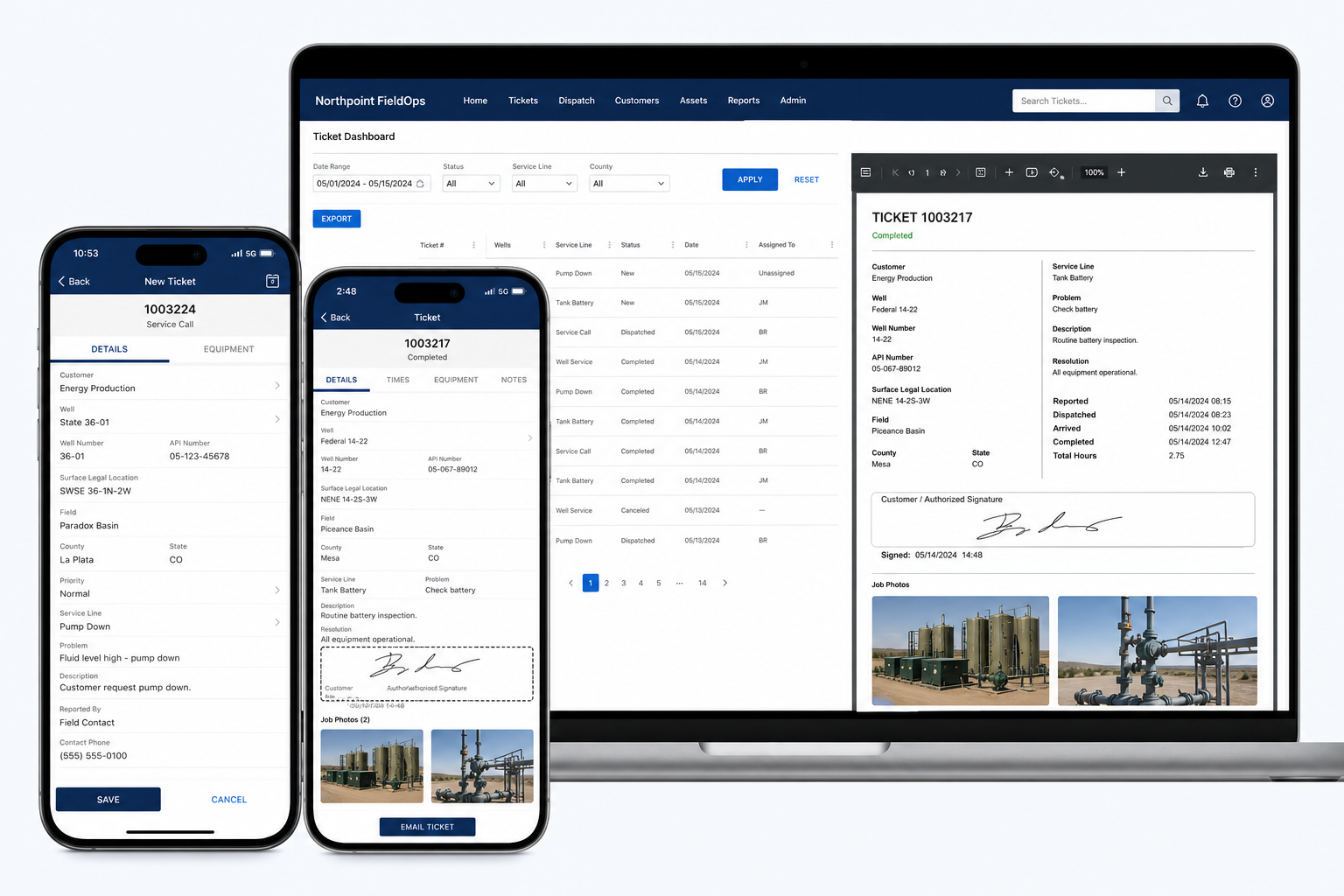
Digital Field Tickets, Safety Forms, Equipment Tracking, and Oilfield Workflow Software
Northpoint FieldOps is oilfield ticketing software for service companies that need to replace paper field tickets, delayed paperwork, and scattered job photos with a connected digital workflow.
Crews can complete tickets from a phone, tablet, or computer, collect customer signatures and job photos, generate professional PDFs, and deliver completed records to the office immediately. Start with digital field tickets, then add safety forms, inspections, dispatch, equipment, and certification tracking as your operation requires.
Crews can complete tickets from a phone, tablet, or computer, collect customer signatures and job photos, generate professional PDFs, and deliver completed records to the office immediately. Start with digital field tickets, then add safety forms, inspections, dispatch, equipment, and certification tracking as your operation requires.
From the field to the office, Northpoint FieldOps can organize work tickets, customer signatures, safety forms, equipment inspections, employee certifications, job photos, and completed records in one connected platform.
The goal is straightforward:
Complete the paperwork in the field, deliver it to the office immediately, and reduce the time between finished work and invoicing.
Built for oilfield service companies
Northpoint FieldOps is designed for companies such as:
- Water hauling and vacuum truck operators
- Roustabout crews
- Hotshot and trucking companies
- Welding and fabrication businesses
- Excavation contractors
- Well-service companies
- Pressure-testing providers
- Equipment rental companies
- Environmental service providers
- Safety and inspection companies
- Small and mid-sized field-service fleets
You do not need to replace every system your company already uses.
Northpoint can begin with the paperwork or workflow causing the greatest delay and build from there.
Digital Field Tickets
Paper field tickets can be lost, damaged, submitted late, or returned without the information required for billing.
Northpoint FieldOps can provide mobile-friendly digital tickets that crews complete from a phone, tablet, or computer.
Each ticket may include:
- Customer
- Operator
- Lease or well name
- Well number
- Job location
- Purchase-order number
- Work performed
- Employees on site
- Trucks and equipment used
- Materials and quantities
- Start and stop times
- Mileage
- Billable units
- Job notes
- Customer signature
- Job photographs
- Completion status
After submission, the system can automatically:
- Assign a ticket number
- Generate a professional PDF
- Email the ticket to the office
- Send a copy to the customer
- Save it in a searchable archive
- Mark it ready for invoicing
- Export data for accounting or reporting
Faster Paperwork Can Mean Faster Payment
When completed tickets reach the office immediately, administrative staff can review the work sooner, correct missing information faster, and prepare invoices without waiting for drivers or supervisors to return with paper copies.
Job Safety and Compliance Forms
Safety paperwork should be easy to complete, easy to review, and easy to retrieve.
Northpoint FieldOps can digitize forms such as:
- Job Safety Analyses
- Tailgate safety meetings
- Vehicle inspections
- Equipment inspections
- Incident reports
- Near-miss reports
- Spill reports
- Stop-work reports
- PPE checklists
- Hot-work permits
- Pre-trip inspections
- Post-trip inspections
- Confined-space checklists
- Customer-specific safety forms
Each form can capture:
- Employee name
- Date and time
- Job or location
- Crew members
- Hazards
- Corrective actions
- Signatures
- Photos
- Supervisor review
- GPS location when appropriate
Completed records can be stored by employee, job, customer, vehicle, or equipment unit.
Equipment and Fleet Inspections
Northpoint FieldOps can create a digital record for each truck, trailer, pump, tank, compressor, generator, welder, or piece of heavy equipment.
Each equipment profile may include:
- Unit number
- VIN or serial number
- Make and model
- Current mileage or hours
- Inspection history
- Maintenance notes
- Open repair issues
- Registration expiration
- Insurance expiration
- Certification records
- Attached documents
- Photographs
A QR code can be attached to the unit so an employee can scan it and immediately open the correct inspection form.
Maintenance Reminders
The system can help identify:
- Upcoming service intervals
- Expiring registrations
- Insurance renewals
- Overdue inspections
- Unresolved repair issues
- Equipment placed out of service
Work Orders and Dispatch
Office staff can create a work order and send the assignment to the appropriate crew.
A work order may include:
- Customer
- Job site
- Scope of work
- Scheduled date and time
- Assigned crew
- Required equipment
- Customer contact
- Directions
- Gate instructions
- Site hazards
- Required paperwork
- Priority
- Purchase-order number
The field crew can update the job through statuses such as:
Assigned → En Route → On Site → Work Completed → Ready to Invoice
This gives the office a clearer view of active and completed jobs.
Employee Certification Tracking
Oilfield service companies often manage multiple training requirements and expiration dates.
Northpoint FieldOps can track items such as:
- H2S training
- SafeLand or PEC
- OSHA training
- First aid and CPR
- Commercial driver licenses
- Medical cards
- Equipment qualifications
- Customer-specific orientation
- Drug-testing records
- Respirator fit testing
- Defensive driving
- Additional safety certifications
Management can receive reminders before a credential expires.
Employee records can also be filtered by:
- Active
- Expiring soon
- Expired
- Missing documentation
- Qualified for specific work
Customer and Well-Site Directory
Enter commonly used customer and site information once and reuse it across field tickets, safety forms, work orders, and invoices.
Records may include:
- Customer or operator
- Billing contact
- Billing email
- Lease name
- Well name
- Well number
- Site address
- GPS coordinates
- Gate instructions
- Site contact
- Required PPE
- Known hazards
- Customer-specific forms
- Purchase-order requirements
- Billing instructions
This reduces repetitive typing and helps crews receive consistent information.
Digital Signatures and Job Photos
Field employees can collect customer approval before leaving the site.
A completed record may include:
- Customer representative name
- Signature
- Date and time
- Completion acknowledgment
- Before-and-after photos
- Equipment photos
- Damage documentation
- Material receipts
- Supporting documents
All information stays connected to the job rather than being scattered across employee phones and email threads.
Searchable Ticket and Document Archive
Office staff can search records by:
- Ticket number
- Customer
- Job location
- Well or lease
- Employee
- Equipment
- Date
- Status
- Purchase-order number
- Work type
Records can be filtered, printed, emailed, or exported for reporting.
This can reduce the time spent searching through filing cabinets, inboxes, shared folders, and text messages.
Northpoint Oilfield Website Package
Northpoint can also create a professional website for your oilfield service company.
A strong company website may include:
- Service pages
- Equipment and fleet gallery
- Safety qualifications
- Industries served
- Service areas
- Employment applications
- Request-a-quote forms
- Vendor documents
- Certificate upload forms
- Emergency contact information
- Customer portal links
- Local search-engine optimization
- Hosting and maintenance
Your field capabilities may be excellent. Your website should communicate that clearly to operators, purchasing managers, contractors, and potential employees.
Built Around Your Existing Operation
Northpoint FieldOps is not intended to force your business into one rigid process.
The system can be designed around:
- The tickets you already use
- Your current numbering system
- Customer-required forms
- Your approval process
- Your billing workflow
- Your equipment list
- Your safety procedures
- Your existing accounting software
- The responsibilities of office and field staff
Existing paper forms can often be used as the starting point for digital versions.
Start With One Workflow
You do not need to build the entire platform at once.
Digital Field Tickets
Begin with mobile tickets, customer signatures, PDF generation, photographs, and office email delivery.
Safety and Inspections
Add JSAs, tailgate meetings, equipment inspections, vehicle inspections, and incident reporting.
Equipment and Certifications
Track units, maintenance, documents, employee qualifications, and expiration dates.
Complete FieldOps Platform
Connect work orders, dispatch, field tickets, safety, inspections, customers, equipment, certifications, and reporting.
Each phase can provide immediate value while preparing the company for future expansion.
Online First, Offline Later
The initial Northpoint FieldOps system can operate as a secure mobile-friendly web application.
Where dependable service is available, employees can complete and submit records from the field.
For crews working in areas with poor cellular coverage, a future offline-capable version may include:
- Save forms on the device
- Complete tickets without a signal
- Store photos temporarily
- Synchronize when service returns
- Prevent duplicate submissions
- Preserve incomplete drafts
Offline functionality should be implemented and tested carefully before being relied upon for critical field operations.
Why Northpoint FieldOps?
Practical Development
The system is built around the actual document, ticket, or workflow creating the problem.
Budget-Conscious Implementation
Begin with one useful tool rather than purchasing a large platform containing features your company may never use.
Direct Support
Work directly with Northpoint Web Solutions rather than navigating a large software support department.
Custom Forms and Workflows
Your customer fields, safety forms, terminology, ticket numbers, and approval steps can be incorporated into the system.
WordPress and Web-Based Flexibility
Many features can be incorporated into a secure company website or connected administrative portal.
Scalable Design
Begin with digital field tickets and add dispatch, inspections, certifications, customer portals, and integrations over time.
Potential Northpoint FieldOps Packages
Northpoint Field Tickets
A focused system for companies that want to eliminate paper tickets.
Includes:
- Digital field tickets
- Customer signatures
- Job photos
- PDF generation
- Email delivery
- Ticket numbering
- Searchable archive
- CSV export
Estimated setup: $2,500–$6,000
Estimated monthly service: $199–$499
Northpoint FieldOps Professional
A broader operational system that may include:
- Digital tickets
- Safety forms
- Vehicle and equipment inspections
- Employee certification tracking
- Work orders
- Customer and site records
- Management reporting
Estimated setup: $6,000–$15,000
Estimated monthly service: $500–$1,500
Custom FieldOps Platform
For businesses needing:
- Dispatch
- Offline mobile operation
- Customer portals
- Accounting integration
- Fleet maintenance
- Advanced permissions
- Multiple locations
- API connections
- Custom reporting
Custom proposal required
Pricing depends on the number of forms, employees, workflows, integrations, and support requirements.
Request a Free Field Workflow Review
Northpoint Web Solutions can review the paperwork and processes your company currently uses.
During the review, we can examine:
- Field tickets
- Safety forms
- Equipment inspections
- Customer signatures
- Job photos
- Employee certifications
- Dispatch procedures
- Office handoffs
- Billing delays
- Repetitive data entry
- Existing software
- Potential accounting integrations
The objective is to identify the one improvement that would create the most immediate value.
Complete the Work. Capture the Record. Invoice Faster.
What oilfield ticketing software should handle
A useful digital field ticket should capture the information your office needs to review work and prepare it for billing. Northpoint FieldOps tickets may include:
- Customer, operator, lease, well name, and well number
- Job location and purchase-order number
- Work performed, employees, trucks, equipment, materials, and billable units
- Start and stop times, mileage, notes, and completion status
- Customer signature and job photographs
After submission, the system can automatically assign a ticket number, generate a PDF, email the ticket to the office, send a copy to the customer, save it in a searchable archive, mark it ready for invoicing, and export data for accounting or reporting.
Move completed tickets from the field to the office faster
When completed tickets reach the office immediately, administrative staff can review the work sooner, correct missing information faster, and prepare invoices without waiting for drivers or supervisors to return with paper copies.
Records can be searched by ticket number, customer, job location, well or lease, employee, equipment, date, status, purchase-order number, or work type. They can also be filtered, printed, emailed, or exported for reporting.
Add safety forms and inspections when you are ready
FieldOps can extend beyond ticketing to digitize Job Safety Analyses, tailgate safety meetings, vehicle inspections, equipment inspections, incident reports, near-miss reports, spill reports, stop-work reports, PPE checklists, hot-work permits, pre-trip inspections, post-trip inspections, confined-space checklists, and customer-specific safety forms.
Completed records can be stored by employee, job, customer, vehicle, or equipment unit, with signatures, photos, supervisor review, corrective actions, and GPS location when appropriate.
Track equipment, certifications, and job assignments
Companies can create digital records for trucks, trailers, pumps, tanks, compressors, generators, welders, and other heavy equipment. Profiles may include inspection history, maintenance notes, open repair issues, registration and insurance dates, certification records, documents, and photographs.
FieldOps can also track employee requirements such as H2S training, SafeLand or PEC, OSHA training, first aid and CPR, commercial driver licenses, medical cards, equipment qualifications, customer orientations, and other safety certifications.
Office staff can create work orders with job details, assigned crews, required equipment, directions, hazards, paperwork, priorities, and purchase-order information. Crews can update statuses from Assigned to En Route, On Site, Work Completed, and Ready to Invoice.
Replace delayed oilfield paperwork with digital field tickets
Paper tickets, scattered spreadsheets, text-message photos, and delayed paperwork can slow review, billing, and record retrieval. Northpoint FieldOps gives oilfield service companies a way to complete work records in the field and deliver them to the office immediately.
Oilfield ticketing software built around your existing workflow
Crews can complete mobile-friendly digital field tickets from a phone, tablet, or computer. Tickets can capture customer and well information, work performed, equipment, materials, start and stop times, notes, photos, signatures, and completion status.
After submission, the system can generate a PDF, email the ticket to the office or customer, save it in a searchable archive, and mark it ready for invoicing.
Expand from tickets to connected field operations
Once digital tickets are working, companies can add safety forms, equipment inspections, work orders, dispatch statuses, employee certification tracking, customer and well-site records, and searchable job archives. Each phase can provide immediate value without requiring the company to replace every system it already uses.
Designed for oilfield service companies
FieldOps is designed for water hauling and vacuum truck operators, roustabout crews, hotshot and trucking companies, welding and fabrication businesses, excavation contractors, well-service companies, pressure-testing providers, equipment rental companies, environmental service providers, safety and inspection companies, and small and mid-sized field-service fleets.
Northpoint’s stated approach is practical development: start with the document, ticket, or workflow creating the greatest delay, then build from the company’s existing forms, numbering system, approval process, billing workflow, and equipment list.
Start small instead of replacing every system
Companies do not need to build the complete FieldOps platform at once. A focused digital ticket system can begin with mobile tickets, customer signatures, job photos, PDF generation, email delivery, ticket numbering, a searchable archive, and CSV export. Safety, inspections, equipment, certifications, dispatch, and reporting can be added later.
The initial system can operate as a secure mobile-friendly web application. Offline functionality should be implemented and tested carefully before being relied upon for critical field operations.
Choose the FieldOps starting point that fits your operation
Northpoint Field Tickets: Estimated setup of ,500–,000 and estimated monthly service of 9–9.
Northpoint FieldOps Professional: Estimated setup of ,000–,000 and estimated monthly service of 0–,500, depending on the workflows included.
Custom FieldOps Platform: Intended for businesses needing capabilities such as dispatch, offline mobile operation, customer portals, accounting integration, fleet maintenance, advanced permissions, multiple locations, or API connections.
Discuss the first workflow you want to improve and determine whether digital field tickets or a broader FieldOps implementation is the appropriate starting point.
Start with the oilfield workflow causing the biggest delay
Tell Northpoint which paperwork or field process you want to improve first. You can begin with digital field tickets and expand to safety, inspections, equipment, certifications, dispatch, and reporting as your operation is ready.
What oilfield ticketing software should handle
A useful digital field ticket should capture the information your office needs to review work and prepare it for billing. Northpoint FieldOps tickets may include:
- Customer, operator, lease, well name, and well number
- Job location and purchase-order number
- Work performed, employees, trucks, equipment, materials, and billable units
- Start and stop times, mileage, notes, and completion status
- Customer signature and job photographs
After submission, the system can automatically assign a ticket number, generate a PDF, email the ticket to the office, send a copy to the customer, save it in a searchable archive, mark it ready for invoicing, and export data for accounting or reporting.
Move completed tickets from the field to the office faster
When completed tickets reach the office immediately, administrative staff can review the work sooner, correct missing information faster, and prepare invoices without waiting for drivers or supervisors to return with paper copies.
Records can be searched by ticket number, customer, job location, well or lease, employee, equipment, date, status, purchase-order number, or work type. They can also be filtered, printed, emailed, or exported for reporting.
Add safety forms and inspections when you are ready
FieldOps can extend beyond ticketing to digitize Job Safety Analyses, tailgate safety meetings, vehicle inspections, equipment inspections, incident reports, near-miss reports, spill reports, stop-work reports, PPE checklists, hot-work permits, pre-trip inspections, post-trip inspections, confined-space checklists, and customer-specific safety forms.
Completed records can be stored by employee, job, customer, vehicle, or equipment unit, with signatures, photos, supervisor review, corrective actions, and GPS location when appropriate.
Track equipment, certifications, and job assignments
Companies can create digital records for trucks, trailers, pumps, tanks, compressors, generators, welders, and other heavy equipment. Profiles may include inspection history, maintenance notes, open repair issues, registration and insurance dates, certification records, documents, and photographs.
FieldOps can also track employee requirements such as H2S training, SafeLand or PEC, OSHA training, first aid and CPR, commercial driver licenses, medical cards, equipment qualifications, customer orientations, and other safety certifications.
Office staff can create work orders with job details, assigned crews, required equipment, directions, hazards, paperwork, priorities, and purchase-order information. Crews can update statuses from Assigned to En Route, On Site, Work Completed, and Ready to Invoice.