A Branded, Simplified WordPress Dashboard Built for Your Organization
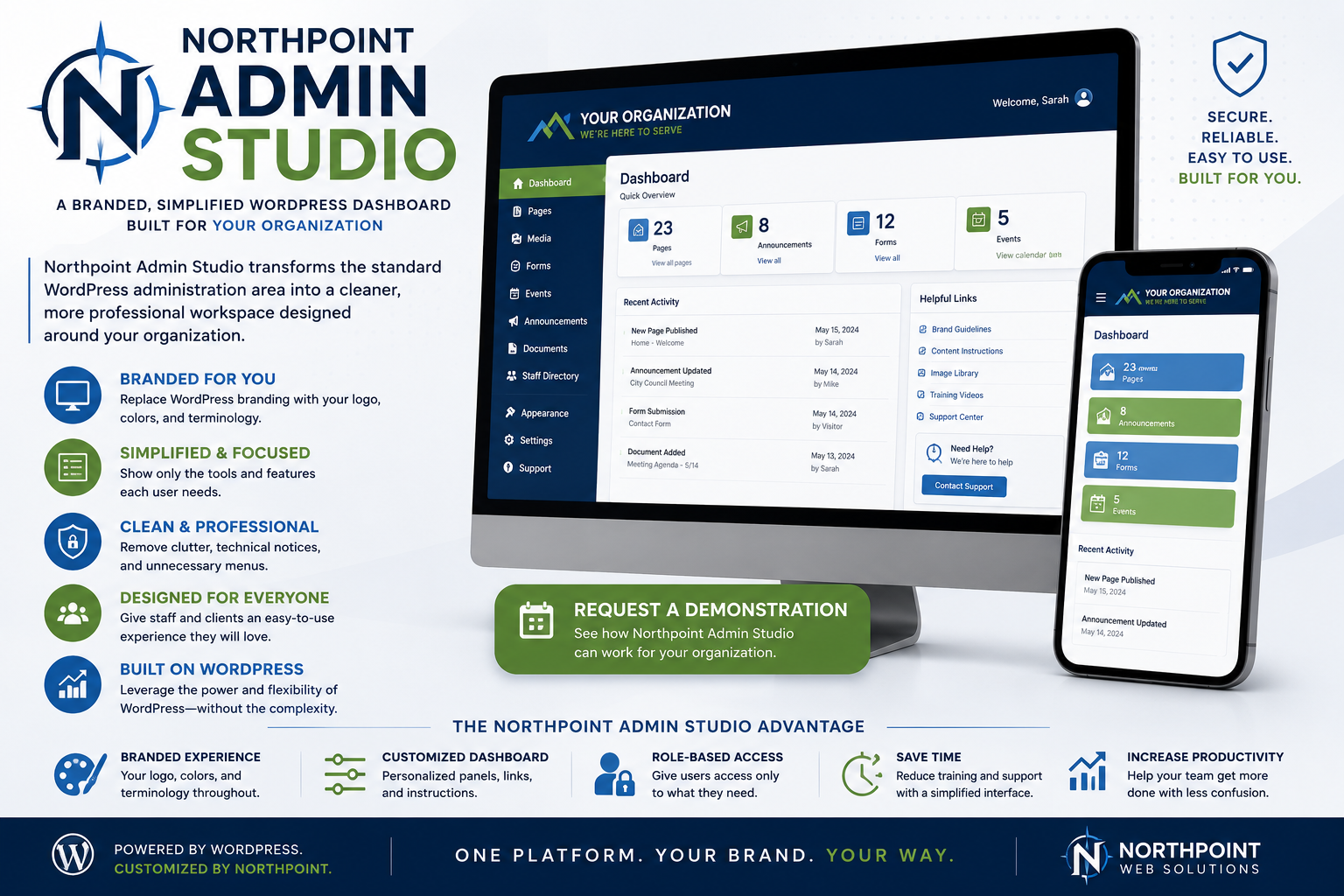
Northpoint Admin Studio transforms the standard WordPress administration area into a cleaner, more professional workspace designed around your organization.
Instead of presenting staff or clients with generic WordPress branding, unnecessary menus, technical notices, and confusing settings, Northpoint Admin Studio creates a customized dashboard with your logo, colors, instructions, tools, and terminology.
The result is a WordPress experience that feels like your own software platform.
[Request a Demonstration]
Make WordPress Feel Like Your Own System
WordPress is powerful, but its standard administration area was designed for developers, publishers, and website owners with many different needs.
Most employees do not need access to everything WordPress provides.
Northpoint Admin Studio simplifies the experience by presenting only the tools each user needs.
A standard WordPress dashboard might include:
Posts
Media
Pages
Comments
Appearance
Plugins
Users
Tools
Settings
A customized dashboard might instead show:
Website Dashboard
City Alerts
Public Notices
Meetings
Forms
Documents
Departments
Website Help
The underlying website still uses WordPress, but the administrative experience becomes clearer and more appropriate for the organization.
Custom Login Branding
The standard WordPress login screen can be replaced with a professional branded entry page.
Available customizations may include:
- Organization logo
- Custom background
- Brand colors
- Welcome message
- Login instructions
- Support contact
- Privacy notice
- Custom login URL
- Password-reset guidance
- Removal of WordPress branding
For a city website, the login screen might display:
Duchesne City Website Administration
Authorized staff access only.
For a business or agency, it can display the client’s identity instead of the WordPress logo.
A Customized Administrative Dashboard
After logging in, staff can see a dashboard built around their responsibilities.
Possible dashboard features include:
- Welcome message
- Organization logo
- Quick-action buttons
- Recently updated content
- Active website alerts
- Pending form submissions
- Upcoming meetings
- Website maintenance information
- Training instructions
- Support contact details
- Commonly used links
- System-status summaries
The dashboard can become the starting point for daily website work rather than a collection of generic WordPress widgets.
Simplified Menus
Northpoint Admin Studio can hide, rename, reorder, or group administrative menu items.
This makes the dashboard easier to navigate and reduces unnecessary distractions.
For example:
Before
Dashboard
Posts
Media
Pages
Comments
Appearance
Plugins
Users
Tools
Settings
Fluent Forms
SEO
Custom Post Types
After
Dashboard
News
City Alerts
Public Notices
Meetings
Forms & Applications
Departments
Documents
Staff
Website Support
The terminology can match the organization’s actual workflow.
Role-Based Dashboard Experiences
Different users can see different menus and dashboard tools.
Administrator
May have access to:
- Website settings
- User management
- Plugins
- Themes
- Security
- Backups
- All content sections
City Recorder
May have access to:
- Meetings
- Agendas
- Minutes
- Public notices
- Elections
- Forms
- Documents
- Alerts
Recreation Staff
May have access to:
- Recreation programs
- Pool information
- Parks
- Events
- Registrations
- Announcements
Department Editor
May have access only to:
- Assigned department pages
- Department staff
- Related forms
- Department notices
Client Editor
May have access to approved website content but not technical settings.
This creates a safer and more focused environment for every user.
Protect Technical Settings
Many WordPress problems occur when a well-intentioned user changes something outside their area of responsibility.
Northpoint Admin Studio can restrict access to:
- Plugins
- Themes
- Theme editor
- Site settings
- Permalinks
- User roles
- Security tools
- Backup settings
- Global page-builder options
- Custom code
- Server-related settings
Staff can continue updating the information they manage without being exposed to settings that could damage the website.
Custom Dashboard Instructions
Northpoint Admin Studio can place guidance directly where staff need it.
Examples include:
Use City Alerts for urgent information that should appear in the red website banner.
Upload approved meeting minutes only after formal adoption.
Do not place applicant email addresses in the From field of notification emails.
Use the Public Notices section for official hearings and legal notices.
Contact Northpoint support before installing or removing plugins.
These instructions reduce training time and help prevent common mistakes.
Quick-Action Buttons
The dashboard can include large, clearly labeled buttons for common tasks.
Examples include:
- Create City Alert
- Add Public Notice
- Upload Meeting Agenda
- Post Job Opening
- Review Form Submissions
- Update Department
- Add Community Event
- View Website
- Contact Support
This allows staff to begin common tasks without navigating through several menus.
Organization Branding
Northpoint Admin Studio can apply consistent branding throughout the administration area.
Possible elements include:
- Organization logo
- Custom accent colors
- Branded dashboard header
- Login-screen design
- Custom footer text
- Agency support information
- Custom menu icons
- Department labels
- Client-specific help links
- Branded email notices
This creates a polished experience for staff, clients, and website administrators.
Remove Unnecessary WordPress Branding
Depending on the implementation, Northpoint Admin Studio can replace or remove:
- WordPress logo in the admin bar
- Generic dashboard welcome panel
- WordPress footer credits
- Version information
- Update notices for restricted users
- Plugin advertisements
- Promotional dashboard widgets
- Unnecessary help tabs
- Developer-oriented menu items
Administrators can retain access to technical information while ordinary users see a cleaner interface.
Custom Administrative Footer
The standard WordPress footer can be replaced with organization-specific information.
For example:
Duchesne City Website Administration
Website support provided by Northpoint Web
or:
Northpoint Civic CMS
Need assistance? Contact Website Support.
The footer can include:
- Support email
- Support phone number
- Documentation link
- Website status link
- Training resources
- Software version
- Organization copyright
Admin-Bar Customization
The black WordPress toolbar at the top of the website can be simplified.
Possible changes include:
- Replace the WordPress logo
- Add a direct dashboard link
- Add a “View Website” button
- Add a “Create Alert” shortcut
- Add a support link
- Remove comments
- Remove developer menus
- Hide update indicators for restricted users
- Add organization-specific shortcuts
This makes the toolbar more useful for staff who regularly switch between the public site and administration area.
Custom Welcome Experience
New staff members can be greeted with a simple onboarding panel.
For example:
Welcome to the City Website Dashboard
From this dashboard, you can:
- Update department information
- Publish public notices
- Upload agendas and minutes
- Review online forms
- Create website alerts
For assistance, use the Website Support link or contact your administrator.
This gives users immediate direction instead of placing them in an unfamiliar WordPress screen.
Built-In Help and Documentation
Northpoint Admin Studio can include a custom help section with:
- Written instructions
- Short training videos
- Frequently asked questions
- Screenshot guides
- Staff procedures
- Content standards
- Accessibility reminders
- Support request form
- Emergency contact details
Help content can be tailored to the exact website rather than relying solely on generic WordPress documentation.
Custom Notification Management
WordPress plugins often display notices throughout the dashboard.
Some are useful to administrators but confusing to ordinary staff.
Northpoint Admin Studio can:
- Hide promotional notices
- Restrict technical warnings to administrators
- Display organization-specific reminders
- Show maintenance announcements
- Present urgent support notices
- Reduce dashboard clutter
Important security and maintenance information can remain visible to authorized administrators.
White-Label Client Portals
Northpoint Admin Studio is also useful for web agencies and service providers.
An agency can provide clients with a branded dashboard that includes:
- Agency logo
- Custom support links
- Client-specific instructions
- Maintenance status
- Hosting details
- Training resources
- Service-plan information
- Request-support button
This creates a more professional client experience and strengthens the agency’s brand.
Designed for Northpoint Civic CMS
Northpoint Admin Studio works especially well with Northpoint Civic CMS.
Together, they can create a municipal dashboard such as:
Northpoint Civic

Dashboard
City Alerts
Public Notices
Meetings
Agendas & Minutes
Departments
Forms & Applications
Documents
Employment
Website Support
Staff interact with familiar municipal categories while the underlying WordPress tools remain organized and protected.
Northpoint Notify Integration
The dashboard can include direct access to Northpoint Notify.
Possible widgets include:
- Active alerts
- Recent broadcasts
- Subscriber totals
- Failed-delivery warnings
- Create New Alert button
- Twilio connection status
- Email delivery status
Authorized staff can reach the alert system without navigating through unrelated WordPress menus.
Northpoint Civic Forms Integration
Northpoint Admin Studio can surface form information directly on the dashboard.
Examples include:
- New building permit applications
- Pending business license submissions
- Upcoming park reservations
- Utility applications awaiting review
- Recent payment submissions
- Forms requiring staff attention
Each department can see only the submissions relevant to its work.
Northpoint Content Manager Integration
Structured content sections created through Northpoint Content Manager can be renamed and reorganized for staff.
Instead of seeing technical labels such as “Custom Post Types,” users may see:
- Meetings
- Staff Directory
- Projects
- Facilities
- Job Openings
- Public Notices
- Frequently Asked Questions
Northpoint Admin Studio provides the simplified interface while Content Manager organizes the underlying information.
Northpoint AI Assistant for Staff
A future or optional staff assistant could be available inside the dashboard.
Staff could ask questions such as:
How do I post a City Council agenda?
Where do I review park reservation submissions?
How do I create a water outage alert?
Which page contains the business license information?
The assistant could guide staff through approved website procedures and documentation.
Agency and Client Branding Modes
Northpoint Admin Studio can support different branding approaches.
Organization Branding
The dashboard displays the city, business, school, or nonprofit identity.
Northpoint Branding
The dashboard presents the website as part of the Northpoint platform.
Agency Branding
A web agency can apply its own brand for client websites.
Combined Branding
The client’s organization appears prominently, with support identified as being provided by Northpoint or another agency.
This flexibility allows the system to match the business relationship.
WordPress Multisite Support
For organizations managing several WordPress websites, Northpoint Admin Studio can potentially support multisite environments.
Examples include:
- Several municipal department websites
- Multiple city clients
- School network sites
- Franchise websites
- Regional organization sites
- Web agency client networks
Branding and menu controls can be applied consistently while allowing site-specific differences.
Multisite functionality depends on the final plugin configuration and hosting environment.
Security-Conscious Administration
A simplified dashboard can support better security by limiting unnecessary access.
Available protections may include:
- Role-based menus
- Restricted plugin access
- Disabled file editing
- Limited user-management permissions
- Hidden technical settings
- Activity logging
- Session controls
- Strong-password guidance
- Two-factor authentication compatibility
- Custom support alerts
Northpoint Admin Studio does not replace a full security solution, but it can reduce the number of users exposed to sensitive controls.
Preserve Administrator Access
White-label customization should not make the website impossible to maintain.
Full administrators can retain access to:
- Plugins
- Themes
- Users
- System settings
- Updates
- Logs
- Security tools
- Database tools
- Developer settings
The simplified experience is primarily intended for staff members, editors, clients, and department users.
Page-Builder Controls
Northpoint Admin Studio can help reduce accidental page-builder changes.
Depending on the page builder, users may be allowed to:
- Edit approved text
- Replace images
- Update links
- Change limited section content
while being restricted from:
- Deleting major sections
- Changing global styles
- Editing headers and footers
- Modifying responsive settings
- Changing templates
- Adding unauthorized scripts
This is especially valuable on websites maintained by multiple staff members.
Custom User Profiles
User profile screens can also be simplified.
Unnecessary options may be hidden while useful fields remain available, such as:
- Name
- Password
- Department
- Job title
- Contact information
- Profile photo
- Assigned content areas
This gives the organization a cleaner user-management experience.
Dashboard Analytics
The dashboard may include concise website information such as:
- Recent page updates
- Most-visited pages
- Form-submission totals
- Active subscriber count
- Current alerts
- Broken-link warnings
- Website uptime
- Security notices
- Pending updates
The goal is to provide useful information without overwhelming staff with technical reports.
Common Applications
Northpoint Admin Studio is useful for:
- City and county websites
- Public agencies
- School websites
- Business websites
- Nonprofit organizations
- Churches
- Membership organizations
- Web agencies
- Franchise networks
- Multi-location businesses
- Client-managed WordPress sites
- Internal company portals
Any organization that gives nontechnical users access to WordPress can benefit from a simpler dashboard.
Benefits for Organizations
Easier Staff Training
Users learn organization-specific tools instead of the entire WordPress system.
Safer Website Management
Sensitive technical settings can be restricted.
Stronger Branding
The dashboard reflects the organization rather than generic software.
Less Confusion
Unnecessary menus, notices, and settings are removed.
Faster Common Tasks
Quick links lead directly to everyday workflows.
Better Support
Instructions and support tools appear inside the dashboard.
Professional Client Experience
Agencies can present WordPress as a polished managed platform.
More Than a Logo Replacement
A basic white-label plugin may only replace the WordPress logo and footer.
Northpoint Admin Studio goes further.
It can reshape the complete administrative experience through:
- Custom roles
- Simplified menus
- Dashboard workflows
- Quick-action buttons
- Staff instructions
- Branded login screens
- Technical restrictions
- Integrated Northpoint software
- Organization-specific help
- Client support tools
The goal is not simply to hide WordPress.
The goal is to make WordPress easier and more appropriate for the people using it.
Northpoint Admin Studio
Turn WordPress into a Branded Platform Your Staff Can Actually Use
Northpoint Admin Studio gives organizations a cleaner, safer, and more professional WordPress administration experience.
Your branding replaces generic software.
Your staff sees the tools they need.
Your website settings remain protected.