Hey—I’m Andrew North. If you’ve ever wrestled with five different logins, a dozen people editing the same page, or staff who only have partial visibility into tasks, you’re not alone. Back when I was learning on bulletin-board systems and early dial-up connections, the appeal of a single place to manage things was obvious. Today’s websites should do the same for your organization: be one place staff use every day to get work done.
Three administration problems most organizations recognize
When we start conversations with municipal IT leads, nonprofit operations managers, or small-agency administrators, three issues always come up:
1. Scattered logins and fragmented tools
Staff juggle separate logins for hosting, WordPress, forms, GIS, email lists, and third‑party apps. That creates delays when someone is out, increases the chance of orphaned accounts, and makes auditing difficult.
2. Inconsistent content and broken workflows
Content edits, press releases, and announcements are often produced in email threads or shared drives, then pasted into the site without a review process. The result: inconsistent tone, duplicated pages, outdated notices, and confused visitors.
3. Loose or unclear staff permissions
WordPress roles are a start, but many organizations need department-level access, assignment of tasks, or temporary permissions that standard roles don’t cover. Without clearer controls, mistakes happen and responsibility is hard to track.
How a centralized dashboard maps to those problems
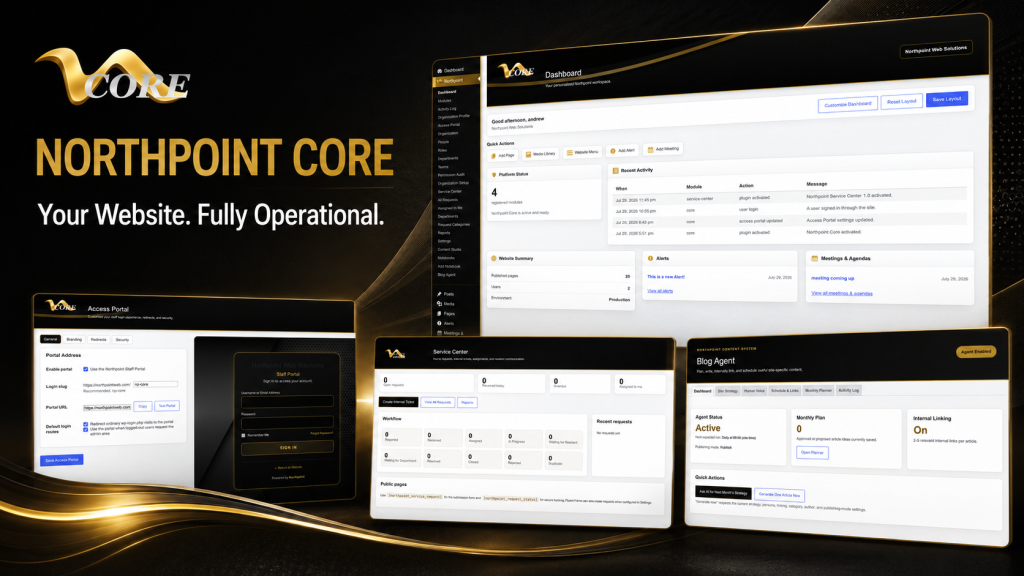
A well-designed administrative dashboard doesn’t just add another interface; it centralizes common tasks and enforces a repeatable workflow for content, requests, and staff responsibilities. Northpoint Core is designed to be that central hub—it’s a modular framework that brings tools together inside WordPress so you don’t force staff to bounce between unrelated systems.
Single sign-in and consolidated tools
Instead of telling staff to remember hosting credentials, form‑builder logins, and separate admin panels, a dashboard gives them one place to land. Northpoint Core is designed to host modules—Content Studio, Notebooks, Service Center—so your team logs into WordPress and has contextual links to the exact tools they need. That reduces friction and makes backups, maintenance, and onboarding simpler.
Content workflows that reduce duplication
One reason we designed Northpoint Content Studio to work within the Core framework is to create a dedicated environment for drafts, internal reviews, and scheduled publishing. Editors can write in a place that’s separate from live pages, route content for approval, and publish on a schedule. That cuts down on accidental live edits and makes it easier to keep tone and formatting consistent across pages and departments.
Department-based permissions and task assignment
Northpoint Organization tools support departments, teams, staff, roles, and permissions. When combined with a dashboard workflow, an incoming service request can be routed to the right department, assigned to a staff member, given a due date, and tracked—all without exporting to another ticketing system. This reduces the “who owns it?” problem that normally slows responses.
Practical workflow examples
Here are three short examples of what these combined tools accomplish in real operations (no fictional testimonials, just practical patterns we use when building systems).
Streamlined public request handling
When a resident submits a request through a site form, Northpoint Service Center captures the submission, creates an internal ticket, assigns it to a department, and provides a communication history visible to staff. Staff don’t need to check email or multiple spreadsheets; the dashboard shows outstanding items and due dates in one list.
Content publishing with review and scheduling
Content Studio lets writers create drafts, request review from a supervisor, and schedule publication. The dashboard highlights pending drafts and recent edits, reducing accidental overwrites and allowing nontechnical staff to focus on approvals, not formatting.
Accountability with role-aware views
Department heads see only their teams’ items; site admins see the whole picture. That minimizes role confusion while keeping oversight simple. Northpoint Organization tools support these structures so permissions reflect how your organization actually works.
When to add a full dashboard versus incremental tools
Deciding between a complete administrative dashboard and smaller, incremental tools is often about scale and coordination. Here’s a short decision framework to help you choose.
- Choose incremental tools when: Pain points are isolated—one department needs a form automation or the marketing team wants a better editor. If only one workflow is broken and it affects a small group, a targeted plugin or process change may be faster and cheaper.
- Choose a dashboard when: Multiple teams struggle with overlapping workflows, you need consolidated reporting, or account and permission management is a recurring problem. Dashboards pay off when coordination matters more than a single feature.
- Budget and timing: If you need quick wins while planning a dashboard, implement the highest-impact incremental tools first (forms with routing, a dedicated editorial workspace), then fold them into the dashboard later. Northpoint’s modular approach is designed for this incremental path.
Technical and organizational considerations
Building a dashboard on WordPress keeps your website and tools together, but it does require planning: define roles, map workflows, choose which modules to activate, and plan for maintenance. One practical advantage is owning your software rather than depending on multiple SaaS subscriptions; another is that modules can be added over time without rebuilding the public site.
If you want examples of dashboards and modular apps built into WordPress, our Software & Apps page explains how Northpoint positions Core as a platform for modules such as Content Studio, Notebooks, and the Service Center. For an admin-specific, branded dashboard experience, see Northpoint Admin Studio, which illustrates simplified WordPress administration and role-aware views for staff.
Final thoughts and a brief historical note
When I think about websites that actually work for organizations, I remember the early web days and how a single bulletin board served a community. The goal hasn’t changed: provide a central place people return to because it makes life easier. A WordPress‑based dashboard built with Northpoint Core turns your public website into that kind of place for staff: one login, clearer workflows, and fewer things falling through the cracks.
Need a practical next step? Tell us what is difficult about managing your current website, and we can help identify which incremental tool or dashboard module will make the most difference. Request a Northpoint website review or contact Northpoint Web to discuss a demo or a review of your current setup.
Prefer to browse first? See our Software & Apps overview for Northpoint Core and related modules, or learn about a simplified admin experience on the Northpoint Admin Studio page. If your priority is reliable operations, our Gestión de sitios web services cover hosting, maintenance, backups, and ongoing support while you add applications.
Whether you need one tool or a full administrative hub, schedule a conversation about your current website and the improvements that would make the greatest difference for your staff and visitors.