Hey—I’m Andrew North. I grew up fascinated by bulletin board systems and the early web, teaching myself with library books and trial-and-error. That background matters because I still believe a website should do real work, not just look pretty. If you run a business or municipal office in the Uinta Basin (Vernal, Roosevelt, Duchesne), this article gives a practical, industry-aligned checklist for hiring WordPress help and explains which Northpoint product or service usually matches each local need.
Why ask region-specific questions when hiring WordPress help?
The Basin’s mix of energy support services, contractors, recreation, and small-town government creates predictable website and workflow needs: offline field work, permit-heavy municipal processes, seasonal recreation sign-ups, and straightforward local SEO. When you interview a WordPress developer or agency, focus on whether they understand those operational realities—not just whether they can make a site look modern.
Six common Uinta Basin use cases and the WordPress solution to ask for
Below are the top local scenarios we see and a concrete recommendation for what to ask your developer or which Northpoint product typically fits the job.
1) Oilfield and field operations: tickets, crew dispatch, and offline forms
The problem: crews on-site need a quick way to submit tickets, attach photos, and track assignments without a complex SaaS stack.
Ask for: a WordPress-based ticketing and dispatch workflow that supports mobile submissions, attachments, assignment, and reporting.
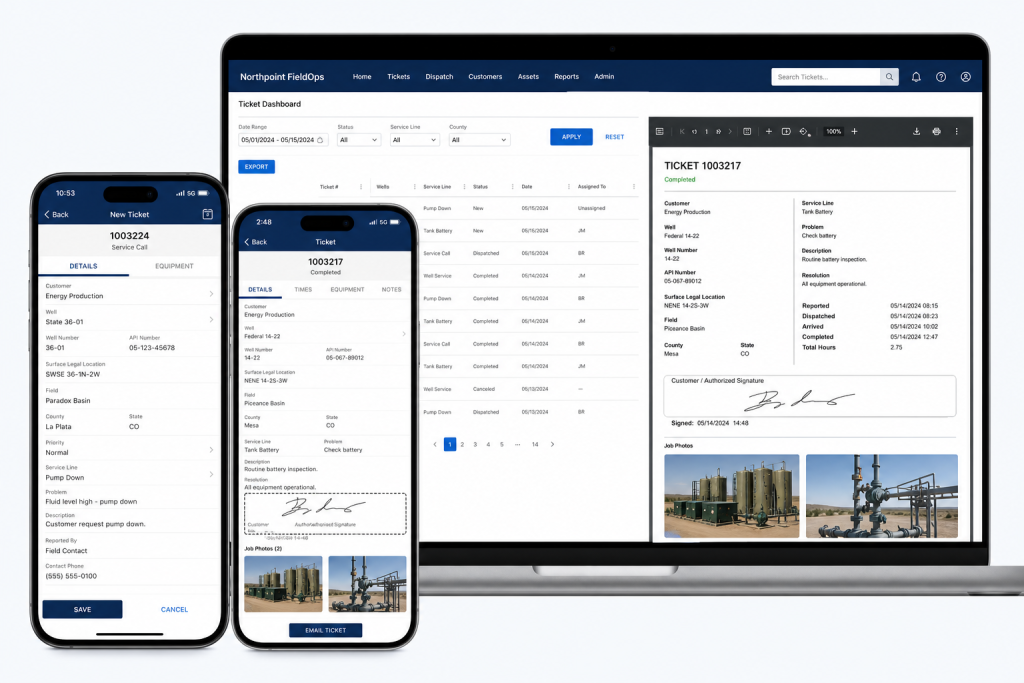
Northpoint fit: Northpoint FieldOps is designed for oilfield field tickets and field operations software. Ask how the developer will integrate mobile-friendly forms, assignment workflows, and CSV exports so your office can reconcile tickets without extra copying.
2) Municipal permits, public forms, and tracking
The problem: municipalities need reliable online forms that convert to an auditable internal workflow and keep the public informed on status.
Ask for: form-to-workflow systems that assign submissions, track statuses, send automated updates, and retain records for public access when required.
Northpoint fit: Northpoint Civic Forms and Northpoint Civic provide form and municipal website tools designed for online permits, applications, and civic workflows. Confirm the proposal includes staff notifications, status updates to requesters, and an internal assignment dashboard.
3) Parks, recreation, and seasonal program registration
The problem: rec departments need class and tournament sign-ups, wait lists, receipts, and limited-time events handled without manual spreadsheets.
Ask for: a registration system that supports capacity limits, payments or fee tracking, automated confirmations, and easy rostering for staff.
Northpoint fit: Northpoint Recreation Manager or modular form and content tools can be configured inside WordPress to handle registrations, event pages, and staff views for rosters and cancellations.
4) Service requests, public works, and accountability
The problem: resident requests arrive by phone, email, and paper—and they disappear into staff inboxes.
Ask for: a managed service-center workflow that captures requests in one place, assigns responsibility, and provides public-facing tracking codes.
Northpoint fit: Northpoint Service Center supports submission tracking, staff assignment, requester communication, internal notes, and reporting. A clear acceptance criterion is that requests shouldn’t rely on individual inboxes.
5) Small business operations: CRM, invoicing, and job scheduling
The problem: multiple SaaS subscriptions for CRM, scheduling, invoicing, and forms can be expensive and fragment data.
Ask for: a plan showing whether WordPress can centralize parts of your workflow—forms that create leads, an integrated staff portal, and automation that reduces manual entry.
Northpoint fit: Northpoint Core and custom WordPress software can connect forms, staff dashboards, and content into a single site-based operating system. Discuss whether a hybrid approach (WordPress for lead and workflow capture plus specialized SaaS for payments) makes sense for your business.
6) Local SEO and customer discovery for high-visibility services
The problem: in close-knit markets, being visible for local queries—“service + town”—drives calls and jobs.
Ask for: local SEO work tied to content that answers real customer questions (service pages, how-to posts, and Google Business optimization), and a content plan that produces steady pages or posts your team can maintain.
Northpoint fit: Our website and software services include local search strategy and content planning tools (Northpoint Blog Agent and Content Studio). A practical deliverable is a prioritized list of 10 service pages and a monthly content schedule tailored to Uinta Basin search behavior.
What to verify before hiring a WordPress developer
Can they show examples of workflow automation or custom plugins they built (not just themes)?
Do they propose tangible acceptance criteria—e.g., “forms create tickets with a unique tracking code and email notifications to X roles”?
Will the solution operate within your existing WordPress site or require a replacement? (We often add tools without rebuilding the public site.)
How will hosting, backups, and updates be handled—especially for sites that run critical operations?
Who will train staff and document the new processes?
Implementation and effort considerations
Custom WordPress tools can often replace several separate SaaS subscriptions, but there’s a trade-off: built-in workflow and ownership versus off-the-shelf convenience. Ask for an estimate that separates discovery, development, and ongoing support. In the early web days I learned the hard lesson that a system without documentation becomes a black box—so insist on staff training and simple admin screens.
Quick checklist to bring to vendor meetings
List your top three workflows (e.g., field tickets, permit applications, event registration).
Note who needs access: public users, front-desk staff, department heads.
Decide whether data must be retained publicly or archived internally.
Ask for a staged plan: discovery → prototype → staff testing → launch → maintenance.
Final note
The web began as a place for sharing files over slow connections; now we use the same platform to run real work. A WordPress developer who understands local industries in the Uinta Basin can turn your website into a working system that handles tickets, permits, registrations, requests, and leads—so it actually works for your organization 24 hours a day.
Talk with Northpoint Web Solutions about your website, software or workflow problem. We can help determine whether an existing Northpoint product, a custom WordPress plugin, or a custom software solution is the best fit.
If you remember connecting to a bulletin‑board system (BBS) over a squeaky dial‑up line, you know how satisfying it feels when a simple system just works. I still like things that do their job without extra fuss. For many contractor owners and operations managers, the website is boxed into the marketing role when it could be doing the actual work of the business: taking requests, creating jobs, tracking field work, and issuing invoices.
Why use the website for job management?
Too many small contractor shops run on emails, text threads, paper tickets, and spreadsheets. That creates lost requests, duplicated work, and billing gaps. The workflow below shows how a WordPress site can accept a form, convert it into a job record, collect field tickets, and produce an invoice—so your team doesn’t have to jump between separate SaaS tools every time.
Overview: forms → jobs → invoicing
At a high level the flow looks like this:
Customer or staff submits a web form (service request, estimate request, or intake)
The form becomes a tracked job record in an internal dashboard
Field staff add time, materials, and inspection notes using mobile field tickets
Office staff review the job summary and create an invoice from the job
Invoice is issued and records are archived for reporting
Step 1 — Capture definitively: use structured forms
Start by replacing free‑text emails with structured web forms that collect the fields you actually need: customer name, address, contact, requested service, priority, photos, and preferred appointment windows. In municipal and contractor systems we build, forms live inside WordPress and can be tailored to ask for required permits, site access notes, or safety items.
If you’re already losing submissions or paperwork, the checklist in How to Stop Losing Form Submissions shows how to capture and track those entries rather than letting them slip into an inbox.
Practical tips
Require at least one phone or email field and an address when a site visit is needed.
Allow photo uploads from phones—many issues are resolved faster when techs see the site beforehand.
Use conditional fields so requesters only see questions relevant to their request.
Step 2 — Turn form submissions into job records
Once a form arrives, it needs to become a manageable job. In the systems we design, a submission creates a job record in an administrative dashboard where staff can:
Assign the job to a crew or individual
Set statuses (new, scheduled, in progress, invoiced, closed)
Attach files and internal notes
Set due dates and estimated hours or cost
Using an internal job record avoids sending PDF tickets back and forth. It also creates a single source of truth that the office and field crews reference.
Permissions and roles
Make sure staff roles are explicit: office staff need editing and invoicing rights, supervisors need to reassign or close jobs, and technicians should be able to add field notes without changing billing fields. Northpoint Core is designed to support organization roles and permissions so access levels are practical and easy to manage; you can learn more about that approach at the Northpoint Core overview.
Step 3 — Field tickets: capture work where it happens
Field staff should be able to add time, parts, photos, and short inspection notes from a phone or tablet. The best practice is a compact field ticket form linked to the job record that appends entries rather than creating separate files. When techs complete a ticket, the office sees the additions in the job timeline and can update status or plan follow‑ups.
Mobile considerations
Design tickets for slow cell coverage—allow offline drafts that submit when the device reconnects.
Keep the UI minimal: time in/out, materials used (with unit and quantity), and a photo or two.
Validate numeric fields on entry so time and material quantities don’t require manual cleanup later.
Step 4 — Build invoices from job summaries
Once a job’s field tickets and materials are in the system, creating an invoice should be a one‑click or one‑form process that pulls the job’s items into a billable summary. That avoids double entry and reduces billing errors.
In WordPress‑centric systems it’s possible to generate invoices and PDF copies from the job record, and to flag invoices as sent, paid, or overdue. If you prefer external accounting software, the job record can still export a clean CSV for import—keeping the website as the single source of job truth.
Step 5 — Reporting, reconciliation, and continuous improvement
After a few weeks of use, look at basic reports: jobs per week, average time per job type, and invoices issued vs. paid. These insights let you standardize job templates, set realistic dispatch windows, and adjust pricing where needed.
Checklist: what to prepare before you build this workflow
List the exact fields you need on intake forms (don’t guess).
Decide on minimal job statuses and who can change them.
Create a short field ticket template (time, materials, notes, photos).
Identify required invoice line items and preferred output format (PDF, CSV).
Plan basic reports you want in month one—start small and iterate.
Integration and maintenance considerations
Keeping the job system inside WordPress reduces subscription bloat and centralizes backups and access control. It does mean you should plan for ongoing maintenance: plugin updates, secure hosting, and regular backups. Northpoint provides managed WordPress hosting and application maintenance if you prefer to hand off that responsibility.
How to get started
Begin with one service type (for example: residential service calls) and implement the intake form and a simple job record. When the team adopts the process, add field tickets and invoice generation. If you want forms prebuilt for municipal-style intake, consider looking at Formularios Cívicos de Northpoint as an example of structured form design for public agencies and service organizations.
Turning a website into a working job-management hub doesn’t require replacing everything you use today. It requires deliberate steps: capture structured data, create a single job record, collect field entries, and produce invoices from that record. Those four steps remove friction for office staff and keep technicians focused on the work that pays the bills.
If you want help planning or testing a workflow, tell us what is difficult about managing your current website, and we can help identify a practical next step. Request a Northpoint website review to discuss forms, job tracking, invoicing, or a demo of how these pieces fit together.
Hi — I’m Andrew North. Years before modern CMS tutorials existed I learned by building BBSes and teaching myself web hosting from library books. That same hands-on approach applies to municipal IT: if your city still receives a lot of requests by paper or email, a few practical steps can turn those forms into trackable service requests inside WordPress so nothing falls through the cracks.
Why form submissions get lost
Most municipalities I talk with receive forms in several different places: a public email account, a front-desk paper stack, sometimes a department-specific inbox. That fragmentation creates a few predictable problems:
No single source of truth — staff don’t know which system holds the authoritative request.
Requests filed by email or paper lack a tracking code, so there’s no easy way to follow up or assign work.
Responses live in personal mailboxes instead of a shared workflow, which makes auditing and reporting difficult.
Turning your WordPress site into a managed service center with request tracking fixes these problems by capturing requests in a central database, assigning IDs and statuses, and keeping communication and internal notes in one place.
A practical checklist to build a managed service center into WordPress
This checklist is designed for city IT directors, clerks, and small districts that want a predictable, auditable workflow without replacing their entire site.
1. Capture every incoming request into one system
Decide on a single place where incoming requests are stored. That can be a custom form on your WordPress site, a managed service module, or a combination that also ingests staff-forwarded emails and scanned paper forms. If you already use WordPress, adding an internal Service Center module keeps data inside the site rather than scattered between inboxes.
2. Give every request a tracking code
Assign a unique ID immediately on submission. A short code is enough — the goal is to eliminate “which request?” questions in follow-ups. Tracking codes make phone and in-person inquiries quicker and let your team reference the case consistently.
3. Standardize required fields and categories
Define a small set of mandatory fields (requester contact, location, type of service) and a concise category list (public works, utilities, permits, complaints). Standardization improves routing and reporting and reduces back-and-forth clarification emails.
4. Convert paper and email into trackable entries
For paper forms, scan or have staff enter the information into the central system the same day. For emailed requests, train staff to forward messages to the intake inbox or use an automated forward-to-form process. Where possible use forms designed for the public site so residents can receive a confirmation and tracking code right away. If you need modern online forms built for municipalities, consider a solution that integrates form entry directly into the service center.
5. Implement assignment, status, and due dates
Make assignment and status changes routine: each request should show who’s responsible, its current status (received, in progress, closed), an internal due date, and an optional public update. This simple structure prevents tasks from reverting to “someone should do this” without accountability.
6. Keep communication and internal notes in one place
Requests should include a visible communication thread: messages sent to the requester, internal notes, and attachments. That creates an audit trail for decisions and helps new staff pick up work without a long handover.
7. Notifications and requester confirmations
Send an automatic confirmation when a request is received with its tracking code and a link to check status. Notifications to assigned staff should be configurable so teams get the right alerts without notification fatigue.
8. Reporting and simple dashboards
Build basic reports: open requests by department, average time-to-close, and requests older than a target number of days. Even simple dashboards turn vague impressions into actionable workloads and let leadership see backlog at a glance.
9. Backups, retention, and privacy
Store request records in your regular site backups and define a retention policy that fits your records rules. Treat personal data with the same care you would for other municipal records; limit visible fields in public-facing lists and avoid putting sensitive information in public notes.
10. Training, documentation, and a small pilot
Start with one high-volume form or department, document the intake steps, and run a short pilot. Training short sessions and quick reference cards for staff prevent old habits from returning.
Short implementation tips for small cities and districts
One problem we encounter when building municipal systems is scope creep: teams try to solve every workflow at once. Instead, prioritize the forms that cause the most follow-ups or those that historically get lost. Use a staging site for testing, and import a small backlog so staff can see the system with real entries before going live.
If you use WordPress, modules that connect forms to a shared administrative dashboard make rollout smoother. Northpoint Core is designed to turn WordPress into an administrative platform and can host plugin-style modules that handle request intake, staff assignments, and reporting. For organizations that need modern, accessible online forms that tie directly into a service workflow, consider dedicated civic forms that integrate with your service center.
What to expect after launch
After a short ramp-up you should see fewer requests lost to mailbox silos, faster assignment times, and clearer reporting for leadership. A website that captures and tracks requests is working for your organization 24 hours a day: residents get confirmations when they file requests, and staff spend less time searching for scattered emails or chasing paper records.
If your team is in the Uinta Basin or anywhere in Utah and you want to explore a practical, low-friction rollout, tell us what’s difficult about managing your current website. We can identify a practical next step, review your site, or show a demo of how a WordPress-based service center could work for your staff.
Request a Northpoint website review to discuss design, forms, hosting, or administrative tools, or ask for a demonstration of Northpoint Core and our civic form integrations. Need a better way to manage public requests, staff assignments, or reporting? Let’s talk about the tools your organization actually needs.
Local SEO can help contractors in Vernal, Roosevelt, Duchesne, and nearby Uinta Basin communities become easier to find—but visibility alone does not create a reliable pipeline. Your Google Business Profile, service pages, reviews, forms, calls, and follow-up process all need to work together.
Use this actionable checklist to improve the customer experience from first search to first conversation. Start with the quick priorities below, then work through each section at a pace your team can maintain.
Use this actionable checklist to improve the customer experience from first search to first conversation. Start with the quick priorities below, then work through each section at a pace your team can maintain.
Quick checklist (read this first)
Start with these priorities, then use the sections below for step-by-step actions:
Claim and optimize your Google Business Profile (GBP) and list a clear service area.
Create focused service pages on your website for each primary service and local area.
Upload and name images correctly; add descriptive alt text.
Build a review request workflow and respond to reviews.
Connect website forms and call tracking to a CRM or simple tracking sheet so leads are assigned and followed up.
1. Google Business Profile: make it the first helpful interaction
Contractors get a lot of immediate visibility through the map pack. Verify your GBP, keep your name/address/phone (NAP) consistent, and choose the primary and secondary categories that match the services you want more of. One problem we encounter when helping local customers is an out-of-date business hours or phone number on GBP—fixing that removes friction for people who are ready to call.
Action steps:
Verify your listing and set the correct service area (Uinta Basin towns you serve).
Add a direct booking URL or “Request a Quote” link that points to a specific form on your website.
Post recent project photos and short updates—GBP posts help show activity.
If you want help aligning GBP messaging and website pages, see our local SEO services for contractors for hands-on support.
2. Service pages that match search intent and convert
Each primary service (for example: pump repairs, well service, road grading) should have its own page. Those pages are where search intent meets your ability to capture lead details.
Action steps:
Create a dedicated service page for each offering with a concise description, typical service area, and common questions.
Add a clear call-to-action (CTA) above the fold—“Request a quote,” “Upload a photo,” or “Call now.”
Include a short checklist of what you need from the customer (address, photos, best contact time) to speed quoting.
Note: We regularly integrate conversion-focused pages into broader website plans; see our SEO and web design services for examples of how pages and lead capture work together.
3. Images: name, compress, and explain
Contractor photos do double duty: they show credibility to customers and provide search engines context. But many businesses upload phone photos with default camera filenames. That’s a missed opportunity.
Action steps:
Rename image files before upload using a readable format: uinta-basin-well-pump-repair.jpg.
Use descriptive alt text that includes the service and location when appropriate.
Compress images for fast pages; slow pages lose visitors.
In the systems we build, images are stored with consistent metadata so they’re easier to reuse for proposals, social posts, or portfolio pages.
4. Reviews: build a simple, repeatable workflow
Positive reviews matter. More important than chasing perfect wording is having a repeatable process so happy customers actually leave reviews.
Action steps:
Automate a short review request after job completion via SMS or email with a direct link to your Google review page.
Store the link in a mobile-friendly format so crews can send it from the field.
Track who left a review and assign someone to respond—thanking reviewers builds trust.
We help teams set up review workflows tied to their forms and job systems so requests don’t get lost.
5. Capture leads: connect forms, calls, and job assignment
Local SEO is only useful if leads are captured and followed up. A website form that lands in a forgotten inbox does no work.
Action steps:
Use focused forms on service pages that ask for the minimum details needed to follow up (name, phone, address, brief description, photo upload).
Send an immediate autoresponder confirming you received the request and setting expectations for response time.
Integrate form submissions and call logs into a CRM or tracking sheet so every lead is assigned and tracked to close—this is where traffic becomes booked work.
If your business needs job tracking, invoicing, or field ticketing built into the website, tools like Northpoint FieldOps or custom integrations can convert leads into scheduled work and invoices without juggling multiple subscriptions.
6. Calls, tracking, and measuring what matters
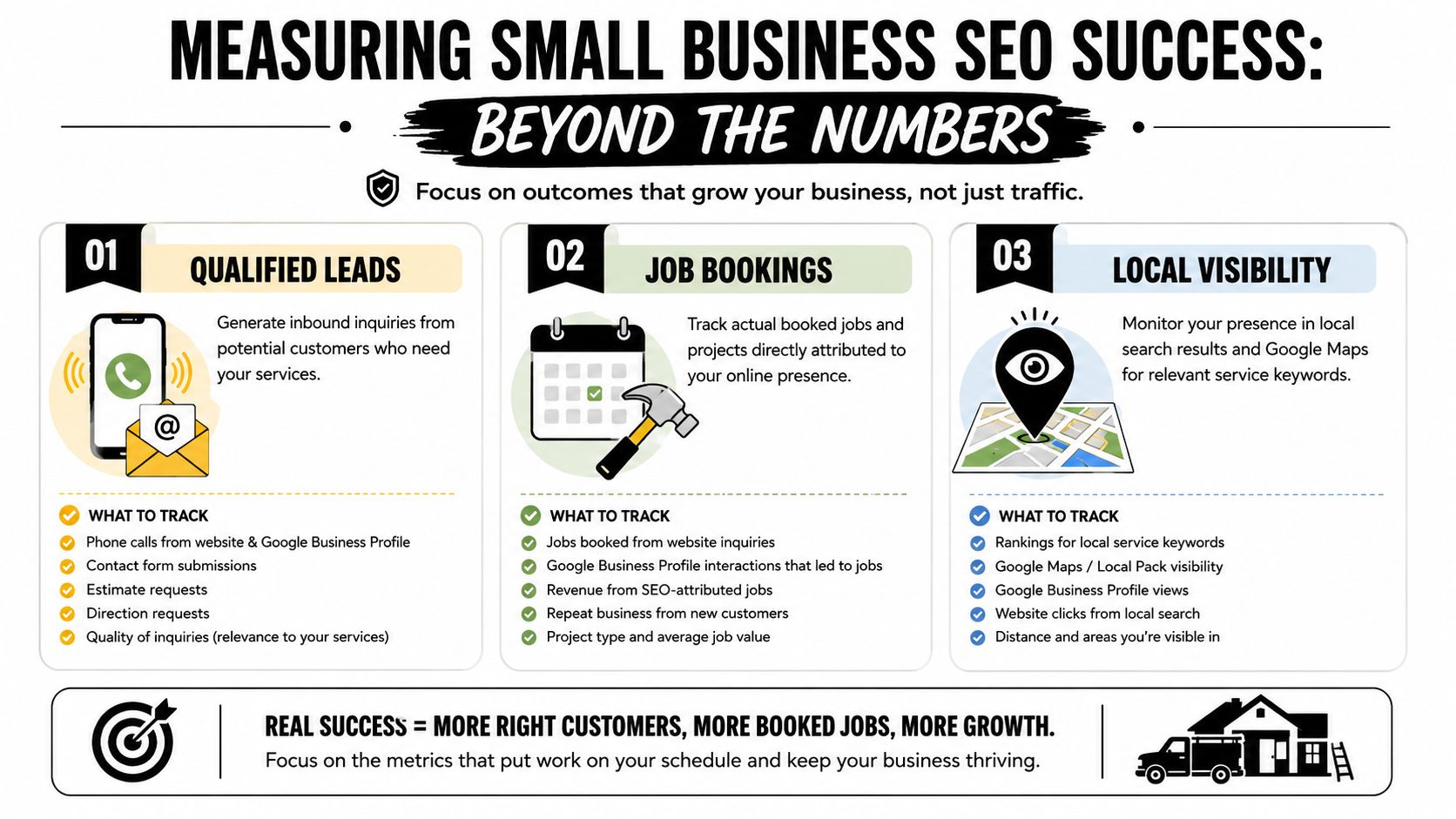
Set up basic tracking so you know which pages and keywords send the best leads. Use a unique call-tracking number for ads or listings when necessary, and make sure you capture the referring page for every form submission.
Action steps:
Tag links from your GBP and ads with UTM parameters so you can see which channels lead to requests.
Log lead source in your CRM so you can measure “leads-to-jobs” conversion by channel.
Review where leads stall—if many calls never get a follow-up, tighten your assignment workflow.
7. Iterate: small changes, measured improvement
Make one measurable change at a time: tweak a CTA, rename images, or add a FAQ to a service page. Track the effect on form submissions and phone calls, and repeat what works.
Bringing the pieces together
Your website can do more than publish information—it can be the system that handles requests, assigns work, and follows up until the job is done. We design WordPress sites and plugins so forms, CRM integrations, and job workflows live in one place. If you want an option that fits how your business actually runs, our custom software and integrations may be helpful resources.
Want help applying this checklist to your business? Request a website review or schedule a conversation so we can look at your current setup and suggest practical next steps. Tell us what is difficult about managing your current website, and we can help identify a practical next step.
Claim and optimize your Google Business Profile and list a clear service area.
Create focused service pages for each primary service and local area.
Upload, name, compress, and describe project images correctly.
Build a repeatable review request and response workflow.
Connect website forms and call tracking to a CRM or simple tracking sheet.
Measure inquiries and make one improvement at a time.
1. Google Business Profile: make the first interaction helpful
Contractors can receive immediate visibility through the map pack, so start by verifying your Google Business Profile, keeping your name, address, and phone information consistent, and choosing categories that match the services you want to promote.
Check your business hours and phone number regularly. Set the correct service area for the Uinta Basin towns you serve, add a direct Request a Quote or booking link when appropriate, and post recent project photos or short updates to keep the profile useful.
Each primary service should have its own focused page. For example, pump repairs, well service, and road grading may attract different searches and require different customer questions. A dedicated page can explain the service, identify the typical service area, answer common questions, and provide a clear next step.
Place a clear CTA near the top, such as “Request a quote,” “Upload a photo,” or “Call now.”
Ask only for the details needed to begin follow-up, such as address, photos, and preferred contact time.
Explain what happens after someone submits a request.
3. Use project images to support visibility and trust
Contractor photos can show prospective customers what you do while giving search engines additional context. Default camera filenames do not explain much, so rename files before uploading them using readable terms such as uinta-basin-well-pump-repair.jpg.
Use descriptive, accurate alt text.
Compress images so pages load efficiently.
Keep photo naming and metadata consistent across the site.
Why local SEO does not always produce more contractor jobs
Being visible in local search is only part of the process. If your Google Business Profile has outdated information, your service pages are too broad, or inquiries disappear into an inbox, increased visibility may not become booked work.
A practical local SEO system for contractors
Use this checklist to improve the parts of your local presence that customers see first: your Google Business Profile, service pages, project images, reviews, forms, calls, and follow-up process.
What this checklist helps you improve
Make it easier for nearby customers to find the services and areas you serve.
Give prospective customers clearer paths to request a quote or call.
Reduce lost inquiries by connecting forms, calls, and lead assignment.
Measure which pages and channels generate meaningful inquiries.
Built around Uinta Basin contractor needs
This guide is written for contractors serving Vernal, Roosevelt, Duchesne, and surrounding Uinta Basin communities. It focuses on practical website and lead-handling improvements rather than generic marketing advice.
Do you need to fix everything at once?
No. Start with the highest-friction issue you can verify, such as an inaccurate Google Business Profile phone number, a missing service page, or a form that is not being followed up. Make one measurable change at a time and review the effect on inquiries.
Want help applying the checklist?
Northpoint can review your current website and local SEO setup, identify practical gaps, and help you decide what to address first.
Find the most practical next step for your contractor website
If your Google Business Profile, service pages, forms, or follow-up process need attention, request a website review. Northpoint can help identify the highest-priority improvements for your current setup.
Claim and optimize your Google Business Profile and list a clear service area.
Create focused service pages for each primary service and local area.
Upload, name, compress, and describe project images correctly.
Build a repeatable review request and response workflow.
Connect website forms and call tracking to a CRM or simple tracking sheet.
Measure inquiries and make one improvement at a time.
1. Google Business Profile: make the first interaction helpful
Contractors can receive immediate visibility through the map pack, so start by verifying your Google Business Profile, keeping your name, address, and phone information consistent, and choosing categories that match the services you want to promote.
Check your business hours and phone number regularly. Set the correct service area for the Uinta Basin towns you serve, add a direct Request a Quote or booking link when appropriate, and post recent project photos or short updates to keep the profile useful.
Each primary service should have its own focused page. For example, pump repairs, well service, and road grading may attract different searches and require different customer questions. A dedicated page can explain the service, identify the typical service area, answer common questions, and provide a clear next step.
Place a clear CTA near the top, such as “Request a quote,” “Upload a photo,” or “Call now.”
Ask only for the details needed to begin follow-up, such as address, photos, and preferred contact time.
Explain what happens after someone submits a request.
3. Use project images to support visibility and trust
Contractor photos can show prospective customers what you do while giving search engines additional context. Default camera filenames do not explain much, so rename files before uploading them using readable terms such as uinta-basin-well-pump-repair.jpg.
Use descriptive, accurate alt text.
Compress images so pages load efficiently.
Keep photo naming and metadata consistent across the site.
If you are looking for website design in Vernal, Utah, you may need more than someone who can simply build a good-looking website.
Vernal businesses compete for customers online every day.
Contractors.
Oilfield service companies.
Restaurants.
Retail businesses.
Professional services.
Home service companies.
Tourism and recreation businesses.
When a potential customer needs something, one of the first things they often do is search online.
The question is simple:
Will they find your business—or someone else’s?
At Northpoint Web, we provide website design, ongoing website management, proactive search engine optimization, managed content, and AI integration options for businesses in Vernal and throughout the Uinta Basin.
A Vernal Business Website Should Be Built for Vernal Customers
One of the problems with national website companies is that they often approach every local business the same way.
Choose a template.
Add a logo.
Write a few paragraphs.
Publish the website.
But Vernal is not a generic market.
Businesses here serve a unique combination of local residents, oilfield companies, contractors, rural communities, tourists, and customers from throughout northeastern Utah.
The website for a Vernal business should reflect the people that company actually serves.
Where do your customers come from?
What services are they searching for?
Do you only serve Vernal?
Do you work throughout Uintah County?
Do customers come from Roosevelt or Duchesne?
Do you serve businesses connected to the energy industry?
Does tourism affect your business?
These questions matter when planning a website and local SEO strategy.
Why Local SEO Matters for Vernal, Utah Businesses
Imagine someone searches Google for a service you provide.
They may search:
“contractor Vernal Utah”
“plumber near Vernal”
“excavation company Uintah County”
“website designer Vernal Utah”
“best roofing company Vernal”
Your business may provide exactly what that customer needs.
But if your website does not clearly explain your services and location, search engines may have difficulty understanding when your company is relevant.
That means we can continue paying attention to the website after launch.
We can update content.
Add services.
Build new landing pages.
Evaluate search opportunities.
Create articles.
Improve calls to action.
And help the website change as the business changes.
Proactive SEO Instead of Waiting for the Business Owner
Most Vernal business owners have enough to do.
They should not have to spend Saturday night researching Google keywords.
We believe the website company should help look for online opportunities.
At Northpoint Web, our proactive SEO approach can include evaluating services that are poorly represented on a website, identifying customer questions that deserve content, reviewing local search opportunities, and improving existing pages.
If a business expands into a new service, the website may need a new page.
If customers repeatedly ask the same question, that question may make a useful article.
If a company wants more work in a specific part of the Uinta Basin, the website strategy may need to change.
The business owner should not always have to call the website company first.
Managed and Automatic Blog Content for Vernal Businesses
Many website companies tell small businesses to start a blog.
Then they leave the business owner to write it.
That rarely works.
A Vernal contractor probably has better things to do than write an article after working all day.
The same is true for most business owners.
Northpoint Web can help plan, create, manage, and publish website content based on actual business services and search opportunities.
In some situations, automatic blog publishing can help maintain a consistent content schedule.
But we do not believe in publishing meaningless AI articles simply to fill a website.
Content should have a reason to exist.
It should answer a customer question.
Explain a service.
Address a local issue.
Or help potential customers understand the business.
AI Integration for Vernal Small Businesses
Artificial intelligence is creating new opportunities for small businesses.
The challenge is knowing what is actually useful.
A Vernal business may benefit from an AI website assistant that helps visitors find the correct service.
A contractor may use a smarter inquiry process to collect project details.
A service company may want to better organize incoming customer questions.
A business may need help creating and managing ongoing website content.
Northpoint Web can evaluate practical AI integration options for Vernal businesses.
We start with the business problem.
Then we consider whether AI or automation can help solve it.
Technology should make the business easier to operate.
It should not create another complicated system for the owner to manage.
There are excellent website designers throughout the country.
But local presence can provide an advantage.
We know where Vernal is.
That may sound like a low standard, but it matters more than people think.
We understand the relationship between Vernal, Roosevelt, Duchesne, and the surrounding Uinta Basin communities.
We understand that local businesses may serve customers across a wide geographic area.
We understand the importance of the oil and gas industry to the Basin.
We understand rural Utah.
We understand that local reputation still matters.
Northpoint Web combines professional website development with a local understanding of the Uinta Basin.
Looking for a Web Designer in Vernal, Utah?
If you are comparing website design companies in Vernal, Utah, consider what you want after the website launches.
Do you simply want a new website?
Or do you want someone helping manage your online presence?
Northpoint Web provides website design, ongoing website management, proactive SEO, local search optimization, managed blog content, automatic publishing options, and practical AI integration for Vernal and Uinta Basin businesses.
Our goal is simple.
We want your website to become a managed part of your business—not another online project everyone forgets about.
The harder question is deciding who should build and manage it.
Businesses in Vernal, Roosevelt, Duchesne, Myton, Ballard, Naples, and the surrounding Uinta Basin communities have unique challenges. We serve a large geographic area. Many local companies travel between communities. Contractors may work in multiple counties. Customers often search for a service online before they ever ask a neighbor who to call.
That means your website needs to do more than look professional.
Does this company understand where I actually do business?
The Uinta Basin is different.
A contractor based in Duchesne may work in Roosevelt, Vernal, Altamont, and rural areas throughout Duchesne and Uintah counties.
A business in Roosevelt may want to attract customers from both sides of the Basin.
A Vernal company may serve customers well beyond the city limits.
Your website structure and search engine optimization strategy should reflect the way your business actually operates.
Local Web Design Should Include Local SEO
One of the biggest mistakes small businesses make is building a website without considering how potential customers search.
Imagine you own a construction company in Roosevelt.
Your website may simply say:
Welcome to ABC Construction. We provide quality construction services.
That tells Google and potential customers very little.
What type of construction?
Where do you work?
Do you build homes?
Do you remodel?
Do you build garages?
Do you work in Vernal?
Do you serve Duchesne?
A properly planned small business website should clearly explain your services and the geographic areas you serve.
This is where local SEO in the Uinta Basin becomes important.
At Northpoint Web, we look at the business before simply designing the pages.
We want to understand what you do, where you work, which services are most profitable, and what opportunities may exist online.
Your Website Should Not Sit Untouched for Five Years
This is one of the biggest differences between traditional web design and the approach we are developing at Northpoint Web.
Most websites follow the same cycle.
A business owner decides they need a new website.
The website is built.
Everyone is excited.
The website launches.
Then nobody touches it for four or five years.
Meanwhile, the business changes.
New services are added.
Employees change.
Service areas expand.
Competitors improve their websites.
Customer questions change.
Search opportunities appear.
The website stays exactly the same.
We believe a business website should be actively managed.
Northpoint Web Offers Complete Online Website Management
Northpoint Web is more than a Uinta Basin web design company.
Our goal is to help manage the online side of a local business.
Depending on the needs of the company, that may include website updates, new service pages, proactive search engine optimization, local SEO improvements, managed blog content, automatic blog publishing, landing pages, lead forms, and AI integration.
Instead of waiting for a business owner to call and say, “Can you change something on my website?” we want to actively look for opportunities.
If there is a service your company provides that is poorly represented online, we can evaluate it.
If your business is expanding into another Uinta Basin community, your website may need to reflect that.
If customers repeatedly ask the same question, that question may deserve a page or article.
Search engine optimization is often sold as a mysterious technical service.
It should not be.
At its core, SEO involves helping search engines and people better understand your business and the information on your website.
For a local company, we may look at questions such as:
What services are potential customers searching for?
Which Uinta Basin communities does the company serve?
Are important services missing from the website?
Does each major service have enough useful information?
Are there customer questions that could become articles?
Are competitors appearing for searches where your company should be visible?
We call this proactive SEO management.
We do not want to install an SEO plugin and declare the job finished.
We want to continue looking for opportunities.
Automatic Blog Posts and Managed Website Content
Many small business owners know they should add content to their websites.
They simply do not have time.
A contractor finishing a twelve-hour day is probably not going home excited to write an 1,200-word article about bathroom remodeling in Vernal, Utah.
A plumber does not want to research blog keywords.
A local business owner should be running the business.
Northpoint Web can help plan, create, manage, and publish search-focused website content.
Modern automation and AI tools can also help make ongoing content management more efficient.
However, AI should not simply generate hundreds of meaningless articles.
The content should be connected to the actual business.
It should answer real questions.
It should discuss real services.
And when appropriate, it should reflect real opportunities in the Uinta Basin.
AI Integration for Uinta Basin Small Businesses
Artificial intelligence is changing the way businesses operate.
But most small businesses do not need an expensive AI department.
They need practical solutions.
Could an AI website assistant help customers find the correct service?
Could a smarter form collect project information before an estimate?
Could customer inquiries be organized automatically?
Could frequently asked questions be answered more efficiently?
Could AI help a company maintain useful website content?
At Northpoint Web, we are interested in practical AI integration for Uinta Basin businesses.
The question is not:
How can we add AI to your website?
The better question is:
Is there something repetitive, slow, or frustrating in your business that technology could make easier?
That is where AI becomes useful.
Why Local Presence Matters When Choosing a Uinta Basin Web Designer
We live here.
We know the difference between Duchesne and Vernal.
We understand that Roosevelt is not simply another Salt Lake City suburb.
We understand the oilfield.
We understand contractors.
We understand rural service areas.
We understand that many Uinta Basin businesses grow through reputation, relationships, and word of mouth.
A good website should support those strengths.
It should not try to turn a local company into a generic national brand.
Your website should look professional while still accurately representing your business.
What Should You Ask a Uinta Basin Web Design Company?
Before hiring a website company, ask what happens after the website launches.
Who updates the website?
Who looks for new search opportunities?
Who adds new services?
Who creates content?
Who watches how the business is represented online?
Can the website grow?
Can AI or automation be added later?
Does the company understand your service area?
Most importantly:
Is the company simply building your website, or are they helping manage your online presence?
Those are two very different services.
Looking for a Web Design Company in the Uinta Basin, Utah?
Northpoint Web provides professional website design and online website management for businesses throughout the Uinta Basin.
We work with local businesses, contractors, service companies, and organizations that want more than a website that simply sits online.
Our approach can include website design, ongoing website management, proactive SEO, local search optimization, managed blog content, automatic publishing options, landing pages, and practical AI integration.
We are local.
We understand the Uinta Basin.
And we believe your website should continue working and improving long after it launches.
Your website should not simply exist online. It should be a managed part of your business.
A DIY website can cost under $50 per month, while a professional site from a freelancer or agency usually lands somewhere from $3,000 to over $10,000. That spread is normal. Website price depends entirely on how you build it and what you need it to do.
If you're a contractor in Vernal, a trucking company in Roosevelt, or an oilfield service outfit in Duchesne, you've probably already seen this. One quote looks cheap enough to ignore. Another looks like someone priced you a new piece of equipment. Both might be honest. They just aren't talking about the same thing.
A website is a lot like a truck. A basic pickup gets you down the road. A fully outfitted work truck with toolboxes, racks, upgraded suspension, and a diesel motor costs a whole lot more because it does a whole lot more. Same with websites. A simple online brochure is one thing. A site that brings in leads, filters bad prospects, and helps you recruit CDL drivers or operators is a different asset entirely.
That distinction matters more in rural Utah than most generic website articles admit. Around the Uinta Basin, labor is tight, trust matters, and buyers often check your website before they call. If your site can't help you win jobs or attract workers, the cheap option can turn into the expensive one fast.
How Much Does a Small Business Website Really Cost
A contractor in the Uinta Basin can get one quote for $800 and another for $8,000, and both can be honest numbers. They are pricing different tools for different jobs. A cheap site is like a basic trailer you pull to the job. A growth-focused site is more like a service truck stocked to keep work moving and bring in the next call.
That gap confuses a lot of owners. It should not. Website cost depends on what the site is expected to produce for the business.
A simple site can be inexpensive. A site built to bring in quote requests, show up in search, answer common questions, and help recruit operators or CDL drivers costs more because it does more work. If you want a clear picture of what goes into a serious build, review what's really included in a $7,500 website build.
The easiest way to understand pricing is to compare it to another marketing service owners already know. If you've ever looked at a real estate photo pricing guide, you know the price changes based on the job. A few basic listing photos cost less than a full package with drone shots, twilight images, and marketing extras. Website pricing works the same way. A home page and contact page are one level. Lead forms, hiring pages, local SEO setup, and custom service content are another.
What you're really buying
For a small business in rural Utah, a website usually needs to earn its keep in a few specific ways:
Build trust so a prospect picks up the phone instead of calling the next company
Generate leads from Google searches, map listings, and referrals
Help recruiting when skilled labor is hard to find and harder to keep
Save office time by answering basic questions before someone calls
That last point gets ignored in generic website guides. Around here, labor is tight. If you're an excavation company, HVAC shop, diesel outfit, or oilfield service business, your site is not just a brochure. It can help you win work and fill open positions. Those two outcomes matter more than having fancy design features nobody asked for.
Here is the rule I give local owners. If the website only needs to show you exist, keep it lean. If it needs to help grow revenue or attract good people, pay for a professional build that is set up to do that job well.
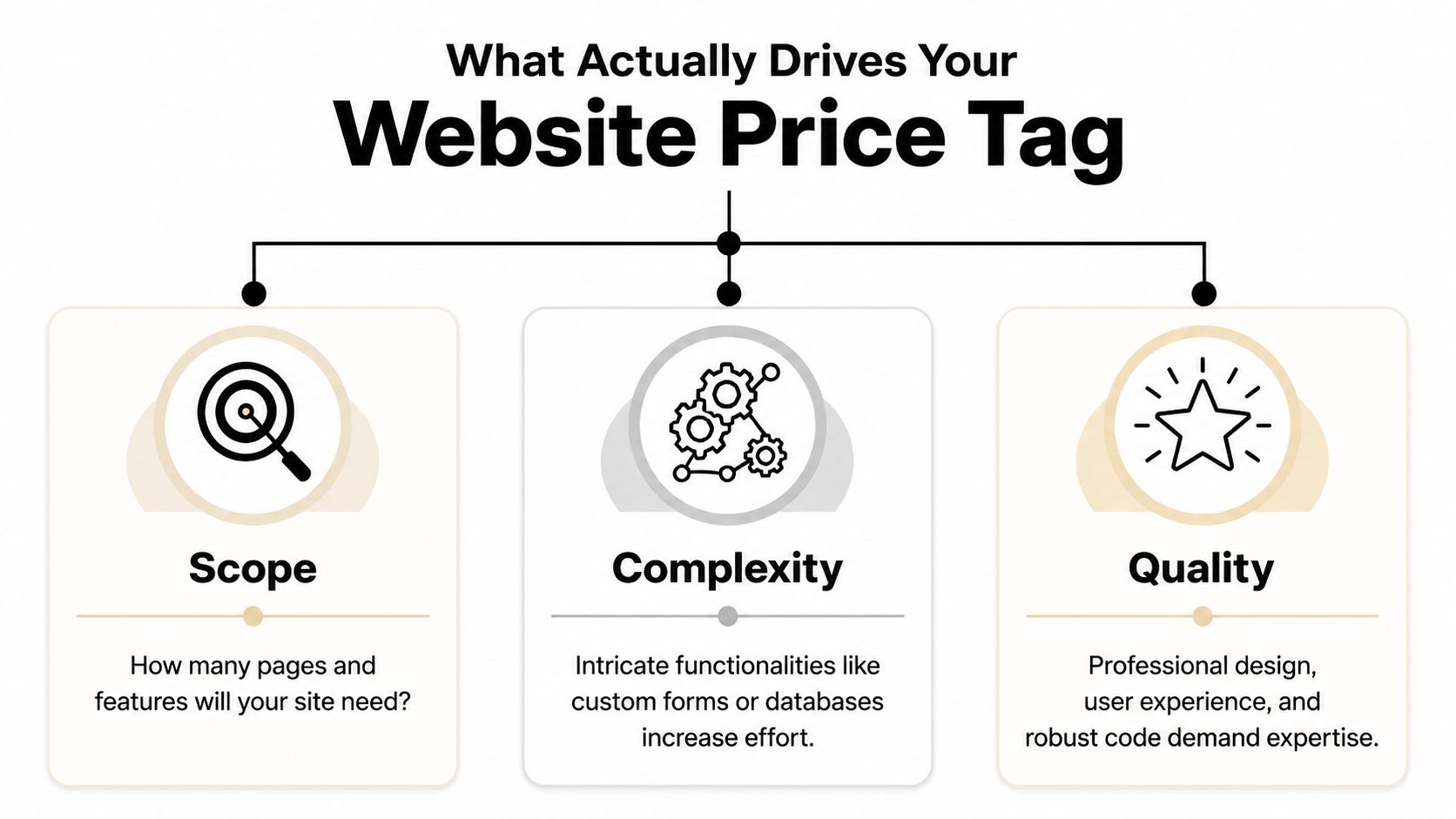
What Actually Drives Your Website Price Tag
The number of pages matters, but it usually isn't the main driver. Functionality complexity is where price starts to move.
Industry guidance shows a basic DIY WordPress build can start near $100 to $400 upfront with $10 to $75 per month in hosting and tools, while a custom small-business site commonly rises to $2,000 to $8,000 with a freelancer or $10,000 to $35,000+ with an agency when it includes custom design, SEO setup, integrations, or e-commerce features, as outlined in Elementor's website cost guide.
Imagine building a workshop. Square footage affects cost, sure. But the wiring, concrete work, specialty tools, and finishes are what really separate a basic shed from a building that supports serious work.
Scope is the size of the job
Scope is the footprint.
If you need a home page, about page, service pages, gallery, contact page, and maybe a careers page, that takes more planning and content than a one-page site. More pages usually mean more writing, more layout work, and more decisions.
But don't get stuck counting pages like they're the whole story. A seven-page site can still be simple. Another seven-page site can be a headache if every page has custom sections, forms, filters, or special content needs.
Complexity is where cost jumps
This is the big one.
Add a quote request system that routes leads by service type. Add hiring forms for CDL drivers. Add booking, CRM integration, e-commerce, shipping logic, or custom location pages. Every feature adds setup, testing, and future maintenance.
A lot of business owners don't see that part at first. They compare a cheap site to a growth-focused site and think the only difference is design. It isn't. The difference is what happens behind the scenes. If you want a plain-English breakdown of that middle tier, this explanation of what's really included in a $7,500 website build is worth reading.
Here's a simple way to judge complexity:
Low complexity means brochure pages, basic contact forms, standard templates
Medium complexity means lead funnels, service-area pages, stronger SEO setup, better forms
High complexity means custom applications, recruiting workflows, online payments, portals, or deep integrations
The video below gives a solid overview of how these moving parts affect budget.
Quality decides whether the site works or just exists
Two shops can both say they build websites. That doesn't mean they build the same thing.
Quality shows up in the writing, layout, mobile performance, photo selection, calls to action, code quality, and how easy the site is to update later. It also shows up in the strategy. A decent builder can make a website look acceptable. A strategist builds it so a contractor gets better calls and fewer tire-kickers.
A cheap site often lowers launch cost, not ownership cost. If it breaks, looks dated, or fails to convert, you pay for it later.
That's why small business website cost should be judged like any other capital expense. Don't ask only what it costs to buy. Ask what it costs to own, use, and rely on.
Choosing Your Path DIY vs Freelancer vs Agency
A website builder, a freelancer, and an agency can all put a site online. That does not mean they solve the same business problem.
For a contractor in Roosevelt or an oilfield service company in Vernal, the question is simple. Do you need a site that just proves you exist, or a site that helps you win bids, get quote requests, and recruit people who can pass a drug test and show up on Monday? Website pricing works the same way as buying equipment. A basic tool is cheaper. The right tool earns its keep.
When DIY makes sense
DIY works for a new business that needs a clean placeholder fast.
If you are just getting started, a platform like Wix or Squarespace can handle the basics. You can list services, show your phone number, add a form, and stop losing work to competitors who at least have something online.
That said, DIY usually tops out early.
Once you need better service-area pages, stronger local search visibility, hiring pages, or clearer calls to action, the cracks show. You end up wrestling with templates instead of running your business. For a serious contractor, that is like trying to trench with a shovel because the shovel was cheaper than a machine.
When a freelancer is the practical middle ground
A good freelancer is often the right fit for a small business that has outgrown DIY but does not need a full outside team.
This route can work well for local service companies with a defined scope and decent source material. If you already know your services, have solid photos, and can give feedback quickly, a freelancer can build a strong site without a lot of overhead.
The tradeoff is depth and capacity. One person may be handling design, copy, SEO setup, edits, and support. If that person is good, great. If that person disappears during hunting season, gets booked out, or is weak in one area, your project slows down or comes out uneven.
When an agency is the right tool
Agency work fits businesses that expect the website to produce results, not just sit there.
If the site needs to support lead generation, recruiting, content planning, search structure, maintenance, and ongoing improvement, an agency is usually the better choice. That matters in the Uinta Basin, where many companies are fighting two battles at once. They need more qualified inquiries, and they need more skilled labor. Generic website advice misses that. Around here, the hiring side often matters just as much as the sales side.
If you are still sorting out platform options before choosing a provider, this guide to small business website platforms will help you compare the tradeoffs.
Website Build Options Compared
Factor
DIY (Wix, Squarespace)
Freelancer
Agency (Northpoint Web)
Upfront cost
Lowest
Middle
Higher
Monthly cost
Predictable subscription
Varies by hosting and support setup
Usually paired with ongoing support
Best for
Basic credibility
Solid custom site with moderate needs
Lead generation, recruiting, long-term growth
Owner involvement
High
Medium
Medium, but more guided
Flexibility
Limited
Good
Highest
Support after launch
Usually self-managed
Depends on the freelancer
Usually structured
Recruiting and SEO readiness
Basic
Possible if scoped well
Better fit for businesses that need strategy and execution
If your website needs to help hire operators, drivers, techs, or office staff, DIY is usually the wrong choice. It lowers launch cost, but it often costs more in missed calls, weak applicants, and rebuilds later.
My recommendation is straightforward. Use DIY if cash is tight and you need to get online this month. Hire a freelancer if the project is clear and your needs are moderate. Hire an agency if the website affects revenue, staffing, or both. A $50 tool should not be carrying a $500,000 part of your business.
Real Website Costs for Uinta Basin Businesses
Generic website advice usually stops at pages and design. Around here, that misses the point. For a lot of Uinta Basin businesses, the website isn't just a brochure. It's part sales tool, part recruiting tool, part credibility check.
A local business owner doesn't just need "a website." He needs a site that helps him solve the problem right in front of him.
Excavation contractor in Duchesne
This owner needs more than a gallery of dirt work and pipe installs.
He needs project photos, service pages, trust signals, a clean quote request form, and a recruiting page that doesn't look like an afterthought. If he needs operators, laborers, or CDL drivers, the hiring side can't be buried in a generic careers tab with one sentence and a bad application form.
Recent analysis focused on rural energy markets says a standard $5,000 brochure site often fails to attract qualified tradespeople because it lacks recruiting features such as job-board integrations and employee testimonial structures. The same analysis says recruitment costs for skilled trades in rural U.S. energy sectors exceed $4,000 per hire, and the added recruiting premium for the right website functionality is typically 15% to 25% of the total build cost in these markets, according to this Uinta Basin-focused website cost discussion.
That should change how you budget. If one good hire matters, the site needs to support hiring from day one.
Oilfield service company in Roosevelt
This company usually cares about trust, capability, and professionalism.
The site should show service lines clearly, explain the company's operating standards, make it easy for buyers to understand what crews and equipment are available, and give larger clients confidence that they're dealing with a legitimate operation. Safety, responsiveness, and clean presentation matter here because procurement teams and field managers are judging your company before they ever call.
For this kind of business, the website earns its keep by helping win better conversations. It also supports recruiting when the labor market tightens. A weak site makes a serious company look smaller than it is.
This one is different. The main question isn't hiring. It's control.
A rental owner may want a site that shows the property well, answers guest questions, builds trust, and encourages direct booking inquiries instead of depending entirely on third-party platforms. That pushes the budget toward better photography, polished layout, stronger mobile experience, and cleaner calls to action.
The lesson across all three examples is the same. The right website budget comes from the business problem. Not from a random average on the internet.
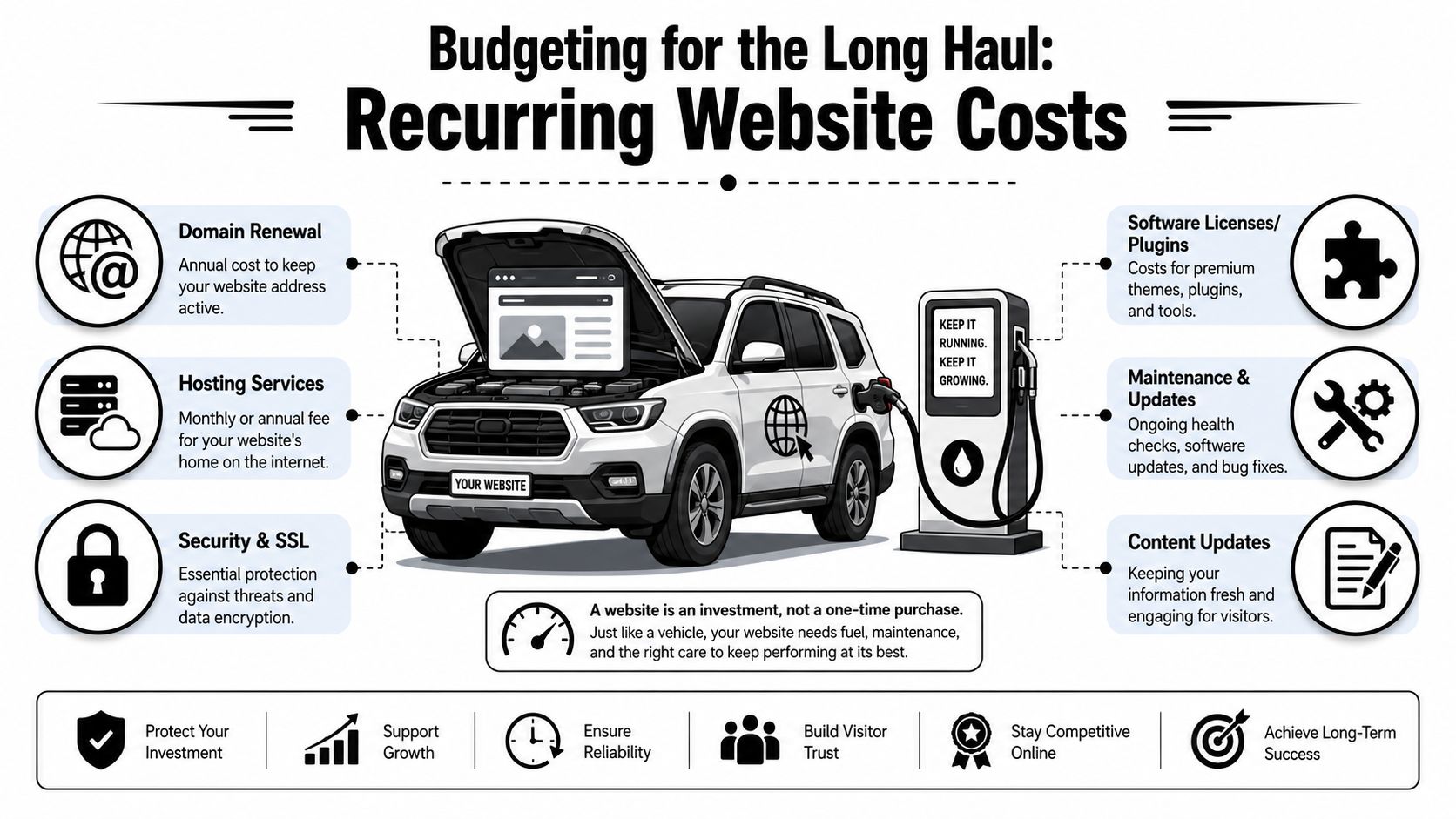
Budgeting for the Long Haul Recurring Website Costs
A website isn't a one-time print job. It's more like a truck in your fleet. Once you buy it, you still have fuel, tires, insurance, service, and the occasional repair. Ignore those costs and the thing stops doing its job.
Independent industry guides put standard small-business builds at roughly $1,500 to $15,000 for a 5 to 8 page site, while recurring expenses commonly add $500 to $2,400 per year for hosting, domain, maintenance, backups, and security updates. For service businesses, maintenance retainers of $100 to $500 per month are common, based on this small business website cost guide.
The first-year budget is what catches people
A lot of owners only budget for the build.
Then the domain renews. Hosting renews. Plugins need licenses. WordPress needs updates. Forms break. A staff member wants new service pages. A phone number changes. Suddenly the website didn't cost what the invoice said. It cost the invoice plus the upkeep.
Your real small business website cost is build price plus the cost to keep it secure, current, and useful.
That's why I tell people to budget in two buckets from the start:
Build cost for design, content, setup, and launch
Ownership cost for hosting, maintenance, security, backups, and edits
What ongoing website costs usually include
Most recurring website budgets include a mix of the following:
Hosting that keeps the site online and loading reliably
Domain renewal so you keep ownership of your web address
Security and backups in case the site gets hit or something breaks
Plugin and software licensing for forms, SEO tools, booking tools, and premium features
Maintenance labor for updates, testing, fixes, and small content changes
Reputation work can also become part of ongoing digital costs, especially if reviews or search trust are affecting leads. If that issue is on your radar, this overview of pay-for-results reputation management services is a useful companion read because reputation and website conversion usually work together.
The bottom line is simple. If the website matters to your business, maintenance is not optional. You don't park a truck all winter, skip oil changes, and expect it to haul without problems. Same deal here.
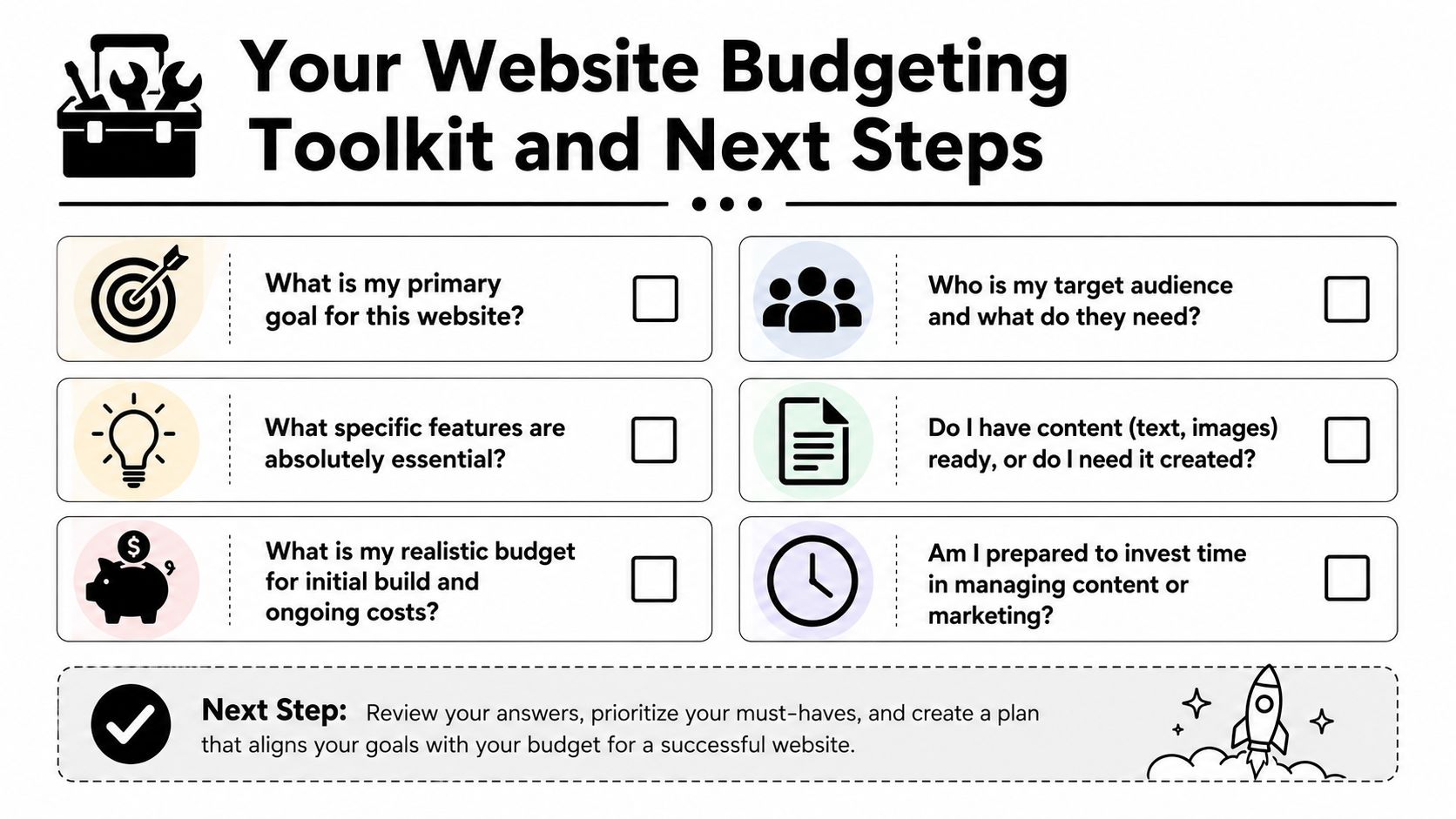
Your Website Budgeting Toolkit and Next Steps
If you want accurate quotes, don't start by asking, "What does a website cost?" Start by answering the questions that define the job.
Six questions to answer before you ask for quotes
Write these down before you call anyone.
What is the website supposed to do? If the answer is "just have something online," your budget can stay lean. If the answer is "bring in leads, support sales, and help recruit," expect a more serious build.
Who needs to use it? Homeowners, commercial buyers, truck drivers, job applicants, vacation guests, and municipal contacts all need different information. One site can't speak clearly to everyone unless it's planned well.
What features are required from day one? Quote forms, hiring forms, job pages, service-area pages, galleries, booking requests, CRM connections, and review integration all change scope.
Do you already have content and photos? Good websites need good raw material. If you don't have quality jobsite photos, team photos, service descriptions, or hiring copy, somebody has to create them.
Who will handle updates after launch? Some owners want control. Others never want to log in. Be honest. That answer affects platform choice and support needs.
What's your real budget for build and ownership? Not your wish budget. Your actual budget. If you only plan for launch and ignore recurring costs, you're setting the project up wrong.
"The cheapest website is usually the one that only has to exist. The minute it needs to perform, strategy matters."
Three practical budget levels
I like to frame website budgeting around function, not vanity.
Stronger service pages, conversion-focused structure, better messaging, room for SEO and lead capture
Established service business that wants more calls
Recruiting and Growth Engine
Hiring pages, applicant flow, stronger trust content, service clarity, recruitment support, maintenance plan
Contractors, oilfield services, trucking, and industrial firms trying to grow crews
You don't need to name your project this way when you get quotes. But you should know which category you're shopping for. A lot of bad website decisions happen because owners ask for a business card site when what they need is a lead and recruiting system.
Common questions from local business owners
Can I update the site myself? Usually, yes. But there's a big difference between changing text on a page and managing plugins, forms, security, and layout problems. Know which kind of update you're talking about.
Should I start small and add later? Usually yes, if the foundation is right. Starting lean is smart. Starting cheap on the wrong platform is not.
Do I need ongoing SEO right away? Not every business needs a heavy SEO push on day one. But every business does need clear service pages, solid messaging, clean structure, and a site that doesn't look abandoned.
Should I choose based on lowest bid? No. Choose based on whether the bid matches the business outcome you need. Lowest bid is only a win if the site does the job.
What should I bring to the first conversation? Your services, service areas, photos, logo, competitor examples, and a clear answer about whether hiring is part of the website's job.
If you're a local contractor or industrial business owner, the right move is to treat your website like any other business asset. Buy the right tool for the work. Don't overbuild. Don't underbuy. And don't confuse a cheap launch with a smart investment.
If you want help sorting out what your website should cost for your business, Northpoint Web works with contractors, oilfield service companies, trucking businesses, and other rural Utah companies that need websites built for leads, recruiting, and day-to-day credibility. A straight conversation about your goals, your market, and your realistic budget will save you a lot of wasted time.
Business to business marketing—also called company to company marketing—helps one organization become easier for another organization to find, evaluate, and contact. For contractors, industrial firms, trucking companies, and other Uinta Basin businesses, that process often starts with a website, Google visibility, reviews, and clear proof of capability.
This guide explains eight practical B2B marketing strategies and how to apply them without wasting time on broad, generic promotion. The right mix depends on who you sell to, how buyers research you, and whether your immediate priority is leads, recruiting, reputation, or long-term visibility.
This guide explains eight practical B2B marketing strategies and how to apply them without wasting time on broad, generic promotion. The right mix depends on who you sell to, how buyers research you, and whether your immediate priority is leads, recruiting, reputation, or long-term visibility.
That's an example of business to business marketing for the Uinta Basin. It isn't flashy branding for venture-backed software. It's a welding shop proving capability, a trucking company recruiting drivers, an excavation contractor showing service areas, or an oilfield service firm building enough credibility online to make the shortlist.
B2B isn't a small side market. The global B2B eCommerce market was valued at $36.16 trillion in 2026 and is projected to reach $41.40 trillion by 2027, a projected 14.5% CAGR, according to SellersCommerce B2B marketing statistics. The same dataset notes that customer referrals account for 54% of all B2B leads, which fits what rural Utah businesses already know. Reputation still drives sales.
The simplest example of business to business marketing is targeting the companies you want, instead of hoping the right people stumble across you. That's ABM. For a crane company, hydrovac contractor, or web partner serving industrial firms, that means building outreach around named accounts in Uintah and Duchesne counties instead of broad “Utah businesses” messaging.
A lot of small firms think ABM is only for large sales teams. It isn't. In the Basin, a short target list often works better because a few accounts can change the year.
Build around target accounts, not broad audiences
Start with a list of companies that fit your best work. Maybe it's oilfield operators expanding crews, trucking companies struggling with recruiting, or civil contractors bidding larger jobs. Then build one page, one message, and one offer around each type.
For example, if you're marketing to an oilfield service company, don't send them to your homepage. Send them to a page that speaks directly to field recruiting, equipment capability, safety credibility, and fast contact paths. If you're trying to win excavation accounts, show earthwork photos, service area pages, and proof that you understand bid-driven timelines.
Practical rule: If your outreach could be sent to twenty different companies with no edits, it's too generic for ABM.
A Uinta Basin ABM example
A practical version looks like this:
Pick high-value account groups: Focus on operators, subcontractors, rental companies, and industrial service firms already active in your service area.
Create account-specific landing pages: Build one page for trucking recruitment, one for excavation leads, one for oilfield hiring support.
Align sales and marketing: Decide who follows up, what gets sent first, and what counts as a qualified response.
Use LinkedIn for research: Check who owns, manages, or influences the buying decision before you reach out.
What doesn't work is pretending personalization means dropping a company name into a cold email. Real ABM means the page, the proof, and the offer all match the account.
2. Content Marketing and Thought Leadership
Content marketing gets oversold and under-executed. Many contractors hear “start a blog” and picture generic posts nobody reads. That's not thought leadership. Good B2B content answers the exact questions buyers, estimators, project managers, and job seekers already have.
This shift matters because buyers are doing more homework before they ever talk to you. According to Corporate Visions B2B buying behavior statistics, 81% of buyers initiate first contact with sellers, 61% prefer an overall rep-free buying experience, and 73% avoid suppliers that send irrelevant outreach. If you're invisible during the research stage, you're late.
Teach what your buyers already ask
For Basin businesses, strong content usually falls into a few buckets. Service explainers. Recruiting pages. Case studies. Safety and process videos. Location pages. Capability pages.
An excavation company might publish pages on trenching, site prep, utility work, and emergency response. A trucking company might create hiring content around routes, equipment, home-time expectations, and what a new driver can expect during onboarding. A welding shop might post project galleries with short writeups explaining material type, use case, and turnaround.
One detail many companies miss is image optimization. Even your project photos should support search visibility. Northpoint Web's guide on naming pictures for SEO is a good example of the kind of small technical fix that adds up over time.
A simple content template for rural contractors
Use this structure for nearly any service article:
Problem: Name the issue the buyer is trying to solve.
Process: Explain how your crew handles the work.
Proof: Add photos, certifications, service areas, or a short result summary.
Action: Give one next step, such as call, request quote, or apply now.
What doesn't work is posting trend pieces that have nothing to do with your actual sales process. If your buyers need confidence, publish proof.
3. Search Engine Optimization (SEO) and Local SEO
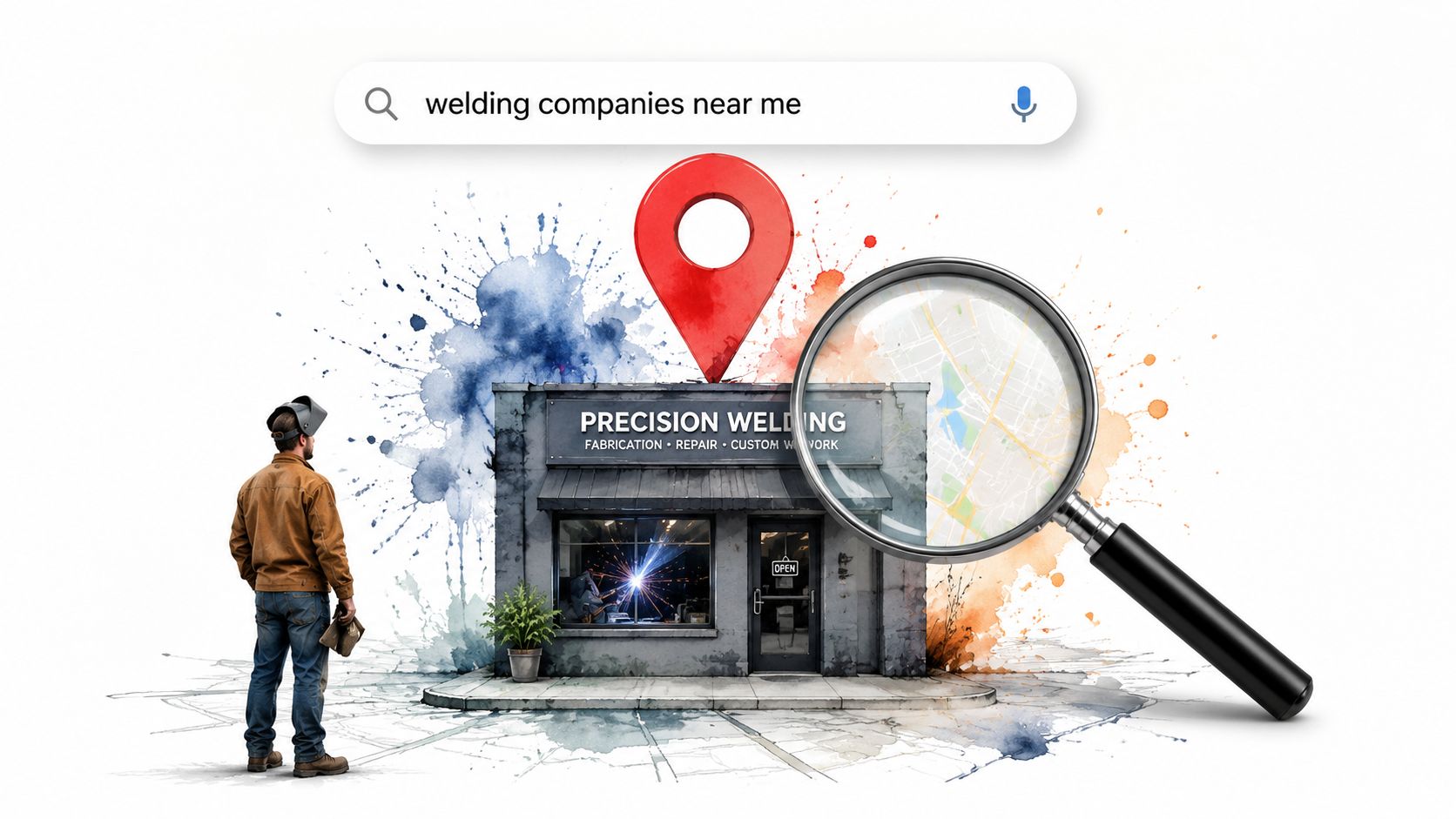
For most industrial and construction companies in the Uinta Basin, SEO isn't about chasing vanity rankings. It's about showing up when someone searches “welding contractor Vernal,” “excavation company Duchesne,” or “CDL jobs Roosevelt Utah.” Local SEO is often the clearest example of business to business marketing because it connects a business need to a local provider at the moment of intent.
A well-built Google Business Profile, solid service pages, and clear location targeting often outperform a fancy site with weak structure.
Local visibility wins practical searches
Buyers in long-cycle industries don't always convert on the first visit. They compare. They return. They verify. That's why your local presence has to do more than exist. It has to reduce doubt.
A contractor searching for a subcontractor wants to know where you work, what you do, and whether you look established. A job seeker wants to know if you're active, legitimate, and hiring. Local SEO supports both.
Claim your Google Business Profile: Fill out services, business categories, hours, and contact details.
Match your NAP everywhere: Your name, address, and phone need to match across listings.
Build service and location pages: Don't lump everything into one generic services page.
Collect reviews consistently: Reviews support trust, especially for firms buyers haven't worked with before.
Buyers don't need your website to be clever. They need it to be clear, current, and easy to verify.
What doesn't work is stuffing city names into thin pages. Search visibility improves when each page helps the visitor.
4. LinkedIn Sales Development and Professional Networking
LinkedIn is one of the few places where B2B networking, recruiting, credibility, and direct outreach all live in the same channel. For oilfield service owners, trucking operators, and industrial suppliers, that's useful because the same platform can help you stay visible to decision-makers and future hires.
Still, LinkedIn gets misused all the time. Owners either ignore it completely or treat it like a billboard for company slogans.
LinkedIn works when you use it like a jobsite introduction
The best approach is straightforward. Optimize your company page. Make sure leadership profiles are complete. Post enough to show the company is active and competent. Then use direct outreach carefully.
A welding or fabrication shop can connect with plant managers, contractors, and procurement contacts. A trucking company can use LinkedIn to support recruiting by posting fleet updates, hiring messages, and team spotlights. A construction manager can stay in front of suppliers and subcontractors without making every interaction a pitch.
The trade-off is time. LinkedIn works best with consistency, but most rural companies don't have a full-time marketing person. That means leadership should focus on a small number of useful posts instead of trying to mimic national brands.
What to post if you hate posting
Start with practical content:
Project updates: Share what your team completed and where.
Hiring posts: Show the work environment, equipment, and expectations.
Operational insight: Talk about process, safety, scheduling, or coordination.
Customer proof: Share a short success story without overcomplicating it.
What doesn't work is generic connection requests followed by immediate sales messages. That burns trust fast, especially in small regional markets where people know each other.
5. Email Marketing and Lead Nurturing
Email still matters because most B2B deals don't close on first contact. A contractor might ask for pricing, go quiet for weeks, then return when a project is approved. A trucking prospect may visit your jobs page now and apply later. Email gives you a way to stay present without chasing people.
That's where many businesses get it wrong. They either never follow up, or they send repetitive “just checking in” messages that add no value.
Stay in front of buyers without being annoying
Useful B2B email is segmented and relevant. Prospects should get different emails than past customers. Applicants should get different emails than project leads. If you're sending the same blast to everyone, you're wasting the channel.
This matters even more now because digital buyers are screening vendors on relevance. Strong nurture emails can support the self-education buyers already prefer, especially when your sales cycle involves approvals, scheduling, and multiple stakeholders.
A practical nurture sequence
A simple sequence for a Basin contractor or industrial company might look like this:
Email one: Thank them for reaching out and explain the next step.
Email two: Share a related service page, project example, or capabilities sheet.
Email three: Address a common concern such as scheduling, safety, or mobilization.
Email four: Invite a call, site visit, or quote request.
For recruiting, the same principle applies. Send applicants a clear follow-up, company overview, and job expectations instead of leaving them in the dark.
Send emails people can use. If every message asks for something but gives nothing, replies will dry up.
If you need a broad overview of setup, list building, and campaign basics, this complete email marketing guide is a solid reference.
6. Lead Generation and Conversion Rate Optimization (CRO)
Lead generation is where strategy meets reality. If your website gets traffic but doesn't produce calls, quote requests, or applications, the problem usually isn't “more marketing.” It's friction. CRO fixes that friction.
This is one of the most useful examples of business to business marketing because the gains come from making your current traffic more likely to act. You don't always need more visitors first. You may need a better path for the right ones.
Your website has one job
Most contractor websites try to say everything at once. They cram all services onto one page, bury contact info, use weak headlines, and ask visitors to hunt for the next step. That hurts conversions.
A stronger page says who you help, what you do, where you work, and how to contact you. Fast. Then it backs up the claim with proof.
A service page for an excavation or oilfield company should usually include:
Clear headline: State the service and service area immediately.
Short capability summary: Explain the work in plain language.
Proof section: Add project photos, certifications, equipment, or testimonials.
Strong contact path: Use a short form, visible phone number, and simple CTA.
Case studies matter here too, but only if they show business impact. Visable notes that a strong B2B case study should document measurable before-and-after outcomes because decision-makers use quantified results to judge whether the solution could apply to their own business, as explained in Visable's guide to case studies in B2B.
What doesn't work is sending paid traffic or SEO traffic to a homepage with no focused offer.
7. Paid Search Advertising (Google Ads, PPC) and Local Services Ads
Paid search is useful when you need visibility now. SEO takes time. Referrals fluctuate. Bids open and close. Hiring needs can hit all at once. Google Ads can put a contractor, trucking company, or industrial service business in front of searchers already looking for help.
That said, paid search gets expensive fast when the setup is sloppy. Broad keywords, weak landing pages, and no negative keyword list will burn budget.
Use paid search for intent, not awareness
The best paid campaigns target commercial intent. Someone searching for “roustabout services Vernal” or “excavation contractor near Duchesne” is much closer to action than someone searching broad industry terms.
For local service businesses that qualify, Local Services Ads can also be worth testing because they sit high in results and lean heavily on trust signals. For other firms, standard search campaigns often make more sense, especially when paired with focused landing pages built around one service and one location.
Where paid campaigns usually go wrong
Common mistakes are predictable:
Sending traffic to the homepage: The ad promise and landing page need to match.
Ignoring search terms: Bad traffic hides inside broad campaigns.
Running one ad group for everything: Separate services and locations.
Not tracking calls and forms: If you can't tie leads back to campaigns, you can't improve them.
One real B2B e-commerce example shows what can happen when digital infrastructure supports growth. Adobe reports that after moving to Adobe Commerce, FoodServiceDirect.com achieved a 40% increase in new customer acquisition, a 110% increase in repeat purchases, and 40% growth in B2B sales, while managing a 250,000-SKU catalog through a headless-commerce architecture in Adobe's B2B e-commerce case studies. Most Basin companies don't need that level of complexity, but the lesson holds. Better digital systems make paid traffic more valuable.
8. Video Marketing and YouTube for B2B
A drilling superintendent in the Uinta Basin is comparing vendors after hours. He is not looking for a clever brand film. He wants to see your crew, your iron, your shop standards, and whether your team looks ready to show up safely and do the work.
That is why video works so well in industrial B2B. It gives buyers proof before the first call. For oilfield service companies, trucking firms, and construction contractors around Vernal, Roosevelt, Duchesne, and surrounding job corridors, that proof matters more than polished messaging.
Show the work buyers actually care about
The best B2B videos for Basin companies are simple and specific. A welding shop can record a fabrication sequence with a short explanation of tolerances, materials, and turnaround times. An excavation contractor can show site prep, trenching, and finished grade. A trucking company can film a driver recruiting video that covers truck specs, haul types, home time, and what a new hire should expect in the first two weeks. An oilfield service company can walk through field readiness, safety process, dispatch speed, and mobilization capacity.
Production quality matters less than usefulness. A clear phone video with decent audio, steady shots, and a supervisor who speaks plainly will usually do more for trust than a glossy promo full of drone footage and generic claims.
Here's a practical example to study:
Video formats that fit Basin businesses
Use formats that help sales conversations, bid support, and recruiting:
Jobsite walkthroughs: Show equipment, crew coordination, staging, and finished results.
Capability videos: Explain one service, one process, or one piece of specialized equipment.
Recruiting videos: Cover schedule, expectations, safety culture, equipment quality, and who is a good fit.
FAQ clips: Answer the questions buyers ask before they request a quote or issue a bid invite.
Keep each video focused on one topic. A three-minute video on hydro excavation in winter conditions is more useful than a vague company overview that tries to cover everything at once.
A practical way to implement this
Start with five videos, not twenty. Pick the services that drive the highest-value jobs or the hardest-to-fill roles. Write a rough outline with three parts: what the service is, how your team handles it, and what the customer or applicant should do next. Record on-site when possible. Real conditions beat a conference room every time.
Then publish with plain titles buyers would search for, such as "Vac truck services in the Uinta Basin," "How our pipeline excavation crew handles remote sites," or "CDL driver jobs in Vernal, Utah." Add a short description, list the service area, and mention the equipment or job types shown in the video.
A lot of brand videos fail for one reason. They stay abstract. Industrial buyers want evidence that your company can perform the work safely, professionally, and on schedule. Video gives them that evidence fast.
8-Point Comparison of B2B Marketing Strategies
Strategy
Implementation Complexity 🔄
Resource Requirements ⚡
Expected Outcomes 📊
Ideal Use Cases 💡
Key Advantages ⭐
Account-Based Marketing (ABM)
High, multi-stakeholder research & alignment 🔄🔄
High, CRM, automation, dedicated account teams ⚡⚡
Targeted high-value conversions; stronger ROI per account 📊⭐
B2B industrial clients targeting specific companies or hires
Highly personalized outreach; faster close for qualified accounts ⭐
Content Marketing & Thought Leadership
Medium, ongoing editorial process 🔄
Medium, writers, SEO, multimedia production ⚡
Increased organic traffic, authority, long-term lead flow 📊
Firms building regional authority or recruiting skilled labor
Evergreen assets; credibility and sustained inbound leads ⭐
SEO & Local SEO
Medium–High, technical + content upkeep 🔄🔄
Medium, technical expertise, tools, local listings ⚡
Sustained organic visibility and high-intent local leads 📊
All local service businesses competing for regional work
Cost-effective, long-lasting visibility in "near me" searches ⭐
LinkedIn Sales Development & Networking
Medium, profile strategy and outreach routine 🔄
Low–Medium, time, Sales Navigator, content ⚡
Direct access to decision‑makers; relationship-based leads 📊
Humanizes brand; strong engagement and SEO benefits ⭐
Your Next Move Turning Examples into Action
These eight examples of business to business marketing work because they match how real buyers behave in industrial, construction, trucking, and oilfield markets. People still buy from companies they trust. That hasn't changed. What has changed is where that trust starts. It starts on Google, on your website, on your company profile, in your videos, in your reviews, and in the clarity of your message.
For Uinta Basin businesses, the biggest mistake isn't doing too little marketing. It's doing disconnected marketing. A contractor runs ads to a weak homepage. A trucking company posts jobs on social but has no recruiting page worth visiting. An oilfield service firm has solid field capability but no useful proof online. A welding shop relies on referrals but gives referred prospects nothing strong to validate the recommendation. That gap costs work.
There's also a practical local reality here. Many Basin companies don't have in-house marketing teams. The owner handles sales. The office manager updates Facebook when there's time. Hiring needs are urgent. Project opportunities come in waves. That means your marketing has to be simple enough to run, but strong enough to support long sales cycles and reputation-based buying.
The better move is to choose the one strategy tied to your biggest current constraint.
If leads are the issue, fix SEO, local visibility, service pages, and conversions first. If recruiting is the issue, build a proper careers section, create job-specific landing pages, and support them with video and paid search. If credibility is the issue, publish project proof, case studies, reviews, and capability content that helps buyers feel safe choosing you.
A practical rollout for most companies looks like this:
Month one: Fix the website structure, contact paths, and core service pages.
Month two: Clean up Google Business Profile, location pages, and local SEO signals.
Month three: Add case studies, recruiting pages, and a basic content plan.
Month four and after: Layer in email, paid search, LinkedIn outreach, and video.
That sequence works because it builds on itself. Each channel performs better when the website and messaging are already doing their job.
Northpoint Web works with the kinds of businesses that keep the Basin moving. Contractors. Oilfield service companies. Trucking operations. Fabricators. Industrial firms. The job isn't to make your marketing look trendy. The job is to help you win more bids, attract better applicants, and build a digital presence that holds up when serious buyers check you out.
If you've been looking for a practical example of business to business marketing that makes sense in rural Utah, this is it. Start with the channel that solves the most immediate business problem. Then build from there.
If you're ready to turn your website into a real sales and recruiting asset, talk with Northpoint Web. We help Uinta Basin contractors, oilfield service companies, trucking businesses, and industrial firms build stronger websites, better local SEO, and practical digital marketing systems that support growth.
What Is Business to Business Marketing?
Business to business marketing is the process of promoting products or services to another organization rather than directly to an individual consumer. It can include search engine optimization, educational content, account-based outreach, LinkedIn networking, email, paid search, and video.
In practice, company to company marketing supports several stages of the buying process: becoming visible during research, explaining what you do, reducing perceived risk, and making it easy to request information or start a conversation.
Visibility: Appear when a buyer searches for a service, supplier, or local provider.
Evaluation: Show capabilities, service areas, process details, and relevant proof.
Conversion: Provide a clear phone number, form, quote request, or other next step.
1. Account-Based Marketing: Build Around Target Companies
Account-based marketing focuses on specific companies or account groups instead of a broad audience. A contractor, industrial supplier, or marketing partner could create messaging for named account types such as oilfield operators, trucking companies, rental companies, or civil contractors.
Start with the accounts that fit your best work, then align the page, offer, proof, and follow-up process to that group. Sending every prospect to a generic homepage makes personalization difficult. A focused service or industry page can speak more directly to the buyer’s priorities.
Choose a manageable list of target account groups.
Create a page or message for each meaningful group.
Coordinate outreach with the person responsible for follow-up.
Use LinkedIn and other public information for research, not superficial name insertion.
2. Content Marketing and Thought Leadership
B2B content should answer questions that buyers, estimators, project managers, and job seekers already have. Useful formats include service explainers, capability pages, recruiting pages, project galleries, process content, location pages, and case studies when documented evidence is available.
A practical content structure is simple: identify the problem, explain the process, add supported proof such as photos or certifications, and provide one next action. Avoid publishing unrelated trend articles that do not help a potential buyer understand your work.
For image-related improvements, see Northpoint Web’s SEO guide for contractors and apply descriptive, useful naming and optimization to project images.
3. SEO and Local SEO for B2B Companies
Search engine optimization helps a company appear when buyers research a service, supplier, or local provider. For Uinta Basin businesses, searches may include a service and place, such as a contractor category with Vernal, Duchesne, Roosevelt, or another service area.
Start with the fundamentals before pursuing broad visibility:
Keep your Google Business Profile, services, hours, and contact information current.
Make your business name, address, and phone details consistent across listings.
Create useful service pages and location pages instead of one thin, generic page.
Collect legitimate customer reviews consistently.
Make every page clear about what you do, where you work, and how a buyer can contact you.
If your website or local visibility is not helping buyers understand your services, Northpoint Web Solutions can help you identify the most useful next step. Contact us to discuss your current website, search visibility, content needs, or broader digital marketing priorities.
Business to business marketing is the process of promoting products or services to another organization rather than directly to an individual consumer. It can include search engine optimization, educational content, account-based outreach, LinkedIn networking, email, paid search, and video.
In practice, company to company marketing supports several stages of the buying process: becoming visible during research, explaining what you do, reducing perceived risk, and making it easy to request information or start a conversation.
Visibility: Appear when a buyer searches for a service, supplier, or local provider.
Evaluation: Show capabilities, service areas, process details, and relevant proof.
Conversion: Provide a clear phone number, form, quote request, or other next step.
1. Account-Based Marketing: Build Around Target Companies
Account-based marketing focuses on specific companies or account groups instead of a broad audience. A contractor, industrial supplier, or marketing partner could create messaging for named account types such as oilfield operators, trucking companies, rental companies, or civil contractors.
Start with the accounts that fit your best work, then align the page, offer, proof, and follow-up process to that group. Sending every prospect to a generic homepage makes personalization difficult. A focused service or industry page can speak more directly to the buyer’s priorities.
Choose a manageable list of target account groups.
Create a page or message for each meaningful group.
Coordinate outreach with the person responsible for follow-up.
Use LinkedIn and other public information for research, not superficial name insertion.
2. Content Marketing and Thought Leadership
B2B content should answer questions that buyers, estimators, project managers, and job seekers already have. Useful formats include service explainers, capability pages, recruiting pages, project galleries, process content, location pages, and case studies when documented evidence is available.
A practical content structure is simple: identify the problem, explain the process, add supported proof such as photos or certifications, and provide one next action. Avoid publishing unrelated trend articles that do not help a potential buyer understand your work.
For image-related improvements, see Northpoint Web’s SEO guide for contractors and apply descriptive, useful naming and optimization to project images.
3. SEO and Local SEO for B2B Companies
Search engine optimization helps a company appear when buyers research a service, supplier, or local provider. For Uinta Basin businesses, searches may include a service and place, such as a contractor category with Vernal, Duchesne, Roosevelt, or another service area.
Start with the fundamentals before pursuing broad visibility:
Keep your Google Business Profile, services, hours, and contact information current.
Make your business name, address, and phone details consistent across listings.
Create useful service pages and location pages instead of one thin, generic page.
Collect legitimate customer reviews consistently.
Make every page clear about what you do, where you work, and how a buyer can contact you.
If your website or local visibility is not helping buyers understand your services, Northpoint Web Solutions can help you identify the most useful next step. Contact us to discuss your current website, search visibility, content needs, or broader digital marketing priorities.
Your Website: Is It a Lead-Gen Asset or a Security Risk?
If you run a contractor shop, trucking company, welding outfit, excavation business, or oilfield service company in the Uinta Basin, your website probably does two jobs at once. It brings in quote requests, and it helps you find hard-to-hire people like CDL drivers, mechanics, welders, and operators. That makes it a business tool, not just an online brochure.
It also makes your site a target.
When a website gets compromised, the damage usually shows up in plain business terms. Contact forms start pushing spam. Applicant submissions disappear or get intercepted. Bid request details end up exposed. Customers see browser warnings, or your site starts redirecting to junk pages you didn't create. Then your crew is chasing a website mess while still trying to run jobs, answer phones, and keep equipment moving.
That's the core problem for rural businesses. Most owners don't have an in-house security team, and most attacks don't care whether your office is in Duchesne, Roosevelt, Vernal, or out on a county road with spotty service.
The good news is you don't need enterprise complexity to get the basics right. You need disciplined website security best practices, applied in a way that works for a field-based business with limited time and real operational pressure.
If your website has a contact form, quote request form, hiring page, login screen, or payment connection, HTTPS is the floor. It encrypts data moving between the visitor's browser and your server, which matters when someone is sending job history, phone numbers, driver qualification details, or project information through your site.
For contractors and oilfield service companies, this isn't theoretical. A driver application on a recruiting page carries personal data. A bid request can include project scope and location details. If your site still loads over HTTP, or if parts of it load with mixed content, you're telling browsers and visitors that your setup isn't buttoned up.
If you're building on WordPress, a good business WordPress website setup should include HTTPS from day one, not as an afterthought.
What to check in the real world
A lot of owners think, “I have the padlock, so I'm done.” Not quite. I've seen sites with a valid certificate but broken redirects, old image links still loading over HTTP, or subdomains left unsecured.
Use a trusted certificate authority, force all traffic to HTTPS, and enable HSTS so browsers stop trying the insecure version first. If you run multiple subdomains, a wildcard certificate can make management cleaner. For teams that also secure remote connections between staff and systems, this guide for service providers on VPNs is a useful companion read.
Practical rule: If an applicant, customer, or vendor can submit information on your site, every form page and every asset on that page should load over HTTPS. No exceptions.
2. Web Application Firewalls
Why a WAF matters for small business sites
A truck is out on a job near Roosevelt, the office manager is handling payroll, and your website starts getting hammered with fake form submissions and repeated login attempts. Nobody on your crew has time to babysit server logs. A Web Application Firewall helps by screening traffic before it hits your site, your forms, or your hosting account.
That matters for contractors, oilfield service companies, and other rural businesses that rely on a website but spend their day in the field. Job application forms attract spam bots. Bid request pages can be scraped. Old plugin URLs get probed whether your company has ten employees or a hundred. Public websites get targeted because they are public, not because the attacker knows your business by name.
Cloudflare recommends protections such as DDoS mitigation, bot management, Zero Trust access controls, and security analytics for internet-facing properties, all of which point to the same practical conclusion. A WAF is one of the simplest ways to reduce junk traffic and block common web attacks before they turn into downtime or cleanup work (Cloudflare application security guidance).
How to use one without breaking your site
Start with a service that fits your stack and your budget. Cloudflare and Sucuri are common picks for small business sites. AWS WAF makes sense for teams already on Amazon infrastructure. Wordfence can help on WordPress, but plugin-level protection is not the same as filtering traffic before it reaches the server.
Set the WAF up in monitoring mode first if the provider allows it. That gives you a chance to see normal traffic patterns before you start blocking requests. I recommend paying close attention to login pages, contact forms, application forms, XML-RPC, and any page where someone can upload a file or submit project details.
The trade-off is straightforward. Loose rules let more junk through. Aggressive rules can block a legitimate customer, vendor, or applicant.
That matters here in the Basin, where owners often need to log in from a truck, a job trailer, a hotel, or a cell connection that does not look consistent from day to day. If you use country blocks, IP reputation rules, or strict bot filters, test them against how your staff and partners access the site.
A few settings usually deliver the most value:
Rate limit admin and login URLs: This cuts down brute-force attempts and reduces server strain.
Protect forms with bot controls: Quote requests, job applications, and equipment inquiries are common spam targets.
Restrict access to unused features: If you do not need XML-RPC or certain API endpoints, block or limit them.
Review logs weekly: Look for repeated hits on old plugin paths, suspicious query strings, and spikes tied to specific pages.
Pair WAF rules with business password best practices: Filtering bad traffic helps, but weak admin credentials still create avoidable risk.
A WAF does not replace patching, access control, or strong login security. It buys time, reduces noise, and stops a lot of low-effort attacks from ever reaching the parts of your website that matter to the business.
3. Strong Password Policies and Authentication
Lock down the accounts that matter most
A lot of website break-ins in small business start with a login, not some Hollywood-style hack. On a contractor or oilfield services site, that can mean access to job applications, bid details, contact forms, invoices, or the admin tools that control your whole online presence.
Start with the accounts that can do real damage. WordPress admin matters. So do your hosting account, domain registrar, business email, page builder login, and any service that can change DNS, publish content, reset passwords, or add users. If you are still deciding what kind of site setup fits your business, your choice of small business website platforms affects how easy it is to manage authentication, user roles, and account recovery.
WordPress deserves extra attention because it is common, heavily targeted, and often managed by busy owners who are also running crews, bidding jobs, and handling hiring. One stolen admin password combined with sloppy account habits can turn into a poisoned site, fake invoices, or a locked-out owner by the end of the day.
Use a password manager such as 1Password, Bitwarden, or LastPass. Give every important account its own long, unique password. Then turn on MFA with an authenticator app instead of SMS when you can. SMS is better than nothing, but app-based MFA usually gives you better protection.
Authentication that still works for busy crews
The hard part is not knowing what to do. The hard part is setting it up so your office manager, estimator, outside marketer, and after-hours web helper can still get in without sharing one admin login.
Better account structure solves most of that.
Separate ownership from daily use: Keep one owner-level account for emergencies and major changes. Use lower-permission accounts for normal updates, hiring posts, and content edits.
End shared logins: If multiple people use the same credentials, you lose accountability the minute something changes or breaks.
Remove access the same day someone leaves: That includes employees, freelancers, and temporary help brought in for a hiring push or a redesign.
Review who has access every quarter: Rural businesses often add vendors and forget them. Old accounts stay behind long after the project ends.
One plain rule works well here in the Basin. If a password lives in a notes app, spreadsheet, text thread, or email chain, treat that account as exposed and replace the credentials.
A lot of site owners say they “keep things updated,” but when you dig in, it usually means they click update when they remember. That isn't patch management. That's gambling.
OWASP says its current released version is the OWASP Top Ten 2025, and it remains the most widely recognized baseline for web application risk awareness. One reason it stays useful is that it keeps attention on issues like vulnerable and outdated components, insecure configuration, authentication failures, and access control problems. That maps directly to how business websites get compromised.
WordPress sites need a routine, not good intentions. Core updates, plugin updates, theme updates, PHP compatibility, and hosting stack updates all matter. If your website runs your hiring funnel or lead generation, patching isn't optional maintenance. It's part of operations.
A patching routine that works
A good patching system is simple enough that someone follows it. For many small businesses, that means a staging site, scheduled update windows, and a clear priority order.
Recent operational guidance for small business sites also points out a gap most generic lists miss. Unused plugins and themes should be removed, backups should be frequent and tested, and patching SLAs should be defined so critical fixes are applied in 24 to 48 hours (small business website security guidance).
If you're still deciding what platform gives you the best control over updates and security, this comparison of small business website platforms can help you avoid setups that become hard to maintain.
Update by risk first: Security fixes, login-related plugins, form tools, and anything touching payments or file uploads come first.
Remove what you don't use: Disabled plugins and forgotten themes still create exposure.
Test before and after: Check forms, menus, mobile layouts, and admin access after updates. Don't assume the site is fine because the dashboard says “success.”
5. Regular Backup and Disaster Recovery
Backups are only real if you can restore them
Most owners feel good once they hear “the site is backed up.” I don't. I want to know where the backup lives, how often it runs, whether it includes both files and database content, and whether anyone has tested a restore.
If your site gets hacked, corrupted, deleted, or broken during an update, the backup is what keeps a bad day from turning into a business outage. That's especially true if your site stores quote requests, applicant submissions, or customer inquiries that your office depends on.
A strong backup plan includes the website database, uploaded files, theme files, plugin files, configuration, and any critical settings. Tools like UpdraftPlus, BackWPup, JetBackup, and Acronis can help, but the tool isn't the strategy. The strategy is what matters.
What a practical backup plan looks like
For a contractor or field-service business, I'd keep it boring and dependable. Automated backups, offsite storage, encryption where sensitive data is involved, and written restore steps that someone can follow under pressure.
A backup you've never restored is a theory, not a recovery plan.
Use the 3-2-1 mindset if you can. Keep multiple copies, use different storage locations, and make sure at least one copy sits offsite. Then test restoration on a staging copy so you know the backup boots, displays correctly, and preserves your forms and database content.
The biggest miss I see is not backup frequency, but backup confidence. Owners assume the host has it handled. Sometimes they do. Sometimes they only keep partial snapshots, short retention windows, or server-level copies that don't solve a clean restore problem after malware spreads.
6. Principle of Least Privilege and User Access Control
Give access by job role
Not everyone who touches your website needs admin rights. Your office manager might need access to form submissions. Your marketing person might need blog access. A third-party ad vendor might only need analytics or landing page access. A developer might need temporary higher privileges, but not forever.
Least privilege means every user gets only the access needed to do the job. No more.
That matters even more for companies with remote operators, distributed teams, outside bookkeepers, or multiple vendors touching the same site. Research on cybersecurity adoption in SMEs found that adoption improves when tools fit existing workflows, are easy to use, and have support from management and trusted vendors, which lines up with what works in the field. Security controls stick when they don't fight daily operations (SME cybersecurity adoption research).
Where contractors usually get this wrong
The usual problems are predictable. Shared admin accounts. Old vendor logins that never got removed. An employee who only edits pages but still has plugin and theme access. A former marketing freelancer with access to DNS. Those aren't edge cases. They're common.
Use WordPress roles properly. Subscriber, Contributor, Author, Editor, and Administrator exist for a reason. If you need more control, tools like User Role Editor can narrow permissions further.
Review access quarterly: Ask who still needs access and who doesn't.
Use separate admin accounts: One for sensitive changes, another for routine work.
Disable accounts immediately on exit: Don't wait for the end of the week.
For businesses with remote crews and outside partners, the hard part is balancing security with usability. Guidance aimed at current website threats also points out that teams need practical controls like MFA, logging, minimized permissions, input validation on both front-end and back-end systems, and turning off directory browsing, without making the business unusable for people working offsite (website security guidance for 2025 threats).
7. Security Headers and Content Security Policy
Quiet protections that matter
Security headers aren't flashy, but they close off a lot of unnecessary risk. They tell browsers how to behave when rendering your website and handling content. Done right, they reduce exposure to clickjacking, content sniffing, and sloppy downgrade behavior.
Start with the practical basics. HSTS helps force secure connections. X-Frame-Options helps stop your site from being embedded in malicious iframes. X-Content-Type-Options reduces content-type guessing by the browser. Referrer policy settings can reduce information leakage.
A lot of contractor sites run extra scripts from chat widgets, form plugins, analytics tools, map embeds, and ad platforms. That creates convenience, but it also expands the client-side attack surface.
Here's a good walkthrough on the browser side of that work:
Roll out CSP carefully
Content Security Policy is where many teams either give up or overdo it. A strict CSP can block malicious scripts, but it can also break half your site if you launch it without knowing what resources the site needs.
Start in report-only mode. Review what the browser says it's trying to load. Then tighten your script-src, style-src, img-src, and frame-src rules over time. If your hiring page needs an embedded form or your map page needs a trusted external script, allow that specific source and nothing broader than necessary.
Avoid inline scripts when possible: External files are easier to manage and secure.
Use self-hosted resources when practical: Fewer third-party dependencies usually means fewer surprises.
Retest after redesigns: New builders, widgets, and plugins often introduce new external calls.
8. Input Validation and Output Encoding
Forms are attack surfaces
If your website accepts any user input, it has to treat that input as untrusted. Every contact form, hiring form, quote form, search box, comment field, and file upload can become a path for abuse if validation is weak.
This is especially important for Basin businesses using websites to recruit skilled labor. Job applications often include resumes, licenses, certifications, and free-text work history. If your site accepts any file type, trusts only front-end validation, or echoes submitted data back onto a page without encoding it properly, you're inviting trouble.
Input validation checks whether the data matches what you expect. Output encoding makes sure the site displays that data safely in HTML, JavaScript, or other contexts. You need both.
Practical validation rules
The fastest way to improve this area is to stop being permissive.
Validate on the server: Browser-side checks are helpful for users, but attackers can bypass them.
Use allowlists: Accept known-good formats for phone numbers, email fields, dates, and ZIP codes instead of trying to block every bad input.
Restrict uploads hard: Check file type by content, not just extension. If a hiring form only needs PDF resumes, don't allow everything else.
Use prepared statements: Database queries should never paste raw user input directly into SQL.
Encode before display: If a user types HTML or script-like content into a form field, the browser should display text, not execute anything.
A common local example is a quote request form that allows a message box plus document upload. That setup is useful. It also needs tighter rules than most cheap form plugins use out of the box. Good website security best practices don't just say “have a contact form.” They make sure the form can't become the weak link.
9. Security Monitoring and Logging
You can't respond to what you don't see
A lot of small businesses find out about a compromise from a customer. That's too late.
You need logs and alerts that tell you when something unusual is happening. Repeated failed logins. New admin users. File changes where nothing should have changed. Spikes in blocked traffic. Form abuse. Plugin changes. DNS changes. Those events create the trail you'll need if you ever have to figure out what happened and how far it went.
This is also where many owners realize their website needs ongoing technical management, not just a designer who launched it and disappeared. That's one reason I tell businesses to read this piece on why your website needs more than just a designer. Design gets the site live. Monitoring helps keep it safe.
What to monitor first
Start simple if you have to. Wordfence, Sucuri, hosting logs, Cloudflare logs, and server access logs can provide enough visibility to catch obvious issues. If your environment grows, centralized tooling becomes more useful, and platforms for centralized log management can make investigations a lot easier.
Use alerts sparingly at first. Too many alerts and nobody reads them. Too few and you miss the signal.
Watch for changes to admin users, plugin installs, login behavior, file integrity, and traffic spikes before you worry about fancy dashboards.
Store logs somewhere attackers can't easily tamper with. Rotate them so they don't eat disk space. And make sure whoever is responsible for the site knows what an alert means and what the first response should be. Logging without action is just digital clutter.
10. Employee Security Awareness and Training
Your staff can open the door or shut it
Technical controls matter, but people still make or break your setup. If someone on your team clicks a fake Microsoft 365 login page, reuses the same password everywhere, or hands over access to the wrong “vendor,” your website security can come apart fast.
This shows up in ordinary business routines. A dispatcher gets an email that looks like it came from hosting support. An office employee gets asked to “verify” a domain login. A manager working from the road uses a weak hotspot and sends credentials the wrong way. None of that feels like a movie-style cyberattack. It feels like a normal workday until it isn't.
Training should cover the basics clearly. Phishing awareness. Password hygiene. MFA prompts. Secure handling of applicant data. How to report something suspicious. What not to send over plain email. Who is allowed to approve website or domain changes.
Train for the jobs people actually do
Generic annual training videos don't stick because they don't match the work. A field-heavy company needs role-specific guidance. Office staff need one level of training. Managers with approval authority need another. Outside marketing help and admin users need more.
Keep it practical.
Use real examples: Fake invoices, fake hosting renewals, fake login reset emails, and impersonation messages are common.
Teach reporting early: People should know who to call when something looks off.
Make it easy to ask: Staff stay quiet when they think they'll get blamed for raising a concern.
The goal isn't to turn your crew into security analysts. It's to make sure they recognize obvious traps and know how to react before a small mistake becomes a website outage, data exposure issue, or business email mess.
10-Point Website Security Best Practices Comparison
Item
Implementation Complexity 🔄
Resource Requirements ⚡
Expected Outcomes ⭐📊
Ideal Use Cases
Key Advantages / Tips 💡
SSL/TLS Certificates and HTTPS Implementation
🔄 Low→Medium, initial config and renewal management
⚡ Low, free CA options; minor TLS handshake overhead
⭐ High, encryption, trust, SEO boost, PCI readiness 📊
All public sites, e‑commerce, lead forms, login pages
💡 Use trusted CA, enable HSTS, redirect HTTP→HTTPS, monitor expirations
Web Application Firewalls (WAF)
🔄 Medium→High, deployment mode and rule tuning required
⚡ Moderate, service fees, possible latency if misconfigured
⭐ High, blocks OWASP vectors, DDoS mitigation 📊
Sites under automated attacks; e‑commerce; WordPress targets
💡 Start in monitor mode, tune rules, choose cloud vs appliance
Strong Password Policies and Authentication
🔄 Low→Medium, policy enforcement and MFA rollout
⚡ Low, minimal cost; password managers/MFA apps may require subscriptions
⭐ High, reduces account takeover risk; compliance aid 📊
Admin panels, hosting, email, multi‑user sites
💡 Enforce 12+ chars, use authenticator apps, deploy password managers
🔄 Low→Medium, program creation and continual refresh
⚡ Low→Moderate, training platform time and admin effort
⭐ Medium→High, reduces human error; improves reporting 📊
All organizations, especially dispersed or high‑touch staff
💡 Run phishing simulations quarterly, make training role‑specific and interactive
Build Your Digital Fortress with a Local Partner
Website security is never “done.” That's the truth most business owners learn the hard way. A site goes live, everyone feels good, and then the ongoing work starts. Plugins change. Hosting environments change. Employees come and go. Forms get added. Vendors need access. Browsers tighten standards. Attackers keep testing whatever is public.
For contractors, oilfield service companies, trucking operations, fabrication shops, and rural businesses, the challenge is even more practical. You're not sitting around looking for extra IT projects. You're running jobs, dealing with customers, trying to hire good people, and keeping equipment and crews moving. Website security has to fit that reality or it won't happen consistently.
That's why solid website security best practices matter more than flashy promises. You need HTTPS set up correctly. You need a WAF filtering junk before it reaches your site. You need MFA on the accounts that matter, a real update process, tested backups, limited user permissions, safer forms, meaningful logs, and employees who know how to spot obvious problems. None of those steps are glamorous. All of them are effective.
The other reality is that website security is part of reputation management. If your hiring form breaks, applicants stop applying. If your contact page gets spammed or your site gets flagged, leads dry up and trust takes a hit. If bid requests or applicant details are exposed, the damage isn't just technical. It's operational and personal.
Northpoint Web works with the kinds of businesses that deal with these issues in practice. Contractors. Oilfield service companies. Industrial businesses. Local companies that need websites to generate leads, recruit employees, and hold up under day-to-day use. That local context matters because the right answer for a Basin contractor usually isn't the same as the right answer for a giant metro e-commerce brand.
If you want your website to act like a dependable business asset instead of a lingering risk, put systems around it. Treat updates like maintenance. Treat forms like entry points. Treat admin access like keys to the shop. And if you don't want that burden sitting on your desk every week, hand it to a team that handles it for you.
A secure site protects more than pages and plugins. It protects your leads, your hiring pipeline, your credibility, and the time you'd rather spend running your business.
If you want a website that's built for Uinta Basin business realities and maintained with security in mind, talk to Northpoint Web. We help contractors, oilfield service companies, trucking businesses, and local companies protect their sites, keep them updated, and turn them into reliable tools for leads, recruiting, and growth.
You're probably in one of two spots right now. Either your company does solid work but Google barely shows you, or your phone rings from referrals and repeat customers, but you know that pipeline gets shaky the second work slows down, a foreman leaves, or a competitor gets more visible online.
That's the core issue with SEO for small businesses in the Uinta Basin. It's not about chasing vanity rankings or sounding smart in a marketing meeting. It's about getting the phone to ring for jobs in Vernal, Roosevelt, Duchesne, and the surrounding area. And for a lot of trades and industrial businesses, it's also about getting qualified job applications from people who are motivated to work.
If you're a contractor, trucking company, welding shop, excavation outfit, or oilfield service business, your online presence needs to do two jobs at once. It needs to bring in customers and help you recruit. Most SEO advice only handles the first half. That's a mistake.
A lot of business owners in the Basin still think the company with the best crew, best equipment, or best reputation should naturally get the work. That's not how search works. The company that shows up first gets the first look, the first call, and often the job.
If someone searches for welding, excavation, water hauling, roustabout services, or CDL jobs near them, they're usually not starting with a list of names they already trust. They're starting with Google. A 2026 SEO industry roundup reports that 68% of online experiences begin with a search engine, and the top three organic Google results receive 68.7% of all clicks. That same roundup says 74% of small businesses invest in SEO. That should tell you everything you need to know. Your competitors aren't ignoring this anymore.
Search visibility decides who gets considered
If you're buried below the top results, you're not just losing website traffic. You're losing the chance to even be compared. Most buyers don't investigate ten contractors. They check the businesses Google puts in front of them, skim reviews, glance at photos, and make a call.
That's why SEO for small businesses matters so much in a market like the Uinta Basin. The service area may be regional, but the buying behavior is the same as anywhere else. People search. Google filters. The visible companies get the action.
Practical rule: If your business isn't showing up when a customer searches for the service you want to sell, your reputation alone won't save you.
A lot of owners waste time blaming the market, seasonality, or price shoppers. Sometimes that's fair. But often the simpler answer is this: your competitor is easier to find.
Good work is not enough if nobody sees it
Local contractors often get tripped up. They assume SEO is some big-city tactic for software companies and online stores. It isn't. It's basic visibility. If your website and Google presence don't clearly show what you do and where you do it, Google has no reason to send people your way.
If you want a practical breakdown of implementing SEO for SMBs, that resource is worth reviewing because it lays out the process in plain language. But the local takeaway is simpler. Your company needs to be findable for the exact services and locations that pay your bills.
Here's the blunt version:
If you depend on local jobs, you need local search visibility.
If you serve a niche trade, you need pages built around that trade.
If you want steady hiring, you need to show up for job-related searches too.
The contractor who understands that will keep taking market share from the one who doesn't.
Your Digital Storefront Mastering Google Business Profile
Your Google Business Profile is usually the first thing people see. Before they hit your website, they see your business name, category, reviews, photos, hours, service area, and phone number. That profile does a lot of the selling before your homepage even gets a chance.
Guidance for small businesses with limited budgets points to Google Business Profile as the local SEO cornerstone because it can produce the fastest lift in calls and form fills for a tight geographic service area, especially for local service companies in smaller markets like ours, as noted in this local SEO guidance for small businesses.
Why Google Business Profile comes first
If your budget is limited, don't start with a fancy website rebuild just because an agency says you need one. Start with the asset closest to the search result. For local contractors, that's usually your Google Business Profile.
A weak profile creates friction fast. Wrong category. Incomplete services. Old phone number. No recent photos. No jobsite updates. No review responses. That makes your company look inactive, even if your crew is slammed every day.
Your profile should answer these questions immediately:
What do you do
Where do you work
Can I trust you
How do I contact you right now
If those answers aren't obvious, fix that before you touch anything else.
What to fix on your profile this week
Here's the checklist I'd use for a contractor in Duchesne, Roosevelt, or Vernal.
Pick the right primary category: Don't settle for something broad if a more precise option exists. If you're an excavation contractor, use that. If you're a trucking company, don't hide behind a vague construction label.
Set real service areas: Use the towns and counties you serve. Don't sprawl into areas you never work just because you think it will help.
List specific services: Add excavation, grading, hydrovac, reclamation, welding, fabrication, hauling, roustabout work, or whatever services you want more of.
Upload current photos: Use real equipment, real crews, real trucks, real projects. Stock photos weaken trust.
Keep hours and contact info current: This sounds basic because it is. It still gets messed up constantly.
Answer reviews: A short, professional response shows the profile is active and monitored.
For businesses trying to tighten up local visibility, Northpoint Web has also published resources related to Google Business Profile optimization that are relevant if you want to compare your setup against a contractor-focused approach.
After you've cleaned up the basics, use short updates to prove the business is active.
How to post like an active local company
Most contractors never touch Google Posts. That's a miss. You don't need polished ad copy. You need evidence that your company is alive and doing work.
Post things like:
Recent jobs: Finished a pad, completed a weld-out, delivered a haul, wrapped a reclamation project.
Equipment updates: Added a truck, upgraded a trailer, brought on new gear.
Seasonal notes: Mud season scheduling, winter access, summer project availability.
A quick visual walkthrough helps if you've never managed a profile seriously:
A complete Google Business Profile won't fix a bad business. It will stop a good business from looking invisible.
Keep the posts plain. One photo, one short description, one clear action. Call. Request a quote. Apply now. That's enough.
Building a Website That Wins Jobs and Builds Trust
Your Google profile gets the click. Your website decides whether that click turns into a lead. If your site looks dated, loads poorly on a phone, buries your services, or makes people hunt for contact info, you're leaking opportunity.
A small business website does not need to be massive. It needs to be clear. It needs to match what people searched for. And it needs to make contacting you easy.
Stop trying to rank for everything
The right SEO model for most small businesses is simple. Define a focused set of 20 to 50 phrases, map them to specific pages, then monitor performance in Google Search Console and Google Analytics 4 before making changes, as outlined in this small-business SEO workflow guide.
That means you don't need a bloated site with random pages for every possible phrase. You need a controlled list of high-intent keywords tied to real services and real locations.
A solid starter set might include service phrases, location phrases, and a few combination terms. Think in plain English. The way a customer talks on the phone is usually close to the way they search.
Most contractor websites should have dedicated pages for core services. Not one giant “Services” page stuffed with everything from welding to trucking to reclamation to rentals.
Build pages around the jobs you want more of. Then make each page answer the basic buying questions fast.
Here's a structure that works well:
Headline with service and location fit
Short intro saying who the service is for
List of specific jobs or scopes
Photos from real projects
Trust signals like reviews, certifications, or experience
Clear call to action
If you're reworking a site from scratch, this kind of small business web design approach is usually more effective than trying to patch an old site with scattered pages and vague messaging.
What your service pages should actually say
Don't write like a brochure. Write like you're explaining the work to a serious buyer.
Use page titles and headings like these:
Page type
Example title
Excavation page
Excavation Contractor in Vernal for Site Prep, Utilities, and Earthwork
Welding page
Commercial Welding in Roosevelt for Field Repairs and Fabrication
Trucking page
Water Hauling and Trucking Services in the Uinta Basin
Careers page
CDL Driver Jobs in Duchesne with Local and Regional Work
Then make the body copy specific. Name the work. Name the service area. Name the kinds of clients you serve. If you do industrial, say industrial. If you do oilfield support, say oilfield support. If you handle emergency field repair, say that plainly.
Don't make a prospect guess whether you handle their type of job. If it's profitable work you want, put it on the page.
Also, every service page should have a visible phone number, a contact form, and a next step that doesn't sound vague. “Request a quote” beats “Learn more.” “Talk to our team” beats “Submit.”
Using Your Website to Recruit Skilled Workers
A lot of contractor websites are built like the company is only trying to sell jobs. That's half the battle. In the Basin, a business can lose just as much money from a labor shortage as it does from a weak sales pipeline.
That's why SEO for small businesses needs to include hiring. If you need operators, CDL drivers, welders, mechanics, laborers, or field hands, your site should help recruit them every day of the week.
Most competitors still treat hiring like a Facebook post and a prayer. They post “now hiring,” maybe throw up a basic job ad, and wonder why weak applicants trickle in. Meanwhile, a candidate is searching Google for local driving jobs, welding jobs, or operator jobs and landing on whichever company built pages for those searches.
If you need skilled people, your website shouldn't just say “we're hiring.” It should give applicants a reason to choose you.
What a hiring page needs to include
Your careers page should not be a dead-end paragraph with an email address. Build pages around real roles if you hire for them repeatedly.
Good recruiting pages include:
Job title and location: CDL Driver in Duchesne, Welder in Vernal, Equipment Operator in Roosevelt.
Type of work: local hauling, oilfield support, shop fabrication, field repair, civil work, reclamation.
What the day looks like: candidates want to know the actual environment.
Requirements: licenses, experience, schedule expectations, travel if applicable.
Why someone would want the job: equipment quality, steady work, crew culture, project type.
Simple application path: no clunky maze, no broken forms.
If you need a lightweight way to collect applications on your own site, this guide on how to build application forms with HTML is useful for understanding the structure of a clean application form without making the process more complicated than it needs to be.
Project pages can help you hire
This is the part most companies miss. A strong project page can attract clients and future employees at the same time.
If you publish a jobsite recap about a reclamation project, pipeline support job, trucking contract, or custom fabrication job, you're showing more than capability. You're showing your standards. Applicants see your equipment, your work environment, your safety mindset, and the type of jobs they'd be walking into.
That matters.
A bare careers page says, “We have openings.” A good project gallery says, “Here's the kind of operation you'd be joining.”
Use a few simple content types:
Project spotlights: before and after photos, scope, location, challenges, outcome
Equipment pages: trucks, trailers, rigs, support equipment
FAQ content: scheduling, overtime expectations, travel radius, application process
The companies that recruit well online make the business look real, active, and worth joining.
Building Authority with Local Citations and Reviews
Google trusts businesses it can verify across the web. That's where citations and reviews come in. This isn't glamorous work, but it affects whether your company looks established or sketchy.
A citation is your business name, address, phone number, and sometimes your website listed somewhere online. Reviews are public proof that real customers have dealt with you. Both matter because they support trust.
Get listed where your industry actually looks
A lot of cheap SEO vendors chase quantity. They'll dump your business into generic directories nobody uses. That's lazy work.
You want relevance and consistency. Your business details should match everywhere they appear, and the places that mention you should make sense for your trade and region.
Focus on listings like these:
Local business organizations: chamber listings, community directories, local associations
If your business name is written one way on Google, another way on Facebook, and your old phone number still lives on some directory from years ago, clean that up. Mixed signals create doubt.
Ask for reviews without sounding desperate
A lot of owners either never ask for reviews or ask in a way that feels awkward. Keep it simple and send the request right after a successful job, while the experience is still fresh.
Use a short message like this:
Thanks again for the opportunity to work with you. If you were happy with the job, would you mind leaving us a quick Google review? It helps other local customers find our business and lets them know what it's like working with us.
That's enough. No hard sell. No guilt. No long speech.
A few practical habits help:
Ask after a positive outcome: don't wait two months.
Make it easy: send the direct review link by text or email.
Reply to reviews: thank people, mention the service, keep it professional.
Don't script every response: robotic replies look fake.
One honest review from a real customer in your market does more for trust than a pile of weak directory listings ever will.
Measuring Success and Choosing Your Path Forward
Most business owners get lost in SEO because they start staring at the wrong numbers. They obsess over traffic, rankings, or reports full of charts they'll never use. That's not how a contractor should judge online marketing.
Track what ties back to revenue and hiring. If visibility goes up but calls, quote requests, and job applications don't, something is off.
Track the numbers that matter
For most small contractors, the scoreboard is pretty simple:
Are more people finding you in Google and Maps
Are more qualified leads calling or filling out forms
Are more applicants coming through for the roles you need
You can monitor a lot of this with free tools. Google Search Console shows what searches trigger your pages. Google Analytics 4 shows what people do on your site. Your Google Business Profile shows calls, messages, and visibility trends inside the profile interface.
That's enough to make smart decisions.
Look for patterns like:
service pages that get impressions but few clicks
pages that get traffic but no contact form submissions
job pages that attract visits but no applications
map visibility improving after profile updates or review activity
DIY SEO vs. Working with an Agency
You can absolutely handle parts of this yourself. A lot of owners should. But be honest about what will get done once work picks up.
Factor
DIY Approach
Agency Partnership
Time
You save money but spend your own hours learning, writing, updating, and tracking
You trade budget for speed and consistency
Control
You control every change and every message
You need a clear process and good communication
Execution
Often strong at the start, then slips when operations get busy
Usually better for regular updates, content, and follow-through
Local knowledge
Best if you know your customers and write plainly about the work
Best when the agency understands your market and service area
Technical work
Harder if your site has structural issues or tracking gaps
Easier if you need site fixes, page builds, and reporting
Hiring support
Usually neglected unless someone owns it internally
Easier to build recruiting pages and application flows if it's part of the scope
If you're comparing options, contractor-focused providers that handle website structure, local search strategy, and lead generation support, like SEO services for contractors, make more sense than generic agencies that don't understand rural service businesses.
Pick the path you will actually follow through on
Here's the honest test.
DIY works if you're disciplined enough to keep your Google Business Profile updated, publish service and hiring pages, ask for reviews, monitor Search Console, and improve pages over time. Most owners start with good intentions and then get buried in actual work.
Hiring help makes sense when your time is worth more on operations, estimating, sales, crew management, or job execution. It also makes sense if your current site is weak enough that piecemeal fixes won't cut it.
The worst option is sitting in the middle. Half-finished profile. Thin website. No service pages. No careers page. No review process. No follow-up. That's how businesses stay invisible.
SEO for small businesses is not complicated when you strip away the fluff. Show up in Google. Build pages around real services and real locations. Make it easy to contact you. Make it easy to apply. Keep your information current. Track leads and applications. Repeat what works.
If your business needs a website and SEO setup that brings in local leads and supports hiring at the same time, Northpoint Web works with contractors and local companies in the Uinta Basin on exactly that kind of practical digital foundation.
Necessary cookies enable essential site features like secure log-ins and consent preference adjustments. They do not store personal data.
None
Functional cookies support features like content sharing on social media, collecting feedback, and enabling third-party tools.
None
Analytical cookies track visitor interactions, providing insights on metrics like visitor count, bounce rate, and traffic sources.
None
Advertisement cookies deliver personalized ads based on your previous visits and analyze the effectiveness of ad campaigns.
None
Unclassified cookies are cookies that we are in the process of classifying, together with the providers of individual cookies.
None
Zippy Available
💬
Before we start…
This chat may be reviewed by our team, and relevant messages are sent to our configured AI provider. Please do not share passwords, payment details, or other sensitive information.