The harder question is deciding who should build and manage it.
Businesses in Vernal, Roosevelt, Duchesne, Myton, Ballard, Naples, and the surrounding Uinta Basin communities have unique challenges. We serve a large geographic area. Many local companies travel between communities. Contractors may work in multiple counties. Customers often search for a service online before they ever ask a neighbor who to call.
That means your website needs to do more than look professional.
Does this company understand where I actually do business?
The Uinta Basin is different.
A contractor based in Duchesne may work in Roosevelt, Vernal, Altamont, and rural areas throughout Duchesne and Uintah counties.
A business in Roosevelt may want to attract customers from both sides of the Basin.
A Vernal company may serve customers well beyond the city limits.
Your website structure and search engine optimization strategy should reflect the way your business actually operates.
Local Web Design Should Include Local SEO
One of the biggest mistakes small businesses make is building a website without considering how potential customers search.
Imagine you own a construction company in Roosevelt.
Your website may simply say:
Welcome to ABC Construction. We provide quality construction services.
That tells Google and potential customers very little.
What type of construction?
Where do you work?
Do you build homes?
Do you remodel?
Do you build garages?
Do you work in Vernal?
Do you serve Duchesne?
A properly planned small business website should clearly explain your services and the geographic areas you serve.
This is where local SEO in the Uinta Basin becomes important.
At Northpoint Web, we look at the business before simply designing the pages.
We want to understand what you do, where you work, which services are most profitable, and what opportunities may exist online.
Your Website Should Not Sit Untouched for Five Years
This is one of the biggest differences between traditional web design and the approach we are developing at Northpoint Web.
Most websites follow the same cycle.
A business owner decides they need a new website.
The website is built.
Everyone is excited.
The website launches.
Then nobody touches it for four or five years.
Meanwhile, the business changes.
New services are added.
Employees change.
Service areas expand.
Competitors improve their websites.
Customer questions change.
Search opportunities appear.
The website stays exactly the same.
We believe a business website should be actively managed.
Northpoint Web Offers Complete Online Website Management
Northpoint Web is more than a Uinta Basin web design company.
Our goal is to help manage the online side of a local business.
Depending on the needs of the company, that may include website updates, new service pages, proactive search engine optimization, local SEO improvements, managed blog content, automatic blog publishing, landing pages, lead forms, and AI integration.
Instead of waiting for a business owner to call and say, “Can you change something on my website?” we want to actively look for opportunities.
If there is a service your company provides that is poorly represented online, we can evaluate it.
If your business is expanding into another Uinta Basin community, your website may need to reflect that.
If customers repeatedly ask the same question, that question may deserve a page or article.
Search engine optimization is often sold as a mysterious technical service.
It should not be.
At its core, SEO involves helping search engines and people better understand your business and the information on your website.
For a local company, we may look at questions such as:
What services are potential customers searching for?
Which Uinta Basin communities does the company serve?
Are important services missing from the website?
Does each major service have enough useful information?
Are there customer questions that could become articles?
Are competitors appearing for searches where your company should be visible?
We call this proactive SEO management.
We do not want to install an SEO plugin and declare the job finished.
We want to continue looking for opportunities.
Automatic Blog Posts and Managed Website Content
Many small business owners know they should add content to their websites.
They simply do not have time.
A contractor finishing a twelve-hour day is probably not going home excited to write an 1,200-word article about bathroom remodeling in Vernal, Utah.
A plumber does not want to research blog keywords.
A local business owner should be running the business.
Northpoint Web can help plan, create, manage, and publish search-focused website content.
Modern automation and AI tools can also help make ongoing content management more efficient.
However, AI should not simply generate hundreds of meaningless articles.
The content should be connected to the actual business.
It should answer real questions.
It should discuss real services.
And when appropriate, it should reflect real opportunities in the Uinta Basin.
AI Integration for Uinta Basin Small Businesses
Artificial intelligence is changing the way businesses operate.
But most small businesses do not need an expensive AI department.
They need practical solutions.
Could an AI website assistant help customers find the correct service?
Could a smarter form collect project information before an estimate?
Could customer inquiries be organized automatically?
Could frequently asked questions be answered more efficiently?
Could AI help a company maintain useful website content?
At Northpoint Web, we are interested in practical AI integration for Uinta Basin businesses.
The question is not:
How can we add AI to your website?
The better question is:
Is there something repetitive, slow, or frustrating in your business that technology could make easier?
That is where AI becomes useful.
Why Local Presence Matters When Choosing a Uinta Basin Web Designer
We live here.
We know the difference between Duchesne and Vernal.
We understand that Roosevelt is not simply another Salt Lake City suburb.
We understand the oilfield.
We understand contractors.
We understand rural service areas.
We understand that many Uinta Basin businesses grow through reputation, relationships, and word of mouth.
A good website should support those strengths.
It should not try to turn a local company into a generic national brand.
Your website should look professional while still accurately representing your business.
What Should You Ask a Uinta Basin Web Design Company?
Before hiring a website company, ask what happens after the website launches.
Who updates the website?
Who looks for new search opportunities?
Who adds new services?
Who creates content?
Who watches how the business is represented online?
Can the website grow?
Can AI or automation be added later?
Does the company understand your service area?
Most importantly:
Is the company simply building your website, or are they helping manage your online presence?
Those are two very different services.
Looking for a Web Design Company in the Uinta Basin, Utah?
Northpoint Web provides professional website design and online website management for businesses throughout the Uinta Basin.
We work with local businesses, contractors, service companies, and organizations that want more than a website that simply sits online.
Our approach can include website design, ongoing website management, proactive SEO, local search optimization, managed blog content, automatic publishing options, landing pages, and practical AI integration.
We are local.
We understand the Uinta Basin.
And we believe your website should continue working and improving long after it launches.
Your website should not simply exist online. It should be a managed part of your business.
A lot of contractor websites in the Uinta Basin fail in the same way. A landowner, plant manager, or superintendent pulls the site up on a phone between calls, tries to confirm services, can't find a direct contact path, and leaves. A driver looking for work taps into the careers page, gets sent to a clunky PDF, and never finishes. The business may be solid. The website just gets in the way.
That's the core issue with website user experience design. It isn't about making a site look trendy. It's about making the site easy to use when someone is in a hurry, on a weak signal, covered in dust, or comparing you to two competitors in the same afternoon.
For industrial companies, that difference shows up in quote requests, phone calls, applicant quality, and whether a customer trusts you enough to reach out at all. A website should work like a dependable field hand. It should answer common questions, direct people to the right next step, and keep doing that after hours, on weekends, and while your crew is in the field.
If your current site feels more like an online brochure than a business tool, that's usually a UX problem. A strong small business web design approach fixes that by making the website clearer, faster, and easier to act on.
Introduction From Digital Brochure to 24/7 Workhorse
Most contractor websites were built with good intentions. Put up the logo, list a few services, add some photos, and call it done. That worked when a website was mostly there so people could say, “Yep, they have one.”
That's not how people use websites now. They use them to make decisions. They check if you handle hydro excavation or roustabout work. They look for service areas. They want a fast way to request a bid, ask about equipment, or apply for a job without playing hide-and-seek.
A website with weak user experience design acts like a locked job trailer. The tools may be inside, but nobody can get to them quickly. A strong UX setup turns that same site into a working asset. It guides a visitor to the right action, reduces dead ends, and gives people confidence that your company is organized before they ever speak to you.
Practical rule: If a visitor can't figure out what you do, where you work, and how to contact you within a short visit, your website is creating friction.
For contractor and oilfield service businesses, UX has to serve real business tasks:
Lead generation: Make it obvious how to request a quote or call now.
Hiring: Remove obstacles for drivers, operators, welders, and laborers who want to apply.
Credibility: Show that your company is legitimate, active, and capable.
Clarity: Help customers understand services without making them decode industry jargon.
Good UX isn't fluff. It's field logic applied to a website. Put the right tool within reach. Label it clearly. Remove extra steps. Keep the path clean.
That's what turns a digital brochure into a 24/7 workhorse.
What Website User Experience Actually Means for Your Business
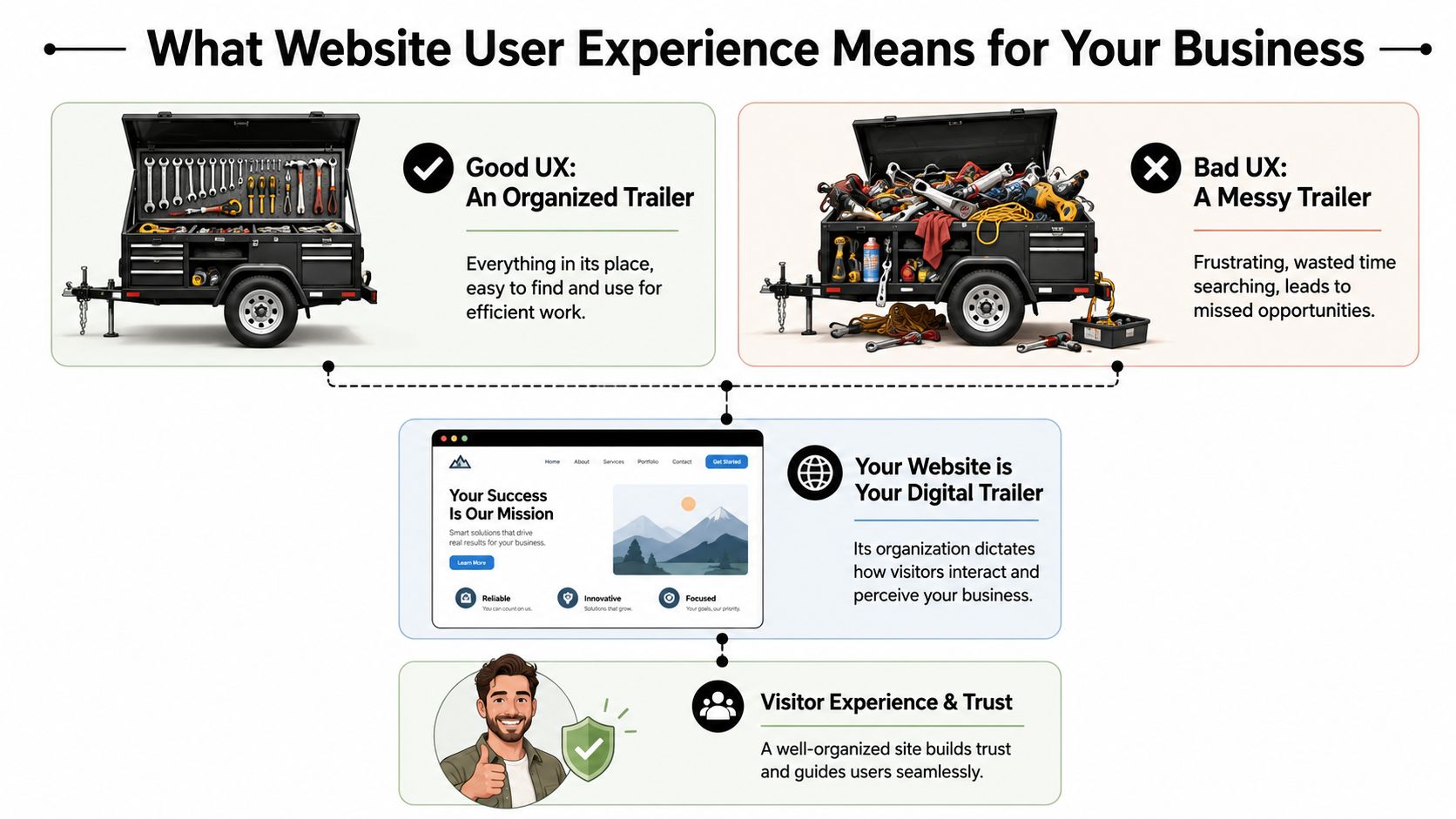
Contractors usually understand UX once you stop talking like a designer and start talking like a foreman. Think about a tool trailer. If every wrench, fitting, and cutoff wheel has a place, the crew moves faster. If everything is piled in the corner, people waste time, get irritated, and sometimes use the wrong thing.
Your website works the same way.
The tool trailer test
A visitor shows up with a job to do. They aren't there to admire your website. They want to know one of a few things fast.
Maybe they need a vac truck. Maybe they need welding support. Maybe they want to know if you work in Duchesne County, Uintah County, or beyond. Maybe they're a CDL driver looking for a better employer.
If the menu is confusing, the pages are scattered, or the contact options are buried, the site feels like a messy trailer. People don't say, “This site has poor information architecture.” They say, “I can't find anything,” and they leave.
That's why website user experience design matters. It organizes your digital space around what the visitor needs to accomplish, not around how your company happens to be structured internally.
Three pillars that matter
Most of UX for a contractor website comes down to three simple tests.
Short forms, click-to-call, readable text, mobile-friendly layouts
Trust
Does this company look legitimate and capable?
Professional design, current photos, clear service area, consistent branding
The first pillar is navigation and layout. A strong site doesn't make people dig through vague labels like “Solutions” or “Resources” when what they need is “Services,” “Careers,” or “Request a Quote.”
The second is ease of use. A form that asks for too much too early kills momentum. A phone number that isn't clickable on mobile wastes an easy opportunity. Tiny text, weak contrast, and crowded pages make the site harder to use than it needs to be.
The third is trust. People judge your operation partly by how your website feels. If it looks outdated, broken, or unfinished, they start wondering what else is disorganized.
A polished website doesn't replace good field performance. It does help a buyer believe you'll deliver it.
The practical takeaway is simple. Review your site the way a stranger would. Don't ask whether it has all the information. Ask whether the right person can find and use that information without effort.
If the answer is no, that's a UX problem, not just a design problem.
How Good UX Drives Leads Recruitment and Credibility
A contractor doesn't invest in a website for compliments. The site needs to produce phone calls, quote requests, and applicants. That's where UX stops being abstract and starts looking like a business decision.
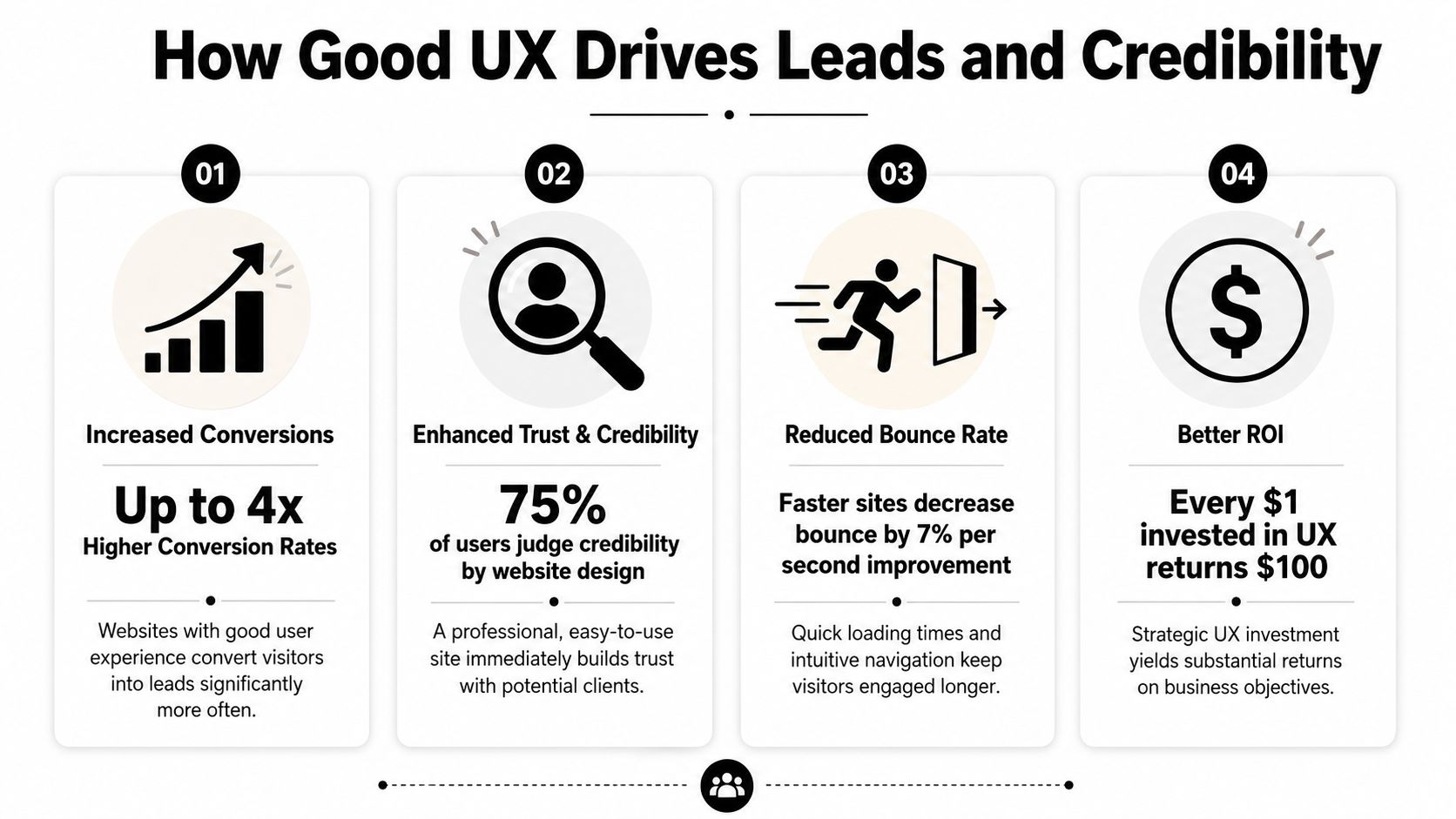
The upside can be substantial. According to DesignRush's roundup of UX statistics, every dollar invested in UX can generate up to $100 in return, which is often described as about 9,900% ROI. The same source also notes that frictionless UX design can increase conversion rates by as much as 400%. For a contractor or oilfield service company, that means the structure of the site can directly affect how many visitors become leads or applicants.
More leads with less friction
A good contractor website doesn't just say “contact us.” It clears a path.
If someone lands on your service page, they should see what you do, where you work, and what to do next. On many underperforming sites, the visitor has to hunt for all three. That's where leads disappear. Not because demand is weak, but because the path is clumsy.
A few things usually work well:
Visible calls to action: “Request a Quote” in the main menu works better than hiding the contact path in the footer.
Short forms: Ask only for what you need to start the conversation.
Service-specific pages: A page about excavation should lead naturally to an excavation estimate request.
Trust cues near the form: Reviews, safety credentials, and service area details reduce hesitation.
If you want a simple way to present credibility elements cleanly, a trust badge generator tool can help package reviews or proof points into something more usable than random screenshots.
For companies focused on lead flow, this is the same logic behind a better website conversion rate strategy. Reduce friction, and more of the traffic you already have turns into real opportunities.
Better recruiting starts with usability
Recruiting is where a lot of contractor sites inadvertently lose good people. The company says it's hiring, but the process sends applicants through a maze. Sometimes it's a PDF. Sometimes it's a desktop-only form. Sometimes the careers page is buried under “About.”
That setup filters out the wrong people. Not the unqualified ones. The busy ones.
A welder on break or a driver between loads won't jump through hoops to express interest. They'll move on to the company with the easier process. Good UX supports hiring by making the careers path obvious, mobile-friendly, and short enough to finish in a real-world setting.
If applying for a job feels like office paperwork, field talent won't finish it.
Credibility gets decided fast
Many local businesses underestimate how much website quality affects perception. A smaller company can look dependable and established online. A capable company can also look disorganized if the site is slow, sparse, or outdated.
Credibility comes from details people notice without thinking about them:
Current project photos
Readable service descriptions
Consistent branding
Clear company contact details
A site that feels maintained rather than abandoned
For industrial buyers, that first impression matters because the consequences are more significant. They're not ordering a T-shirt. They're evaluating whether you seem reliable enough to handle a serious job.
Good UX tells them yes before the first phone call.
Practical UX Upgrades for Your Contractor Website
Most contractor websites don't need a fancy reinvention first. They need practical cleanup. Fix the places where users get stuck, and the site usually starts pulling more weight right away.
One useful way to think about it is task completion. CareerFoundry's overview of UX design notes that well-structured site hierarchies and optimized task flows can improve task completion rates by 20–40%. On a contractor site, that often means more visitors finishing a quote request or job application instead of dropping off halfway through.
Fix the high-friction spots first
Start with the pages tied directly to money and hiring. Don't begin with your history page or a logo refresh.
Make the phone number tap-to-call: On mobile, this should work from the header on every page.
Put “Request a Quote” in the main navigation: Not buried under a submenu.
Create a real careers page: Don't force users to download a document to apply.
Show service areas clearly: If you serve Vernal, Roosevelt, Duchesne, and surrounding areas, say so plainly.
Use plain labels: “Hydrovac Services” beats vague menu text like “Capabilities.”
A lot of this is easier to manage when the site is built on a flexible platform. A well-structured WordPress website for business makes it easier to update service pages, hiring content, and forms without rebuilding the whole site every time something changes.
Build around the jobs people need done
Internal org charts make terrible website navigation. Customers don't care which department owns a service. They care whether you can solve the problem they have today.
That means pages should map to user tasks, such as:
Visitor need
Best page or feature
Get pricing or availability
Quote form with a clear next step
Check service fit
Individual service pages with examples
Confirm service area
Service area page or map
Apply for work
Mobile-friendly careers page
Verify credibility
Projects, certifications, reviews, equipment info
When this is done well, the site feels obvious. That's a compliment. Obvious is good. Obvious gets the job done.
Here's a practical walkthrough that shows the difference between cluttered interfaces and cleaner decision paths:
Use video and visuals to remove doubt
Contractor websites often lean too hard on text or, just as often, on giant photo galleries with no context. The better approach is to use visuals as proof.
Show trucks, crews, fabrication work, equipment, site conditions, and finished results. Add short captions so the visitor knows what they're seeing. A photo of a rig-up yard means more when it's tied to a service, project type, or capability.
A few upgrades usually pay off quickly:
Replace generic stock images with real field photos.
Use headings that answer questions people have.
Keep forms short and place them near relevant content.
Add FAQs for common concerns like service area, turnaround, or equipment types.
Trim dead pages that don't help a visitor take action.
The best contractor websites feel less like advertisements and more like a well-run office counter. Clear signs, direct answers, and no wasted motion.
That's the standard to aim for.
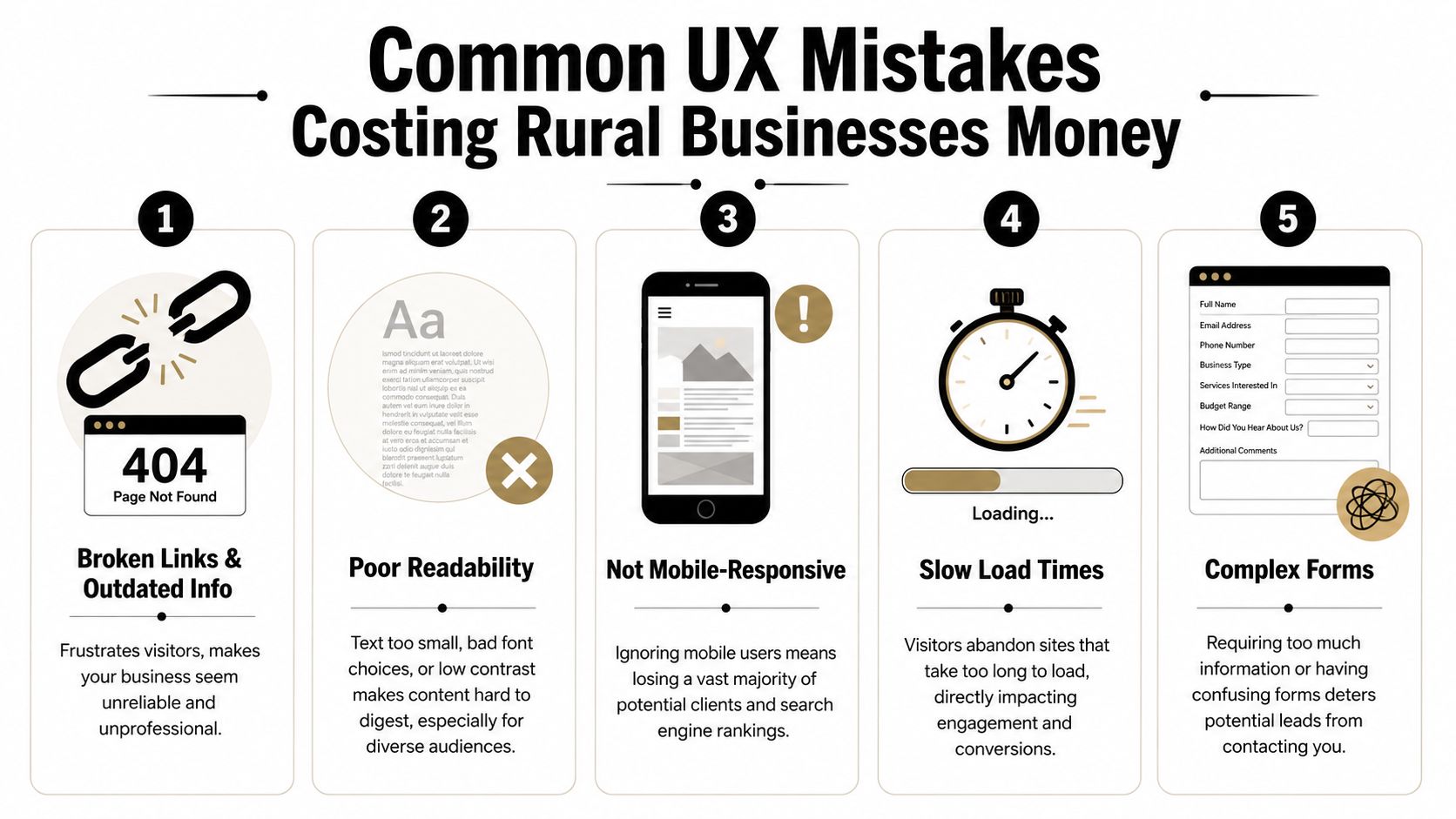
Common UX Mistakes Costing Rural Businesses Money
Some website problems are annoying. Others directly cost you leads and applicants. Rural businesses often deal with both at the same time.
The hard truth is that many local contractor sites still make basic mistakes that turn away good traffic. Not because the owners don't care, but because the site was built once, then left alone while the business kept evolving.
The expensive mistakes I see most often
The first is hidden contact information. If a user has to scroll, search, or switch pages just to find a phone number, the site is slowing down a ready-to-buy visitor.
The second is oversized image files. Contractors want to show off jobs, which makes sense. But if those photos are uploaded straight from a phone or camera with no compression, the site gets heavy fast. On a weak mobile connection, that hurts.
The third is document-first thinking. If your service details, job application, or equipment list live inside downloadable files instead of usable web pages, you're adding friction for no reason.
The fourth is unclear language. Local businesses sometimes write for insiders only. That works if the reader already knows your world. It fails when a property owner, office manager, or project coordinator needs plain-English confirmation that you do the work they need.
A quick diagnostic list helps:
Buried contact paths: Visitors shouldn't have to hunt for a call or quote option.
Outdated information: Old crew photos, expired job posts, and stale service pages make the business look inactive.
Tiny text and weak contrast: Hard-to-read sites lose people fast.
Forms that ask too much: Long forms feel like work, especially on mobile.
Broken mobile layouts: If the site pinches, overlaps, or cuts off content, users won't fight through it.
Why rural conditions make bad UX worse
Rural users don't always browse on ideal connections. They may be on the road, on-site, or using older devices. That changes what “good enough” means.
According to the Wikipedia overview of user experience design, sites that exceed Google's Core Web Vitals thresholds for speed and stability can see conversion rates 10–30% higher than slower, poorly optimized sites. For Uinta Basin businesses, that matters because many visitors are using mobile devices in less-than-perfect network conditions.
Challenging environments expose weak websites. A slow-loading gallery, shifting layout, or heavy script might be tolerable on office fiber. It becomes a problem in the field.
Slow websites don't just test patience. They make the company look less professional than it is.
If your website only works well under perfect conditions, it isn't working well.
Your Prioritized UX Action Plan
Most owners don't need another vague reminder to “improve the website.” They need a sequence. What should get fixed first, what can wait, and what deserves a bigger rethink later.
The best UX plans start with friction removal, then move into structure, then into refinement. That keeps the work practical and tied to business results instead of endless tinkering.
This week
Handle the obvious issues first. These are the fixes that stop immediate leakage.
Test your site on your own phone: Not in the office, but the way a customer would use it.
Check every main contact path: Phone number, quote form, contact page, and careers page should all work cleanly.
Move key actions higher: Put quote requests and job opportunities where they're visible without hunting.
Remove dead weight: Broken pages, outdated PDFs, and old announcements should go.
Review readability: If the text is hard to read, increase contrast and size.
A good companion for this step is a structured WCAG AAA checklist. Even if you don't pursue every accessibility standard at once, it gives you a practical way to catch readability and usability issues that affect real visitors.
The next 90 days
Once the urgent problems are fixed, clean up the foundation.
Build clearer service pages. Simplify the main menu. Create a dedicated careers section. Add real project photos with context. Make sure each important page points to one next action instead of several competing ones.
This is also the right time to rethink navigation depth. Critical pages should be easy to reach. Visitors shouldn't need to bounce through multiple layers just to find employment info, equipment details, or service-area coverage.
You'll usually get the best results by focusing on these business paths:
Priority
What to improve
Why it matters
High
Quote flow
Direct impact on leads
High
Careers flow
Direct impact on recruiting
Medium
Service page clarity
Helps qualify the right inquiries
Medium
Mobile usability
Supports field and rural users
Ongoing
Photo and content updates
Keeps credibility current
Longer-term improvements
After the basics are solid, you can add more advanced UX improvements. That might include better FAQ content, tighter local SEO alignment, stronger review presentation, or smarter automation around lead intake.
It may also include AI-assisted interactions. Used carefully, they can help answer common questions or guide users to the right page. But the experience has to stay clear and trustworthy. The Moqups article on hidden work in UX/UI design notes that as AI-driven interactions become more common, UX has to preserve transparency and trust. For a service business, that means users should understand what the tool is doing and still have a clear path to a real human when needed.
Don't bolt on an AI chat widget just because everyone else is doing it. If it blocks the contact form, gives muddy answers, or feels like a gimmick, it hurts more than it helps.
The long-term goal is simple. Build a site that works under real conditions, supports the way your customers and applicants behave, and keeps earning its place in the business.
If your website isn't bringing in enough leads, helping you recruit, or reflecting the quality of your company, Northpoint Web can help. We build practical websites for contractors, oilfield service companies, trucking businesses, and other growing companies in the Uinta Basin that need their site to do more than sit online.
If you're a contractor in the Uinta Basin, you've probably felt this already. One week the phone stays busy, the crew is moving, and bids are going out. The next week you're chasing estimates, trying to fill the schedule, and still short a CDL driver, operator, or welder. That's where digital marketing stops being a side project and starts acting like part of the business itself.
Most contractor marketing advice is written for metro markets with giant budgets and cookie-cutter service areas. That isn't how rural Utah works. Around here, your website has to help you win jobs in Vernal, Roosevelt, Duchesne, and the outlying service areas. It also needs to help you recruit the kind of people you can't afford to lose. Good digital marketing for contractors does both. It brings in project leads and it gives serious applicants a reason to call, apply, and stick around.
A lot of contractors still treat their website like a digital business card. Company name, phone number, a few photos, maybe a contact form buried at the bottom. That setup used to be enough when most work came from referrals alone. It isn't enough now.
Acerca de 97% of consumers start their search online when they need a contractor, which is why search visibility, local SEO, and a mobile-friendly website are now core infrastructure, not optional extras, according to Blue Corona's contractor marketing guidance. If your competitor has a better site, they often get the first look, even if your field work is stronger.
Your site is your working hub
A contractor website should do more than explain who you are. It should answer the questions buyers and applicants already have before they call.
That means the home page needs to point people somewhere useful fast. A residential customer might need "Get an Estimate." An oilfield service buyer may want "Request a Quote." A welder or equipment operator looking for work needs "Apply Now" without digging through five pages.
Practical rule: If someone can't tell what you do, where you work, and how to contact or apply within a few seconds on a phone, the site is losing business.
For contractors, mobile performance matters because people are checking you from a truck, a job trailer, a lunch break, or a kitchen table at night. The site has to load cleanly, use HTTPS, and make navigation obvious. Those aren't fancy upgrades. They're basic operating requirements.
A strong build usually includes:
Service-specific pages: Don't hide everything under "Services." Create pages for actual work, such as hydrovac, excavation, welding, roustabout services, or commercial concrete.
Location relevance: Mention the markets you really serve instead of pretending you cover half the state.
Clear contact paths: Phone tap, simple form, quote request, and directions should all be easy to find.
Careers access: Put hiring front and center if labor is a bottleneck.
Project proof: Real job photos, equipment photos, and scope details build confidence quickly.
What the site needs to do on day one
The best contractor sites are built around decisions. Every page should help someone take the next step.
Consider the following:
Visitor type
What they want
What your page should offer
Property owner or manager
Confidence and a fast quote path
Service page, gallery, estimate CTA
Industrial buyer
Capability and response speed
Scope-specific page, certifications or experience, quote CTA
Job seeker
Payoff, culture, and easy application
Careers page, role details, apply CTA
Most weak sites fail because they try to sound professional instead of being useful. They use generic lines like "quality service" and "trusted team" but never show the work, the equipment, the service area, or the process.
If you're rebuilding on WordPress, a practical starting point is a WordPress website for business that gives you control over service pages, hiring pages, and local search content without locking you into a proprietary platform.
A contractor website should work like a dispatcher that never sleeps. It should route customers to the right service and route applicants to the right job.
Dominate Local Search With Google and SEO
Most contractors don't need to rank everywhere. They need to show up where they can perform the work. That's why local search matters more than broad visibility.
A practical workflow for digital marketing for contractors is to start with the website, then layer in Google Business Profile optimization and geo-targeted ads. That same guidance also warns against broad geographic targeting and poor lead-source tracking in 800.com's contractor marketing guide. That's exactly where many rural contractors burn time and ad spend.
The local search checklist that matters
If you serve Vernal, Roosevelt, Duchesne, or surrounding rural areas, Google needs clear signals about what you do and where you do it. Local SEO isn't magic. It's consistency.
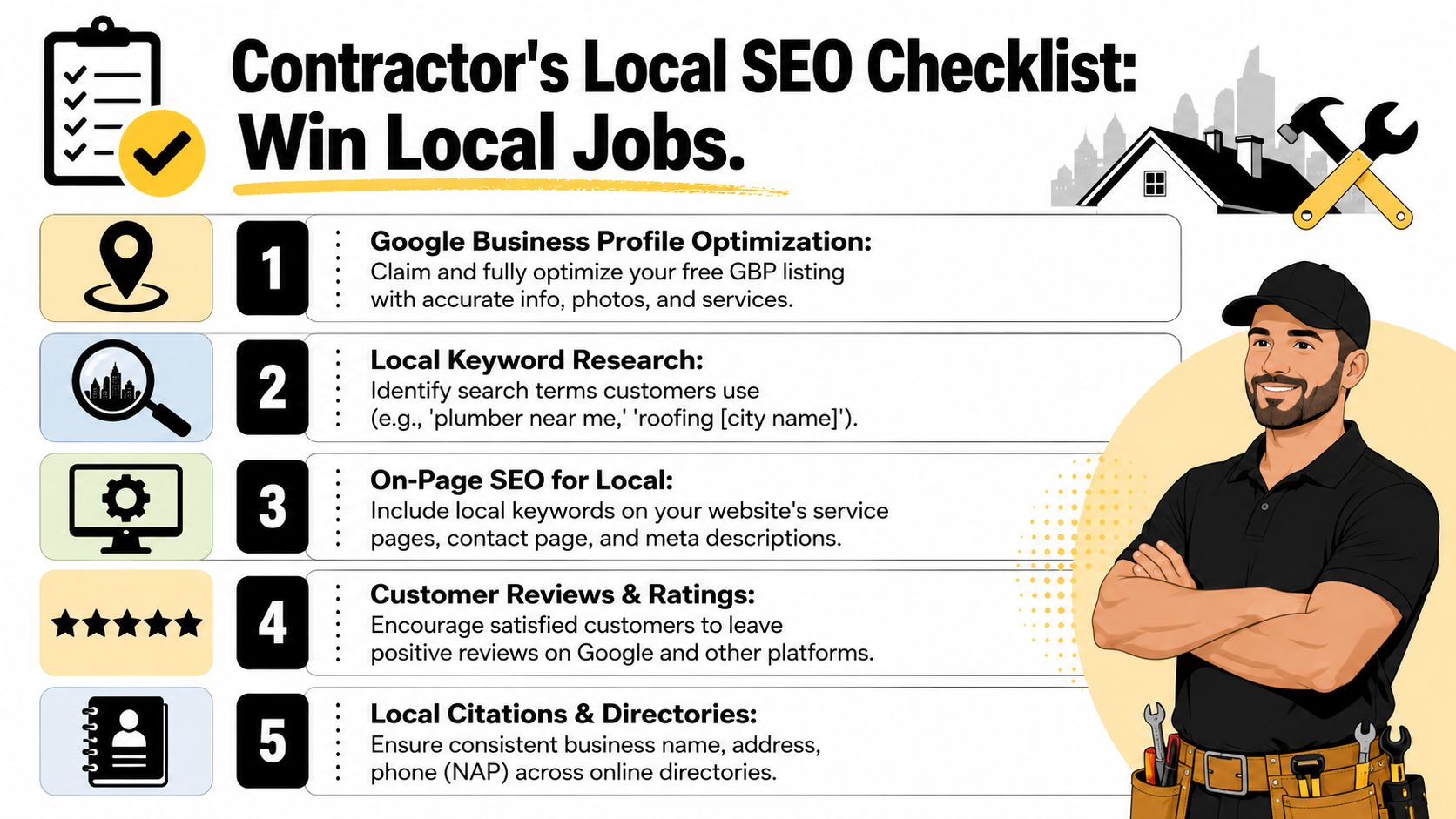
Start with this checklist:
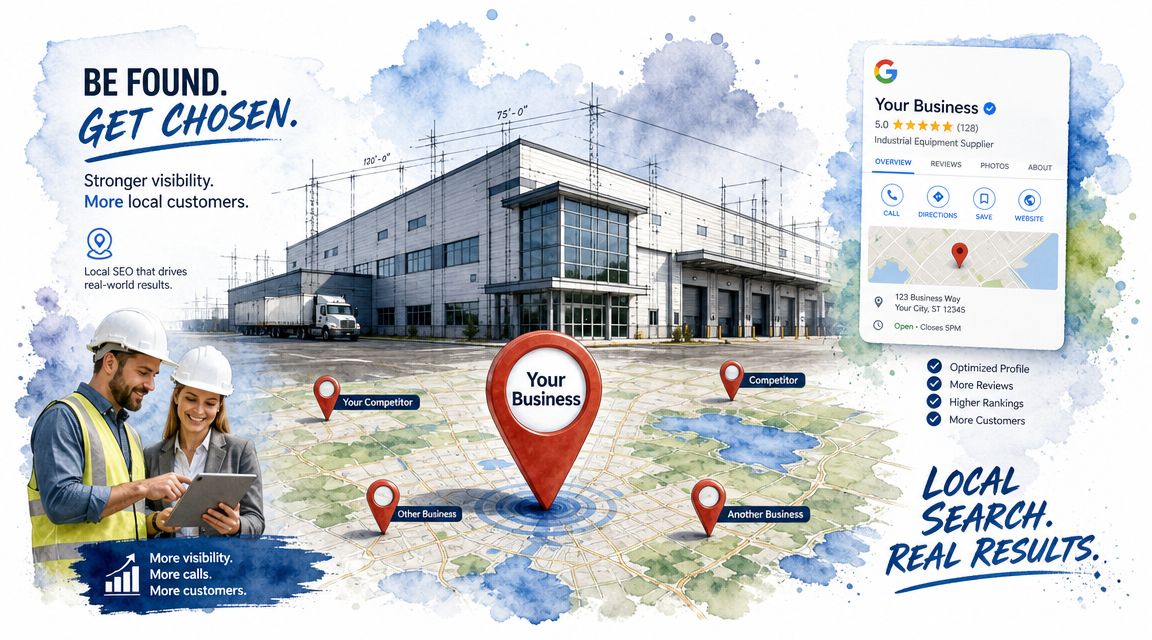
Claim and finish your Google Business Profile Fill out business categories, hours, services, phone number, and website. Half-complete profiles don't compete well.
Keep NAP consistent Your business name, address, and phone need to match across directories and your website. Small mismatches create confusion.
Upload real photos Use actual crew, equipment, trucks, yard, and jobsite photos. Generic stock imagery weakens trust.
Ask for reviews steadily Don't wait until the end of the year and ask everyone at once. Make it part of closeout.
Create location-aware service pages If you do excavation, hydrovac, welding, or trucking, build pages around those services and the places you really serve.
For teams that want extra help spotting on-page opportunities and content gaps, tools like AI SEO software can help organize the work without turning SEO into a full-time side job.
A more detailed local strategy for contractors is covered in this guide to local SEO for contractors.
Here's a useful walkthrough if you want to see local search basics in action:
What local contractors usually get wrong
The most common mistake is trying to target too much territory with vague pages. A contractor in Duchesne County doesn't need to act like a statewide operation unless the business actually runs that way.
Another issue is weak proof. If your Google profile says you do industrial welding, pipeline support, or excavation, but the profile has no recent photos and the website has one generic "Services" page, Google has less to work with and buyers have less reason to call.
Your local search presence should look like a real operating company, not a placeholder listing someone set up and forgot.
Google Business Profile posts can also pull extra weight. Use them to highlight completed jobs, seasonal availability, equipment additions, or current openings. That's one place where lead generation and recruiting can live side by side without feeling forced.
Create Content That Attracts Both Customers and Crew
Most contractor content misses the obvious opportunity. It talks only to buyers. That's a mistake in any market where labor is tight.
Industry guidance has started to catch up here. Construction and contractor companies are using digital marketing not just to generate leads, but also to “generate interest from future employees” and strengthen employer brand, as noted in Phaser Marketing's construction digital marketing article. For rural and industrial contractors, that isn't a side benefit. It's one of the main reasons to publish content at all.
One piece of content can do two jobs
A solid project spotlight should help a prospect trust your company and help a potential hire picture themselves working there.
Say you post a hydrovac job recap. A customer sees response capability, equipment quality, and professionalism. A CDL driver or operator sees late-model gear, organized crews, and whether your company looks serious or sloppy. Same content. Two audiences.
That kind of dual-use content has a better return than generic blogging because it reflects actual field work. You don't need marketing fluff. You need proof.
A project spotlight works best when it includes:
The type of work: What was done and why the client needed it.
The environment: Remote site, industrial facility, municipal area, residential neighborhood.
The process: Equipment used, scheduling realities, safety considerations, and execution.
The people: Crew photos, role highlights, or a short note about the team on site.
The outcome: Not inflated claims. Just a clear explanation of what was completed.
Content ideas that fit contractor reality
A lot of contractors freeze up because they think content means writing long blog posts every week. It doesn't. Start with formats you can realistically maintain.
Here are a few that work well:
Content type
What customers see
What applicants see
Project spotlight
Capability and quality
Equipment, crew standards, work environment
Before and after gallery
Visible results
Pride in workmanship
Safety post
Professionalism and process
Culture and expectations
Day-in-the-life video
Real operations
What the job is actually like
Hiring page update
Company growth
Open roles and easier next steps
A simple content calendar helps, especially if you're trying to keep social channels active without scrambling every week. If you need a framework, this guide on how to craft an effective social media strategy is useful because it pushes you toward repeatable themes instead of random posting.
The best contractor content usually starts in the field. Take the photo, jot down what happened, and turn it into a page, post, or hiring update before the job fades from memory.
One more point matters here. Careers content shouldn't feel separate from brand content. If your company talks about quality, safety, and reliability to customers, those same values should show up in job descriptions, recruiting pages, and crew updates. People notice when the public message and the hiring message don't match.
Run Smart Paid Ads for Immediate Local Leads
A contractor in the Basin can burn through a month of ad spend in a week if the setup is sloppy. I see it all the time. Ads run across too much territory, clicks come in from places the crew will not drive to, and the phone calls that do convert are a poor fit. Paid ads can still work fast, but only when the campaign is built around your actual service area, your real margins, and whether you need customers, employees, or both.
According to WordStream's Google Ads benchmarks for search advertising, home improvement campaigns tend to run at higher cost per click than many other local categories. That matters in rural and industrial markets, where every wasted click hits harder because search volume is smaller and the wrong lead can tie up your estimator for half a day.
Tight targeting beats broad reach
For contractors, paid search usually outperforms broad awareness ads because the buyer is already looking for a service. In the Uinta Basin, that often means splitting campaigns by town, service line, and intent. Roosevelt trenching traffic should not be mixed with Vernal shop fabrication traffic. Emergency repair traffic should not land on a page built for planned project bids.
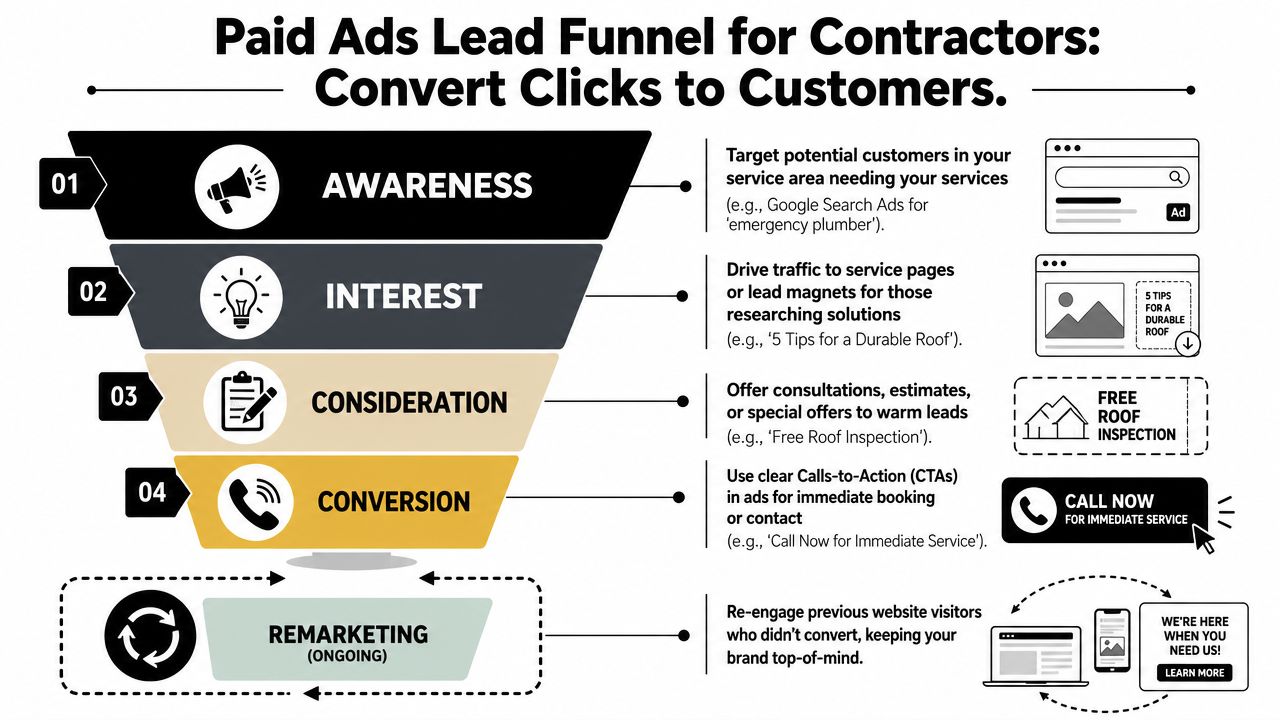
A paid setup that holds up usually includes:
Narrow geography: Target only the towns, counties, and drive radius you will serve profitably.
Service-specific landing pages: Send excavation clicks to excavation pages, welding clicks to welding pages, and recruiting clicks to hiring pages.
Separate lead paths: Keep customer quote requests and job applications on different pages, forms, and follow-up sequences.
Careful remarketing: Reconnect with people who visited a service page, quote page, or careers page but did not take the next step.
That separation matters more in smaller markets. A single website often has to do two jobs at once. It needs to bring in work and help fill openings for operators, welders, laborers, or CDL drivers. Generic campaigns blur those goals together and usually hurt both.
If you want a stronger system behind the ads, this guide to lead generation for contractors does a good job showing how traffic, landing pages, and conversion paths fit together.
Where paid ads usually leak money
The first leak is geography. Contractors widen the map because more coverage sounds like more opportunity. What they get instead is calls from outside the service area, lower close rates, and crews stretched across too much ground.
The second leak is message match. If the ad offers hydrovac, directional boring, roofing repair, or tenant improvement, the landing page should continue that exact offer with a clear next step. Sending every click to the homepage is expensive guesswork.
The third leak is treating recruiting as an afterthought. In industrial and rural markets, hiring pressure can be just as urgent as lead pressure. Paid social and search can support that, but only with dedicated job pages, clear qualification language, pay or schedule details when appropriate, and an easy application process. Tools like Formzz forms, chat & AI can help reduce drop-off once someone decides to apply or request a quote.
Paid ads should direct the right person to the right page, with one clear action to take.
Smaller contractors do not need giant campaigns. They need clean campaign structure, honest targeting, landing pages tied to real services, and separate ad paths for customers and crew. That is what gets immediate leads without filling your inbox with junk.
Track Your Results and Automate Follow-Up Like a Pro
A contractor in the Basin can spend good money getting the phone to ring, then lose the job because nobody called back until the next morning. The same thing happens on the hiring side. A mechanic, operator, or laborer fills out an application during lunch, hears nothing, and takes a job with the company that replied first.
That is why tracking and follow-up matter so much in rural and industrial markets. You are not just trying to get more leads. You are trying to protect the leads and applicants you already paid to get.
Market Veep's construction marketing strategy guide makes a solid point here. Contractor marketing works better when you run it like an acquisition system with clear goals, channel tracking, and defined KPIs. I agree with that. If you cannot tell where good jobs and good applicants came from, you are guessing.
The numbers that actually matter
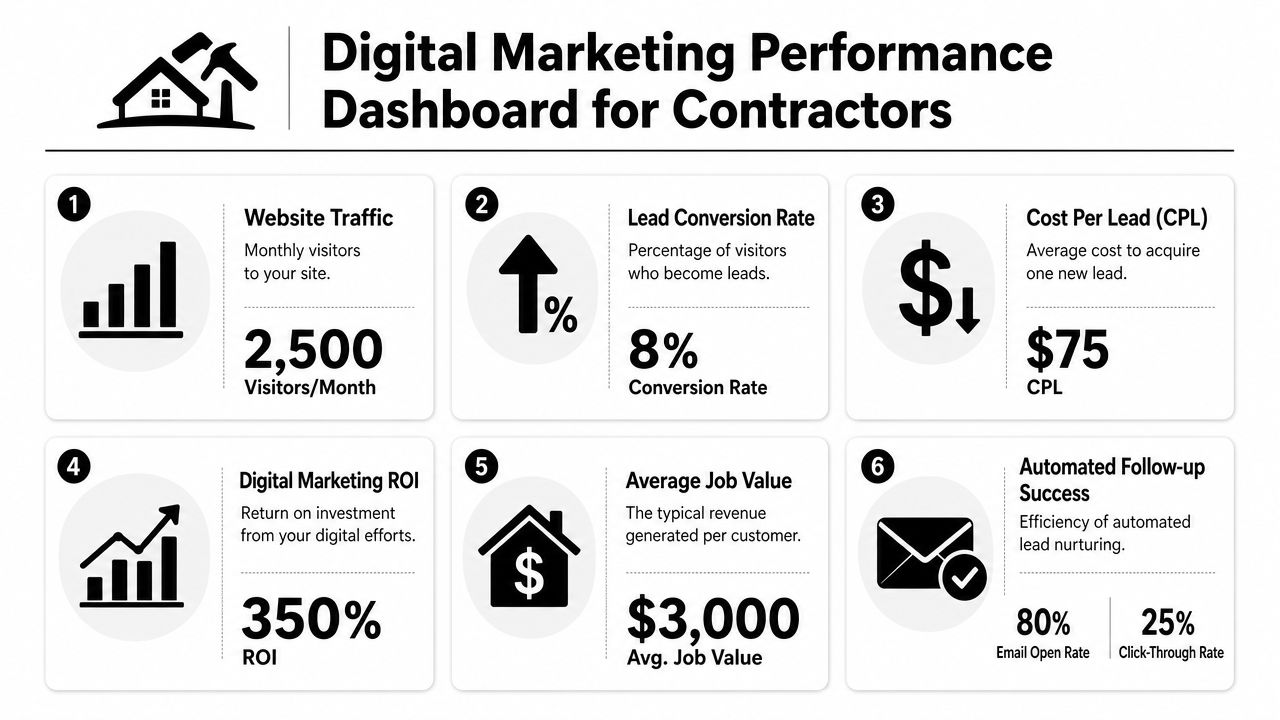
Skip the bloated dashboard. A short weekly scorecard is enough for a lot of contractors.
Track these:
Lead source: Which channel brought the call, form fill, or message?
Booked estimate rate: How many inquiries turned into actual appointments?
Qualified lead rate: Which sources produce real jobs in your service area, not bad-fit calls?
Cost per lead: What did each paid lead cost?
Close rate by source: Do Google leads close better than Local Services Ads, Facebook, or referrals?
Applicant source quality: Which channels bring people who answer the phone, show up, and fit the work?
That last one deserves its own line item. In the Uinta Basin, staffing pressure can hit just as hard as sales pressure. If the field is short on CDL drivers, welders, roofers, or operators, recruiting data belongs on the same report as lead data.
Track the handoff, not just the click
A lot of reporting stops at form submissions. That misses the part where money is made or lost.
Track what happens after the inquiry comes in. How fast did someone respond? Was the lead booked, quoted, won, or marked unqualified? Did an applicant finish the application, answer the callback, and make it to an interview? Those steps show where the bottleneck is.
HubSpot's guide to marketing automation timelines makes the broader point that systems need time, clean setup, and regular review before you judge performance: HubSpot's marketing automation strategy guide. That fits contractor marketing too. Check results every month, make adjustments quarterly, and do not rebuild the whole machine every two weeks because one campaign had a slow spell.
Automation should cover the first five minutes
Fast follow-up wins work. It also wins hires.
A simple CRM or intake system should catch every form, call, quote request, and job application in one place. Then use automation for the first response so nobody sits in limbo after hours or while the office is busy.
Useful automations include:
Trigger
Automation
Why it helps
Quote form submitted
Instant email or text acknowledgement
Confirms receipt and sets expectation for next contact
Careers form submitted
Immediate applicant response
Keeps qualified people from drifting to another employer
Missed call
Automatic text follow-up
Recovers leads and applicants who called after hours
New lead assigned
Internal notification to the right person
Speeds up response and creates accountability
Estimate scheduled
Reminder text or email
Reduces no-shows
Interview scheduled
Confirmation and reminder message
Improves applicant attendance
For smaller teams, tools that combine forms, chat, and automation can cut a lot of manual back-and-forth. This overview of Formzz forms, chat & AI shows how a small business can automate intake and follow-up without piecing together a big enterprise setup.
Fast follow-up protects conversion rate on both sides of the business, jobs and recruiting.
The trade-off is simple. More automation gives you speed and consistency, but it still needs a human handoff with good judgment. Auto-replies should confirm, route, and set expectations. They should not replace the estimator who knows the territory or the office manager who can tell whether an applicant is serious.
Done right, tracking shows where leads and applicants come from, and automation keeps them warm long enough for your team to do the part that closes.
Your Digital Playbook for the Uinta Basin
Digital marketing for contractors works best when you stop thinking of it as advertising and start treating it like business infrastructure. Around here, that means something pretty practical. Your online presence should help the company get found, get trusted, get contacted, and get staffed.
The contractor who wins online in a rural market usually isn't the one with the flashiest branding. It's the one with the clearest service pages, the strongest local signals, the best proof of work, and the fastest follow-up. That business shows up when someone searches. It looks credible on a phone. It has a hiring path that doesn't waste applicants. And it doesn't make people guess what happens next.
A practical order of operations
If the current setup feels scattered, use this order.
Fix the website first Build pages for actual services, real locations, and real actions. Add estimate and apply paths that are easy to use on mobile.
Tighten local visibility Finish the Google Business Profile, clean up business information across the web, and publish location-aware service pages.
Create field-based content Use projects, equipment, crew updates, safety moments, and hiring posts as the foundation. Don't wait for perfect polished campaigns.
Add paid ads where urgency exists Use paid search for immediate service demand and targeted recruiting pushes when hiring pressure spikes.
Track and automate Measure lead sources and applicant sources. Respond quickly. Adjust based on what produces real work and qualified people.
This approach works because it lines up with how contractors operate. Build the asset first. Improve visibility second. Add fuel where needed. Then measure hard.
What consistency looks like in the real world
Consistency doesn't mean posting every day or buying every tool on the market. It means the basics are handled month after month.
That includes keeping service pages current, adding new project photos, asking for reviews, checking where leads came from, and cleaning up the response process. It also means looking at recruiting with the same seriousness as lead generation. If you need operators, CDL drivers, welders, or laborers, your digital presence should make that obvious and make applying easy.
A strong contractor marketing system also respects the trade-offs. SEO builds long-term visibility, but it takes patience. Paid ads move faster, but they need tight control. Content builds trust, but only if it reflects real work. Automation saves time, but only if the underlying process makes sense.
The good news is that none of this requires a giant-city agency mindset. It requires clear priorities, a working website, local discipline, and follow-through. Contractors in the Uinta Basin already know how to build durable systems in the field. The same logic applies online.
If you handle those pieces well, your website stops being something you have because every business is supposed to have one. It becomes an operating asset that helps bring in jobs, support recruiting, and make the company easier to trust.
If you're ready to turn your website into a tool that brings in leads and helps recruit better employees, Northpoint Web works with contractors and industrial businesses in the Uinta Basin to build practical websites, stronger local search visibility, and digital systems that support real business growth.
Industrial companies still earn business through referrals, repeat customers, and long-standing relationships. But when a project manager needs a contractor in a new service area, a procurement contact verifies your capabilities, or a skilled worker researches where to apply, the process often starts with Google.
SEO for industrial companies helps your business show up for the services, equipment, certifications, locations, and job-specific solutions your market is already searching for. The goal is not more traffic at any cost. It is better visibility with buyers and applicants who may be ready to take the next step.
SEO for industrial companies helps your business show up for the services, equipment, certifications, locations, and job-specific solutions your market is already searching for. The goal is not more traffic at any cost. It is better visibility with buyers and applicants who may be ready to take the next step.
That still matters. It probably always will.
But the gap shows up when a project manager needs a contractor in a new service area, when a procurement contact has to verify capabilities before sending an RFQ, or when a welder or CDL driver is deciding which company to apply to. They don't start with your reputation if they don't know you yet. They start with Google. They search for the service, the equipment, the certification, the location, or the exact problem they need solved.
That's where SEO for industrial companies stops being a marketing buzzword and starts becoming a business issue. If your company doesn't show up when those searches happen, you're invisible to buyers and applicants who were ready to take the next step.
Beyond Word-of-Mouth Why SEO is Your Next Big Growth Engine
Word-of-mouth is still one of the best sales channels in industrial markets. It brings trust with it. If a drilling superintendent, plant manager, or general contractor sends work your way, you start the conversation with credibility that no ad can buy.
The problem is that referrals rarely close the whole gap anymore. Buyers still verify what they hear. They search your company name, review your service pages, look for project photos, and check whether they work in their region. If they can't find much, or what they do find looks outdated, that referral gets weaker fast.
Why industrial search behaves differently
Industrial search isn't about broad consumer traffic. It's about a smaller number of people making bigger decisions. They don't type vague phrases when they need a real vendor. They search for things like service capabilities, tolerances, certifications, delivery areas, equipment classes, and jobsite-specific solutions.
One reason this matters is simple. Search is where many B2B buying journeys begin. According to this manufacturer SEO guide from Market Veep, 57% of B2B marketers say SEO generates more leads than any other marketing initiative, and 49% of B2B marketers who have strategically used SEO believe it delivers better ROI than any other channel. For industrial companies, that value comes from showing up for precise, high-intent searches rather than chasing mass visibility.
If you run a welding shop, excavation outfit, trucking company, or oilfield service business, the best search visitor isn't the one casually browsing. It's the one searching with a problem and a spec sheet in hand.
Practical rule: In industrial SEO, less traffic can be better traffic if it brings quote requests, phone calls, and serious applicants.
What skeptical owners usually get wrong
The common objection is fair. “Our customers don't find us online. We get jobs through relationships.” In practice, both are usually true. Relationships open doors, and search confirms whether you belong on the shortlist.
A strong online presence helps in three places:
Referral validation: Someone hears your name and immediately checks your site.
New market expansion: A buyer outside your current network searches for a contractor in your area.
Recruiting support: Drivers, operators, mechanics, and laborers search employers before they apply.
That's why SEO for industrial companies works best when it supports the way industrial sales already happen. It doesn't replace relationships. It strengthens them and fills the gaps between them.
If you want a contractor-specific view of how this plays out in service industries, this overview of SEO services for contractors is worth a look.
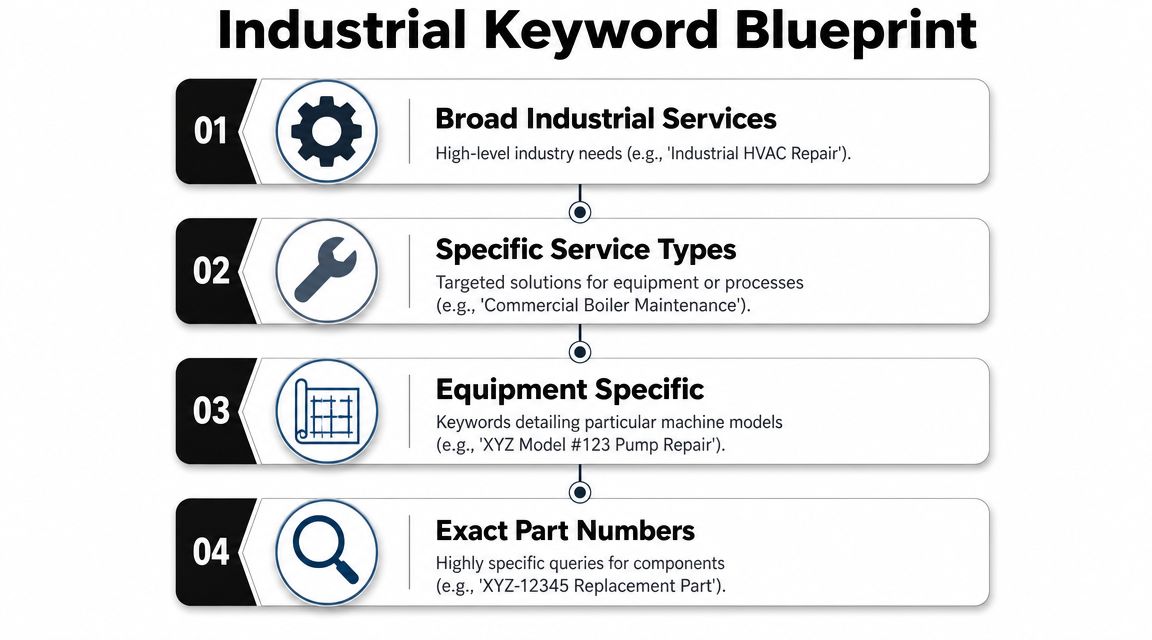
The Industrial Keyword Blueprint From Services to Part Numbers
Most industrial companies start keyword planning too broad. They target terms like “construction company,” “oilfield services,” or “machine shop,” then wonder why the traffic doesn't turn into work. Those phrases are usually too vague, too competitive, or too early in the buying process.
The better approach is to build keyword targets around how industrial buyers search. They usually know more than the average consumer. Often, they already know the process, the material, the job condition, the compliance requirement, or the exact component they need.
The three intent layers that matter
A strong industrial keyword strategy needs three layers. As Konstruct Digital explains in its industrial SEO guide, those layers are capability terms, technical-specification terms, and application-specific terms. Industrial buyers also search by part numbers, material grades, and certification standards, which makes those entities especially valuable for high-intent SEO.
Here's what that looks like in plain terms:
Capability terms These are your core services. Think “hydrovac contractor Vernal Utah,” “roustabout services Uinta Basin,” or “structural steel fabrication Utah.” They tell Google and buyers what you do.
Technical-specification terms Real commercial intent becomes apparent. Examples might include material grades, pressure classes, axle types, pipe sizes, lifting capacities, or welding processes. Buyers using these searches usually aren't window shopping.
Application-specific terms These connect your service to a real use case. “Pipeline reclamation contractor,” “tank battery maintenance contractor,” or “aggregate hauling for road construction” tells you what problem the searcher is trying to solve.
How to build a list that actually brings leads
A good keyword list usually starts in the field, not in an SEO tool. Listen to how your estimator, dispatcher, shop manager, and sales rep describe jobs on the phone. Then compare that language with how buyers phrase needs in RFQs, bid requests, and procurement emails.
Use a simple filter when you review any search term:
Question
Good sign
Bad sign
Does it describe a real service?
Matches a revenue line
Sounds general or academic
Does it include a technical detail?
Material, equipment, certification, location
No buying signal
Could a buyer search this before contacting you?
Yes, especially near RFQ stage
More likely student or hobby traffic
A generic keyword may get impressions. A specific keyword gets the right phone call.
For oilfield, construction, trucking, and industrial service firms, the strongest terms often combine service + geography, service + equipment, or service + application. That's how you move from “we need traffic” to “we need the right searches.”
Owning Your Service Area with Local SEO and Google Business Profile
Most industrial companies don't need to dominate the whole internet. They need to win in the places they serve. If your crews work Duchesne, Roosevelt, Vernal, the Uinta Basin, or a defined regional footprint, your local search presence needs to reflect that clearly.
A lot of owners overlook this because they think local SEO is only for restaurants, plumbers, or retail stores. That's a mistake. For industrial contractors and service-area businesses, local visibility often determines who gets the first call.
What your Google Business Profile should do
Your Google Business Profile is often the first branded asset a prospect sees. It should answer basic trust questions immediately. Are you real? Are you active? Do you work in my area? What kind of projects do you handle?
For industrial companies, that means treating the profile like an operations snapshot, not just a directory listing.
Focus on these basics:
Define your service area clearly: If you travel across counties or operate throughout a basin or regional corridor, set that up properly instead of relying on a single office address.
Use real jobsite and equipment photos: Show trucks, crews, fabrication work, equipment fleets, yards, and field conditions. Skip stock imagery.
Collect relevant reviews: Reviews from actual customers, vendors, and project partners help validate reliability and responsiveness.
Keep categories and services aligned: Your listed services should match the language on your website.
If you want extra ideas that overlap well with contractor-type businesses, Pipeline On has a useful guide on local SEO strategies for home service businesses. The market isn't identical, but the practical GBP habits carry over well.
Local pages beat generic coverage
A single “Service Areas” page usually isn't enough. If you serve multiple cities, counties, or regions, create useful pages for those places. Not thin copies. Real pages that explain what work you do there, what types of customers you serve, and what equipment or response capabilities matter in that geography.
That's especially important when buyers search location-first. They may search the service plus the basin, county, or city before they ever look for your company name.
A useful companion read on that side of the work is this collection of local SEO articles, especially if your business depends on map visibility and regional landing pages.
Here's a quick video that shows the mindset behind stronger local visibility:
Trust signals that matter locally
Industrial buyers don't need flashy branding. They need confidence.
A local search presence gets stronger when it shows:
Current activity: Recent photos, updated hours, and active profile management
Operational proof: Equipment, trucks, crews, certifications, and types of work
Geographic clarity: Towns, counties, and service regions you cover
Responsiveness: Prompt replies to reviews and clear contact options
Local SEO works best when it mirrors the way work gets awarded in the field. Buyers look for coverage, credibility, and evidence that your company can show up and perform.
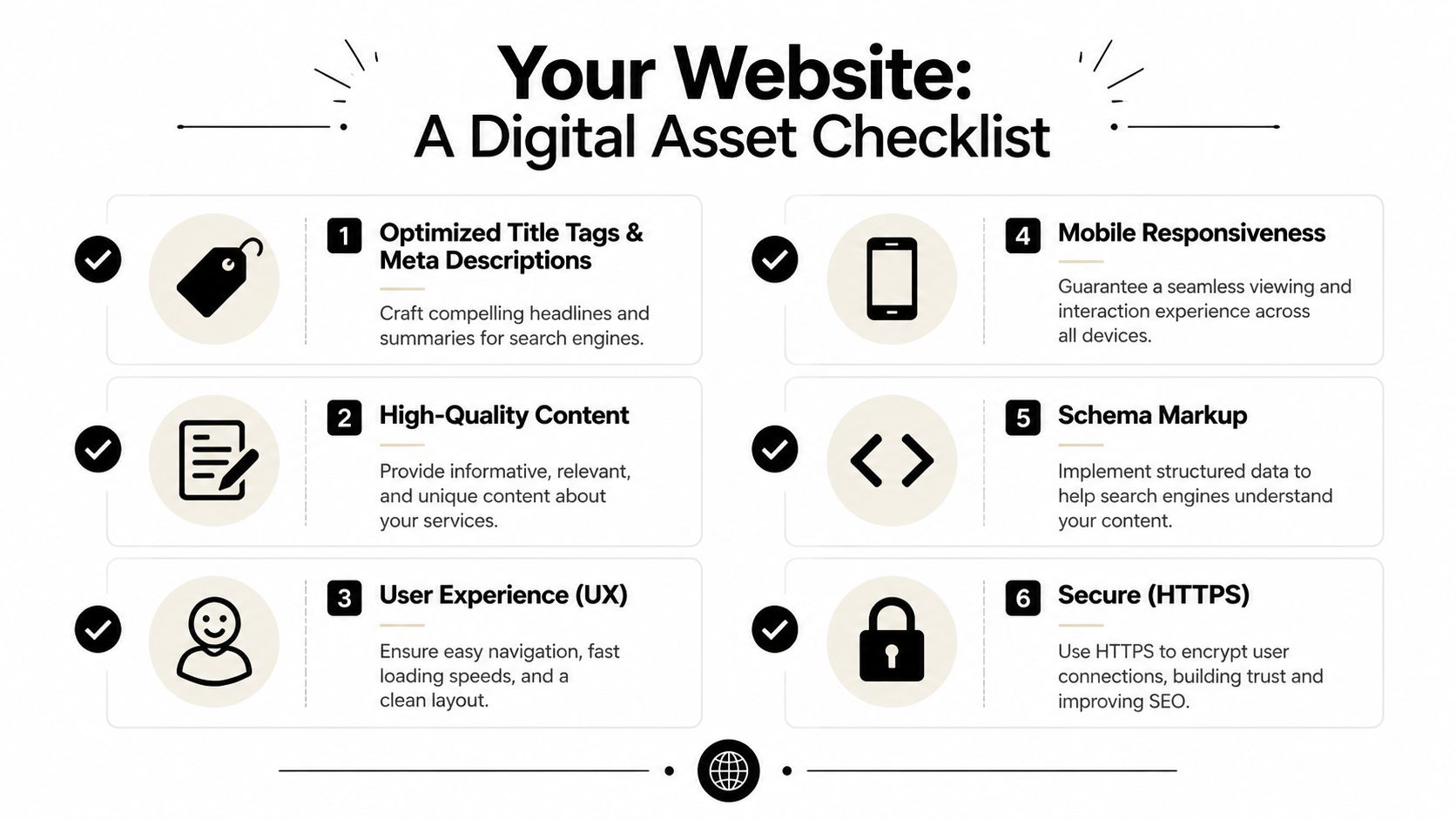
Your Website as a Hard-Working Digital Asset
A lot of industrial websites still function like digital brochures. They have a homepage, an about page, a short services page, and a contact form. That may check a box, but it doesn't do much selling, ranking, or recruiting.
Your website should work more like a critical piece of equipment. It should be reliable, easy to operate, and built for output. In this case, the output is qualified leads, stronger credibility, and better applicants.
Structure pages around real services
If your company offers excavation, hydrovac, roustabout work, welding, hauling, reclamation, or equipment rentals, each one deserves its own page. Not a bullet on a general services page. A dedicated page.
That page should clearly cover:
the service itself
the types of customers or projects it fits
the geographic area you serve
the equipment, certifications, or capabilities involved
the next step, such as a call or RFQ
This is one reason many industrial sites underperform. They bury valuable services under broad headings and force both Google and buyers to guess what they do.
Technical SEO matters more than most owners think
A good industrial site also has to be crawlable. That matters even more for manufacturers, distributors, and companies with larger service or product catalogs. As Nopio notes in its industrial SEO article, search engines handle faceted navigation poorly, so best practice is to use canonical tags, noindex directives for low-value filters, and publish specification tables directly in HTML instead of only in PDFs. The same source also notes that adding schema fields such as mpn can help part-number searches map to the correct listing.
That's technical language, but the business takeaway is simple. If your most useful information is buried in PDFs, duplicate filter pages, or messy navigation, Google has a harder time understanding your site.
Field-tested advice: Put key specs, capabilities, materials, and equipment details on the page itself. PDFs can support the page, but they shouldn't be the only place the information lives.
Mobile speed changes who stays and who leaves
A foreman checking a vendor between stops, a project engineer on site, or a candidate applying from a phone won't fight through a slow or clumsy website. If your site takes too long, hides contact info, or makes forms difficult, you lose good opportunities before a conversation starts.
Think of your website in operational terms:
Website element
What it should do
Service pages
Match high-intent searches to specific offerings
Technical content
Prove competence and answer buyer questions
Mobile usability
Make it easy to call, request a quote, or apply
Site architecture
Help search engines find and understand important pages
If your site looks decent but doesn't produce much, the issue is often structure, not just design. That's why this piece on why your website needs more than just a designer hits the right point. Industrial sites need performance, not just appearance.
Content for Contracts and Crews Attracting Leads and Talent
Industrial content has two jobs. It needs to help buyers trust you enough to contact you, and it needs to help workers trust you enough to apply. Most companies only build for the first one, and many don't build for either with much intention.
The better model is straightforward. Publish content that answers serious buyer questions and serious applicant questions. If both groups can quickly tell what you do, where you work, and why your company is solid, the website starts pulling more weight.
Content that helps win contracts
Say a project manager is comparing contractors for pipeline support work, site prep, fabrication, hauling, or environmental cleanup. They're not looking for a fluffy blog post. They want enough detail to know whether your company belongs on the bid list.
The strongest pages usually follow a layered approach. Zero Gravity Marketing's article on industrial SEO challenges notes that industrial buying journeys involve multiple stakeholders, and content should serve engineers, procurement teams, and field users at the same time. A strong page leads with concise business outcomes, then goes deeper into technical detail, certifications, and downloadable resources. The same source also notes that industrial buyers increasingly research from phones and that pages slower than 3 seconds can lose visitors.
That layered format works because different people look for different proof:
An engineer wants methods, tolerances, materials, and specifications.
Procurement wants scope clarity, service area fit, and confidence you can deliver.
Operations or field teams want to know you understand real-world site conditions.
A useful contract-focused content mix often includes:
Detailed service pages: One page per service line, not one generic catch-all page
Project galleries: Real photos with captions that explain the work
Capability pages: Equipment lists, certifications, materials, and service regions
FAQ content: Straight answers to jobsite, scheduling, safety, and scope questions
Content that helps hire better people
Now look at the same site from a welder's, driver's, or operator's perspective. Most industrial careers pages are thin. They list a job title, maybe a sentence or two, and an email address. That's not enough if you want better applicants.
Strong recruiting content gives candidates a reason to choose your company over the next one. It should explain the work environment, expectations, locations, schedule realities, and what kind of person does well there.
A more effective hiring section usually includes:
A real careers page: Explain the company, the work, and the kind of roles you hire for
Mobile-friendly application flow: Short, usable forms that don't frustrate field applicants
Work culture proof: Photos of crews, trucks, shop conditions, and project environments
If your website can convince a buyer you're reliable, it can also convince a good employee that you're worth applying to.
One foundation, two outcomes
Consequently, SEO for industrial companies becomes more valuable than many owners expect. The same technical structure, local visibility, and page quality that help generate RFQs also support recruiting. Service pages attract buyers. Location pages build regional trust. A strong mobile experience helps both quote requests and job applications.
That makes your website more than a sales tool. It becomes part business development system, part recruiting platform.
Building Digital Authority Through Industry Partnerships
A lot of business owners hear “link building” and think of spam emails, cheap directory sites, and shady SEO tactics from fifteen years ago. That approach isn't useful for industrial companies, and it usually creates more noise than value.
A better way to think about it is digital networking. You already have real-world authority through suppliers, associations, chambers, project partners, vendors, and customers. SEO works better when you translate those relationships into credible online mentions and links.
Start with relationships you already have
Most industrial companies don't need to manufacture authority from scratch. They need to document the authority they already have.
That can include:
Trade associations: Membership directories, profile listings, or featured member pages
Manufacturers and suppliers: Vendor pages, dealer locators, or customer spotlights
Local business groups: Chamber of Commerce listings, regional business organizations, economic development sites
Project partners: Joint announcements, subcontractor acknowledgments, or case summaries
The key is relevance. A link from an organization tied to your market, region, or service type is usually worth more than a random mention on an unrelated site.
What works and what wastes time
The strongest authority-building efforts usually feel normal from a business standpoint. If you'd do it for reputation even without SEO, it's often a good sign.
Good examples include:
Tactic
Why it works
Give a testimonial to an equipment vendor
They may publish it with a company link
Sponsor a local trade event
You often earn a relevant listing or mention
Publish technical insights with a partner
Both companies gain useful visibility
Maintain directory profiles in real industry organizations
Buyers and search engines both use them
What usually doesn't work is chasing volume for its own sake. Low-quality directories, paid junk listings, and generic outreach rarely help industrial firms build trust with the right audience.
Your best SEO authority often comes from the same people who already know your work is solid.
Authority is also a branding signal
There's another practical benefit here. When a prospect checks your company and sees your name connected to trade organizations, local business groups, suppliers, and community partners, your credibility goes up. That's not only an algorithm issue. It affects how buyers and applicants perceive risk.
For industrial businesses, the cleanest authority strategy is simple. Be visible in the places your industry already respects.
Tracking Real Results From Website Clicks to Signed Contracts
Industrial SEO goes sideways when reporting focuses on rankings and raw traffic instead of business outcomes. Being number one for a broad search term doesn't help much if the people landing on the site were never going to request a quote or apply for a job.
That's why BlackBean Marketing's industrial manufacturing SEO article gets the priority right. It warns that ranking number one isn't useful if the traffic is unqualified, and says the better success metrics are a mix of qualified organic sessions, RFQ submissions, and pipeline attribution, not traffic alone.
Industrial SEO KPI Scorecard
Metric
Why It Matters for Industrials
How to Track It
Qualified organic sessions
Shows whether the right visitors are landing on service, location, or careers pages
Review organic landing pages and filter for pages tied to real buying or hiring intent
RFQ submissions
Direct lead signal from search traffic
Track form submissions tied to quote or estimate forms
Phone calls from organic traffic
Many industrial buyers still prefer calling first
Use call tracking or tagged click-to-call events
Careers form submissions
SEO can support hiring as well as sales
Track completed job applications from organic sessions
Pipeline attribution
Connects leads to actual revenue opportunities
Match CRM records to original organic source when possible
If you need a sharper framework for scoring inquiry quality, this guide on how to define lead quality KPIs is useful because it pushes the conversation beyond simple lead counts.
What to ignore first
Don't obsess over vanity metrics in isolation. Broad rankings, total impressions, and non-converting traffic can look good in a report and still do nothing for the business.
A better monthly review asks:
Are the right pages getting found?
Are quote requests improving in quality?
Are more applicants coming through the careers funnel?
Can sales trace serious opportunities back to organic search?
That's the level where SEO becomes an operating asset instead of a marketing line item.
Frequently Asked Questions About Industrial SEO
How is SEO for industrial companies different from consumer SEO
Industrial SEO targets a smaller audience with much higher intent. Buyers often search with technical language, specific service needs, certifications, material grades, part numbers, and locations. The goal isn't mass traffic. It's getting found by the right person at the right stage of a buying or hiring decision.
Do we need separate pages for every service
Usually, yes. If excavation, hauling, welding, fabrication, reclamation, rentals, and roustabout work all sit on one page, both buyers and search engines have to guess what matters most. Dedicated pages make your capabilities clearer and improve relevance for specific searches.
Should we focus more on Google Business Profile or the website
Both matter, but they do different jobs. Google Business Profile helps with local visibility, map presence, and quick trust signals. Your website closes the gap by showing capabilities, project proof, locations served, and clear quote or application paths.
Can SEO help with hiring too
Yes. It's one of the most overlooked benefits. Many workers search employers before they apply. A strong careers section, mobile-friendly applications, and visible location and service pages can help attract better applicants, especially in competitive labor markets.
What if our industry is too niche for search volume
That's often a good sign, not a problem. In industrial markets, narrow search demand can still produce valuable opportunities. A handful of highly specific searches from engineers, procurement contacts, or field supervisors can be worth far more than broad, unqualified traffic.
How long does industrial SEO take
It depends on your starting point, your market, and how much work gets implemented. What matters most is consistency. Industrial SEO tends to compound when service pages, local visibility, technical improvements, and content quality all improve together.
If your company needs a website that brings in better leads, supports recruiting, and reflects the quality of your operation, Northpoint Web helps contractors, oilfield service companies, and industrial businesses build digital assets that work effectively. They're based in the Uinta Basin and understand how rural Utah businesses compete, hire, and grow.
Why industrial SEO is different from consumer SEO
Industrial search is usually narrower and more technical than consumer search. Buyers may search by service, geography, equipment class, material, certification, application, or part number. That means the most valuable opportunities may come from specific searches rather than high-volume generic terms.
Build the strategy around the language used in RFQs, procurement conversations, estimating calls, dispatch, and recruiting. Those real-world terms are more useful than relying only on broad phrases such as “construction company” or “industrial services.”
Build an industrial keyword map around buying intent
Organize target topics into three practical groups:
Capability terms: the services your company sells.
Technical terms: materials, processes, specifications, certifications, or equipment.
Application terms: the job, environment, or problem the buyer needs solved.
Combine these topics with relevant service areas when appropriate. Review each target by asking whether it represents a real revenue line, a genuine buyer need, and a reasonable path to contact.
Make your service area visible without creating thin pages
Industrial service-area businesses should clearly explain where they work and what they do there. Keep location pages useful by including actual service coverage, relevant capabilities, operating limitations, and a clear inquiry path. Do not create near-duplicate pages for every town unless each page provides genuinely distinct information.
Review your Local SEO presence, including your Google Business Profile, business details, service descriptions, photos, and review process. These assets should reinforce the same services and locations shown on your website.
Turn the website into a useful sales and recruiting asset
Each important service should have a page that explains what is provided, who it is for, the situations it supports, the areas served, and how to start a conversation. Capability details should be specific enough for a buyer to decide whether contacting you makes sense.
Recruiting content can support the same foundation by explaining the kinds of work, roles, locations, and application steps that are genuinely available. Use clear calls to action for both commercial inquiries and employment inquiries when both audiences matter.
Industrial buyers and applicants start with Google
Industrial companies still win business through relationships, referrals, and repeat customers. But buyers, procurement contacts, project managers, and potential employees often verify a company online before they call or apply. If your services, locations, capabilities, or certifications are difficult to find, a referral may not be enough to keep you on the shortlist.
A search strategy built around how industrial buyers actually search
Industrial SEO should connect real revenue lines to the searches your market uses. That may include services, equipment, materials, certifications, applications, service areas, and technical specifications. The goal is not broad traffic for its own sake; it is qualified visibility for searches that can lead to RFQs, calls, project conversations, or applications.
What a stronger industrial search presence can support
Help prospective buyers validate your company after a referral.
Make important services and capabilities easier to discover.
Support visibility in the locations your crews or teams serve.
Give recruiting prospects a clearer understanding of your company.
Create measurable paths from search visits to calls, forms, and other inquiries.
Use evidence and operational detail instead of generic marketing language
Industrial buyers need specific information before they reach out. Explain the services you provide, the equipment or processes you support, the areas you serve, and the types of projects you accept. Add real project examples, photos, certifications, or capability details only when they are accurate and approved for publication.
SEO does not replace relationships or industry expertise
SEO is not a replacement for referrals, sales relationships, estimating, or field experience. It supports those channels by helping people find and validate your company when they are outside your existing network. A focused strategy can also prioritize specific commercial searches instead of pursuing general traffic that has little connection to your work.
Find the next opportunities in your industrial website
Northpoint can review how your services, locations, and conversion paths are represented online, then identify practical opportunities to improve search visibility and qualified inquiries. Direct readers to the services page for the appropriate next step rather than making unsupported promises about rankings or lead volume.
See where your industrial website can improve
If buyers or applicants are searching for your services but finding competitors, start with a review of your current website structure, service coverage, local visibility, and inquiry paths. Explore Northpoint's services to identify an appropriate next step.
Industrial search is usually narrower and more technical than consumer search. Buyers may search by service, geography, equipment class, material, certification, application, or part number. That means the most valuable opportunities may come from specific searches rather than high-volume generic terms.
Build the strategy around the language used in RFQs, procurement conversations, estimating calls, dispatch, and recruiting. Those real-world terms are more useful than relying only on broad phrases such as “construction company” or “industrial services.”
Build an industrial keyword map around buying intent
Organize target topics into three practical groups:
Capability terms: the services your company sells.
Technical terms: materials, processes, specifications, certifications, or equipment.
Application terms: the job, environment, or problem the buyer needs solved.
Combine these topics with relevant service areas when appropriate. Review each target by asking whether it represents a real revenue line, a genuine buyer need, and a reasonable path to contact.
Make your service area visible without creating thin pages
Industrial service-area businesses should clearly explain where they work and what they do there. Keep location pages useful by including actual service coverage, relevant capabilities, operating limitations, and a clear inquiry path. Do not create near-duplicate pages for every town unless each page provides genuinely distinct information.
Review your Local SEO presence, including your Google Business Profile, business details, service descriptions, photos, and review process. These assets should reinforce the same services and locations shown on your website.
Turn the website into a useful sales and recruiting asset
Each important service should have a page that explains what is provided, who it is for, the situations it supports, the areas served, and how to start a conversation. Capability details should be specific enough for a buyer to decide whether contacting you makes sense.
Recruiting content can support the same foundation by explaining the kinds of work, roles, locations, and application steps that are genuinely available. Use clear calls to action for both commercial inquiries and employment inquiries when both audiences matter.
Necessary cookies enable essential site features like secure log-ins and consent preference adjustments. They do not store personal data.
None
Functional cookies support features like content sharing on social media, collecting feedback, and enabling third-party tools.
None
Analytical cookies track visitor interactions, providing insights on metrics like visitor count, bounce rate, and traffic sources.
None
Advertisement cookies deliver personalized ads based on your previous visits and analyze the effectiveness of ad campaigns.
None
Unclassified cookies are cookies that we are in the process of classifying, together with the providers of individual cookies.
None
Zippy Available
💬
Before we start…
This chat may be reviewed by our team, and relevant messages are sent to our configured AI provider. Please do not share passwords, payment details, or other sensitive information.