Etiqueta: local seo utah

  • How to Get Website Traffic: Grow Your Utah Business

    How to Get Website Traffic: Grow Your Utah Business

    Your website might look sharp. The logo is clean, the photos are decent, and somebody already paid to “get it online.” But if you're a contractor in Duchesne, a trucking company near Roosevelt, or an oilfield service outfit around Vernal, the key question is simple. Is it bringing in calls, quote requests, and job applicants?

    That's where most advice on how to get website traffic falls apart. A lot of it is written for bloggers, software startups, or online stores chasing broad audience growth. That's not your game. If you run an excavation company, welding shop, roustabout crew, or local service business, you don't need random visitors from all over the map. You need the right people finding the right pages at the right time.

    Current guidance has started to say this more clearly. More traffic does not always mean more leads. For contractors and rural businesses, the better question is which pages bring qualified inquiries or job applicants, not just how to get more visits, as noted in this website visibility analysis.

    That changes everything. It changes what pages you build, what keywords you target, what ads you run, and how you judge whether the site is working. It also changes how social media fits into the picture. If you want a practical example of using social channels to drive actual inquiries instead of empty engagement, PostClaw's social media lead strategy is worth reviewing.

    Table of Contents

    Stop Chasing Clicks and Start Winning Jobs

    A contractor can waste a lot of money chasing “traffic” that never turns into anything. I've seen sites pull attention to the wrong pages, rank for vague terms, and attract people who were never going to call in the first place. The owner gets a report showing activity, but the office still isn't getting better leads.

    That usually happens when the site is built around volume instead of intent. A page trying to rank for everything at once ends up weak. A homepage stuffed with every service, every city, and every keyword becomes unclear to both Google and the customer.

    The traffic that matters is specific

    If someone searches for a broad term, they may just be researching. If they search for a tightly defined service in your area, they're much closer to action. For a rural Utah business, that could mean phrases tied to a service, a place, or a hiring need.

    Examples of stronger intent look like this:

    • Service plus location: excavation contractor Vernal, welding shop Roosevelt, hydrovac services Uinta Basin
    • Problem plus location: emergency pipe repair Duchesne County, site prep contractor near Vernal
    • Job-related searches: CDL driver jobs Vernal, heavy equipment operator jobs Duchesne

    Practical rule: If a page can't reasonably lead to a call, a quote request, or an application, it probably shouldn't be your main traffic priority.

    What usually doesn't work

    Broad tactics sound good because they're easy to sell. They also miss the mark for most local industrial businesses.

    A few examples:

    • Generic blogging: Writing random articles that have nothing to do with your services, service area, or hiring goals.
    • Homepage overload: Trying to make one page rank for every service and every city.
    • Vanity social posting: Posting for reach without a clear path back to a service page, job page, or contact form.
    • Untargeted ads: Paying for attention from people outside your market or outside your actual customer base.

    The businesses that get traction online usually do something simpler. They build a small set of pages with clear purpose, tighten up local relevance, and track whether those pages lead to real business outcomes.

    Master Your Backyard with Local SEO

    If you want to know how to get website traffic for a contractor or service company, start close to home. Local search is usually the shortest path to qualified traffic because the person searching already has a place and a need in mind.

    Search visibility is a major driver of website traffic, and traffic tools can reveal estimated organic and paid traffic, top keywords, and geography. That matters because traffic growth often comes from improving keyword coverage, page-level relevance, and geographic targeting, as explained in Matomo's guide to checking website traffic.
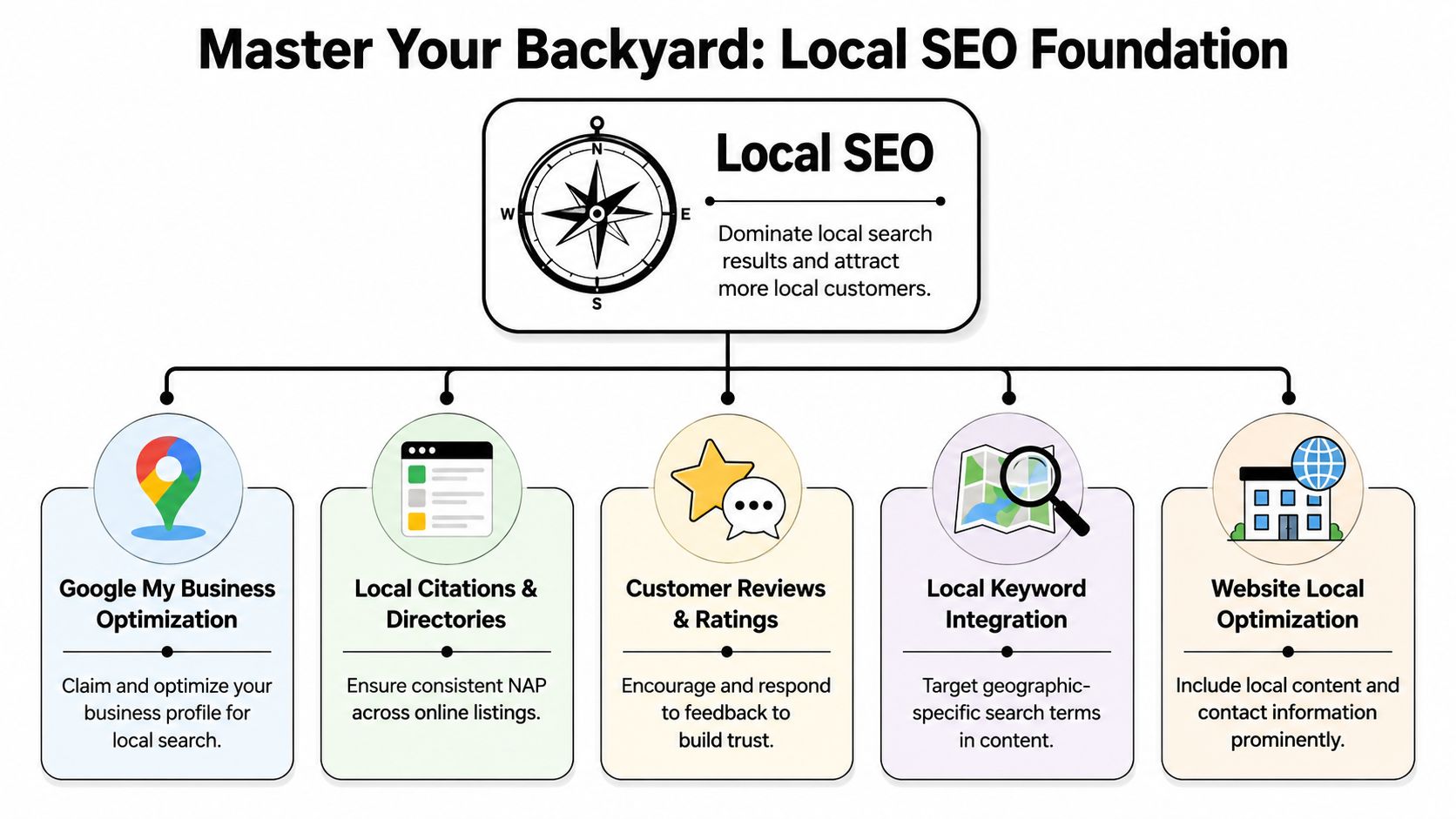
    A diagram illustrating the foundation of local SEO, including GMB, citations, reviews, keywords, and website optimization.

    Start with your service area and business profile

    A lot of local companies leave easy wins on the table because their business profile is half-complete or inconsistent.

    Here's the local checklist I'd handle first:

    • Claim and complete your Google Business Profile: Fill out the business category, services, phone, website, hours, and service areas. Don't leave obvious blanks.
    • Use real photos: Add photos of trucks, crews, equipment, shop space, finished work, and field conditions. Local buyers want proof you're real.
    • Describe what you do: Keep the wording grounded in your core services. Don't drift into buzzwords.
    • Keep your contact details consistent: Your business name, phone, and address details should match across your website and directory listings.
    • Ask for reviews after real work is completed: The best time is when the customer is satisfied and the job is still fresh in their mind.

    You don't need to get fancy. You need to be complete, accurate, and believable.

    Build local proof on your website

    Your business profile can help people discover you. Your website has to close the gap between interest and action.

    That means building location relevance into the site itself:

    • Create individual service pages: One page for excavation, one for welding, one for trucking, one for hydrovac, and so on.
    • Create city or area pages where it makes sense: Not thin copies. Real pages tied to work you do in Roosevelt, Vernal, Duchesne, or nearby service areas.
    • Show local evidence: Job photos, project writeups, service areas, equipment details, and local contact information.
    • Write copy people in your market would recognize: Mention the type of work, terrain, weather, schedules, and equipment realities your customers deal with.

    A dedicated page for “excavation contractor in Vernal” is usually more useful than a generic page trying to target all of Eastern Utah at once. The same goes for recruiting. A careers page that speaks to local workers will do more than a vague “join our team” page.

    If you want a contractor-specific breakdown of that process, local SEO for contractors is a useful reference.

    Local SEO works best when your business profile, review profile, and service pages all point to the same truth about who you serve and what you do.

    Create Content That Wins Jobs and Attracts Talent

    Most rural businesses don't need “more content” in the abstract. They need the right pages. The kind that answer buyer questions, prove capability, and make it easy for a qualified applicant to say, “That's the company I want to work for.”

    A professional team collaborating in a creative office space while reviewing business growth resources on a screen.

    A practical SEO workflow starts with keyword research, then maps one primary keyword per page, places that keyword in the title, subheadings, body copy, URL, and image ALT text, and measures performance so the page can be refined over time, according to Shergroup's traffic growth workflow.

    Build pages for buyers, not browsers

    Think about three common local businesses.

    A welding and fabrication shop shouldn't rely on one generic services page. It should have separate pages for structural welding, field welding, repair work, and fabrication. Each page should show what the shop handles, what industries it serves, and photos tied to that service.

    An excavation company should publish project pages, not just a homepage gallery. A project page can show the scope, site conditions, equipment used, and outcome. That helps two different audiences at once. Buyers see proof of experience. Google sees a page with clear topical relevance.

    A trucking company should avoid vague copy like “we deliver with excellence.” A stronger page talks about the type of hauling, routes, equipment, and industries served. If the company wants work from oilfield operators or construction firms, the site should say that plainly.

    Useful page types include:

    • Service pages: Built around one service and one clear search intent.
    • Project pages: Short portfolio-style pages with photos and a straightforward description of the work.
    • Industry pages: If you serve different markets, create pages for them only when the messaging changes.
    • FAQ pages: Answer common pre-sale questions that stall calls and quote requests.

    If you need ideas beyond standard blog posts, this roundup of essential content types for marketers can help you think in formats instead of just “articles.”

    Use your website to recruit

    For a lot of contractors and industrial companies, hiring is just as urgent as sales. Yet many websites bury careers in the footer and throw applicants into a dead-end form.

    That's a mistake.

    A recruiting page should work like a service page. It needs a clear target and clear language. If you need CDL drivers, roustabouts, mechanics, or equipment operators, give those roles their own pages or at least their own sections with real detail.

    A stronger careers section includes:

    • Job-specific titles: CDL Driver, Welder, Heavy Equipment Operator, Shop Mechanic
    • Location context: Let applicants know where the work is based and what territory the company serves
    • Work reality: Schedule expectations, field conditions, travel expectations, and the type of projects they'd work on
    • Application path: A simple form, a phone number, and a clear next step

    A careers page that speaks plainly about the work will attract fewer casual applicants and more people who actually fit the job.

    Images matter here too. Name them clearly and descriptively before uploading. If you want a practical reference on that point, naming pictures for SEO lays it out in plain terms.

    Quick Website Fixes That Boost Traffic

    Some traffic problems have nothing to do with content. The site may be hard to use, difficult to explore, or measured badly enough that nobody can tell what's working.

    Fix the stuff that makes people leave

    Start with the basics a business owner can inspect.

    • Mobile speed: In rural areas, a slow phone connection is normal. If your pages drag because of oversized images, clunky scripts, or heavy design effects, people leave.
    • Navigation: Your top menu should make sense at a glance. Services, service area, projects, careers, about, contact. That's enough for most companies.
    • Page layout: Put the phone number, service area, and next step where people can find them without hunting.
    • Local business details: Make sure the site clearly shows who you are, where you operate, and how to reach you.

    If your developer needs a technical reference for performance issues, this technical guide to web optimization is a solid place to start.

    Clean up your measurement before you judge results

    A lot of owners think a page is performing because analytics show traffic. However, half the visits came from staff, the web agency, or people inside the business checking the site.

    Technical traffic analysis should exclude internal visits before judging performance, because staff and agency traffic can distort page-level metrics. One recommended workflow is to exclude office and remote-team traffic, then use user-flow reporting to identify traffic drivers and drop-off points, as explained in Humblytics' traffic analysis guide.

    That matters because a clean view changes your decisions. If a service page attracts outside visitors and moves them toward contact, keep improving it. If people land on a page and disappear, that's usually a content, design, or navigation problem.

    A few questions to ask your web provider:

    • Are internal visits excluded from reporting?
    • Which pages bring visitors into the site first?
    • Where do users drop off before contacting us?
    • Which pages support leads or applications, and which pages just soak up attention?

    You don't need to become a developer. You do need enough clarity to ask better questions.

    Smart Spending with Paid Ads and Partnerships

    Organic traffic builds over time. Sometimes you need to move faster. That's where paid traffic and partnerships come in, but only if you stay disciplined.

    A hand inserting a coin into a tablet screen displaying a handshake and partnership business growth graph.

    Throwing money at broad campaigns is how small businesses burn through budget. A contractor usually gets better results by narrowing the audience, narrowing the message, and sending visitors to a page built for one action.

    Use paid traffic where intent is already strong

    Recruiting is one of the clearest examples. A local company can run social ads focused on job openings, local geography, and the kind of work offered. That's a lot more useful than boosting random brand posts.

    Google ads can also make sense when they align with high-intent searches and dedicated landing pages. The same goes for Local Service Ads where they fit the business model and service category. The key is simple. Don't pay to send people to a generic homepage.

    A better paid setup looks like this:

    • One campaign per service or hiring goal
    • One landing page per campaign
    • Local targeting aligned to your actual service area
    • Clear conversion action such as call, form fill, or application

    For contractor-focused strategy ideas, lead generation for contractors is a practical reference.

    Track channels by business outcome

    Many ad campaigns go sideways when people watch clicks and impressions, then never connect those visits to leads or applicants.

    Google Analytics 4 is a foundational tool because it shows whether visitors came from search, social, email, direct, or referrals. The U.S. Chamber of Commerce notes that a practical dashboard should track traffic source, top pages, and a business outcome such as leads or sign-ups, because traffic alone doesn't show whether the site is producing results, as outlined in their GA4 tracking guide for business owners.

    That's the part to pay attention to. If social sends applicants, keep it. If referrals from local supplier websites send quote requests, build more of those relationships. If an ad campaign sends low-quality traffic, cut it fast.

    Partnership traffic is often overlooked, especially in rural markets. Suppliers, trade associations, chambers, complementary subcontractors, and local organizations can all send relevant visitors. A simple website mention, referral page, or partner listing can drive more useful traffic than a broad awareness campaign.

    This short video gives a helpful overview of thinking about traffic channels in a more practical way.

    Bottom line: Pay for traffic when the audience, message, and landing page are tightly matched. Don't pay just to feel like marketing is happening.

    Your 90-Day Website Traffic Action Plan

    A lot of rural businesses do not have a traffic problem first. They have a sequence problem.

    A contractor in the Basin pays for ads, sends people to a weak homepage, gets a few visits, and hears no phone calls. An oilfield company posts occasional updates, sees some traffic, and still gets no serious bid requests or qualified applicants. The pattern is common. Traffic shows up before the website is ready to convert it into work.

    That is why the first 90 days matter. For contractors, trucking companies, fabricators, and other rural businesses, the job is to build a site that matches how real customers and job seekers search. Then you put money behind the pages that already prove they can produce calls, quote requests, and applications.
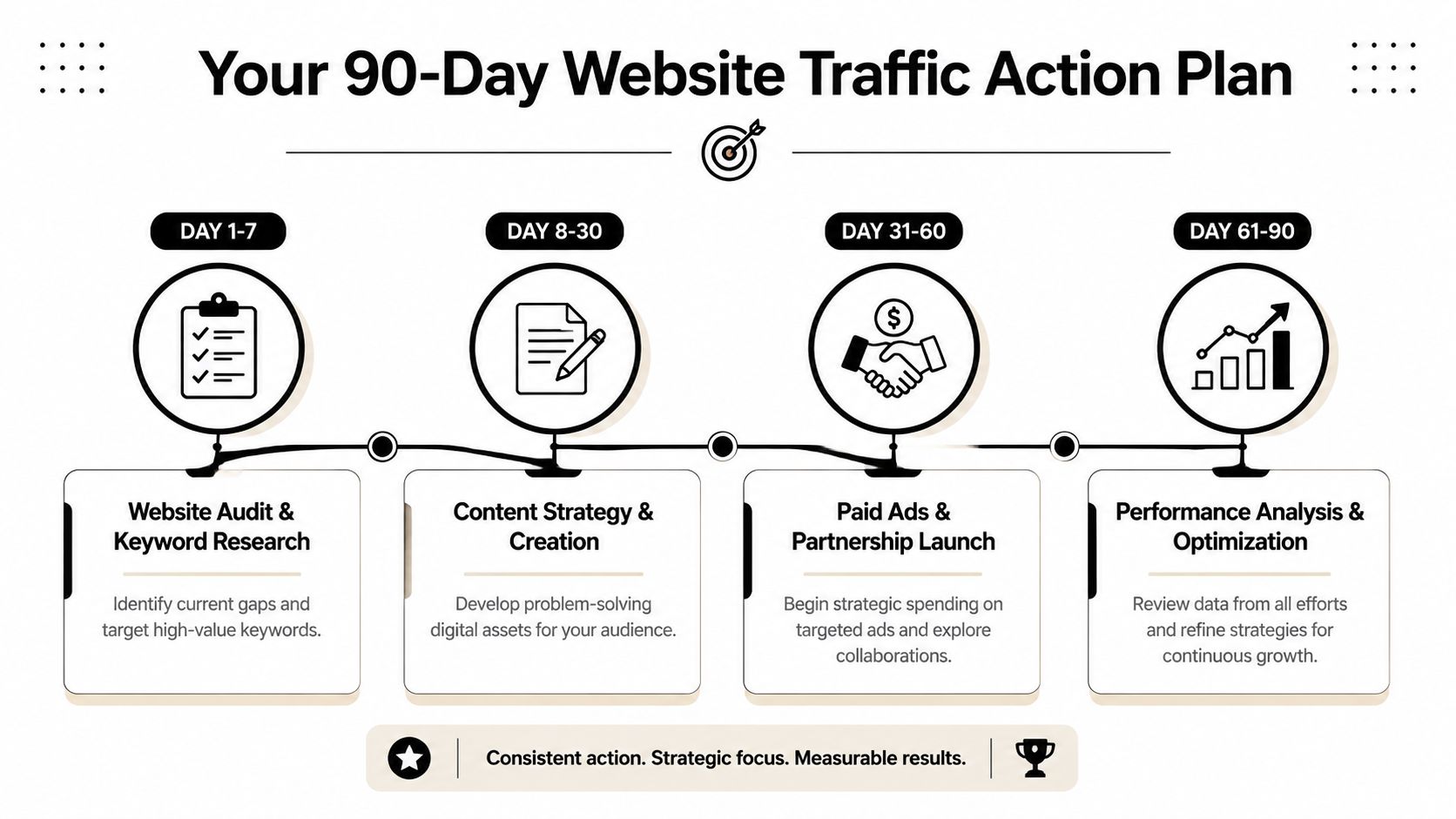
    A 90-day action plan infographic illustrating steps to improve website traffic including auditing, content, ads, and analysis.

    Days 1 through 30

    Start with clarity.

    Your website should answer three questions fast. What do you do. Where do you work. What should the visitor do next. If those answers are buried, traffic will leak out before it turns into anything useful.

    Focus on these tasks:

    • Audit your current website: Check navigation, service pages, contact paths, mobile usability, and whether the site clearly states your service area.
    • Review your Google Business Profile: Fill out missing fields, update photos, and make sure your services are described accurately.
    • List your core pages: One page per major service. If you do excavation, trucking, welding, and hydrovac, each needs its own page.
    • Identify target searches: Choose practical keyword themes based on what buyers or applicants would search.
    • Clean up analytics: Make sure internal traffic isn't muddying the picture.

    The goal for month one is simple. A stranger should land on the site and know within a few seconds whether you handle the kind of work they need and whether you serve their area.

    Days 31 through 60

    Build the pages that carry the business.

    A small business website does not need fifty blog posts to get traction. It needs a short list of pages tied to real services, real project types, and real hiring needs. That is the difference between traffic that looks nice in a report and traffic that turns into bid invites and applicants who can do the work.

    Priority work for this phase:

    • Create or rewrite service pages: Give each main service its own page with plain language, local relevance, and a direct call to action.
    • Publish one or two project pages: Use real job photos and explain what was done.
    • Build a real careers section: Add role-specific details for the positions you need to fill.
    • Reach out for one local partnership opportunity: A supplier, trade group, chamber, or complementary business is enough to start.
    • Ask for reviews consistently: Not aggressively. Just steadily after completed work.

    Each page should earn its spot. It should answer a buyer's question, support a sales conversation, build trust before a call, or help a solid applicant decide to apply.

    Days 61 through 90

    Now review results and make sharper decisions.

    This is the point where some owners get impatient and try three new channels at once. Usually that spreads the budget thin and muddies the results. A better move is to review what is already gaining traction, fix weak pages, and test one paid campaign with a clear goal.

    Do this next:

    • Review top pages: Which service pages draw attention? Which project pages hold it?
    • Check conversions, not just visits: Calls, form submissions, and applications matter more than raw sessions.
    • Improve weak pages: Tighten headlines, clarify copy, add better photos, or simplify the call to action.
    • Launch one targeted paid campaign: Pick a recruiting need or one service with strong local intent.
    • Keep building local proof: More reviews, more project examples, more evidence that you do what you say.

    If you try to build everything at once, progress slows. If you build in the right order, each step supports the next one.

    90-Day Traffic Generation Plan

    Phase Timeline Key Actions Goal
    Foundation Days 1-30 Audit site, clean navigation, improve business profile, define service pages, clean up analytics Make the site clear, local, and measurable
    Content and outreach Days 31-60 Publish service pages, project pages, careers content, request reviews, start one partnership Build pages that attract buyers and applicants
    Analysis and amplification Days 61-90 Review top pages, refine weak pages, track leads and applications, test one targeted ad campaign Strengthen what works and expand carefully

    If you want help implementing this kind of plan, Northpoint Web works with contractors, oilfield service companies, trucking businesses, and other rural Utah companies on websites, local SEO, and lead-focused digital marketing.

    If your website looks fine but still is not helping the business, that can be fixed. Northpoint Web helps companies in the Uinta Basin build websites that support real outcomes, including qualified leads, project inquiries, and job applicants.

  • Small Business Website Management: 2026 Success Tips

    Small Business Website Management: 2026 Success Tips

    Small business website management is the ongoing work that keeps your website secure, current, fast, and useful to customers. It includes updates, backups, form testing, content changes, performance checks, and regular reviews of the pages that bring in leads or applicants.

    If your website helps people call, request a quote, visit your location, or apply for a job, treat it like an operating asset—not a one-time project. This guide explains what to check weekly, monthly, and quarterly, how to compare DIY with professional help, and what website management services should cover.

    If your website is helping people choose whether to call, request a quote, visit your location, or apply for a job, it should be managed like an operating asset—not treated as a one-time project. This guide explains what to check weekly, monthly, and quarterly, plus when professional website management services may make more sense than handling everything in-house.

    If your website is helping people choose whether to call, request a quote, visit your location, or apply for a job, it should be managed like an operating asset—not treated as a one-time project. This guide explains what to check weekly, monthly, and quarterly, plus when professional website management services may make more sense than handling everything in-house.

    That's where most small businesses get stuck.

    For a lot of contractors, trucking outfits, welders, excavation crews, and oilfield service companies, the hard part isn't launching the site. It's keeping it useful when you're busy running jobs, dealing with weather, chasing parts, and trying to hire decent people. A website without management turns into the digital version of a truck with bald tires and a dead battery. It's still sitting there, but it's not helping you make money.

    Good small business website management is not about babysitting technology. It's about keeping your site ready to do three jobs every day: bring in leads, back up your credibility, and help people decide to call you instead of the next guy.

    Table of Contents

    Your New Website Is Live Now What

    A contractor in Roosevelt gets a new website launched on Friday. By Tuesday, he's already wondering what he's supposed to do with it. He thought the website was the finish line. It's not. It's the yard where the actual work starts.

    That confusion is normal. Most owners were sold the build, not the management. They got handed the keys but no maintenance plan, no login process, no update routine, and no clear idea who's responsible for what.

    Here's the reality. About 83% of U.S. small businesses have a website as of 2026, so merely having one isn't special anymore. What matters now is whether it's managed well. At the same time, 81% of consumers research online before making a purchase, and 94% of first impressions relate to web design, which means buyers judge you before they ever call. Those figures are noted in Network Solutions website statistics.

    A neglected website stops pulling its weight fast. Old project photos make you look inactive. Expired job postings make you look disorganized. Broken forms make you miss bids without even knowing it. A service page that never got updated can steer work to a competitor.

    Your website should answer the questions your office gets asked every week. If it doesn't, your staff is doing the same work twice.

    That's why I tell business owners to stop thinking about the website as a one-time expense. Treat it like an operating asset. If it helps you win jobs, hire workers, and look credible, it needs regular attention just like your trucks, trailers, and equipment.

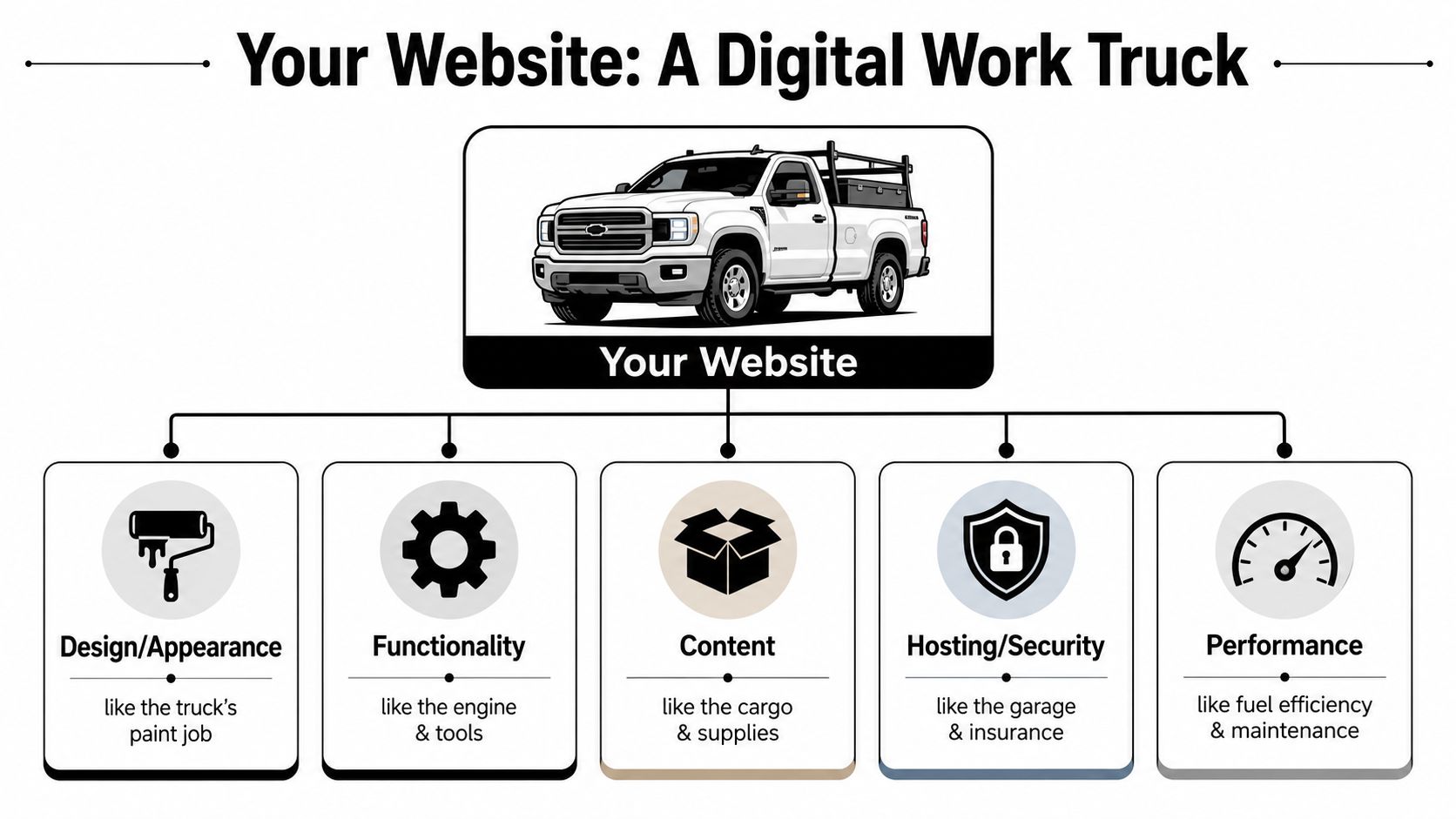
    Think of Your Website Like a Work Truck

    If you own a construction company, trucking business, or oilfield service outfit, this part is simple. Your website is a work truck. It's not wall art. It has a job.

    An infographic comparing components of a website to parts of a work truck for business management.

    The parts that matter

    Hosting is the garage. If the garage is junk, the truck sits in a bad environment and you deal with problems you shouldn't have to deal with.

    Your domain name is the license plate. That's how people find you and identify you.

    Software updates are oil changes. Skip them long enough and things start breaking at the worst time.

    Security is locks, alarms, and insurance. You hope you never need it, but when you need it, you really need it.

    Backups are the spare truck and the insurance file. If something fails, you need a way to get back on the road quickly.

    Content is the fuel and the payload. Service pages, hiring pages, photos, reviews, and contact info are what make the website useful.

    What poor maintenance looks like

    A truck can look good and still be unreliable. Same with a website.

    If pages load slowly, people leave. A commonly used benchmark says a 10-second page load delay increases bounce rates by 123%, and a one-second delay can cut conversions by up to 20%. That came up in the source linked earlier, and it matters because speed isn't a vanity issue. It affects whether someone fills out a form or moves on.

    Here's the plain-English version:

    • Slow pages cost calls.
    • Broken forms cost estimates.
    • Outdated info costs trust.
    • Missing photos cost credibility.
    • Weak security can shut the whole thing down.

    Practical rule: If you wouldn't send a foreman to a job in a truck with warning lights on, don't send customers to a website with known issues.

    What a well-run site actually does

    A managed website doesn't need to be flashy. It needs to be dependable.

    It should load fast on a phone in the field. It should show the towns you serve. It should make it easy to call, request a quote, or apply for a job. It should prove you're active with current project photos, current services, and current contact information.

    That's small business website management in real terms. Keep the machine running, and it keeps helping the business.

    Your Digital Maintenance Schedule

    Most owners fail at website management for one reason. They treat it like a random chore instead of a schedule.

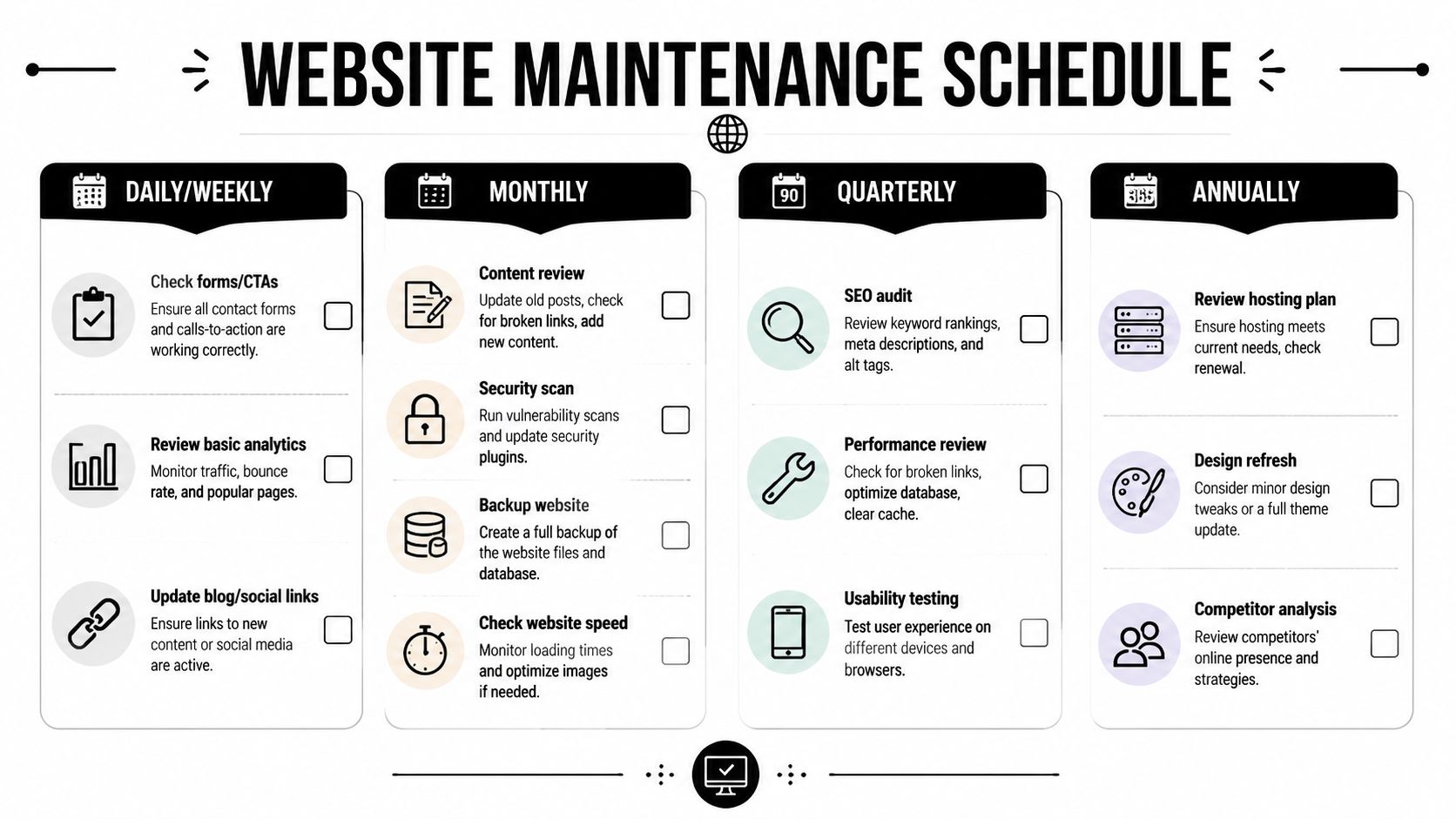
    That's a mistake. If you put this on a calendar and keep it simple, it becomes manageable. HubSpot notes that key technical tasks include prompt software and plugin updates, regular full-site backups, uptime and performance monitoring, broken-link checks, and analytics review because those tasks reduce security risks and help spot traffic and conversion problems early. You can review that list in HubSpot's guide on website management for small business.

    Use the same mindset you'd use for preventive maintenance on equipment.

    An infographic titled Website Maintenance Schedule detailing daily, weekly, monthly, quarterly, and annual maintenance tasks for websites.

    Weekly jobs that keep you out of trouble

    Every week, somebody needs to check the basics.

    • Test the contact form: Fill it out yourself. Make sure the message lands in the right inbox.
    • Click the main call buttons: Phone, quote request, careers, and service pages should all work.
    • Review updates: If your site runs on WordPress, plugins and themes need prompt attention.
    • Run or confirm a backup: Don't assume it's happening.
    • Look for obvious errors: Broken layouts, missing images, strange popups, or pages that won't load.

    A weekly check doesn't need to take long if the site is set up right. It's a short walkaround inspection.

    Here's a practical walkthrough worth keeping handy for your team:

    Monthly checks that protect leads and reputation

    Once a month, step back and look at how the site is performing.

    Review analytics. Find out which pages people visit, which service pages get attention, and whether your careers page is being used. If you're trying to tie website activity back to real business outcomes, this resource for proving marketing ROI is useful because it shows how to think about tracking without turning your office into a data lab.

    Then handle the maintenance jobs owners usually ignore:

    • Check page speed: Slow pages frustrate users fast.
    • Review broken links: Old links make the site feel neglected.
    • Update photos and project examples: Fresh work proves you're active.
    • Read submitted leads: Look for patterns. Are people asking for a service you haven't explained clearly?
    • Review security settings: A solid baseline matters. Northpoint Web has a practical page on website security best practices if you want a simple checklist.

    If customers keep asking questions your website should answer, the problem isn't the customer. The page is weak.

    Quarterly reviews that keep the site aligned with the business

    Quarterly is where strategy shows up.

    A lot can change in a few months. New service areas. New hiring needs. New equipment. A boom in one town and a slowdown in another. Your website should reflect that.

    Do these quarterly:

    1. Review every main service page
      Make sure services, locations, and wording still match the work you want.

    2. Update the careers section
      If you need CDL drivers, operators, welders, or laborers, say so clearly.

    3. Check every major call to action
      Quote request, call button, job application, and map directions should all be friction-free.

    4. Audit local relevance
      Add recent work from recognizable local places when possible.

    5. Decide what can be delegated
      If the owner is still doing all this alone, the system is wrong.

    That last point matters more than is often acknowledged. Website maintenance falls apart when it depends on one overloaded person remembering everything.

    Who Is Your Digital Foreman DIY vs Agency

    A website needs an owner. Not ownership on paper. Actual responsibility.

    If nobody owns it, updates get skipped, forms break, hiring pages go stale, and the site slowly turns into a digital brochure from two years ago. That's why I like to frame this as a foreman problem. Who's running the digital job site?

    A 2024 National Small Business Association report found that 62% of small business owners spend more than 10 hours per week on non-core digital tasks. That's time you're not using to estimate jobs, manage crews, or close work. For a lot of rural businesses, the better answer is fractional, task-specific management instead of either doing everything yourself or paying for a bloated retainer.

    The three real options

    DIY works if your site is simple, you're organized, and you'll do the work. Most owners overestimate this. They think they'll update it Friday night. Then Friday night comes and they're fixing a trailer light or catching up on paperwork.

    In-house staff can work if you've got an office manager or marketing person who is dependable and trained. The risk is turnover. One person learns the logins, process, and tools, then leaves. Now you're back at zero.

    Agency or specialist support makes sense when the site directly affects bids, recruiting, and reputation. The smart version of this is not always full-service. For many small businesses, the practical answer is limited support for the few things that really matter, like safety notice updates, careers page changes, project uploads, and basic maintenance.

    Don't buy a giant service package if what you need is consistent help with a short list of high-value jobs.

    Website Management Options Compared

    Approach Cost Time Required Best For
    DIY Lowest cash cost, highest owner time cost High Very small businesses with simple sites and a disciplined owner
    In-house Ongoing payroll cost Moderate Companies with stable office support and clear internal processes
    Fractional agency support Targeted monthly cost for specific tasks Low to moderate Rural contractors who need help updating key pages without a full retainer
    Full agency management Highest recurring cost Lowest owner involvement Businesses where the site is central to lead flow, recruiting, and active marketing

    My opinion is simple. If the owner is the only person who can update the site, that system is fragile. If an agency controls everything and your team can't make basic changes, that system is also fragile.

    The best setup for a lot of contractors is shared control. The business owns the logins, process, and approvals. A trusted partner handles the technical work and the updates that tend to get pushed off.

    The Essential Digital Toolbox for Contractors

    You do not need twenty apps. You need a few tools that answer a few basic questions.

    Is the site up?
    Are people finding it?
    Are forms working?
    Can you restore it if something breaks?

    That's the toolbox.

    The few tools that actually matter

    Google Analytics tells you what pages people visit and where they came from. Don't get lost in every report. Start with your service pages, careers page, and contact page. Those are the pages tied closest to money and hiring.

    Google Search Console shows how your site appears in search and can flag indexing or coverage issues. It's one of the few free tools I'd call mandatory.

    An uptime monitor alerts you if the site goes down. If your website is offline and nobody knows, you can lose opportunities unseen.

    A backup tool gives you a restore point when updates or errors cause trouble. If your site runs on WordPress, pick a reputable backup plugin and make sure someone verifies it works.

    A simple content process matters as much as any software. One shared folder for job photos, one approved list of services, one person responsible for submitting updates. That alone fixes a lot of chaos.

    If you're still deciding where your site should live and what platform makes sense, this page on small business website platforms is useful because it frames the decision in practical terms instead of tech jargon.

    For the marketing side, I also like this guide to contractor marketing success because it connects website work to the bigger picture of getting found and chosen.

    One local option in this mix is Northpoint Web. They provide website design, hosting, and maintenance for small businesses in the Uinta Basin, which is relevant if you want one provider handling the technical side while your team focuses on operations.

    Connect Your Website to Local Search and Google Business Profile

    Your website should not sit by itself.

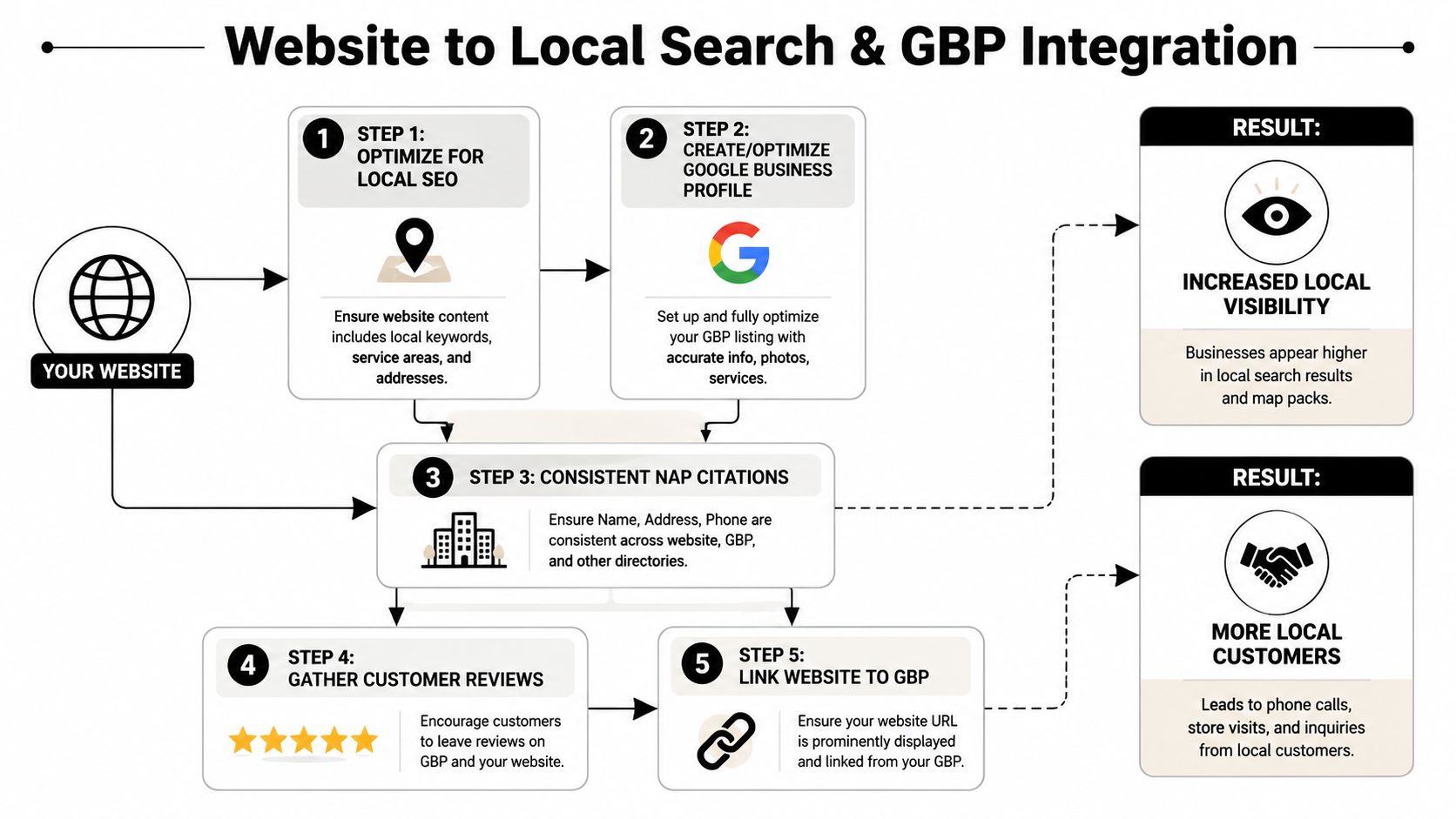
    For contractors and industrial businesses, the website is the home base. Your Google Business Profile, local search visibility, review activity, service area pages, and project updates should all connect back to it. When those pieces work together, you have a better shot at showing up when someone nearby needs the work you do.

    A flowchart showing five steps to integrate a business website with Google Business Profile for local SEO.

    Here's where rural businesses need a different approach than generic website advice. In construction and similar trades, staff turnover can run over 20% annually, and that reality affects website management. If your process depends on one office person or one tech-savvy employee, it will break. A better system uses simple workflows so field crews can send in project photos and basic updates that can quickly be posted to the website and Google Business Profile.

    A simple field to office workflow

    A foreman finishes a job near Duchesne. He takes a few solid photos on his phone. He sends them to one shared place with a short note: location, service performed, and any equipment shown. Someone in the office or your web partner turns that into:

    • A gallery update on the website
    • A short Google Business Profile post
    • A service area signal tied to the town or region
    • Fresh proof that you're active and doing real work nearby

    That's not busywork. That's local visibility.

    If you want a practical breakdown of how this fits into rankings, maps, and service area visibility, this page on local SEO for contractors is worth reading.

    A job photo isn't just a photo. It's proof you're active, local, and capable.

    The same goes for hiring. If your careers page says “always accepting applications” but never mentions the actual roles you need, you're wasting a strong asset. Connect the website to real recruiting needs. Update openings. Show your equipment. Show your crews. Make it easy to apply from a phone.

    That's how small business website management ties directly to local search and local trust. Not with abstract SEO talk. With simple proof, posted consistently.

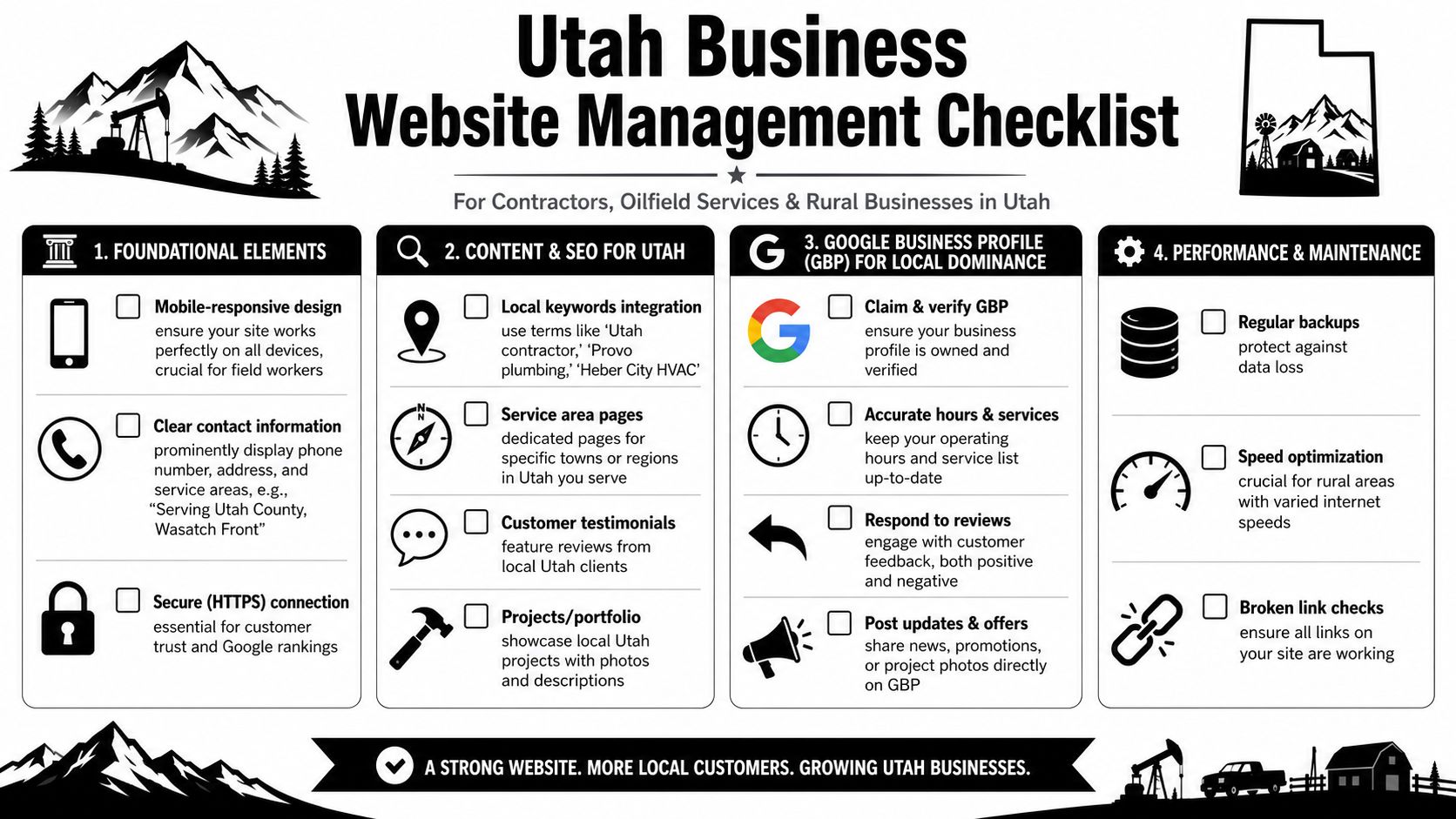
    A Website Management Checklist for Utah Businesses

    If you run a business in Duchesne, Roosevelt, Vernal, or anywhere in rural Utah, you need a checklist that matches real operating conditions. Spotty service. Limited office time. Crews in the field. Hiring pressure. Fast changes in workload.

    Print this out. Put it on the desk. Review it once a month.

    An infographic checklist for Utah small businesses to manage their websites, SEO, and local digital presence effectively.

    What to check this month

    • Phone number visibility
      Is your number easy to tap on a phone? A foreman or property manager shouldn't have to hunt for it.

    • Service area accuracy
      Are the towns and regions you serve listed clearly?

    • Hiring page relevance
      Are you showing the positions you need now, not the ones you needed last season?

    • Recent project proof
      Do you have current photos from local jobs, equipment in the field, or completed work people can recognize?

    • Quote form function
      Has somebody tested the form recently and confirmed the lead goes to the right person?

    • Google Business Profile consistency
      Do the website and Google listing match on services, phone, business hours, and location details?

    • Mobile experience
      Can somebody on a jobsite load the page, read it, and call you without pinching and zooming all over the screen?

    • Core page freshness
      Homepage, services, careers, and contact page should never look abandoned.

    • Security and backup status
      Do you know who handles updates, backups, and restore points?

    • Analytics sanity check
      Are people reaching the pages that matter most? If you need a broader framework for auditing what your data is telling you, this master your analytics data guide is a useful companion.

    A well-managed site doesn't have to be complicated. It has to be current, easy to use, and tied to what your business needs right now. More bids. Better hires. Fewer missed opportunities.


    If your website is live but nobody's really managing it, Northpoint Web can help you put a practical system around it. That means maintenance, updates, local visibility, and a site that supports the way rural Utah businesses operate.

    What small business website management includes

    Website management is broader than fixing a broken page. A practical management routine usually includes:

    • Technical maintenance: WordPress, plugin, theme, hosting, and security updates.
    • Reliability checks: Backups, uptime monitoring, broken-link reviews, and contact-form testing.
    • Content management: Updating services, service areas, project photos, job openings, contact information, and calls to action.
    • Performance review: Checking page speed, mobile usability, analytics, and the pages connected to leads.
    • Business alignment: Making sure the website reflects current services, hiring needs, locations, and priorities.

    The right scope depends on the site and the business, but the goal is consistent: keep the website dependable and useful when customers need it.

    Why website management matters after launch

    A newly launched website is not the finish line. Services change, job postings expire, contact details become outdated, and forms or integrations can stop working. A page that once answered a customer’s question may no longer match the work your business wants.

    For contractors, trucking companies, welders, excavation crews, and oilfield service companies, a managed site should make it easy for people to understand what you do, where you work, how to contact you, and whether you are actively hiring. Current information supports credibility and reduces repeat questions for the office.

    Weekly website management checklist

    A short weekly review can catch problems before they cost a lead or create confusion:

    • Submit the main contact or quote form and confirm the message reaches the right inbox.
    • Click phone, quote, careers, and primary service-page buttons on a mobile device.
    • Check for broken layouts, missing images, error messages, or unexpected popups.
    • Confirm that backups and security updates are being handled.
    • Review urgent changes, such as a new service area, closed office, or expired job opening.

    Keep a simple record of who checks these items and what needs follow-up. Clear ownership is often as important as the checklist itself.

    Monthly and quarterly website reviews

    Monthly management should go beyond checking whether the site is online. Review which pages receive attention, whether visitors can complete important actions, and what questions appear repeatedly in submitted leads or customer conversations. Then update the pages that should answer those questions.

    Every quarter, review the major service pages, locations served, careers content, project examples, contact details, and calls to action. Compare the website with the work the business actually wants. If a service, town, hiring need, or priority has changed, the site should change with it.

    Need help keeping your business website current?

    If your team does not have time to manage updates, backups, forms, content changes, and routine reviews, Northpoint Web Solutions offers website management support for keeping a business website maintained and useful. Review the service details to see whether ongoing help fits your site and workflow.

    What small business website management includes

    Website management is broader than fixing a broken page. A practical management routine usually includes:

    • Technical maintenance: WordPress, plugin, theme, hosting, and security updates.
    • Reliability checks: Backups, uptime monitoring, broken-link reviews, and contact-form testing.
    • Content management: Updating services, service areas, project photos, job openings, contact information, and calls to action.
    • Performance review: Checking page speed, mobile usability, analytics, and the pages connected to leads.
    • Business alignment: Making sure the website reflects current services, hiring needs, locations, and priorities.

    The right scope depends on the site and the business, but the goal is consistent: keep the website dependable and useful when customers need it.

    Why website management matters after launch

    A newly launched website is not the finish line. Services change, job postings expire, contact details become outdated, and forms or integrations can stop working. A page that once answered a customer’s question may no longer match the work your business wants.

    For contractors, trucking companies, welders, excavation crews, and oilfield service companies, a managed site should make it easy for people to understand what you do, where you work, how to contact you, and whether you are actively hiring. Current information supports credibility and reduces repeat questions for the office.

    Weekly website management checklist

    A short weekly review can catch problems before they cost a lead or create confusion:

    • Submit the main contact or quote form and confirm the message reaches the right inbox.
    • Click phone, quote, careers, and primary service-page buttons on a mobile device.
    • Check for broken layouts, missing images, error messages, or unexpected popups.
    • Confirm that backups and security updates are being handled.
    • Review urgent changes, such as a new service area, closed office, or expired job opening.

    Keep a simple record of who checks these items and what needs follow-up. Clear ownership is often as important as the checklist itself.

    Monthly and quarterly website reviews

    Monthly management should go beyond checking whether the site is online. Review which pages receive attention, whether visitors can complete important actions, and what questions appear repeatedly in submitted leads or customer conversations. Then update the pages that should answer those questions.

    Every quarter, review the major service pages, locations served, careers content, project examples, contact details, and calls to action. Compare the website with the work the business actually wants. If a service, town, hiring need, or priority has changed, the site should change with it.

    Need help keeping your business website current?

    If your team does not have time to manage updates, backups, forms, content changes, and routine reviews, Northpoint Web Solutions offers website management support for keeping a business website maintained and useful. Review the service details to see whether ongoing help fits your site and workflow.

    What is small business website management?

    Website management is the ongoing care required after a site launches. It is broader than occasional content editing and more practical than simply having hosting. The work should keep the website available, secure, accurate, easy to use, and connected to business goals.

    For a contractor, trucking company, welder, excavation crew, oilfield service company, or other small business, the managed site should make it easy to understand services, see current evidence of work, find service areas, contact the company, and review open jobs when hiring is important.

    What website management services include

    • WordPress maintenance: Review and apply relevant software, plugin, and theme updates.
    • Backups and recovery readiness: Run or confirm backups rather than assuming they are working.
    • Lead-path testing: Test contact forms, phone links, quote requests, service pages, and careers paths.
    • Content maintenance: Update services, project photos, job postings, contact information, and locations served.
    • Performance and quality checks: Look for slow pages, broken links, missing images, broken layouts, and unusual popups.
    • Review and improvement: Use analytics and submitted-lead patterns to identify pages that need attention.

    A weekly, monthly, and quarterly maintenance schedule

    Weekly: Test the main contact form, click important call and quote buttons, confirm updates and backups, and look for obvious errors.

    Monthly: Review analytics, page speed, broken links, security settings, current photos, and submitted leads. Check whether important service or careers pages answer the questions customers and applicants are asking.

    Quarterly: Review whether the website still matches the business. Revisit services, service areas, hiring information, calls to action, project examples, and the pages that support current priorities.

    What poor website maintenance looks like

    A website can appear attractive while still failing operationally. Slow pages can cause people to leave, broken forms can hide missed estimates, outdated information can weaken trust, and neglected security can create a serious interruption. The practical test is simple: if a known website issue would stop a customer from calling or submitting a request, it belongs on the maintenance list.

    A website launch is not a maintenance plan

    A website can look finished while forms, software, backups, pages, and contact details gradually become unreliable. For a busy small business, that can mean missed leads, outdated information, and less confidence from people deciding whether to call.

    Small business website management keeps the site dependable

    Website management is the recurring work that keeps a site secure, current, fast, and useful. That includes updates, backups, form testing, content changes, performance checks, and regular reviews of pages that bring in leads or applicants.

    What consistent management helps protect

    • Lead flow: Contact, quote, phone, and careers paths stay easier to test and maintain.
    • Credibility: Services, photos, job postings, and contact information remain current.
    • Security and recovery: Updates and backups receive regular attention instead of being left to chance.
    • Business alignment: Monthly and quarterly reviews help the site reflect current priorities.

    A practical maintenance schedule, not vague promises

    Use a simple rhythm: check forms, buttons, updates, backups, and obvious errors weekly; review analytics, speed, links, security, photos, and submitted leads monthly; and reassess services, hiring information, locations, and business priorities quarterly.

    DIY, internal ownership, or professional help?

    DIY can work when someone has the time, access, and technical confidence to follow the schedule. Internal ownership can work when responsibilities are clearly assigned. Professional help may make more sense when the site supports important leads or hiring but nobody can reliably maintain it during the workweek.

    See whether website management is the right next step

    If your business needs a dependable process for keeping its WordPress website current and useful, review Northpoint’s Gestión de sitios web service. If you are still evaluating the need, keep using the checklist on this page to identify gaps first.

    Ready to take website management off the random-chore list?

    Review Northpoint’s Website Management page to see whether professional support is a fit for your business. If you are not ready to ask for help, use the schedule above to identify the first maintenance gaps to address.